
Maquete de capa de livro
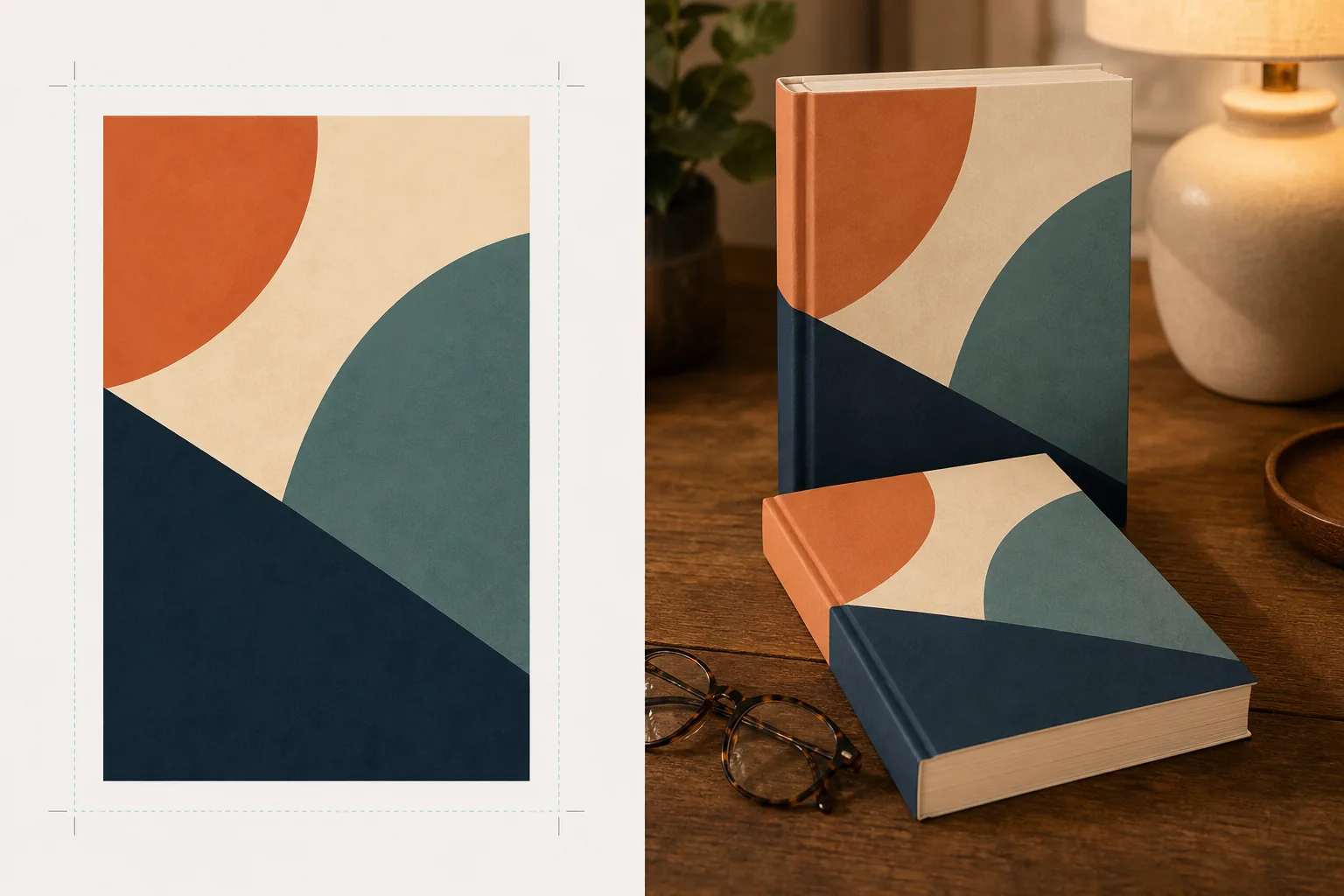
Crie maquetes fotorrealistas da capa do seu livro posicionada em cenas de estilo de vida, em prateleiras ou exibida como uma renderização 3D independente com sombras naturais. Este modelo pega a arte plana da sua capa e a transforma em imagens promocionais para anúncios em redes sociais, sites de autores, conteúdo Amazon A+ e kits de imprensa, sem precisar de nenhum software 3D.
Experimente este modelo gratuitamenteDesign template preview
O que este modelo faz
Converte designs planos de capas de livros em imagens de maquete promocionais que parecem fotografia de produto profissional. Envie a arte da sua capa como um JPEG ou PNG plano e o modelo a mapeia sobre uma forma de livro realista com perspectiva correta, espessura de páginas e curvatura da lombada. A maquete é então posicionada em cenas de estilo de vida — uma mesa de centro com óculos de leitura, uma prateleira de livraria, uma mesa de cabeceira com a luz quente de um abajur — ou renderizada como um produto independente sobre um fundo limpo com sombra natural. Para séries ou promoções de vários livros, várias capas podem ser dispostas em fila ou empilhadas com perspectiva consistente. A direção da luz e da sombra corresponde ao ambiente da cena, de modo que o livro pareça fisicamente presente em vez de uma composição.
Configurações do modelo
| Formato do livro | Brochura, capa dura ou capa dura com sobrecapa |
| Aparência da contagem de páginas | Fino (100 pp.), médio (250 pp.), grosso (400+ pp.) — afeta a largura da lombada e da borda das páginas |
| Tipo de cena | Independente com sombra, mesa de centro, estante, mesa de cabeceira ou segurado na mão |
| Ângulo de perspectiva | Frontal, três quartos ou leve inclinação de cima |
| Resolução de saída | 3000×3000px (1:1 social) ou 2400×1600px (banner 16:10) |
Como usar este modelo
Envie a arte da sua capa
Envie a capa do seu livro como uma imagem plana — no mínimo a capa frontal. Para maquetes de capa dura com sobrecapa, você também pode enviar a lombada e a quarta capa. O modelo aceita arquivos JPEG, PNG e PDF. As dimensões da capa são detectadas automaticamente e as proporções do livro são ajustadas de acordo.
Selecione o formato do livro e a cena
Escolha entre os formatos brochura, capa dura ou sobrecapa. Selecione a faixa de contagem de páginas para que a largura da lombada e da borda das páginas corresponda ao seu livro real. Em seguida, escolha uma cena: independente com sombra, cenário de estilo de vida ou cor de fundo personalizada.
Ajuste a perspectiva e renderize
Escolha o ângulo de visualização — frontal para nitidez de miniaturas, três quartos para profundidade visual ou inclinação de cima para publicações sociais em plano. O modelo renderiza a maquete com iluminação adequada, textura da borda das páginas e direção de sombra correspondente à cena selecionada.
Baixe as imagens promocionais
Exporte em 1:1 para o Instagram, em 16:9 para cabeçalhos de Twitter/Facebook ou em dimensões personalizadas para a seção hero do seu site. Cada exportação inclui a maquete do livro com a opção de fundo transparente, para que você possa inseri-la em seus próprios layouts personalizados.
Dicas profissionais para obter os melhores resultados
- ✓Envie sua capa na maior resolução disponível. A transformação de perspectiva 3D reduz a resolução aparente na face que se afasta do livro, portanto começar com uma fonte de alta resolução garante que o texto na lombada e na capa permaneça legível.
- ✓Para conteúdo Amazon A+, use a maquete independente em fundo branco. Isso confere ao livro um aspecto de fotografia de produto premium que o distingue da imagem plana da capa já exibida na página do anúncio.
- ✓Crie uma composição de série enviando todas as capas de uma série. O modelo as dispõe em fila com perspectiva e espaçamento consistentes, o que tem um impacto visual muito maior para a promoção de uma série do que exibir as capas individualmente.
Ferramentas
Perguntas frequentes
Posso criar uma maquete de um e-reader ou tablet exibindo minha capa?
+
O modelo se concentra em maquetes de livros físicos — formatos brochura e capa dura. Para maquetes de exibição em e-reader ou tablet, você comporia a capa plana sobre a foto de um dispositivo separadamente.
O texto da lombada será legível?
+
Sim, desde que o arquivo de capa de origem inclua a arte da lombada. O modelo envolve a arte da lombada ao redor da borda do livro com uma perspectiva que corresponde ao ângulo da capa frontal. Para livros finos (menos de 150 páginas), a lombada é estreita e o texto pequeno pode ficar difícil de ler em tamanhos de exibição reduzidos.
Posso usar isto para promover um audiolivro ou podcast?
+
Sim. O formato de capa quadrado usado para audiolivros e podcasts pode ser renderizado como uma maquete no estilo caixa de CD ou como um quadrado independente com sombra dimensional, conferindo-lhe uma presença física que a arte de capa plana não tem.
Transforme a arte da sua capa em imagens promocionais impressionantes
Envie uma arte de capa plana e obtenha maquetes de livros fotorrealistas para redes sociais, sites de autores e campanhas de marketing.
Experimente gratuitamenteRelated templates
More design templates for your workflow.
Crie logotipos PNG transparentes com refinamento de borda limpo e exportação em vários tamanhos para web, impressão, mídia social e ícones de aplicativos. Funciona em fotos de logotipos impressos e arquivos digitais.
Crie capas de podcast que atendam às especificações do Apple Podcasts e Spotify com substituição de plano de fundo, isolamento de retrato do host e layouts prontos para tipografia.
Prepare arte digital e fotografias para impressão em grandes formatos com upscaling de IA, expansão de tela, provas de cores precisas e exportação de arquivos prontos para impressão.
Prepare fotos para envio à agência de estoque com remoção de marca registrada, edição de conformidade com autorização de modelo, verificações de qualidade técnica e requisitos de formato específicos da agência.