
Preparação de impressão artística
Prepare obras de arte digitais, fotografias e ilustrações para impressões de galeria em grande formato, telas montadas em chassi e produção de pôsteres. Este modelo usa o AI Enhance para ampliar imagens a resoluções prontas para impressão sem perda de qualidade, e o AI Expand para estender as bordas da tela e criar as margens de dobra — tudo isso mantendo a precisão de cor para a impressão profissional.
Experimente este modelo gratuitamenteDesign template preview
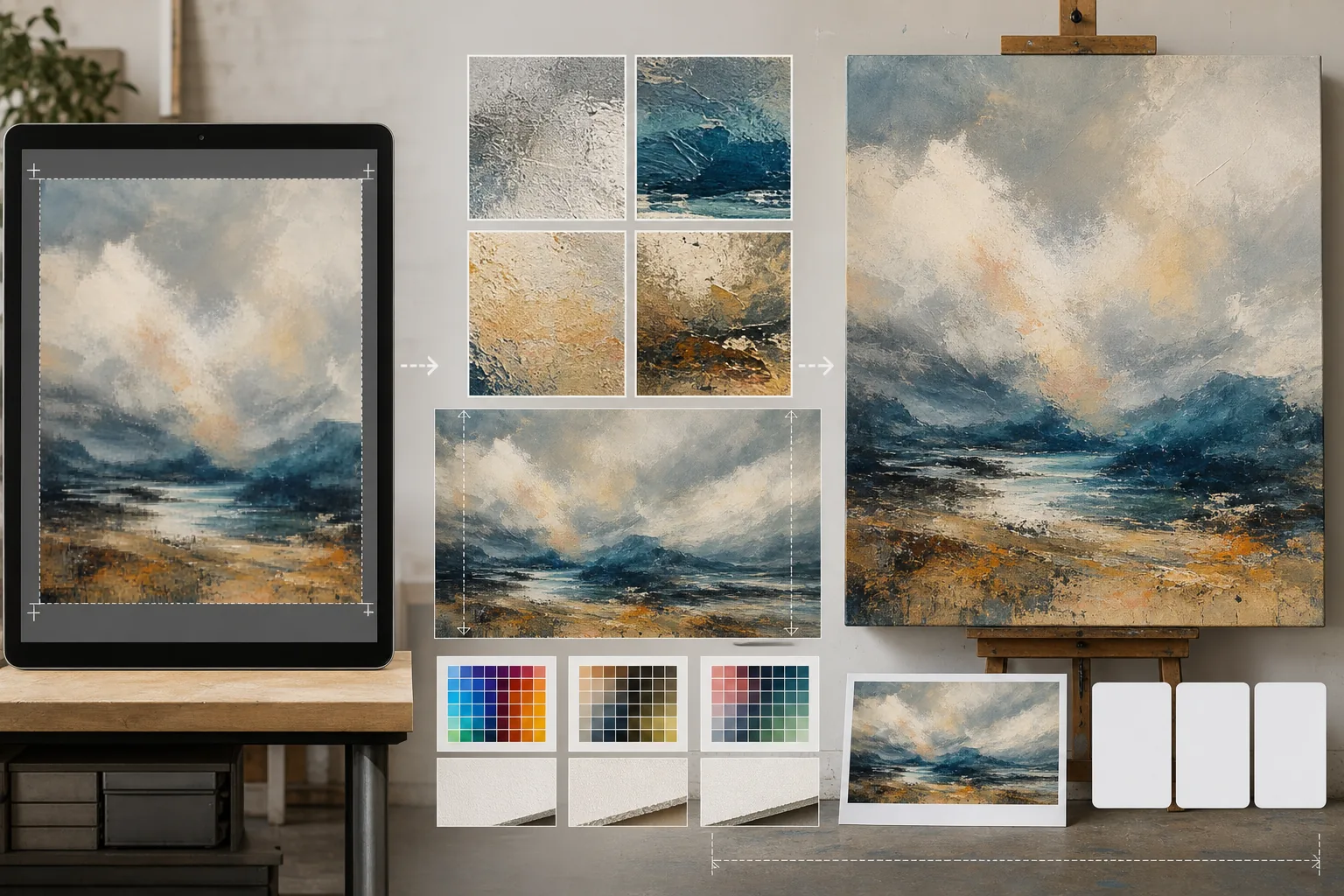
O que este modelo faz
Preenche a lacuna entre os arquivos digitais em resolução de tela e os exigentes requisitos de resolução da produção de impressão física. O AI Enhance amplia as imagens de 2x a 4x preservando os detalhes finos — as pinceladas das pinturas, a estrutura de grão das fotografias, o traço das ilustrações — sem introduzir o desfoque ou os artefatos típicos de uma simples interpolação. O AI Expand estende as bordas da tela gerando continuações perfeitas da obra, fornecendo a margem extra necessária para as telas de galeria montadas em chassi, onde a imagem se dobra ao redor do quadro. Os perfis de cor são convertidos para CMYK ou Adobe RGB com uma prova em tela que mostra como a impressão final aparecerá no papel, na tela ou em substratos metálicos.
Configurações do modelo
| Fator de ampliação | 2x, 3x ou 4x (até 16000px na borda longa para impressões de grande formato) |
| Expansão da tela | Margem de 1,5 polegada, 2 polegadas ou personalizada para o sangramento da dobra em chassi |
| Preservação de detalhes | Adaptativa: pincelada para pinturas, grão para fotos, traço para ilustrações |
| Perfil de cor | sRGB (tela), Adobe RGB (impressão fotográfica) ou CMYK (impressão comercial) |
| Formato de saída | TIFF (impressão sem perdas), PNG (transparência) ou JPEG (visualização web) |
Como usar este modelo
Envie sua obra de arte
Envie o arquivo digital — pintura, fotografia, ilustração ou técnica mista. O modelo aceita arquivos JPEG, PNG, TIFF e PSD. Para obter os melhores resultados de ampliação, comece com a versão de maior resolução que você tiver, mesmo que esteja abaixo do requisito de impressão.
Amplie para a resolução de impressão
Selecione o fator de ampliação com base no tamanho de impressão desejado. Para uma impressão de 24×36 polegadas a 300 DPI, você precisa de 7200×10800 pixels. A IA amplia preservando o caráter do original — as pinceladas continuam sendo pinceladas, o grão do filme continua sendo grão, a pixel art mantém seu charme quadriculado.
Expanda a tela para a montagem em chassi
Se você imprimir em tela com dobra em chassi, o AI Expand gera extensões perfeitas da obra ao redor das quatro bordas. A margem expandida combina com o estilo, a paleta de cores e a textura do original, de modo que as bordas dobradas pareçam intencionais em vez de esticadas ou espelhadas.
Faça a prova e exporte
Revise a prova em tela que mostra como a imagem será renderizada no seu perfil de cor de destino — CMYK para impressão offset ou giclée, Adobe RGB para jato de tinta de belas-artes. Exporte como TIFF para a gráfica ou como PNG para edição posterior. O arquivo inclui dados de perfil ICC incorporados para uma reprodução de cor precisa.
Dicas profissionais para os melhores resultados
- ✓Comece sempre com o arquivo original em sua resolução nativa. Ampliar um arquivo que já foi comprimido e reduzido para exibição na web introduz artefatos que se acumulam a cada geração de processamento.
- ✓Para impressões em tela montada em chassi, solicite uma margem de expansão de 2 polegadas mesmo que o chassi tenha 1,5 polegada de profundidade. A meia polegada extra oferece tolerância durante o processo de tensionamento da tela, em que um leve deslocamento ao esticar pode expor a borda da imagem.
- ✓Solicite uma prova física impressa em um tamanho menor antes de se comprometer com a produção em grande formato. As telas e as impressões em papel reproduzem a cor de forma diferente, e uma prova 5×7 custa uma fração de uma tela 30×40 mas revela qualquer desvio de cor que precise ser corrigido.
Ferramentas
Perguntas frequentes
Qual o tamanho que posso imprimir a partir de uma foto de celular?
+
Uma foto típica de celular de 12 megapixels (4000×3000px) imprime bem em 13×10 polegadas a 300 DPI. Com a ampliação por IA de 2x, isso dobra para 26×20 polegadas. Com a ampliação de 4x, uma foto de celular pode produzir uma impressão nítida de 40×30 polegadas — adequada para exibição em galeria.
A ampliação vai mudar a aparência da minha obra?
+
A IA adapta sua abordagem de ampliação ao tipo de conteúdo. As pinturas mantêm suas pinceladas e textura visíveis. As fotografias preservam sua estrutura de grão e seu caráter de nitidez. As ilustrações mantêm a consistência da espessura do traço. O objetivo é uma versão maior que se pareça com o original, não uma reinterpretação.
Posso expandir apenas um lado da tela?
+
Sim. Você pode especificar quais bordas expandir e em quanto. Isso é útil quando você quer deslocar a composição dentro de uma impressão — por exemplo, adicionar céu acima de uma paisagem para criar espaço para um título, ou adicionar primeiro plano para equilibrar uma composição muito carregada no horizonte.
Imprima sua arte em qualquer tamanho sem perda de qualidade
Envie sua obra digital e obtenha arquivos prontos para impressão com ampliação por IA, expansão da tela e prova com cores precisas.
Experimente gratuitamenteRelated templates
More design templates for your workflow.
Crie logotipos PNG transparentes com refinamento de borda limpo e exportação em vários tamanhos para web, impressão, mídia social e ícones de aplicativos. Funciona em fotos de logotipos impressos e arquivos digitais.
Gere maquetes realistas de capas de livros com perspectiva 3D, renderização de sombras e planos de fundo de estilo de vida para marketing de autores e promoções de editoras.
Crie capas de podcast que atendam às especificações do Apple Podcasts e Spotify com substituição de plano de fundo, isolamento de retrato do host e layouts prontos para tipografia.
Prepare fotos para envio à agência de estoque com remoção de marca registrada, edição de conformidade com autorização de modelo, verificações de qualidade técnica e requisitos de formato específicos da agência.