
Studio ritratti per animali
Trasforma un'istantanea del tuo animale scattata in salotto in un ritratto di qualità da studio. Questo modello risolve le sfide più ardue della fotografia animale — isolare i contorni soffici del pelo da sfondi affollati, rimuovere guinzagli e mani del conduttore visibili e affinare quegli occhi espressivi che rendono irresistibili i ritratti di animali.
Prova gratis questo modelloPortrait template preview
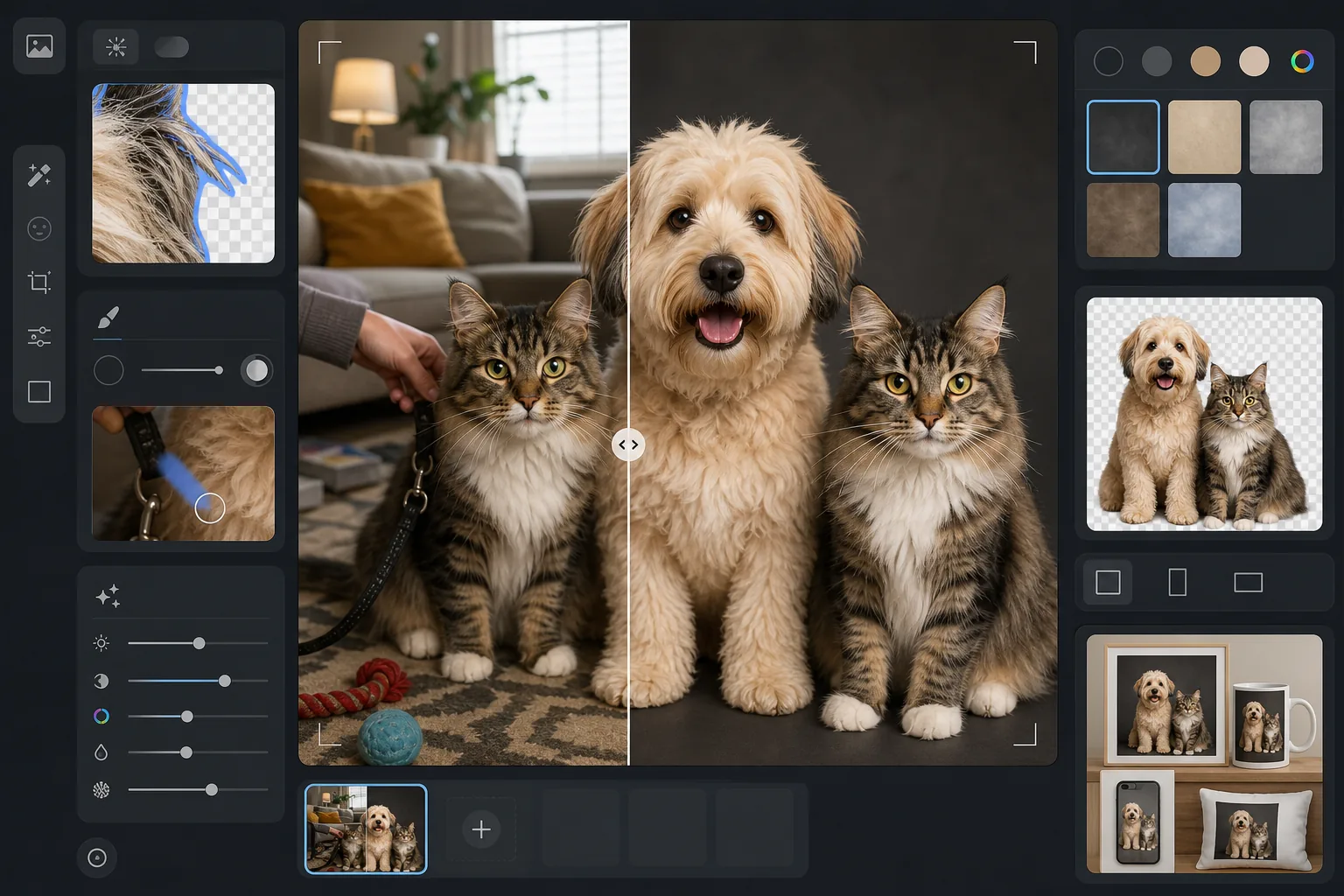
Cosa fa questo modello
Crea ritratti professionali di animali da foto casuali affrontando le sfide uniche che gli animali presentano. Background Eraser usa il rilevamento dei bordi sensibile al pelo per separare nettamente peli sottili, baffi e orecchie piumate da qualsiasi sfondo. Magic Eraser rimuove guinzagli, pettorine, mani del conduttore e oggetti di disturbo. AI Enhance affina i dettagli degli occhi per quello sguardo intenso, esalta texture e colore del manto e corregge il mosso comune nella fotografia di animali.
Impostazioni del modello
| Rilevamento dei bordi | Sensibile al pelo — preserva i singoli peli, i baffi e i contorni piumati |
| Sfondo | Sfondo da studio (antracite, crema o azzurro cielo) o PNG trasparente |
| Miglioramento degli occhi | Aumento della nitidezza con ripristino dei riflessi per occhi espressivi e limpidi |
| Dimensione di output | 2000×2000px (quadrata, ideale per stampe e social media) |
| Correzione del movimento | Lieve riduzione del mosso — compensa i piccoli movimenti dell'animale durante lo scatto |
| Miglioramento del manto | Nitidezza della texture e ricchezza del colore per pelo, piume o squame |
Come usare questo modello
Scatta la foto del tuo animale
Mettiti all'altezza degli occhi del tuo animale per la prospettiva più coinvolgente. Usa la luce naturale e un tempo di scatto rapido (o la modalità raffica del telefono) per congelare il movimento. Tenere un premio appena sopra l'obiettivo è il modo migliore per ottenere un contatto visivo diretto.
Rimuovi lo sfondo
Background Eraser isola il tuo animale con un rilevamento dei bordi sensibile al pelo che preserva peli sottili, baffi e il contorno morbido delle orecchie — i dettagli che il rilevamento dei bordi tradizionale di solito distrugge. Il risultato appare separato in modo naturale, non ritagliato.
Rimuovi guinzagli e distrazioni
Magic Eraser rimuove guinzagli, pettorine, mani del conduttore visibili e qualsiasi oggetto nell'inquadratura. L'IA ricostruisce il pelo o lo sfondo dietro gli oggetti rimossi, così il ritratto sembra che il tuo animale abbia posato da solo.
Migliora ed esporta
AI Enhance affina i dettagli degli occhi, arricchisce colore e texture del manto e corregge un lieve mosso. Scegli un colore di sfondo da studio o esporta con uno sfondo trasparente per un uso personalizzato su biglietti, stampe o regali.
Consigli da professionisti per i migliori risultati
- ✓Scatta in modalità raffica e scegli il fotogramma più nitido — gli animali battono le palpebre e si muovono di continuo, quindi la quantità è tua alleata.
- ✓Per gli animali dal pelo scuro (cani neri, gatti scuri), fotografa davanti a uno sfondo più chiaro per dare all'IA il massimo contrasto per il rilevamento dei bordi.
- ✓Fai tenere a un assistente un premio proprio sopra il telefono o la fotocamera per ottenere un contatto visivo diretto — è ciò che crea lo sguardo coinvolgente e intenso dei ritratti migliori.
- ✓Per i gatti, aspetta che si sistemino in un raggio di sole o sul loro posatoio preferito — i gatti rilassati danno i ritratti più naturali, con occhi aperti e vigili.
Domande frequenti
Riesce a gestire pelo lungo o folto senza rendere i bordi frastagliati?
+
Sì. Il rilevamento dei bordi sensibile al pelo è progettato appositamente per i manti animali. Preserva i singoli peli, la morbida sfumatura del sottopelo e i dettagli sottili come ciuffi delle orecchie e baffi — il risultato sembra una fotografia naturale, non un ritaglio digitale.
Rimuove un guinzaglio senza lasciare artefatti?
+
Sì. Magic Eraser rimuove guinzagli, pettorine e collari in modo pulito. L'IA ricostruisce il motivo del pelo dietro l'oggetto rimosso usando la texture del manto circostante, così nell'immagine finale non resta alcuna traccia visibile del guinzaglio.
Funziona anche con animali diversi da cani e gatti?
+
Sì. Il modello funziona con qualsiasi animale — conigli, uccelli, cavalli, rettili e altro ancora. Il rilevamento dei bordi sensibile al pelo si adatta a piume, pelle liscia e squame oltre che al pelo. Il miglioramento degli occhi funziona su qualsiasi animale con occhi visibili.
Regala al tuo animale il ritratto che merita
Carica una qualsiasi foto del tuo animale e ottieni un ritratto di qualità da studio in pochi secondi. Perfetto per stampe, regali, social media e biglietti per le festività.
Provalo gratisRelated templates
More portrait templates for your workflow.
연령에 맞는 학교 인물 사진 리터칭 템플릿입니다. 전체 수업에 대한 일괄 처리를 통해 자연스러운 잡티 제거, 일관된 배경 및 앨범 표준 출력.
모공과 결은 그대로 유지하면서 잡티는 제거해주는 자연스러운 피부 리터칭 템플릿입니다. 조명도, 플라스틱 모양도 아닙니다. 카메라에 비친 피부가 더 좋아질 뿐입니다.
부드럽고 따뜻한 톤, 피부를 부드럽게 다듬기, 소품 및 방해 요소 제거, 공지 사항 및 벽 예술을 위한 인쇄용 크기 조정을 통해 신생아 및 아기 사진을 향상하세요.
부드러운 피부 보정, 부드러운 빛 조명, 배경 단순화, 따뜻한 색상 그레이딩으로 출산 사진을 수정하여 시대를 초월한 임신 인물 사진을 연출해 보세요.
산만한 배경을 제거하고, 고르지 못한 노출을 수정하고, 피부를 자연스럽게 매끄럽게 하고, 모두가 같은 프레임에서 가장 멋진 모습을 보이도록 하여 가족 사진을 깔끔하게 정리하세요.