
가족 사진 정리
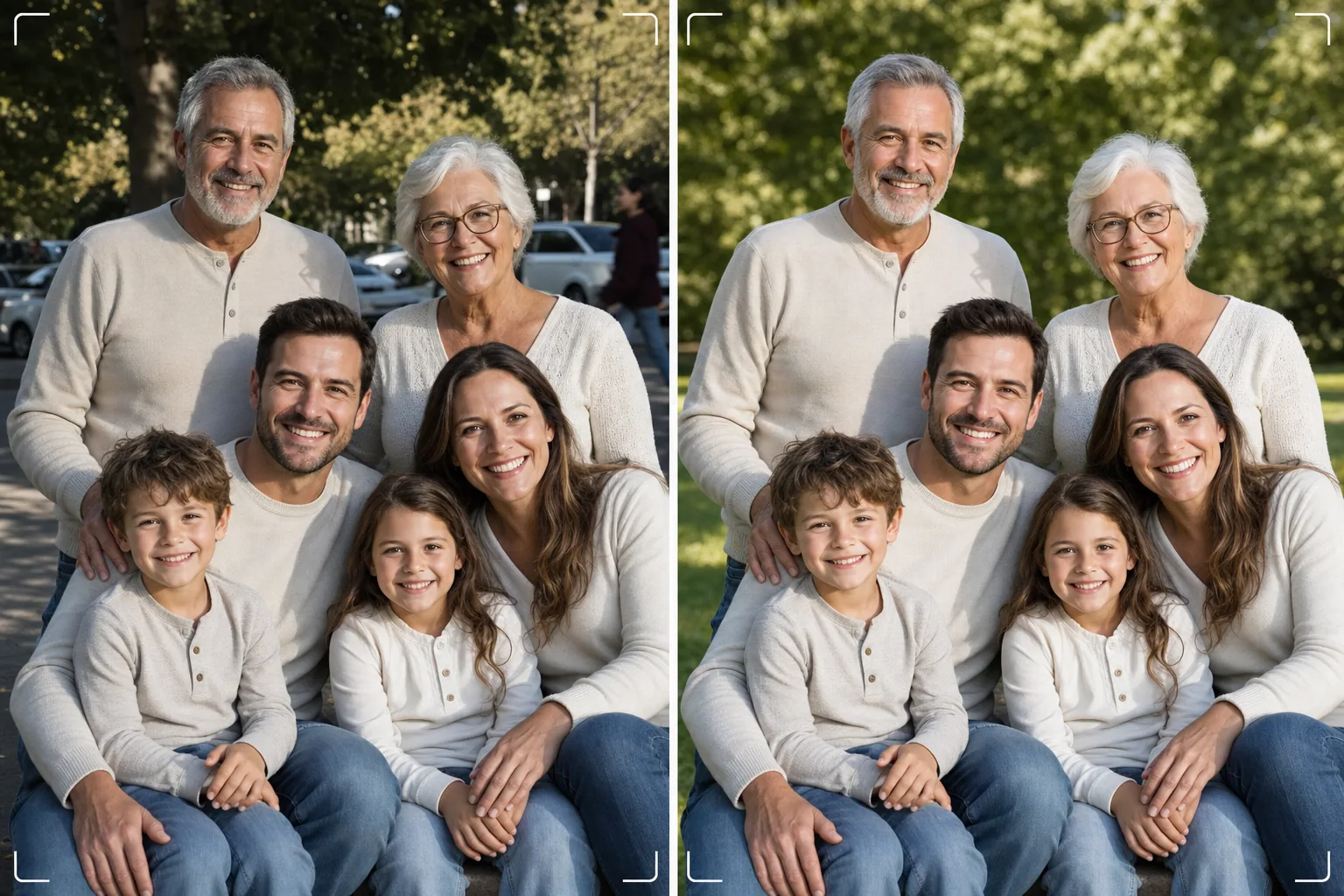
수백 번 촬영할 필요 없이 완벽한 가족 사진을 얻으세요. 이 템플릿은 배경의 방해 요소를 제거하고, 단체 전체의 고르지 못한 조명을 보정하며, 모든 얼굴의 잡티를 자연스럽게 줄이고, 좋은 단체 사진이 훌륭한 사진이 되지 못하게 하는 작은 결점들을 정리합니다.
이 템플릿 무료로 사용해 보기Portrait template preview
이 템플릿이 하는 일
단 한 장의 프레임에서 모두가 멋지게 보이도록 하는, 가족 사진의 보편적인 문제를 해결합니다. Magic Eraser는 사진에 끼어든 사람, 쓰레기통, 비상구 표지판, 전선, 주차된 자동차, 그리고 그 외에 좋은 단체 구도를 망치는 방해 요소들을 제거합니다. AI Enhance는 일부 가족은 그늘에 있고 다른 가족은 직사광선 아래 있을 때 발생하는 고르지 못한 조명을 보정하여 모두를 일관되고 보기 좋은 노출로 맞춥니다. 자연스러운 피부 보정은 누구도 인위적으로 보정한 듯 보이지 않게 하면서 모든 얼굴의 잡티, 다크서클, 홍조를 줄여 줍니다. 그 결과는 모두를 한자리에 모았을 때 상상했던 바로 그 가족 사진입니다.
템플릿 설정
| 배경 정리 | 방해 요소 자동 감지 및 제거(사람, 표지판, 사물) |
| 노출 균형 | 모든 피사체에 고른 조명(그림자 채우기 + 하이라이트 복원) |
| 피부 개선 | 얼굴별 자연스러운 잡티 감소(고유한 특징 보존) |
| 색 보정 | 혼합 조명 단체 사진 전체에 통일된 화이트 밸런스 |
| 샤프닝 | 얼굴 인식 샤프닝(눈과 미소 우선) |
| 출력 해상도 | 긴 변 6000px(300 DPI에서 최대 20×13인치 벽걸이 인쇄) |
이 템플릿 사용 방법
가족 사진 업로드
가족 모임, 명절, 동창회 또는 인물 촬영에서 찍은 단체 사진을 업로드하세요. 이 템플릿은 2명에서 30명까지의 단체를 처리합니다. 최상의 결과를 위해 가장 많은 얼굴이 기분 좋은 표정으로 카메라를 바라보는 프레임을 선택하세요. 템플릿은 배경과 조명을 보정하지만 얼굴 표정이나 감은 눈은 바꿀 수 없습니다.
배경의 방해 요소 제거
Magic Eraser는 가족 단체 뒤에 있는 낯선 사람, 방해되는 표지판, 쓰레기, 차량 및 기타 원치 않는 요소를 식별하여 제거합니다. AI는 배경을 자연스럽게 재구성하여 제거된 사물 뒤의 잔디, 하늘, 벽 또는 바닥을 채웁니다.
조명 균형 맞추기 및 얼굴 개선
AI Enhance는 가족 구성원 간의 노출 차이를 보정합니다. 더 이상 단체의 절반은 그늘에 있고 절반은 햇빛에 눈을 찡그리는 일이 없습니다. 각 얼굴은 개별적인 잡티 감소와 은은한 눈 밝기 보정을 받으며, 동시에 모든 사람의 고유한 특징과 자연스러운 모습이 보존됩니다.
인쇄 또는 공유용으로 내보내기
대형 벽걸이 인쇄용으로는 긴 변 6000px로, 소셜 미디어 및 디지털 연하장용으로는 2000px로 다운로드하세요. 템플릿은 화면 표시용 sRGB 또는 전문 인쇄용 Adobe RGB로 출력합니다. 일반적인 액자 크기에 맞는 여러 자르기 비율(4:5, 5:7, 8:10)을 사용할 수 있습니다.
최상의 결과를 위한 전문가 팁
- ✓빠르게 연속으로 3~5장을 촬영하세요. 가장 많은 사람이 눈을 뜨고 자연스러운 표정을 짓고 있는 한 장을 고르세요. 템플릿이 나머지 모든 것을 처리하지만, 표정과 눈을 뜬 상태는 나중에 바꿀 수 없습니다.
- ✓햇빛과 그늘이 섞인 곳보다는 탁 트인 그늘(나무 그늘 아래나 건물의 그늘진 쪽)에 가족을 배치하세요. 그러면 템플릿이 고르게 조명된 출발점을 얻어 가장 자연스러운 개선 효과를 만들어 냅니다.
- ✓대규모 단체(10명 이상)의 경우 키가 큰 사람을 뒤에 두고 엇갈린 줄로 사람들을 배치하세요. 이러한 자연스러운 배치는 깊이감을 만들고 모든 얼굴이 보이도록 합니다. 템플릿은 광원에서 멀어 약간 어두운 뒷줄의 얼굴을 밝게 할 수 있습니다.
자주 묻는 질문
감은 눈이나 좋지 않은 표정을 고칠 수 있나요?
+
아니요. 템플릿은 조명을 개선하고, 방해 요소를 제거하며, 피부를 매끄럽게 하지만, 얼굴 표정을 바꾸거나 감은 눈을 뜨게 하거나 사람의 위치를 다시 배치할 수는 없습니다. 업로드하기 전에 가장 좋은 표정의 프레임을 선택하세요. 템플릿이 그 프레임을 최상의 모습으로 만들어 줍니다.
대규모 동창회 단체는 어떤가요?
+
템플릿은 약 30명까지의 단체를 처리합니다. 매우 큰 단체의 경우 프레임 내 얼굴 크기가 작아져 개별 얼굴 개선은 더 미묘해지지만, 배경 정리와 조명 보정은 어떤 단체 규모에서도 충분히 효과적입니다.
가족 사진에서 한 사람을 제거할 수 있나요?
+
네, Magic Eraser는 단체에서 특정 인물을 제거할 수 있습니다. 제거하려는 사람을 선택하면 AI가 그 뒤의 배경을 재구성합니다. 이는 그 사람이 다른 사람들 사이 가운데가 아니라 단체의 가장자리에 있을 때 가장 효과적입니다.
Related templates
More portrait templates for your workflow.
연령에 맞는 학교 인물 사진 리터칭 템플릿입니다. 전체 수업에 대한 일괄 처리를 통해 자연스러운 잡티 제거, 일관된 배경 및 앨범 표준 출력.
스튜디오 수준의 애완동물 초상화 템플릿입니다. 털 가장자리를 처리하고, 가죽끈과 핸들러를 제거하고, 배경을 교체하고, 개, 고양이 및 기타 동물의 눈을 날카롭게 만듭니다.
모공과 결은 그대로 유지하면서 잡티는 제거해주는 자연스러운 피부 리터칭 템플릿입니다. 조명도, 플라스틱 모양도 아닙니다. 카메라에 비친 피부가 더 좋아질 뿐입니다.
부드럽고 따뜻한 톤, 피부를 부드럽게 다듬기, 소품 및 방해 요소 제거, 공지 사항 및 벽 예술을 위한 인쇄용 크기 조정을 통해 신생아 및 아기 사진을 향상하세요.
부드러운 피부 보정, 부드러운 빛 조명, 배경 단순화, 따뜻한 색상 그레이딩으로 출산 사진을 수정하여 시대를 초월한 임신 인물 사진을 연출해 보세요.