
비영리 기금 모금 행사 사진
행사 스냅 사진과 프로그램 기록 사진을 기부자 호소, 연례 보고서, 보조금 신청을 위한 설득력 있는 이미지로 바꿔보세요. 이 템플릿은 연회장, 야외 행사, 프로그램 현장의 까다로운 조명을 보정하고 시각적 잡티를 제거하며, 조직 활동의 에너지와 영향력을 전달하는 따뜻한 색감 그레이딩을 적용합니다.
이 템플릿을 무료로 사용해 보기Business template preview
이 템플릿의 기능
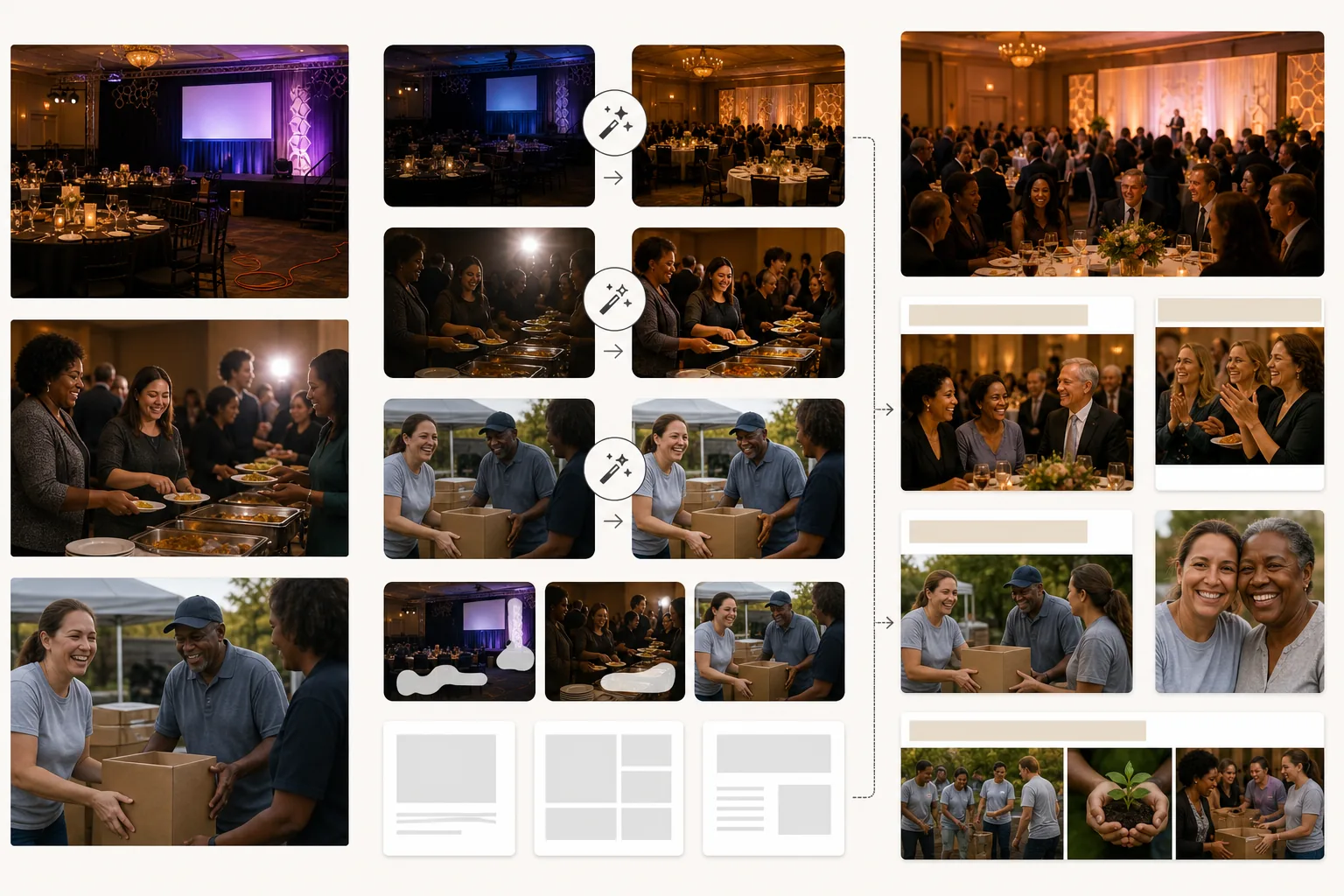
전문 사진 촬영 예산 없이도 비영리 단체 커뮤니케이션의 시각적 품질을 높여줍니다. 대부분의 비영리 단체 사진은 자원봉사자나 직원이 어두운 연회장, 붐비는 야외 행사, 사람이 가득한 프로그램 현장 등 까다로운 환경에서 개인 휴대폰으로 촬영합니다. AI Enhance는 노출 부족을 보정하고, 샹들리에·무대 조명·테이블 촛불에서 비롯된 혼합 조명을 균일하게 맞추며, 그림자에 묻히거나 카메라 플래시로 날아간 얼굴의 디테일을 복원합니다. Magic Eraser는 모금 자료의 전문성을 떨어뜨리는 방해 요소를 제거합니다 — 갈라 행사에서 보이는 케이블과 연장 코드, 야외 행사의 쓰레기와 종이 접시, 건설 현장의 장비, 그리고 특정 자료에 노출되어서는 안 되는 기업 후원사의 브랜드 표지판 등입니다. 따뜻한 색감 그레이딩은 인간적 유대와 긍정적 영향을 전달하며, 비영리 커뮤니케이션 연구에 따르면 이는 기부자의 반응을 이끌어냅니다.
템플릿 설정
| 조명 보정 | 연회장, 야외 행사, 실내 프로그램 현장 프리셋 |
| 플래시 보정 | 주변 온기를 유지하면서 강한 플래시 핫스폿과 적목 현상을 완화 |
| 배경 정리 | 케이블, 임시 표지판, 행사 잡티 제거 |
| 색감 그레이드 | 따뜻한 공동체 (인간적 유대와 긍정적 에너지를 강조) |
| 출력 해상도 | 3000×2000px (연례 보고서, 뉴스레터, 웹용 3:2) |
이 템플릿 사용 방법
행사 또는 프로그램 사진 업로드
모금 갈라, 자원봉사 행사, 프로그램 활동, 지역사회 봉사 등 모든 조직 활동의 사진을 업로드하세요. 휴대폰 사진, 콤팩트 카메라 스냅, DSLR 이미지 모두 사용할 수 있습니다. 이 템플릿은 비영리 단체가 마주하는 다양한 조명 조건을 처리합니다.
조명과 노출 보정
AI Enhance는 노출이 부족한 연회장과 저녁 행사 사진을 밝게 하고, 샹들리에와 무대 조명에서 비롯된 혼합 색조를 보정하며, 강한 플래시 아티팩트를 줄입니다. 너무 어둡거나 밝았던 군중 속 얼굴들이 자연스럽고 따뜻하게 보이도록 균형이 맞춰집니다.
방해 요소 제거
Magic Eraser는 커뮤니케이션 자료의 전문성을 떨어뜨리는 시각적 잡티 — 연장 코드, 케이터링 장비, (부적절한 경우) 후원사 배너, 행사 설치 자재 등을 제거합니다. AI는 제거된 물체 뒤의 바닥, 벽, 배경을 재구성합니다.
기부자 커뮤니케이션용으로 내보내기
연례 보고서와 보조금 신청용으로는 3000×2000px로, 이메일 캠페인·소셜 미디어·조직 웹사이트용으로는 웹 최적화 크기로 다운로드하세요. 따뜻하고 전문적인 품질은 기부자에게 그들의 기여가 잘 운영되는 프로그램에 쓰인다는 것을 알려줍니다.
최상의 결과를 위한 전문가 팁
- ✓진정한 교감의 순간을 포착하세요 — 자원봉사자와 참여자가 함께 웃는 모습, 기부자가 프로그램 책임자와 악수하는 모습, 아이들이 활동에 몰두하는 모습 등입니다. 바로 이러한 진솔한 유대의 순간이 기부자의 마음을 움직이며, AI 보정은 어둡고 불완전한 환경에서 촬영되었더라도 이 순간들을 빛나게 합니다.
- ✓각 행사마다 사진 담당자 한 명을 지정하세요. 휴대폰을 든 직원 한 명이라도 무작위 스냅에 의존하는 것보다 더 나은 결과를 냅니다. 의도적인 구도와 타이밍이 조직의 이야기를 들려주는 순간을 포착하기 때문입니다.
- ✓한 행사의 모든 사진을 동일한 설정으로 처리하세요. 사진 묶음 전반에 일관된 조명 보정과 색감 그레이딩을 적용하면, 무작위 스냅의 산만한 모음이 아니라 연례 보고서나 캠페인 페이지를 위한 일관된 시각적 이야기가 만들어집니다.
자주 묻는 질문
행사 사진에서 후원사 로고를 제거할 수 있나요?
+
네. Magic Eraser는 행사 사진에서 브랜드 배너, 로고 디스플레이, 후원사 표지판을 제거할 수 있습니다. 후원받은 행사의 사진을 특정 후원사를 부각하는 것이 부적절한 맥락 — 예를 들어 경쟁 자금 제공자에 대한 보조금 신청이나 조직 전반의 마케팅 — 에서 사용할 때 유용합니다.
야외 건축 및 자원봉사 행사에도 사용할 수 있나요?
+
네. 야외 자원봉사 행사 — 주택 건축, 공원 청소, 공동체 정원 — 에는 강한 햇빛, 혼합된 그늘, 건축 자재로 어수선한 배경 등 고유의 어려움이 있습니다. 이 템플릿은 이러한 조건을 보정하고 방해되는 장비와 자재를 화면에서 제거합니다.
보조금 신청 사진에 사용할 수 있나요?
+
물론입니다. 전문 품질의 프로그램 사진이 포함된 보조금 신청은 조직의 역량과 효과적인 프로그램 실행을 보여줍니다. 이 템플릿은 자금 제공자가 정립된 조직에 기대하는 시각적 기준을 충족하는 이미지를 만들어냅니다.
기부자에게 모든 기부금의 영향력을 보여주세요
행사와 프로그램 사진을 업로드하면 기부자 호소, 연례 보고서, 보조금 신청을 강화하는 세련된 이미지를 얻을 수 있습니다.
무료로 사용해 보기Related templates
More business templates for your workflow.
일관된 배경, 전문적인 조명 보정, 브랜드에 적합한 색상 그레이딩, 팀 전체에 걸쳐 균일한 이미지 품질을 갖춘 폴란드 기업 팀 사진입니다.
근육 선명도 향상, 동적 조명 보정, 배경 정리, 고대비 운동 컬러 그레이딩을 통해 체육관 및 피트니스 사진을 향상하세요.
잉크 색상의 선명함, 라인 디테일 선명화, 피부 홍조 감소, 아티스트 포트폴리오 및 Instagram의 깨끗한 배경을 사용하여 문신 포트폴리오 사진을 향상시킵니다.
배경 교체, 피부 다듬기, 조명 보정을 통해 세련된 이력서 얼굴 사진을 만드세요. 이력서, 취업 포털 및 기업 디렉토리에 적합합니다.
배경 교체, 저지 색상 향상, 선수 명단 및 프로그램의 경기장 또는 스튜디오 배경을 사용하여 전문 팀 및 개인 선수 사진을 만드세요.
배경 교체, 드라마틱한 조명 강화, 프레스 키트 및 공연장 제출을 위한 인쇄용 출력 기능을 갖춘 전문 밴드 및 음악가 프로모션 사진을 제작하세요.