
기업 팀 사진
값비싼 사진작가 없이도 팀 페이지에 전문적이고 일관된 느낌을 더하세요. 이 템플릿은 개별 얼굴 사진의 배경을 표준화하고, 혼합된 사무실 조명을 중립적인 전문가 톤으로 보정하며, 은은한 피부 보정을 적용하여 모든 팀원의 사진이 동일한 스타일과 품질을 갖추도록 합니다.
이 템플릿 무료로 사용해 보기Business template preview
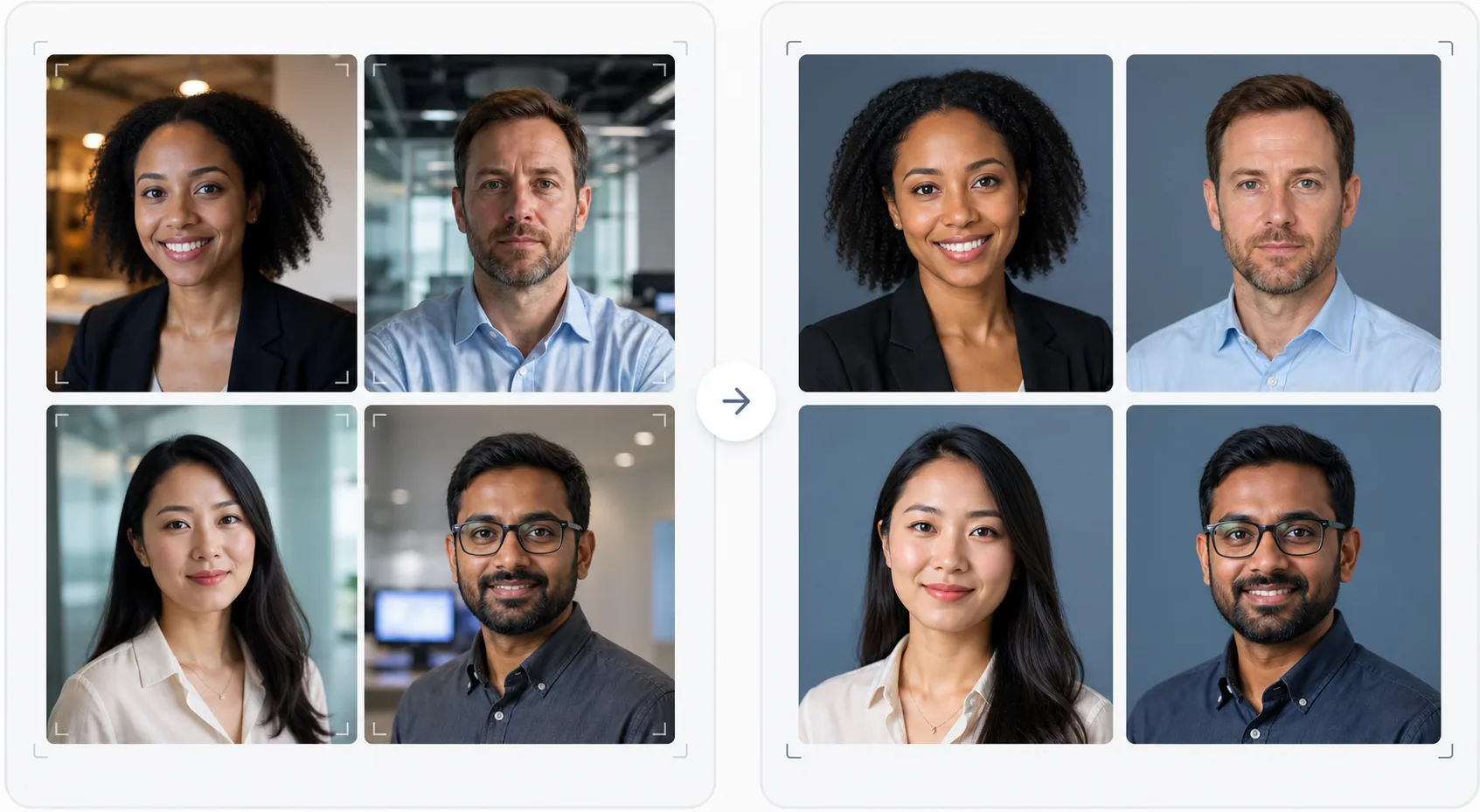
이 템플릿이 하는 일
회사 웹사이트, LinkedIn 회사 페이지, 마케팅 자료를 위한 시각적으로 일관된 팀 사진을 만듭니다. 팀 얼굴 사진이 서로 다른 시간에, 서로 다른 사람이, 서로 다른 카메라로 촬영되면 결과적으로 통일성이 없어 비전문적으로 보이는 팀 페이지가 됩니다. 이 템플릿은 모든 얼굴 사진에서 배경, 색온도, 조명 스타일, 크롭 구도를 표준화하여 이 문제를 해결합니다. Background Eraser는 다양한 사무실 배경을 제거하고 브랜드 색상의 일관된 단색 또는 그라데이션 배경으로 대체합니다. AI Enhance는 노출을 정규화하고, 사무실 형광등의 녹색 색조를 보정하며, 은은한 피부 보정을 적용하여 모든 팀원이 세련되고 전문적으로 보이도록 합니다.
템플릿 설정
| 배경 | 일관된 단색, 그라데이션 또는 사무실 흐림 (브랜드별 구성 가능) |
| 크롭 구도 | 머리와 어깨, 중앙 정렬, 모든 팀 사진에서 일관됨 |
| 조명 정규화 | 중립적 전문가 톤 (형광등, LED, 창문 빛의 혼합 보정) |
| 피부 보정 | 은은한 잡티 감소 및 다크서클 보정 |
| 출력 크기 | 800 × 800 px (웹 팀 페이지) 및 400 × 400 px (디렉터리) |
이 템플릿 사용 방법
팀원 사진 업로드
팀원의 얼굴 사진을 업로드하세요. 서로 다른 카메라, 장소, 시기에 촬영한 것이어도 됩니다. 이 템플릿은 전문 인물 사진부터 책상에서 스마트폰으로 찍은 셀카까지 모든 것을 처리합니다. 효율적인 처리를 위해 팀 전체를 일괄 업로드하세요.
배경 표준화
Background Eraser는 각 사진의 원래 배경을 제거하고 모든 팀원에게 일관된 옵션으로 대체합니다. 단색 브랜드 색상, 전문적인 그라데이션 또는 표준화된 사무실 흐림 효과 중에서 선택하세요. 모든 사진이 동일한 배경 처리를 받아 시각적 통일성을 갖춥니다.
조명 정규화 및 보정
AI Enhance는 각 사진의 조명을 일관된 중립적 전문가 톤으로 보정합니다. 녹색 형광등 색조, 따뜻한 백열등 색조, 혼합 조명이 모두 보정됩니다. 은은한 피부 보정으로 잡티와 다크서클이 줄어듭니다. 눈은 부드럽게 밝아져 적극적이고 친근한 인상을 줍니다.
웹 및 디렉터리용 내보내기
웹사이트 팀 페이지용으로 800 × 800 px, 내부 디렉터리 및 이메일 서명용으로 400 × 400 px로 전체 세트를 다운로드하세요. 모든 이미지는 동일한 색상 프로필, 압축, 파일 명명 규칙으로 내보내져 CMS에 손쉽게 일괄 업로드할 수 있습니다.
최상의 결과를 위한 전문가 팁
- ✓팀원에게 간단한 촬영 지침을 보내세요: 카메라를 정면으로 바라보고, 배경과 대비되는 단색 상의를 입고, 얼굴에 빛이 잘 들도록 하고(가능하면 창문을 향하도록), 살짝 미소 지으며 자연스러운 표정을 유지하세요. 원본 사진이 좋을수록 AI 보정이 덜 필요합니다.
- ✓브랜드 가이드라인에 나오는 배경 색상을 선택하세요. 보통 중립적인 회색, 네이비 또는 브랜드의 보조 색상입니다. 이렇게 하면 팀 페이지가 단순한 사진 모음이 아니라 브랜드 자산이 됩니다.
- ✓새 팀원이 합류하면 동일한 설정으로 템플릿을 통해 처리하세요. 이렇게 하면 팀이 성장하고 변화하더라도 시간이 지나도 시각적 일관성이 유지됩니다.
- ✓임원진과 경영진의 경우 동일한 배경과 스타일을 유지하면서 경영진을 더 넓은 팀과 시각적으로 구분하기 위해 약간 다른 구도(더 타이트한 크롭, 약간 더 따뜻한 톤)를 고려하세요.
자주 묻는 질문
팀 전체를 한 번에 처리할 수 있나요?
+
네. 모든 팀원 사진을 한 번에 일괄 업로드하세요. 이 템플릿은 모든 이미지에 동일한 배경, 조명 보정, 구도를 적용하여 완벽한 일관성을 보장합니다. 사진은 일치하는 크기, 압축, 색상 프로필로 반환됩니다.
팀원들의 사진 품질이 매우 다르면 어떻게 되나요?
+
이 템플릿은 선명도, 노이즈 감소, 압축을 조정하여 스마트폰 셀카와 DSLR 인물 사진 간의 품질 차이를 정규화합니다. DSLR 원본은 항상 약간 더 선명한 결과를 내지만, 처리된 출력물은 시각적으로 충분히 일관되어 웹사이트 그리드에서 품질 차이가 두드러지지 않습니다.
원격 팀에도 적용되나요?
+
대면 촬영이 현실적으로 어려운 원격 팀에 이상적인 사용 사례입니다. 각 팀원이 집에서 셀카를 찍거나 누군가에게 사진을 찍어 달라고 하면, 이 템플릿이 모든 사진을 동일한 스튜디오 세션에서 촬영한 것처럼 표준화합니다.
촬영 없이도 전문적인 팀 페이지를
어떤 소스의 개별 얼굴 사진이든 업로드하면 웹사이트에 바로 사용할 수 있는, 시각적으로 일관되고 브랜드에 부합하는 팀 사진 세트를 받아보세요.
무료로 사용해 보기Related templates
More business templates for your workflow.
근육 선명도 향상, 동적 조명 보정, 배경 정리, 고대비 운동 컬러 그레이딩을 통해 체육관 및 피트니스 사진을 향상하세요.
잉크 색상의 선명함, 라인 디테일 선명화, 피부 홍조 감소, 아티스트 포트폴리오 및 Instagram의 깨끗한 배경을 사용하여 문신 포트폴리오 사진을 향상시킵니다.
배경 교체, 피부 다듬기, 조명 보정을 통해 세련된 이력서 얼굴 사진을 만드세요. 이력서, 취업 포털 및 기업 디렉토리에 적합합니다.
배경 교체, 저지 색상 향상, 선수 명단 및 프로그램의 경기장 또는 스튜디오 배경을 사용하여 전문 팀 및 개인 선수 사진을 만드세요.
배경 교체, 드라마틱한 조명 강화, 프레스 키트 및 공연장 제출을 위한 인쇄용 출력 기능을 갖춘 전문 밴드 및 음악가 프로모션 사진을 제작하세요.
매크로 수준의 디테일 향상, 진정한 젤 및 광택 색상 정확도, 인스타그램 포트폴리오 및 예약 페이지에 대한 깔끔한 손 위치 지정 기능을 갖춘 네일 아트를 선보입니다.