
사진에서 빠진 머리카락 제거
인물 사진과 얼굴 사진에서 날아가는 가닥, 얼굴 전체에 흩어진 머리카락, 빛을 받아 흩날리는 머리카락을 정리하세요. Magic Eraser은 자연스러운 헤어라인과 헤어스타일의 나머지 부분을 유지하면서 산만한 가닥을 제거합니다.
마지막 업데이트
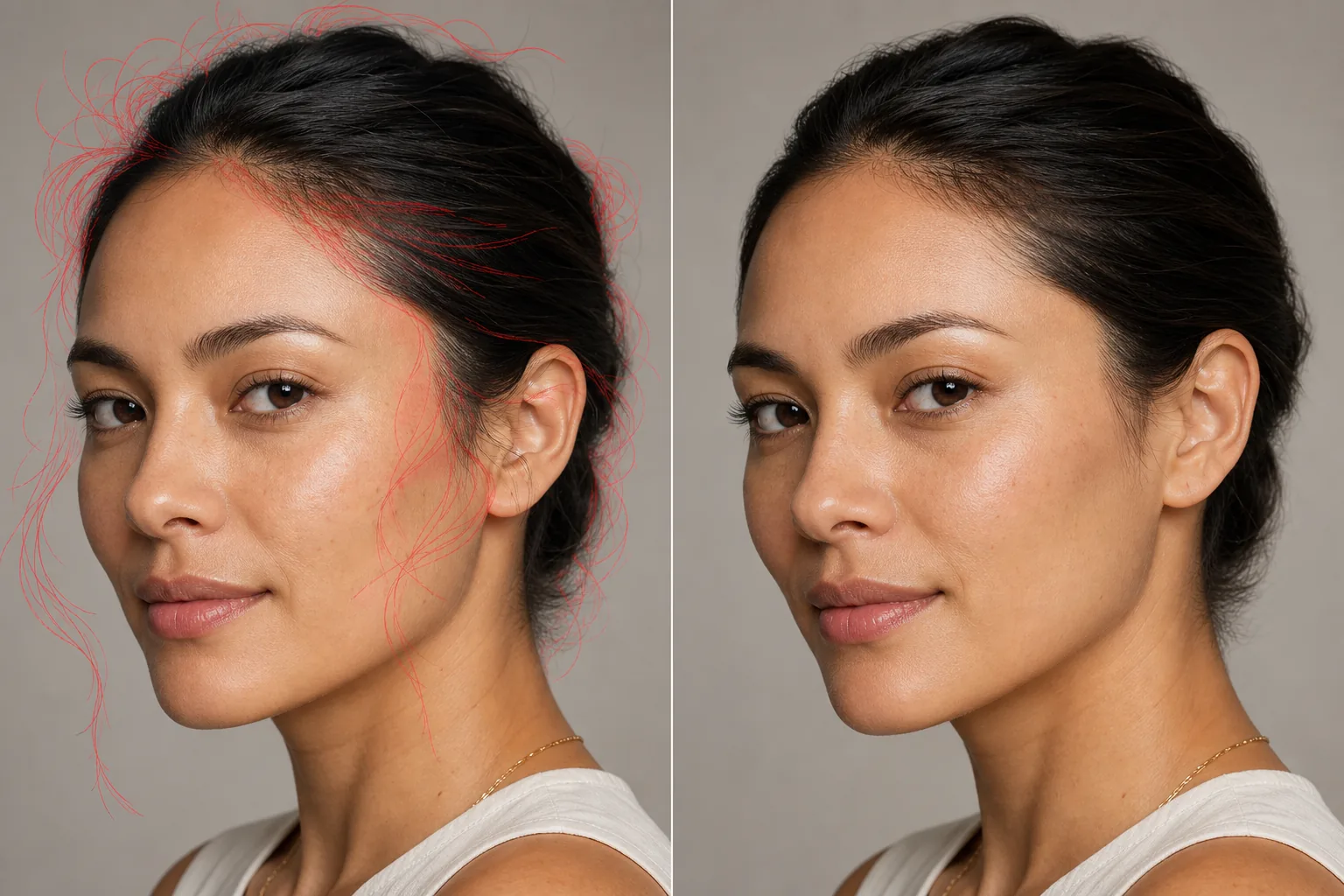
사진에서 잔머리와 삐친 머리카락을 지우는 방법
사진에서 잔머리를 지우려면 웹, iOS, Android에서 Magic Eraser를 열고 인물 사진을 업로드한 뒤, 삐져나온 머리카락을 따라 브러시로 칠하고 — 이마 위로 흩날리는 잔머리, 뺨을 가로지르는 한 가닥, 역광에 비치는 부스스한 머리 후광까지 — Erase를 탭하세요. AI가 머리카락의 흐름을 따라가며 그 아래 깨끗한 피부나 배경을 다시 채워줍니다. 가입 없이 무료로 쓸 수 있어요. 헤어라인은 그대로 두고 흐트러진 잔머리만 칠하면 헤어스타일은 손상 없이 그대로 유지됩니다. 흩날리는 제모는 전문 인물 사진 작업에서 가장 시간이 많이 걸리는 리터칭 작업입니다. 모든 인물 사진 세션에서는 백라이트를 받는 머리카락, 이마를 가로지르는 한 가닥의 가닥, 뺨이나 입술을 가로지르는 한 가닥의 가닥 등 날아가는 가닥이 생성됩니다. 완벽하게 스타일링된 머리카락이라도 바람, 습도 또는 정적 조건에서는 날아가는 현상이 발생합니다. 전문 리터칭 담당자는 이미지당 10~20분을 들여 개별 머리카락 가닥을 공들여 복제하고 복구하며 200~400% 확대/축소하여 다양한 배경 질감에 대해 각 가닥의 경로를 따라갑니다. 30개 이미지의 얼굴 사진 세션에 이를 곱하면 흩어진 머리카락만으로도 몇 시간이 걸립니다. Magic Eraser의 AI는 배경에 대한 선형 패턴을 분석한 다음 깨끗한 배경이나 각 가닥 아래의 피부 질감을 재구성하여 개별 길 잃은 가닥을 감지하고 제거합니다.
3단계에 걸쳐 늘어진 털 제거하기
- 1
초상화를 업로드하세요
웹, iOS 또는 Android에서 Magic Eraser을 열고 정리하고 싶은 날아다니는 머리카락이나 흩날리는 머리카락이 있는 얼굴 사진이나 인물 사진을 업로드하세요.
- 2
길 잃은 가닥을 브러시로 닦으십시오.
각 흩어진 머리카락 가닥이나 날아간 머리카락 그룹을 따라 페인트합니다. 얼굴을 가로지르는 개별 가닥의 경우 머리카락의 경로를 따라가는 얇은 브러시를 사용하십시오. 머리 위의 플라이어웨이 클러스터의 경우 더 넓은 브러시를 사용하여 그룹을 덮습니다. 머리카락을 남기고 싶은 주요 헤어스타일 가장자리를 브러싱하지 마세요.
- 3
지우고 검사하기
지우기를 탭하면 AI가 길 잃은 가닥을 제거하여 그 아래에 있는 깨끗한 배경, 피부 또는 옷을 재구성합니다. 눈에 보이는 모든 플라이어웨이가 사라지고 헤어라인 가장자리가 자연스럽게 보이는지 확대하여 확인하세요. 세련된 초상화를 내보냅니다.
다음에 가장 적합
- 플라이어웨이 클린업을 통한 전문적인 얼굴 사진 리터칭
- 바람에 날린 머리카락을 사용한 웨딩 및 신부 초상화
- 머리카락이 바람에 날리는 야외 인물 사진 세션
- 눈에 띄는 플라이어웨이를 생성하는 역광 머리카락을 사용한 스튜디오 얼굴 사진
- 세련되고 통일된 모습이 필요한 기업 팀 사진
- 스타일링된 머리를 이용한 뷰티 및 패션 사진
- 지저분한 머리 정리가 포함된 학교 인물 사진
- 흩날리는 머리카락이 제품을 가로지르는 제품 모델링
깔끔한 제모를 위한 팁
개별 가닥을 브러싱할 때 전체 확대하여 작업하십시오. 흩어진 털은 가늘고 주요 헤어라인에 가깝기 때문에 정밀도가 중요합니다. 가장 깨끗한 선택을 위해 가닥을 가로지르기보다는 가닥을 따라 브러시를 사용합니다. 백라이트 플라이어웨이(어두운 배경에 밝은 머리카락)의 경우 AI는 배경을 유지하면서 가닥의 빛을 감지하고 제거합니다. 얼굴을 가로지르는 가닥의 경우 AI는 아래의 피부 질감을 재구성합니다. 가장 어려운 시나리오는 다른 머리카락을 가로지르는 흩어진 머리카락, 즉 메인 헤어스타일을 가로지르는 가닥입니다. 아래에 있는 스타일이 적용된 머리카락이 아닌, 빗나간 가닥만 덮도록 조심스럽게 빗어냅니다. 플라이어웨이가 많은 야외 인물 사진의 경우, 가장 주의를 산만하게 하는 가닥(얼굴이나 눈을 가로지르는 가닥)을 먼저 처리한 다음 머리 위의 플라이어웨이 후광을 처리합니다. 일부 사진가들은 자연스러운 모습을 위해 의도적으로 몇 개의 부드러운 플라이어웨이를 남겨둡니다. 완전히 제거하면 헤어스타일이 딱딱해 보일 수 있습니다.
자주 묻는 질문
- 메인 헤어스타일에 영향을 미칠까요?
- 브러시로 칠한 부분만 영향을 받습니다. 브러시를 빗나간 가닥에 두고 주요 헤어스타일 가장자리에서 멀리 두십시오. AI는 빗질한 부분의 털만 제거하고 다른 부분은 그대로 둡니다.
- 백라이트 플라이어웨이를 처리할 수 있나요?
- 예. 백라이트를 포착하는 밝은 플라이어웨이는 어두운 배경과 명확한 대비를 갖기 때문에 실제로 AI가 감지하고 제거하기가 더 쉽습니다.
- 브러시는 얼마나 정확해야 합니까?
- 적당히 정확합니다. 브러시는 빗나간 가닥을 덮어야 하지만 주요 헤어라인은 피해야 합니다. 각 머리카락을 완벽하게 따라갈 필요는 없습니다. 가닥보다 약간 넓은 브러시가 효과적입니다. AI는 선택 항목 내에서 헤어 패턴을 식별합니다.
- 잔머리 제거는 무료인가요?
- 예. Magic Eraser의 무료 등급에는 머리카락 정리가 포함됩니다. 초상화를 업로드하고, 날아간 부분을 브러시로 칠하고, 세련된 결과를 내보냅니다.
- 휴대폰에서 사진 속 잔머리를 어떻게 지우나요?
- 모바일 브라우저나 iOS, Android 앱에서 Magic Eraser를 열고 카메라 롤에서 인물 사진을 불러온 뒤, 손가락으로 핀치해 잔머리에 바짝 확대하세요. 흐트러진 머리카락을 한 가닥씩 손가락으로 따라 칠하고 Erase를 탭하면 됩니다. 휴대폰에서는 확대가 핵심이에요 — 잔머리는 가늘기 때문에 가까이 들여다봐야 옆에 정돈된 머리카락을 건드리지 않고 한 가닥만 따라갈 수 있습니다. 결과는 데스크톱 버전과 똑같습니다.
- 부스스한 잔머리나 머리 전체를 둘러싼 후광 같은 잔머리도 지울 수 있나요?
- 네, 다만 빽빽하게 부스스한 후광은 몇 가닥 흩날리는 잔머리보다 조금 더 신경 써야 합니다. 한 번에 크게 쓸지 말고 후광이 진 부분을 구역별로 나눠 칠하면서, 정돈된 머리의 바깥 가장자리를 따라가세요. 그래야 헤어스타일을 파고들지 않고 부스스함만 줄일 수 있습니다. 단색 배경에서는 거의 완벽하게 정리되고, 복잡한 배경에서는 더 작게 나눠 칠하면서 가장자리를 확인하세요.
- 잔머리를 지우면 머리카락 가장자리가 흐릿하거나 뭉개지지 않나요?
- 흐트러진 잔머리만 칠하고 메인 헤어라인에서 멈추면 그런 일은 없습니다. AI는 헤어스타일 자체가 아니라 머리카락이 가로지른 배경이나 피부를 다시 채우기 때문에 정돈된 가장자리는 또렷하게 유지됩니다. 가장자리가 흐릿해 보인다면 보통 브러시가 정돈된 머리 안쪽으로 살짝 들어간 경우예요 — 실행 취소하고 더 확대한 뒤, 삐져나온 잔머리만 따라 칠하세요.