
사진에서 미터 제거
주차 미터기는 매장 목록 앞에 연석을 따라 늘어서 있습니다. 전기 계량기 상자는 집에서 가장 사진이 잘 찍히는 쪽에 있습니다. 한 줄로 늘어선 가스 계량기가 아파트 건물의 깨끗했던 외벽을 어수선하게 어지럽히고 있습니다. Magic Eraser은 주차 미터기, 유틸리티 미터기, 전기 미터기 패널 및 가스 미터기 은행을 칠한 다음 벽, 기둥, 보도 또는 그 아래의 정면을 재구성하여 최종 이미지가 깨끗해집니다.
마지막 업데이트
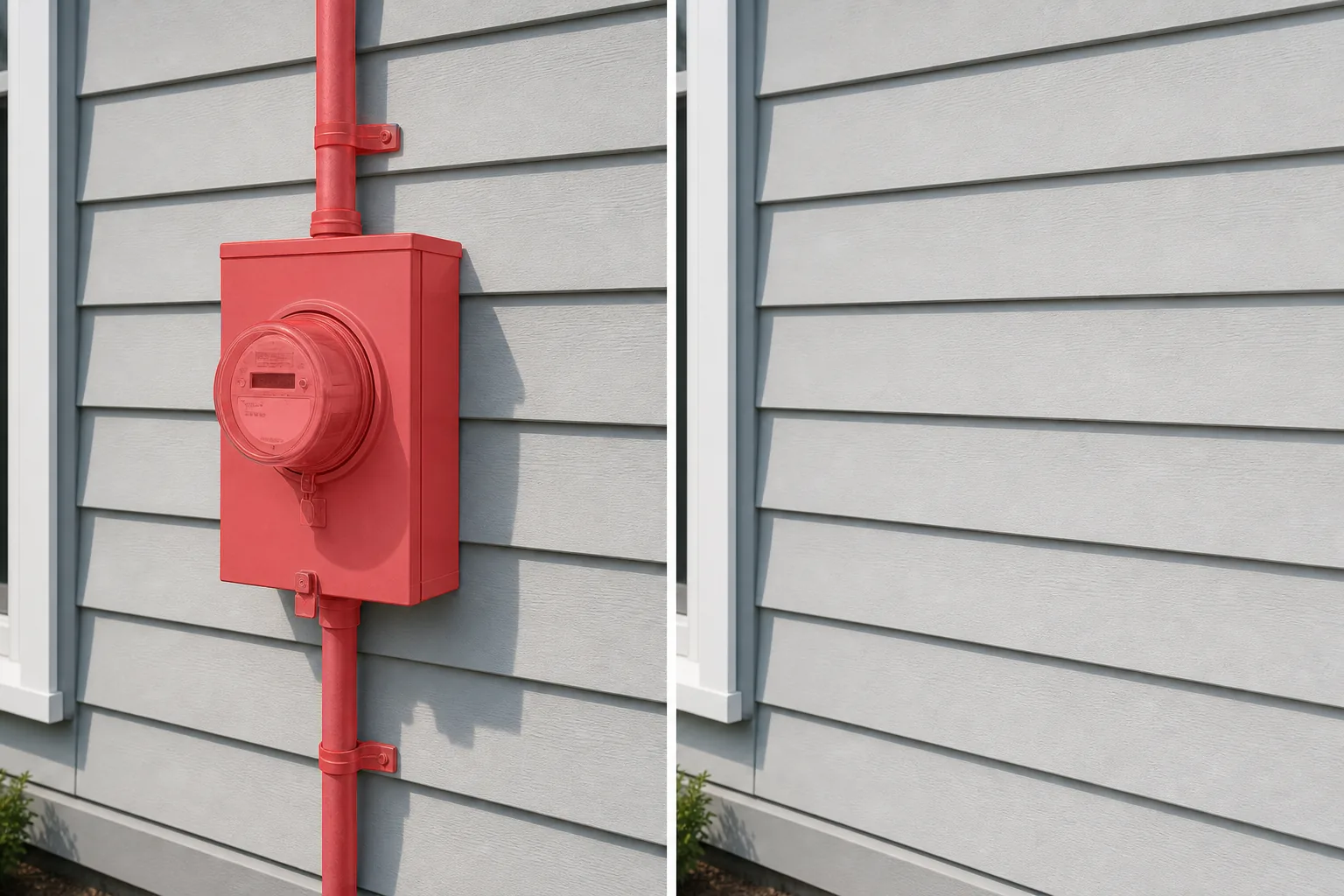
미터기가 부동산 및 건축 사진에서 지속적인 문제가 되는 이유
미터는 건물 규정에 따라 눈에 보이고 접근 가능해야 하는 기능적 인프라입니다. 즉, 미터는 카메라가 가리키는 곳에 정확하게 장착됩니다. 전기 계량기는 눈 높이 정도의 외벽에 설치되며, 유틸리티 회사에서 판독을 위해 접근해야 하기 때문에 종종 집의 전면이나 가장 눈에 잘 띄는 측면에 설치됩니다. 가스 계량기 뱅크는 회색 파이프와 다이얼이 모여 아파트 건물과 타운하우스의 측벽을 따라 늘어서 있습니다. 주차 미터기는 상업 지구의 모든 미터 거리 앞에 연석 높이에 설치되어 매장 전면과 거리 풍경 구성 전체에 반복적인 수직 장애물을 만듭니다. 수도 계량기는 보도 선을 나누는 지상 상자에 있습니다. 부동산 사진작가들에게 집 옆에 있는 전기 계량기는 가장 일반적인 수정 대상 중 하나입니다. 왜냐하면 거의 모든 외부 각도에 나타나며 다른 스타일의 외관에 있는 실용적인 회색 상자에 시선을 끌기 때문입니다. 상업용 건물을 기록하는 건축 사진작가에게 서비스 벽에 있는 유틸리티 미터 열은 건물의 배관을 보는 것과 시각적으로 동일합니다. 정확하지만 디자인이 보여주려는 의도는 아닙니다. 거리 사진가와 여행 사진가의 경우 전경의 주차 미터기는 뒤에 있는 실제 피사체와 경쟁하는 반복적인 수직선을 만듭니다. 미터는 벽돌, 사이딩, 치장벽토, 콘크리트 등 다양한 배경에 배치되고 각 표면 질감은 정확한 재구성이 필요하기 때문에 Photoshop에서 수동 미터 제거는 다소 어렵습니다. Magic Eraser은 주변 벽 질감, 모르타르 패턴, 사이딩 라인 또는 보도 표면을 참조로 사용하여 미터가 놓인 간격을 메우고 수동 리터처가 미터당 소비하는 10-15분이 아닌 몇 초 만에 깨끗한 결과를 생성합니다.
3단계로 미터 제거
- 1
사진 업로드
웹, iOS 또는 Android에서 Magic Eraser을 열고 제거하려는 미터기가 포함된 부동산 외관, 건축 사진, 매장 사진 또는 거리 장면을 로드하세요. JPEG, PNG, HEIC 및 WebP 형식이 모두 지원됩니다.
- 2
미터 위에 브러시
장착 브래킷, 도관 파이프 및 벽이나 바닥에 드리워지는 그림자를 포함하여 미터 전체를 칠합니다. 주차 미터의 경우 베이스에서 미터 헤드까지의 기둥을 포함합니다. 전기 계량기 패널의 경우 전체 회색 상자, 패널로 이어지는 도관, 보이는 경우 그 위의 기상 헤드를 브러싱합니다. 가스 계량기 뱅크의 경우 각 계량기 장치와 연결 파이프를 닦습니다. 브러시 스트로크에 그림자를 포함하면 미터를 제거한 후에도 눈에 띄지 않는 어두운 윤곽선이 남아 있는 것을 방지할 수 있습니다.
- 3
삭제 및 검토
Magic Eraser은 미터를 제거하고 그 뒤에 있는 벽 표면, 사이딩, 벽돌, 회반죽, 보도 또는 기둥을 재구성합니다. 100%로 확대하고 벽 텍스처가 연속적인지 확인합니다. 벽돌 모르타르 선, 사이딩 랩 및 치장벽토 결이 채워진 영역을 통해 자연스럽게 흘러야 합니다. 도관 파이프가 벽을 가로질러 긴 거리를 달린 경우 파이프 경로를 따라 더 좁은 브러시를 사용하여 두 번째 패스를 수행하면 나머지 라인이 모두 정리됩니다. 귀하의 목록이나 포트폴리오를 전체 해상도로 내보냅니다.
다음에 가장 적합
- 전기 계량기 패널이 집의 전면 또는 측면 벽에 있는 부동산 목록 외부
- 가스 계량기와 전기 계량기가 서비스 벽에 늘어선 아파트 및 다세대 부동산 사진
- 주차 미터기로 인해 보도 전망이 차단되는 매장 정면 및 상업용 건물 사진
- 유틸리티 인프라가 설계에 방해가 되는 건축 포트폴리오 샷
- 미터 상자가 외부 각도에서 보이는 에어비앤비 및 휴가용 임대 숙소 목록 사진
- 주차 미터기가 전경을 어지럽게 만드는 거리 사진 및 여행 사진
- 현대 전기 계량기가 시대적 미학을 깨뜨린 역사적인 집 사진
자연스럽게 보이는 미터 제거를 위한 팁
미터 제거 품질은 미터 뒤 벽면에 따라 크게 달라집니다. 균일한 표면(페인트된 치장벽토, 비닐 사이딩, 매끄러운 콘크리트)은 AI가 확장할 수 있는 일관된 질감을 갖고 있기 때문에 가장 깨끗한 채우기를 생성합니다. AI가 반복 패턴을 계속할 수 있기 때문에 벽돌, 돌 베니어판, 삼나무 지붕널과 같은 패턴이 있는 표면도 잘 작동합니다. 그러나 모르타르 선과 지붕널 코스를 최대 확대하여 확인하여 주변 줄과 정렬되는지 확인합니다. 가장 어려운 경우는 서로 다른 두 가지 재료(사이딩이 기초와 만나는 곳, 벽돌이 트림과 만나는 곳)의 교차점에 미터가 장착되는 경우입니다. AI는 단일 텍스처가 아니라 재료 경계를 재구성해야 합니다. 이를 위해 AI가 재료와 전환 선 모두에 대한 참조를 가질 수 있도록 각 측면의 미터를 약간 넘어서 브러시를 사용합니다. 거리 장면에서 주차 미터기를 제거할 때 미터기가 보도에 그림자를 드리우는 경우가 많다는 점을 기억하세요. 그림자도 닦아내지 않으면 콘크리트 위에 떠다니는 어두운 줄무늬처럼 보일 것입니다. 파이프가 복잡한 가스 계량기 뱅크의 경우 섹션별로 작업합니다. 먼저 계량기를 제거한 다음 수평 파이프, 수직 라이저를 제거하여 각 패스가 다음 패스에 대한 컨텍스트를 재구성하도록 합니다.
자주 묻는 질문
- 사진에서 미터를 제거하는 것은 무료인가요?
- 예. Magic Eraser의 무료 등급은 일일 사용량 한도에 따라 미터 제거를 처리합니다. 프리미엄(연간 $29.99)은 제한을 제거하고 고해상도 내보내기를 잠금 해제합니다. 이는 MLS 목록 사진, 건축 포트폴리오 및 인쇄 품질 결과물에 유용합니다.
- 전기 계량기 패널과 그 도관 파이프를 한 번에 제거할 수 있나요?
- 예. 미터 상자, 거기에서 이어지는 도관 파이프, 보이는 경우 위의 기상 헤드를 모두 한 번의 브러시 스트로크로 브러시합니다. AI는 브러시된 전체 영역을 단일 제거 대상으로 처리하고 모든 영역 뒤에 있는 벽을 재구성합니다. 벽을 가로질러 긴 거리를 통과하는 도관의 경우 미터 상자를 먼저 브러싱하고 파이프를 두 번째 패스로 브러싱하면 더 깔끔한 결과를 얻을 수 있으므로 각 채우기에는 더 많은 주변 참조가 있습니다.
- 미터를 제거하면 벽돌이나 질감이 있는 사이딩에 눈에 띄는 패치가 남습니까?
- 대부분의 표면에서는 그렇지 않습니다. AI는 벽돌 패턴, 모르타르 색상, 사이딩 랩 간격 등 주변 질감을 일치시켜 간격을 채웁니다. 두 번째 보기의 이점을 얻는 경우는 패턴 반복에 비해 채우기 영역이 큰 매우 특정한 패턴(헤링본 벽돌, 불규칙한 모양의 장식용 석재 베니어)이 있는 표면입니다. 첫 번째 패스 후 100%로 확대하고 패턴이 깨지는 부분을 작은 브러시로 터치합니다.
- 부동산 목록 사진에서 미터를 제거해야 합니까?
- 계량기는 가치나 기능에 영향을 미치는 자산 기능이 아닌 유틸리티 인프라입니다. 외부 목록 사진을 청소하기 위해 사진을 제거하는 것은 일반적인 부동산 사진 촬영 관행입니다. 이는 촬영 전에 잔디를 깎거나 쓰레기통을 프레임 밖으로 옮기는 것과 비슷합니다. 이는 부동산의 상태를 허위로 나타내지 않습니다. MLS 또는 중개업체에 특정 수정 지침이 있는 경우 해당 지침을 확인하십시오. 단, 미터 제거는 널리 허용됩니다.
- 거리 장면에서 주차 미터기 행을 제거할 수 있나요?
- 예. 기둥과 그림자를 포함하여 각 주차 미터기를 닦으십시오. 연석을 따라 있는 일련의 미터의 경우 서로 가까이 있으면 한 번에 모두 솔질할 수 있고, 프레임 전체에 퍼져 있으면 개별적으로 처리할 수 있습니다. AI는 각 미터 뒤의 보도, 연석 및 배경을 재구성합니다. 미터가 많은 밀집된 도시 장면의 경우 두 개의 패스(먼저 프레임에 가까운 미터, 그 다음 먼 프레임 미터)가 가장 깨끗한 깊이 전환을 생성합니다.