
Restauro di foto vintage
Riporta in vita le preziose vecchie fotografie. Questo modello ripara i danni che i decenni infliggono alle foto stampate: rimuove graffi, pieghe e macchie, recupera il colore dalle stampe sbiadite e converte persino gli originali in seppia o bianco e nero in un colore pieno e realistico, preservando il carattere d'epoca dell'immagine.
Prova gratis questo modelloRestoration template preview
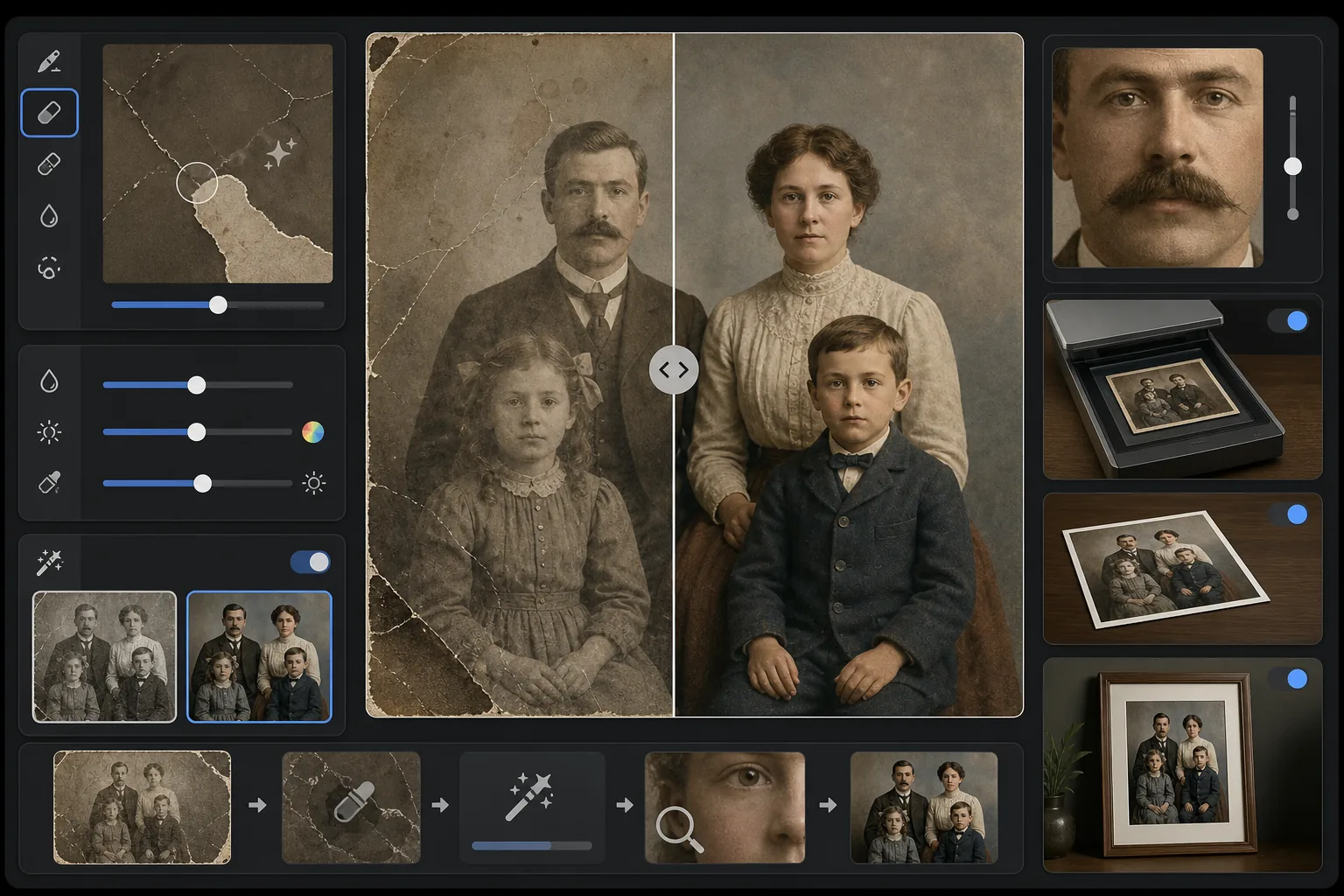
Cosa fa questo modello
Ripara i danni fisici e gli effetti dell'invecchiamento sulle fotografie vintage scansionate. Magic Eraser rimuove graffi, pieghe, macchie d'acqua, macchie di muffa e bordi strappati ricostruendo il contenuto mancante dell'immagine dal contesto circostante. AI Enhance recupera il colore che si è spostato o sbiadito nel corso dei decenni, intensifica i dettagli ammorbiditi dal tempo e può colorare foto in bianco e nero o seppia con colori fedeli all'epoca che rispettano il periodo dell'immagine originale.
Impostazioni del modello
| Riparazione dei danni | Aggressiva — rimuove graffi, pieghe, macchie e bordi strappati |
| Recupero del colore | Spettro completo — ripristina la vivacità originale dei pigmenti sbiaditi |
| Modalità di colorazione | Disattivata, Sottile o Completa (per originali in B/N e seppia) |
| Recupero dei dettagli | Ricostruisce volti e dettagli fini ammorbiditi dall'età e dalla bassa risoluzione di scansione |
| Dimensione di output | Corrisponde alle dimensioni della scansione originale con upscale opzionale 2× |
| Conservazione dell'epoca | Mantiene la trama della grana e la qualità tonale tipiche dell'epoca |
Come usare questo modello
Scansiona o fotografa l'originale
Scansiona la foto vintage a 600 DPI o più per ottenere il massimo dei dettagli recuperabili. Se la scansione non è possibile, fotografa la stampa su una superficie piana con luce uniforme e diffusa — evita il flash, che crea riflessi sulle stampe lucide.
Ripara i danni fisici
Magic Eraser identifica e rimuove graffi, pieghe, danni causati dall'acqua, macchie di muffa e residui di nastro adesivo. L'IA ricostruisce le aree mancanti analizzando il contenuto circostante dell'immagine — riempie gli angoli strappati, ricongiunge le crepe sui volti e rimuove lo scolorimento delle macchie.
Recupera o aggiungi colore
Per le stampe a colori sbiadite, AI Enhance ripristina la tavolozza di colori originale invertendo i modi specifici in cui i diversi strati di colorante si degradano nel tempo. Per gli originali in bianco e nero o seppia, la colorazione opzionale aggiunge colori realistici basati su indizi contestuali come tonalità della pelle, fogliame, cielo e motivi dei tessuti.
Intensifica ed esporta
Il recupero dei dettagli intensifica i tratti del viso, il testo e i dettagli fini che decenni di invecchiamento hanno ammorbidito. Esporta alla risoluzione di scansione originale o esegui l'upscale a 2× per stampare in formati più grandi dell'originale.
Consigli da professionisti per risultati migliori
- ✓Scansiona alla massima risoluzione supportata dal tuo scanner — minimo 600 DPI, preferibilmente 1200 DPI. Più dettagli vengono catturati, più materiale ha l'IA per ricostruire le aree danneggiate.
- ✓Se la foto è bloccata in una cornice o in un album, fotografala sul posto invece di rischiare di strapparla — il modello può rimuovere i bordi della cornice e gli artefatti delle pagine dell'album.
- ✓Per la colorazione di foto storiche, fornisci se possibile un contesto sull'epoca (decennio) e sul luogo — i colori dei vestiti, delle automobili e dei materiali da costruzione variavano notevolmente a seconda del periodo e della regione.
- ✓Elabora prima l'area più danneggiata della foto come test prima di eseguire il restauro completo — questo ti permette di confermare che la qualità della ricostruzione soddisfi le tue aspettative.
Strumenti
Domande frequenti
Può riparare foto con sezioni mancanti come angoli strappati?
+
Sì. L'IA ricostruisce le aree mancanti usando il contesto dell'immagine circostante. Per sfondi come cielo, pareti e fogliame, i risultati sono impeccabili. Per porzioni mancanti di volti o dettagli importanti, la ricostruzione è impressionante ma potrebbe richiedere una lieve regolazione manuale per gli elementi critici.
Quanto è accurata la colorazione delle foto in bianco e nero?
+
La colorazione usa l'analisi contestuale per assegnare colori realistici — le tonalità della pelle, l'azzurro del cielo, il verde del fogliame e i colori comuni dei tessuti sono molto accurati. I colori specifici di oggetti che l'IA non può determinare dal contesto (come la tonalità esatta di un vestito) saranno plausibili anziché garantiti come accurati.
Il restauro rimuoverà il carattere vintage della foto?
+
No. L'impostazione di conservazione dell'epoca mantiene la trama della grana e la qualità tonale tipiche dell'epoca che conferiscono alle foto vintage il loro carattere. I danni fisici come graffi e macchie vengono rimossi, ma la qualità fotografica dell'epoca originale viene rispettata — una foto degli anni '40 sembra ancora una foto degli anni '40, solo non danneggiata.
Salva i ricordi della tua famiglia
Carica la scansione di qualsiasi fotografia danneggiata, sbiadita o invecchiata e guarda decenni di usura svanire. Graffi spariti, colore ripristinato, ricordi preservati.
Provalo gratis