
Foto del menu del ristorante
Trasforma le foto dei tuoi piatti scattate con il telefono in immagini pronte per i tabelloni del menu e le app di consegna. Questo modello esalta la vivacità dei colori del cibo, ripulisce gli sfondi di impiattamento disordinati, isola i piatti per le miniature delle app ed esporta nelle dimensioni esatte richieste da DoorDash, UberEats e Grubhub, senza bisogno di un fotografo gastronomico.
Prova gratis questo modelloFood & Beverage template preview
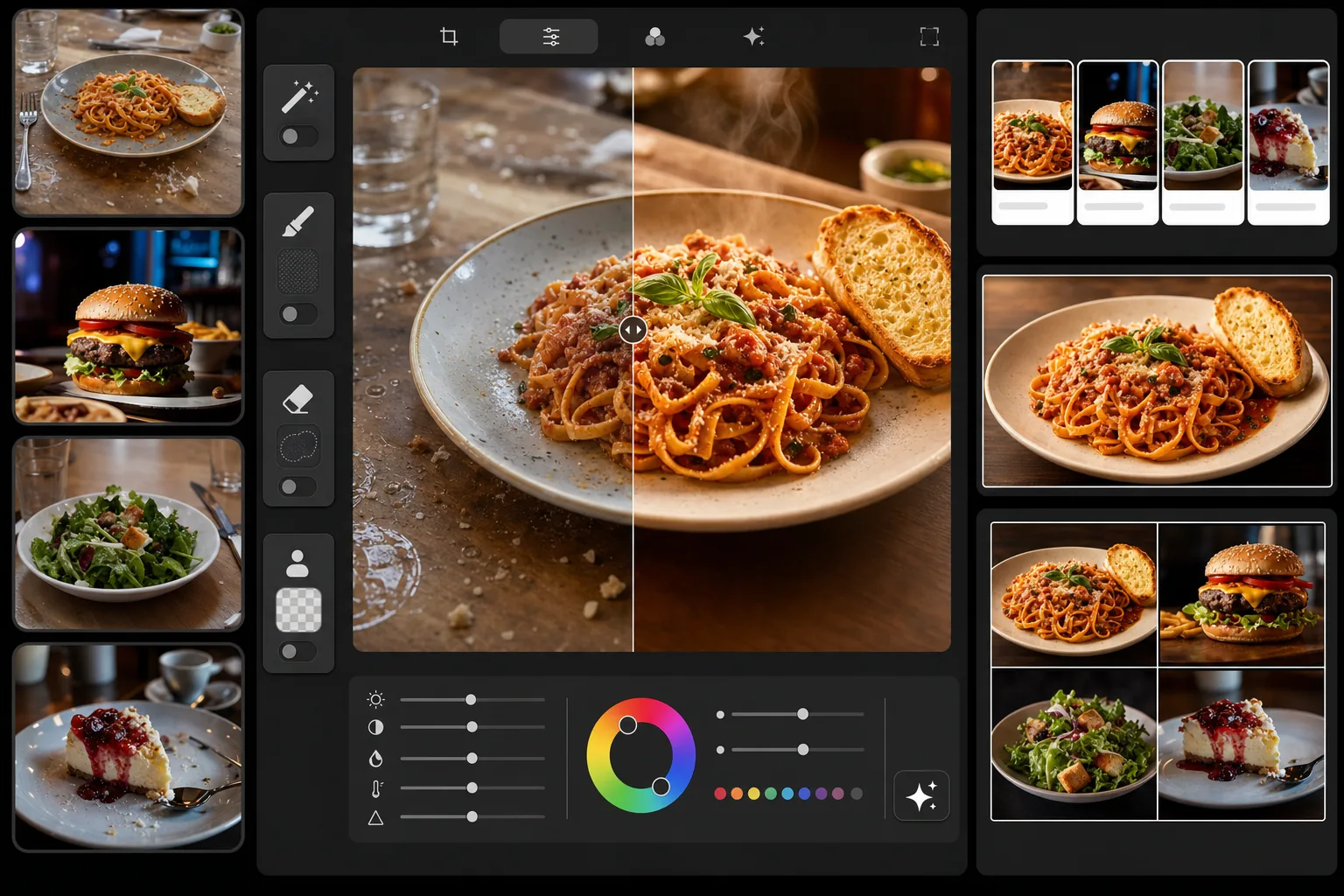
Cosa fa questo modello
Trasforma foto di cibo improvvisate in immagini professionali di qualità da menu. Il modello esalta i toni caldi e appetitosi che rendono efficace la fotografia gastronomica: intensifica i rossi delle salse, scalda le croste del pane fino al dorato e rende le verdure fresche e brillanti. Magic Eraser rimuove gli elementi disordinati sul tavolo, le impronte sui piatti e le briciole sparse. Background Eraser isola i piatti per ottenere miniature pulite per le app di consegna. Il risultato è dimensionato per tabelloni del menu digitali, menu stampati e tutte le principali piattaforme di consegna di cibo.
Impostazioni del modello
| Vivacità dei colori | Ottimizzata per il cibo (+15% di saturazione calda, rossi/gialli/verdi) |
| Dimensione di output (app di consegna) | 1200×800px (orizzontale 3:2, standard DoorDash/UberEats) |
| Dimensione di output (tabellone del menu) | 1920×1080px (display menu digitale 16:9) |
| Bilanciamento del bianco | Luce diurna calda 5200K (compensa la fredda illuminazione LED del ristorante) |
| Opzione sfondo | Isolamento pulito o superficie scura (#2C2C2C) per un impiattamento d'effetto |
| Formato file | JPEG qualità 88% (caricamento rapido sulle app di consegna) |
Come usare questo modello
Fotografa il tuo piatto
Scatta una foto con un'angolazione di 45 gradi o direttamente dall'alto. Usa la luce più intensa disponibile: vicino a una finestra durante il giorno è l'ideale. Se possibile, spegni le luci calde a soffitto del ristorante, perché aggiungono forti dominanti arancioni più difficili da correggere rispetto alla luce naturale.
Ripulisci la scena
Magic Eraser rimuove il disordine sul tavolo, le briciole sparse, le impronte sui piatti, gli aloni di condensa e qualsiasi attrezzatura da cucina visibile sullo sfondo. Per le miniature delle app di consegna, Background Eraser isola completamente il piatto dalla superficie del tavolo.
Esalta i colori del cibo
AI Enhance applica una correzione del colore specifica per il cibo: le salse appaiono più intense, le croste del pane e dei dolci assumono un tono dorato e caldo, le verdure sembrano fresche e vivaci e il formaggio sviluppa una lucentezza fusa e appetitosa. Il miglioramento è calibrato per risultare appetitoso senza apparire artificialmente saturo.
Esporta per la tua piattaforma
Scegli il preset per app di consegna (1200×800px per DoorDash, UberEats, Grubhub), il preset per tabellone del menu digitale (1920×1080px) o una dimensione personalizzata per il tuo menu stampato. Ogni esportazione viene compressa per un caricamento rapido sulla piattaforma di destinazione.
Consigli da professionisti per risultati ottimali
- ✓Fotografa i piatti entro 90 secondi dall'impiattamento. Il vapore, la lucentezza della salsa e l'integrità del ghiaccio si deteriorano rapidamente. Il modello può esaltare i colori, ma non può ripristinare il ghiaccio sciolto o la salsa assorbita.
- ✓Usa un tovagliolo di carta leggermente umido per pulire il bordo del piatto prima di scattare. Magic Eraser può rimuovere le sbavature di salsa, ma un bordo pulito nella foto originale offre il risultato più curato.
- ✓Per le miniature delle app di consegna, l'angolazione dall'alto (flat-lay) funziona meglio perché l'inquadratura quadrata o orizzontale mostra l'intero piatto. L'angolazione di 45 gradi è migliore per i tabelloni del menu e i menu stampati, quando vuoi mostrare altezza e strati.
- ✓Fotografa più piatti del menu sulla stessa superficie con la stessa illuminazione, così l'intero menu avrà un aspetto coerente. Le app di consegna mostrano tutti i tuoi piatti in una griglia e la coerenza visiva trasmette professionalità ai clienti.
Domande frequenti
Quali dimensioni richiedono le app di consegna?
+
DoorDash consiglia un minimo di 1200×800px in orizzontale (rapporto 3:2). UberEats richiede almeno 320×320px, ma consiglia 1200×800px per la migliore qualità di visualizzazione. Grubhub usa un formato orizzontale simile. Il preset per app di consegna del modello esporta a 1200×800px, soddisfacendo o superando i requisiti di tutte e tre le piattaforme.
Il cibo sembrerà ritoccato in modo poco realistico?
+
La correzione del colore è calibrata specificamente per la fotografia gastronomica: esalta le qualità appetitose naturali dei piatti senza farli sembrare artificialmente saturi o al neon. Il risultato sembra una foto di cibo ben illuminata, non un post di Instagram con filtri.
Posso usare la stessa foto per il tabellone del menu e le app di consegna?
+
Il modello supporta più preset di esportazione da una singola immagine caricata. Esporta a 1920×1080px per il tabellone del menu digitale e a 1200×800px per le app di consegna. Il ritaglio si adatta a ogni formato mantenendo il piatto centrato e ben inquadrato.
Fai risaltare al meglio ogni piatto del tuo menu
Carica le foto dei tuoi piatti e ottieni in pochi secondi immagini pronte per app di consegna e tabelloni del menu. Non servono fotografi gastronomici né competenze di styling.
Provalo gratisRelated templates
More food & beverage templates for your workflow.