
Paesaggio pronto per la stampa
Trasforma le fotografie di paesaggio in file pronti per la stampa di grande formato a 300 DPI. Questo modello ingrandisce le immagini per stampe da 16x20 pollici e oltre, rimuovendo al contempo elementi visivi di disturbo come linee elettriche, segnali stradali e recinzioni che distolgono l'attenzione dal paesaggio naturale. La gradazione del colore è ottimizzata per supporti in tela, metallo e carta per belle arti.
Prova gratis questo modelloPhotography template preview
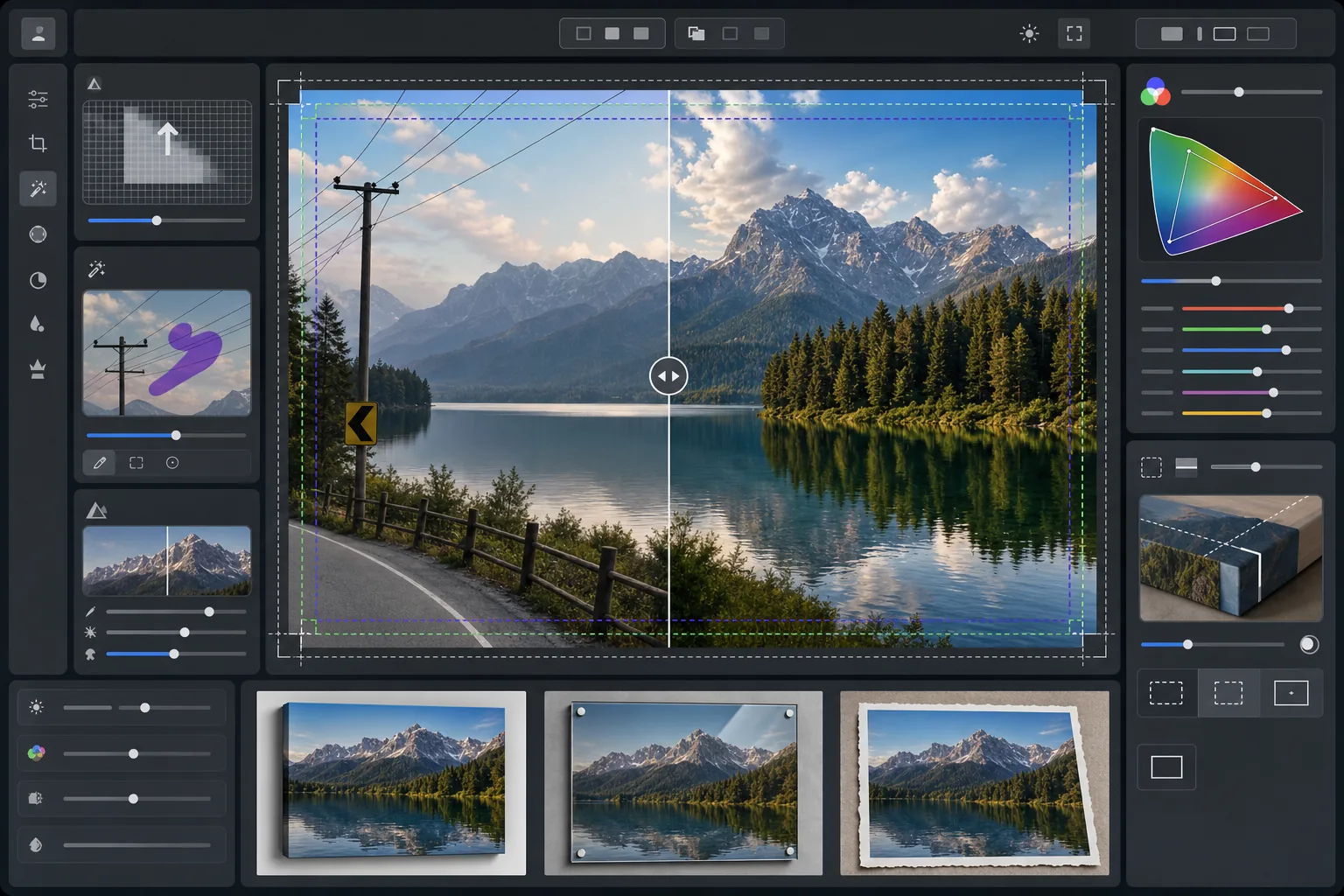
Cosa fa questo modello
Prepara le fotografie di paesaggio per la stampa professionale di grande formato aumentando la risoluzione per soddisfare i requisiti di 300 DPI a 16x20 pollici e oltre. AI Enhance aumenta il numero di pixel senza introdurre artefatti, preservando i dettagli fini del fogliame, delle texture dell'acqua e delle formazioni nuvolose. Magic Eraser rimuove linee elettriche, pali della luce, segnali stradali, recinzioni e altri elementi artificiali che interrompono la composizione naturale. Il colore viene regolato in base alla gamma più ampia e alle diverse proprietà riflettenti delle tele tese, delle stampe su metallo in alluminio e della carta di cotone per belle arti.
Impostazioni del modello
| Obiettivo di ingrandimento | 6000×4000px minimo (300 DPI a 20×13 pollici) |
| Nitidezza | Maschera di contrasto ottimizzata per la stampa (raggio 1,2, fattore 80%) |
| Profilo colore | ProPhoto RGB (gamma massima per la stampa di belle arti) |
| Gamma dinamica | Ombre +0,8 EV, recupero delle alte luci -0,3 EV |
| Riduzione del rumore | Sensibile alla luminanza (preserva la grana nei cieli, ammorbidisce il fogliame) |
| Formato di output | TIFF a 16 bit con profilo ICC incorporato |
Come usare questo modello
Carica la tua foto di paesaggio
Carica un'immagine di paesaggio scattata con qualsiasi fotocamera o smartphone. L'IA analizza la risoluzione di origine e calcola il fattore di ingrandimento necessario per raggiungere i 300 DPI alle dimensioni di stampa desiderate. Anche le foto da smartphone da 12 megapixel possono essere ingrandite in modo pulito per stampe da 16x20.
Rimuovi le distrazioni visive
Magic Eraser identifica e rimuove linee elettriche, pali della luce, segnali stradali, recinzioni, rifiuti e altri elementi artificiali che distolgono l'attenzione dalla scena naturale. L'IA ricostruisce le sfumature del cielo, i bordi della linea degli alberi e le texture del terreno dietro gli oggetti rimossi.
Ottimizza per l'output di stampa
AI Enhance ingrandisce l'immagine alla risoluzione desiderata mentre la rende nitida per la distanza di visualizzazione della stampa. Il colore viene convertito nella gamma ProPhoto RGB per preservare l'intera gamma di verdi, blu e tonalità del tramonto che l'sRGB di consumo taglia.
Esporta per il tuo supporto di stampa
Scarica un file TIFF a 16 bit con il profilo ICC incorporato abbinato al tuo output — tela tesa, stampa su metallo o carta per belle arti. Il file include il margine di abbondanza e i segni di taglio richiesti dalla maggior parte dei laboratori di stampa professionali.
Consigli professionali per risultati ottimali
- ✓Per le tele tese, aggiungi 1,5 pollici di abbondanza su ciascun lato in modo che l'immagine avvolga le barre del telaio senza tagliare la composizione principale. Il modello include nell'output una guida dell'area di sicurezza per la tela da galleria.
- ✓Le stampe su metallo riflettono la luce e amplificano il contrasto, quindi riduci il cursore del contrasto del 10-15% rispetto a ciò che appare bene sullo schermo. Le ombre che sembrano dettagliate sul monitor possono chiudersi completamente sui supporti in alluminio.
- ✓Quando rimuovi lunghe linee elettriche che attraversano l'intera inquadratura, l'IA le elabora a segmenti. Per il risultato più pulito, usa una foto di origine in cui il cielo dietro le linee presenta una sfumatura uniforme anziché motivi nuvolosi complessi.
- ✓Elabora alle dimensioni più grandi che potresti mai stampare, anche se il tuo ordine attuale è più piccolo. Ridimensionare un file 24x36 a 16x20 è senza perdite, ma non potrai ingrandire in seguito un file 16x20 a 24x36 senza perdita di qualità.
Strumenti
Domande frequenti
Quanto grande posso stampare da una foto scattata con lo smartphone?
+
Una foto da smartphone da 12 megapixel (4032x3024) può essere ingrandita in modo pulito a 8000x6000 pixel, il che consente la stampa a 300 DPI a 26x20 pollici. Alle normali distanze di visualizzazione per le stampe grandi (da 1 a 1,2 metri), anche le stampe da 24x36 pollici appaiono nitide partendo da originali da smartphone ingranditi tramite IA.
La rimozione delle linee elettriche lascia tracce visibili?
+
L'IA ricostruisce la sfumatura del cielo, i bordi delle nuvole e la linea degli alberi dietro le linee elettriche rimosse utilizzando i dati dei pixel circostanti. In condizioni di cielo uniforme, la rimozione è praticamente impercettibile. I cieli complessi con nuvole spettacolari possono mostrare una sottile fusione a un'ispezione molto ravvicinata, ma alle normali distanze di visualizzazione della stampa il risultato è pulito.
Quale formato di file devo inviare a un laboratorio di stampa?
+
La maggior parte dei laboratori professionali accetta file TIFF a 16 bit con profili ICC incorporati, che è l'output predefinito di questo modello. Se il tuo laboratorio richiede il JPEG, esportalo con qualità 100 nello spazio colore Adobe RGB. Evita l'sRGB per le stampe di grande formato perché taglia i verdi vivaci e i blu profondi comuni nella fotografia di paesaggio.
Stampa i tuoi paesaggi in qualsiasi formato con sicurezza
Carica una foto di paesaggio e ottieni un file pronto per la stampa con le linee elettriche rimosse, la risoluzione ingrandita e il colore ottimizzato per tela, metallo o carta per belle arti.
Provalo gratis