
Foto per lookbook di moda
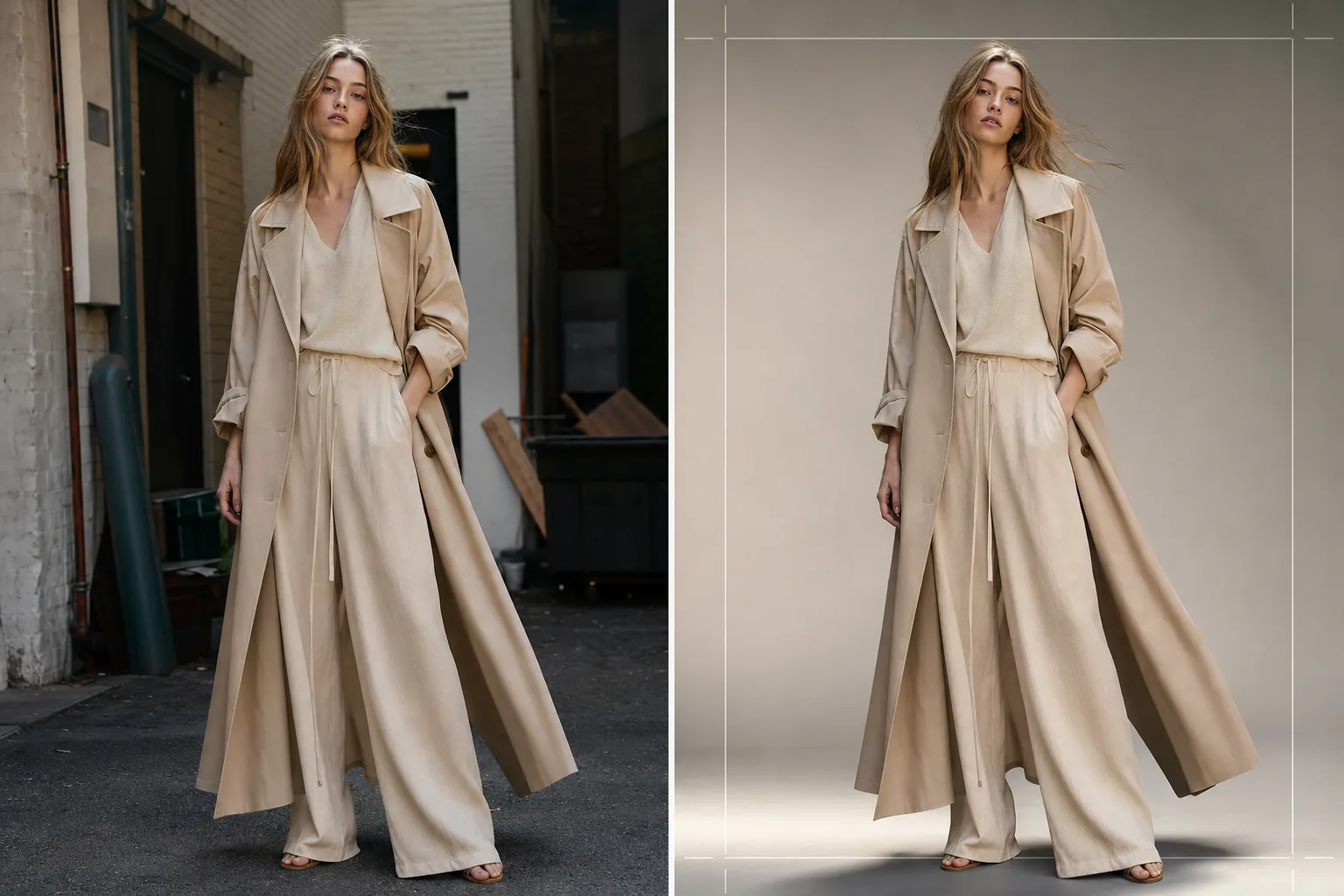
Produci immagini di lookbook di qualità editoriale per collezioni stagionali, presentazioni all'ingrosso e campagne e-commerce. Questo modello rimuove gli sfondi delle location e li sostituisce con fondali da studio puliti o ambienti editoriali curati, applica una correzione del colore di livello moda che fa risaltare i tessuti e migliora la pelle con un ritocco naturale che mantiene il focus sull'abbigliamento.
Prova gratis questo modelloFashion template preview
Cosa fa questo modello
Semplifica l'intero flusso di post-produzione del lookbook, dallo scatto grezzo in location o in studio fino a immagini raffinate e coerenti con il marchio. Background Eraser isola la modella e il capo da qualsiasi ambiente e offre la sostituzione con colori da studio uniti, sfumature gradiente o fondali editoriali curati come muri di cemento, vegetazione naturale o scene di strada urbane. AI Enhance applica una correzione del colore adattata ai tipi di tessuto — toni caldi per lino e lana dai colori terra, toni più freddi per denim e tessuti tecnici — in modo che la trama e la cadenza del capo siano i protagonisti visivi. Il ritocco della pelle è leggero ed editoriale, uniformando le imperfezioni temporanee senza rimuovere lentiggini, nei o caratteristiche naturali che mantengono la modella autentica.
Impostazioni del modello
| Stile dello sfondo | Bianco studio, grigio uniforme, sfumatura gradiente o ambiente editoriale |
| Correzione del colore | Editoriale moda (adattivo al tessuto: caldo per i naturali, freddo per i tecnici) |
| Ritocco della pelle | Editoriale leggero (rimozione imperfezioni, uniformazione del tono, caratteristiche naturali preservate) |
| Miglioramento del tessuto | Nitidezza della trama ed enfasi sulla cadenza per la visibilità dei dettagli del capo |
| Ritaglio e inquadratura | Corpo intero, tre quarti o primo piano con margine di sicurezza per la sovrapposizione di testo |
| Risoluzione di output | 4000×6000px (orientamento verticale, pronto per la stampa a 300 DPI) |
Come usare questo modello
Carica la tua foto del lookbook
Carica uno scatto della modella a figura intera o a tre quarti che indossa il capo in evidenza. Vanno bene le foto di servizi in studio, location esterne e showroom. Il modello gestisce conversioni RAW, JPEG e TIFF ad alta risoluzione.
Sostituisci o perfeziona lo sfondo
Background Eraser isola la modella con un rilevamento dei bordi abbastanza preciso da preservare i bordi di tessuto morbidi, i capelli fluttuanti e i materiali traslucidi come lo chiffon. Sostituisci lo sfondo con un colore da studio in linea con le linee guida del tuo marchio o seleziona un ambiente editoriale che completi l'atmosfera della collezione.
Applica correzione del colore e miglioramento
AI Enhance applica una correzione del colore che enfatizza la trama del tessuto e il colore reale del capo. Il ritocco della pelle viene applicato a un'intensità editoriale — uniformando rossori e imperfezioni temporanee senza appiattire la pelle o rimuovere le caratteristiche naturali. La nitidezza del tessuto fa risaltare i motivi della tessitura, le cuciture e le linee di cadenza.
Esporta per lookbook ed e-commerce
Scarica a 4000×6000px per lookbook stampati e PDF di schede prodotto, o in dimensioni ottimizzate per il web per Shopify, portali all'ingrosso e social media. Il modello può produrre ritagli coerenti su un'intera collezione per un layout del lookbook unificato.
Consigli da professionisti per risultati ottimali
- ✓Fotografa i capi su una modella anziché su un manichino ogni volta che è possibile. La rimozione dello sfondo e il ritocco della pelle dell'IA producono i risultati più naturali con forme umane reali, e gli acquirenti rispondono più positivamente alle immagini che mostrano come il tessuto cade su un corpo.
- ✓Usa un elastico o una clip per tenere i capelli lunghi lontani dalla scollatura di top e giacche durante lo scatto. La rimozione dello sfondo gestisce bene i capelli sciolti, ma i capelli che coprono i dettagli del colletto e la costruzione della scollatura nascondono proprio le caratteristiche che gli acquirenti stanno valutando.
- ✓Mantieni una direzione della luce coerente in tutti gli scatti di una collezione. Quando l'IA applica la stessa correzione del colore e la direzione della luce è coerente, il lookbook si legge come una storia editoriale coesa anziché come un mosaico di servizi diversi.
Strumenti
Domande frequenti
Posso usarlo per scatti di capi in piano?
+
Questo modello è ottimizzato per la fotografia su modella. Per gli scatti di capi in piano su tavoli o disposizioni appese, il modello Clothing Flat Lay Cleanup gestisce quelle composizioni in modo più efficace perché comprende la geometria del tessuto disteso in piano anziché drappeggiato su un corpo.
I tessuti traslucidi come lo chiffon saranno preservati?
+
Sì. Il rilevamento dei bordi in Background Eraser preserva i bordi di tessuto semitrasparenti. Lo sfondo sostitutivo è visibile attraverso il materiale leggero proprio come lo sarebbe l'ambiente originale, mantenendo la silhouette e l'effetto di sovrapposizione previsti del capo.
Posso abbinare lo sfondo al colore esadecimale esatto del mio marchio?
+
Sì. Puoi specificare un codice esadecimale esatto per il colore di sfondo unito, e l'IA genera un fondale uniforme di quel colore con un'appropriata sfumatura d'ombra sotto i piedi della modella per un aspetto ancorato e realistico.
Produci un lookbook raffinato da qualsiasi location di scatto
Carica scatti di modelle e ottieni immagini di lookbook coerenti con il marchio, di qualità editoriale, pronte per stampa, web e presentazioni all'ingrosso.
Provalo gratis