
Cursore Prima e Dopo
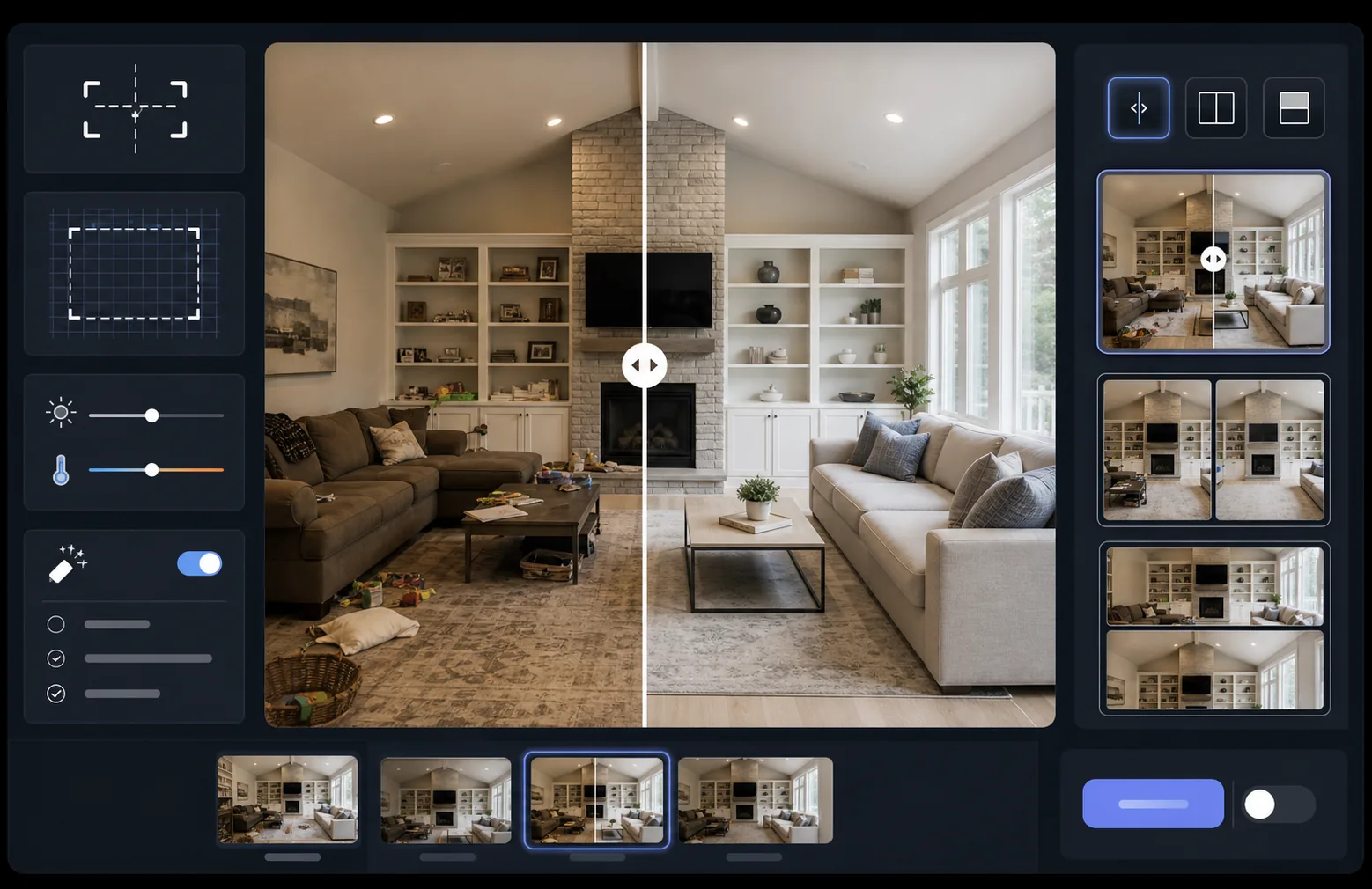
Mostra l'impatto del tuo lavoro con immagini di confronto prima e dopo perfettamente allineate. Questo modello crea coppie pronte per la dimostrazione che mantengono inquadratura, bilanciamento della luce e dimensioni coerenti — ideale per portfolio, casi di studio, riprova sociale e marketing di prodotto, dove la trasformazione visiva racconta la storia.
Prova questo modello gratisMarketing template preview
Cosa fa questo modello
Elabora due immagini — un prima e un dopo — trasformandole in una coppia di confronto perfettamente allineata, pronta per widget a cursore, layout affiancati o rivelazioni animate. AI Enhance normalizza l'esposizione e il bilanciamento del bianco tra i due fotogrammi, così la trasformazione è chiaramente visibile senza che le differenze di illuminazione confondano il confronto. Magic Eraser può ripulire le distrazioni occasionali in uno dei due fotogrammi che non fanno parte della trasformazione voluta.
Impostazioni del modello
| Layout | Coppia pronta per il cursore, affiancata o impilata in verticale (selezionabile) |
| Dimensione di output | 1600×1200px per fotogramma (dimensioni corrispondenti) |
| Allineamento | Registrazione automatica — fa corrispondere prospettiva e inquadratura tra gli scatti |
| Normalizzazione dell'illuminazione | Bilancia esposizione e bilanciamento del bianco sull'intera coppia |
| Sovrapposizione etichette | Etichette 'Before' / 'After' opzionali con posizione personalizzabile |
| Bordo | Divisore grigio neutro da 1px o bordo senza soluzione di continuità (selezionabile) |
Come usare questo modello
Carica la tua immagine prima
Carica la foto originale, non modificata, che mostra lo stato di partenza. Può essere una stanza prima della ristrutturazione, un prodotto prima del miglioramento, una pelle prima del trattamento, o qualsiasi trasformazione visiva che desideri mostrare.
Carica la tua immagine dopo
Carica la foto del risultato che mostra la trasformazione completata. Cerca di fotografare dalla stessa angolazione e distanza dello scatto prima. Il modello allineerà automaticamente le piccole differenze di inquadratura e prospettiva.
Normalizza e allinea
Il modello registra automaticamente le due immagini in modo che gli elementi corrispondenti si allineino pixel per pixel. L'esposizione e il bilanciamento del bianco vengono normalizzati affinché le differenze di illuminazione tra le sessioni di scatto non distolgano l'attenzione dalla trasformazione reale.
Esporta il confronto
Scegli il formato di output — coppia abbinata per un widget a cursore, composizione affiancata per i social media o impilamento verticale per l'email marketing. Aggiungi etichette Before/After opzionali ed esporta in risoluzione ottimizzata per il web o in qualità di stampa.
Consigli da professionisti per i migliori risultati
- ✓Fotografa il prima e il dopo dalla stessa identica posizione, se possibile — segna la collocazione del treppiede o mettiti nello stesso punto. Meno l'IA deve correggere l'allineamento, più nitido sarà il confronto.
- ✓Usa la stessa lunghezza focale per entrambi gli scatti per evitare differenze di distorsione prospettica che fanno apparire i confronti allineati leggermente sfalsati.
- ✓Rimuovi i cambiamenti non pertinenti tra il prima e il dopo usando Magic Eraser — se una pianta si è spostata o è comparso un nuovo oggetto, cancellalo affinché gli spettatori si concentrino sulla trasformazione voluta.
- ✓Per gli inserimenti di cursori sul web, esporta entrambe le immagini con dimensioni identiche e usa il PNG senza perdita per evitare artefatti di compressione lungo la linea di divisione del cursore.
Strumenti
Domande frequenti
Cosa succede se le foto del prima e del dopo sono state scattate da angolazioni leggermente diverse?
+
Il sistema di registrazione automatica gestisce differenze moderate di angolazione della fotocamera, distanza e inquadratura. Individua i punti di riferimento corrispondenti in entrambe le immagini e li trasforma per farli coincidere. Per i migliori risultati, la differenza di angolazione dovrebbe essere inferiore a 15 gradi.
Posso usarlo per le miniature dei video che mostrano trasformazioni?
+
Sì. L'output con composizione affiancata è ideale per le miniature dei video su YouTube e sui social media. Il layout a schermo diviso con etichette comunica immediatamente una storia di trasformazione che invoglia a cliccare.
La normalizzazione dell'illuminazione modifica i risultati effettivi mostrati?
+
No. La normalizzazione dell'illuminazione regola solo l'esposizione complessiva e il bilanciamento del bianco affinché entrambi i fotogrammi sembrino scattati nelle stesse condizioni. La trasformazione reale — i cambiamenti nel soggetto — viene conservata esattamente come è stata fotografata.
Mostra i tuoi risultati, fianco a fianco
Carica le tue foto del prima e del dopo e ottieni in pochi secondi un'immagine di confronto perfettamente allineata e presentata in modo professionale. Lascia che sia la trasformazione a parlare.
Provalo gratis