
Amélioration de photos de mariage
Sauvez les photos de réception sous-exposées, supprimez les arrière-plans gênants et affinez les teints pour obtenir des images de mariage dignes d'un album. Ce modèle est conçu pour les conditions d'éclairage difficiles des cérémonies et des réceptions : salles peu éclairées, dominantes de couleur mélangées dues aux lumières du DJ et arrière-plans encombrés qui détournent l'attention des mariés.
Essayer ce modèle gratuitementEvents template preview
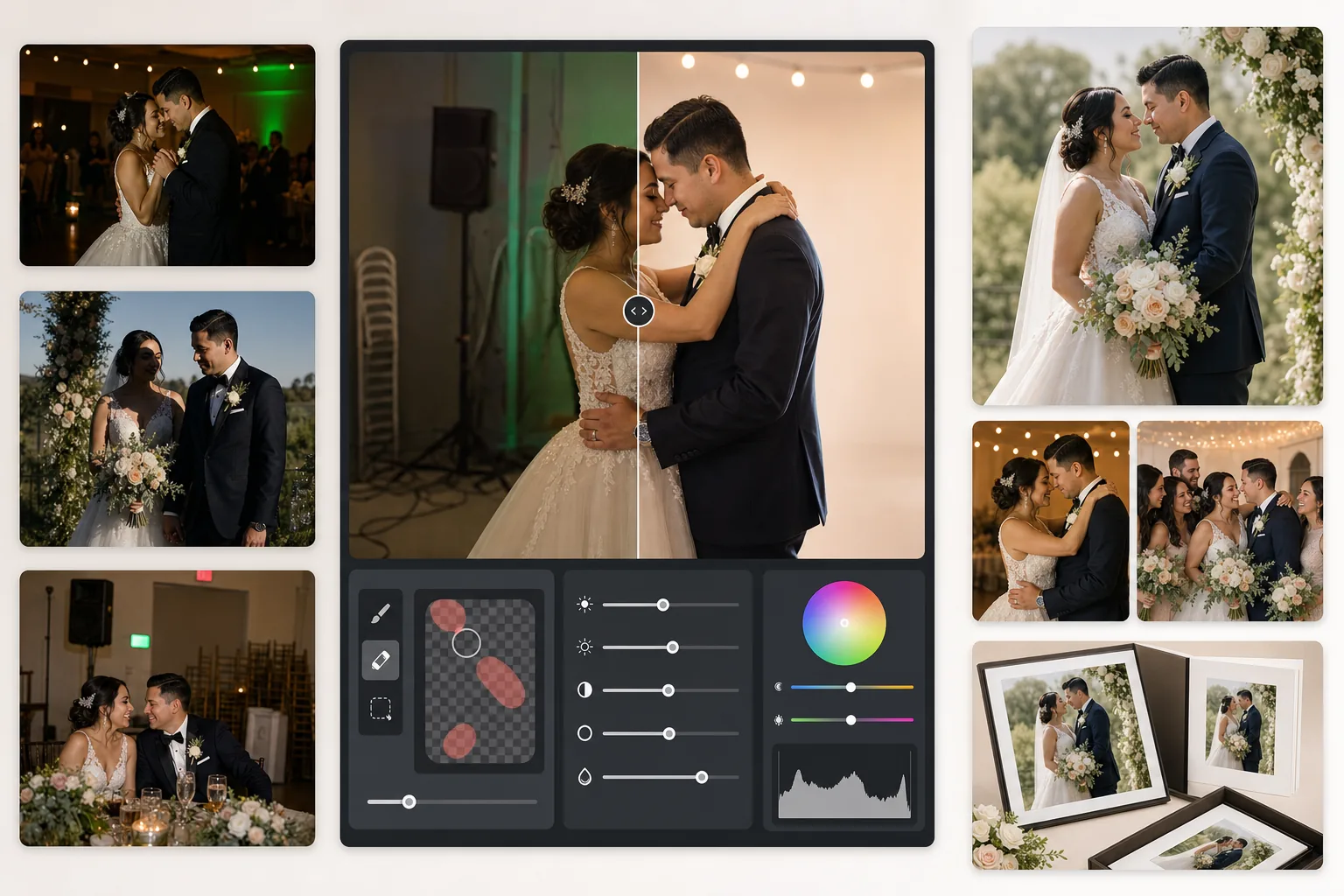
Ce que fait ce modèle
Corrige les problèmes les plus courants en photographie de mariage : prises de réception sous-exposées, dominantes orange du tungstène ou vertes des néons, ombres dures du flash et éléments d'arrière-plan gênants comme les panneaux de sortie, les chaises empilées et le matériel de traiteur. AI Enhance récupère les détails des photos sombres de piste de danse et équilibre l'éclairage mixte, tandis que Magic Eraser supprime les objets indésirables sans laisser de traces. Les teints sont affinés pour paraître naturels et chaleureux sans être trop lissés.
Paramètres du modèle
| Récupération d'exposition | Éclaircissement des ombres de +1,5 EV avec préservation des hautes lumières |
| Balance des blancs | Correction automatique de lumière mixte (tungstène/néon/lumière du jour) |
| Mode teint | Chaleur naturelle (+5 chaleur, +3 lissage, détails préservés) |
| Résolution de sortie | 4000px sur le grand côté (prêt à imprimer à 300 DPI jusqu'à 13×19) |
| Profil colorimétrique | Adobe RGB (gamut plus large pour l'impression professionnelle) |
| Réduction du bruit | Adaptative haute sensibilité ISO (préserve les détails dans les ombres éclaircies) |
Comment utiliser ce modèle
Importez vos photos de mariage
Importez des prises de réception, des images de cérémonie ou des photos prises au smartphone par les invités. Le modèle gère tout, des fichiers JPEG exportés en RAW d'un reflex professionnel aux photos compressées de téléphone — l'IA adapte l'intensité de l'amélioration en fonction de la qualité de la source.
Corrigez l'éclairage et la couleur
AI Enhance éclaircit les scènes de réception sombres, neutralise les dominantes orange-vert dues à l'éclairage mixte de la salle et équilibre les premiers plans éclairés au flash avec les arrière-plans en lumière ambiante. Les teints sont ramenés vers une chaleur naturelle sans affecter le blanc de la robe ni les couleurs de la décoration.
Supprimez les distractions
Magic Eraser supprime les panneaux de sortie, les extincteurs, les chaises empilées, les chariots de traiteur, les câbles électriques au sol et les invités qui s'incrustent en arrière-plan. L'IA reconstruit naturellement le motif de l'arrière-plan derrière les objets supprimés.
Exportez pour albums et tirages
Téléchargez en 4000px sur le grand côté en Adobe RGB pour l'impression en laboratoire photo professionnel, ou en sRGB pour le partage numérique et les galeries en ligne. La sortie est dimensionnée pour des tirages jusqu'à 13×19 pouces à 300 DPI.
Conseils de pro pour de meilleurs résultats
- ✓Pour les prises sombres sur la piste de danse, le modèle peut récupérer environ 1,5 diaphragme de détails dans les ombres. Si la photo originale est presque entièrement noire, l'amélioration peut introduire du bruit — commencez par des photos où vous pouvez au moins distinguer faiblement les sujets.
- ✓La correction du teint est calibrée pour la chaleur de la photographie de mariage — légèrement plus chaude que le neutre, ce qui met en valeur la plupart des teints sous un éclairage mixte. Pour les photos de cérémonie en extérieur bénéficiant déjà d'une bonne lumière naturelle, la correction est subtile.
- ✓Lorsque vous supprimez des objets d'arrière-plan, travaillez une zone à la fois pour des résultats les plus naturels. Les panneaux de sortie, les têtes de sprinkler et les prises murales sont assez petits pour une suppression nette en une seule passe. Les objets plus grands comme les chaises empilées gagnent à être supprimés par sections.
- ✓Traitez d'abord les portraits des mariés, puis les photos de groupe, puis les photos spontanées. Cela vous permet d'établir une base d'étalonnage des couleurs cohérente sur les photos les plus importantes avant de passer aux images secondaires.
Outils
Questions fréquentes
Cela peut-il corriger les photos de réception floues ?
+
AI Enhance peut accentuer un léger manque de netteté dû à des vitesses d'obturation lentes et récupérer des détails importants dans les ombres, mais il ne peut pas corriger un flou de mouvement important où les sujets sont visiblement striés. Les photos présentant un léger flou de bougé ou un léger manque de mise au point s'amélioreront considérablement.
La robe blanche de la mariée perdra-t-elle des détails ?
+
L'algorithme de mappage tonal protège spécifiquement les détails des hautes lumières dans les blancs. La texture de la robe, les motifs de dentelle et les plis du tissu sont préservés même lors de l'éclaircissement des ombres dans la même image. Le résultat conserve une gamme complète, des blancs lumineux aux ombres profondes.
Est-ce suffisant pour des albums imprimés ?
+
Oui. La sortie de 4000px à 300 DPI permet des tirages jusqu'à 13×19 pouces. Le profil colorimétrique Adobe RGB préserve le gamut plus large utilisé par les laboratoires photo professionnels. Pour des pages d'album standard de 8×10, la résolution dépasse largement ce qui est nécessaire pour des tirages nets.
Transformez chaque photo de mariage en une image digne d'un album
Importez des photos de réception et de cérémonie et obtenez en quelques secondes des images améliorées de façon professionnelle, prêtes à imprimer. Fonctionne aussi bien avec les photos d'appareil professionnel qu'avec celles de smartphone.
Essayer gratuitementRelated templates
More events templates for your workflow.