
Éclaircissement de photos d'événement
Récupérez les détails des photos prises dans des lieux sombres lors de concerts, galas, anniversaires et événements d'entreprise. Ce modèle relève l'exposition jusqu'à +2 EV, corrige les ombres dures du flash, supprime les yeux rouges et rehausse l'ambiance de la scène d'origine pour que vos photos d'événement paraissent aussi éclatantes que le moment vécu.
Essayer ce modèle gratuitementEvents template preview
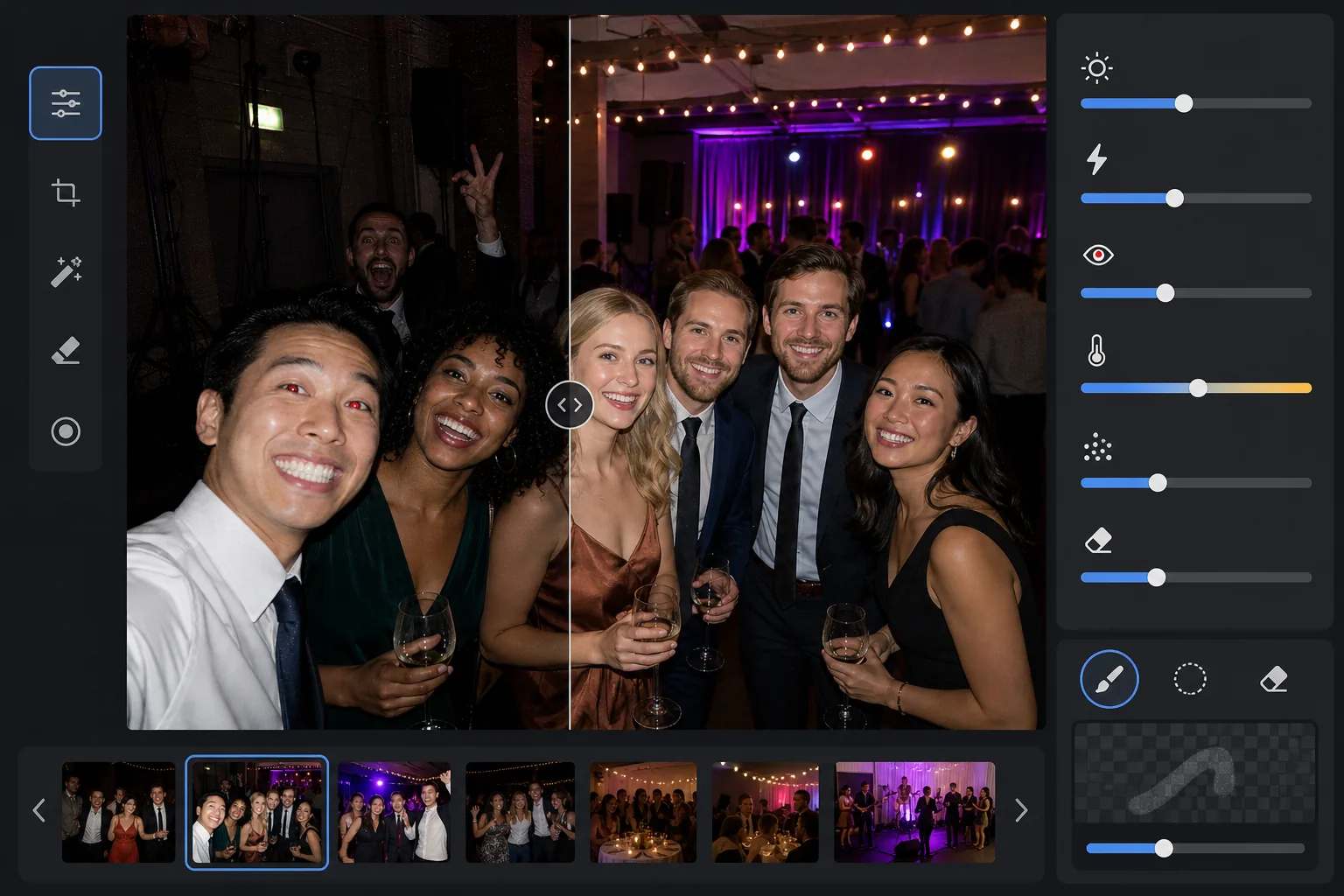
Ce que fait ce modèle
Sauve les photos d'événement prises dans des environnements difficiles à faible luminosité — salles de banquet peu éclairées, salles de concert aux éclairages de scène colorés, fêtes en plein air le soir et salles de jeux en sous-sol. AI Enhance récupère jusqu'à deux diaphragmes de détails dans les ombres tout en préservant l'ambiance des éclairages colorés et des décorations. Les artefacts du flash, dont les ombres dures à l'avant-plan, les yeux rouges et les visages surexposés, sont corrigés automatiquement. Magic Eraser supprime les intrus, les panneaux de sortie, le matériel empilé et autres distractions courantes lors des événements.
Paramètres du modèle
| Relèvement de l'exposition | Récupération adaptative des ombres à +2,0 EV avec préservation de l'ambiance |
| Correction du flash | Atténuation des ombres d'avant-plan, réduction des hautes lumières sur la peau éclairée au flash |
| Suppression des yeux rouges | Détection automatique et reconstruction de la couleur de l'iris |
| Balance des blancs | Adaptative multi-sources (lumières de DJ, tungstène, fluorescent, bougies) |
| Mode ambiance | Renforcement chaleureux de l'ambiance (+8 de chaleur, +5 de vibrance sur l'arrière-plan) |
Comment utiliser ce modèle
Importer des photos d'événement
Importez des photos de n'importe quel événement — concerts, mariages, anniversaires, galas d'entreprise ou réunions dans le jardin. Le modèle détecte automatiquement l'environnement lumineux et ajuste l'intensité de l'amélioration selon le degré de sous-exposition de l'original.
Récupérer l'exposition et corriger le flash
AI Enhance relève les zones d'ombre jusqu'à +2 EV, révélant les visages et les détails perdus dans l'obscurité. Les hautes lumières brûlées par le flash sur les sujets d'avant-plan sont atténuées pour récupérer la texture de la peau, et les ombres portées dures derrière les sujets éclairés au flash sont adoucies pour se fondre naturellement.
Supprimer les yeux rouges et les distractions
Les yeux rouges dus au flash direct sont détectés automatiquement et remplacés par une couleur d'iris naturelle. Magic Eraser supprime les inconnus qui s'incrustent, le matériel visible comme les piles d'enceintes et les câbles, les panneaux de sortie et tout autre désordre qui nuit au moment.
Exporter les photos améliorées
Téléchargez les photos d'événement éclaircies à la résolution d'origine pour le partage social, l'impression ou l'archivage. Le résultat conserve l'ambiance de la scène d'origine — lueur chaude des bougies, éclairages de scène colorés ou guirlandes scintillantes — tout en rendant les visages et les détails clairement visibles.
Conseils de pro pour de meilleurs résultats
- ✓La récupération de +2 EV fonctionne le mieux sur les photos où les sujets sont au moins faiblement visibles dans l'original. Si la photo est entièrement noire à l'exception de quelques sources de lumière, les ombres récupérées contiendront un bruit important. Commencez par des photos où vous pouvez distinguer des silhouettes.
- ✓Pour les photos de concert avec un éclairage de scène coloré et spectaculaire, la correction de la balance des blancs préserve la dominante de couleur artistique au lieu de la neutraliser. Les bains de scène bleus et magenta sont conservés tout en corrigeant les tons de peau des sujets proches de la scène.
- ✓Lorsque vous traitez un lot de photos d'un même événement, faites d'abord un essai sur une photo sombre représentative et une photo au flash. Cela vous permet de vérifier que le niveau de luminosité et la chaleur conviennent avant de traiter l'ensemble du lot.
- ✓La correction des yeux rouges fonctionne aussi bien sur les yeux humains que sur ceux des animaux. Pour les photos d'animaux lors d'événements, l'IA gère le reflet vert ou jaune des yeux que produisent les animaux au flash de l'appareil, en le remplaçant par une pupille foncée naturelle.
Outils
Questions fréquentes
Peut-on corriger des photos entièrement noires ?
+
Le modèle récupère jusqu'à +2 EV de détails dans les ombres, ce qui équivaut à peu près à rendre une photo quatre fois plus lumineuse. Si la photo d'origine montre au moins de faibles contours de vos sujets, la récupération produira des résultats exploitables. Les images entièrement noires où seules des sources de lumière ponctuelles sont visibles ne contiennent généralement pas assez de données du capteur pour récupérer des détails significatifs.
L'éclaircissement va-t-il rendre les photos granuleuses ?
+
Un certain bruit est inévitable lorsqu'on relève les ombres profondes, mais la réduction de bruit adaptative cible spécifiquement les zones relevées. Les détails fins dans les parties bien éclairées de l'image sont préservés tandis que le bruit dans les ombres récupérées est lissé. Le résultat est nettement meilleur que la simple augmentation de la luminosité dans un éditeur de photos basique.
Cela fonctionne-t-il sur les photos de concert avec éclairage de scène ?
+
Oui. Le modèle est conçu pour gérer les éclairages mixtes et colorés. Les bains de scène en bleu, rouge, magenta et vert sont préservés comme éléments artistiques de la scène plutôt que traités comme des dominantes de couleur à corriger. Les visages des sujets proches de la scène reçoivent un ajustement sélectif de la balance des blancs tandis que l'ambiance lumineuse de l'arrière-plan est maintenue.
Faites de chaque photo d'événement une photo digne d'être partagée
Importez des photos d'événement sombres, surexposées au flash ou affectées par les yeux rouges et obtenez des résultats lumineux et naturels qui capturent l'énergie du moment.
Essayer gratuitementRelated templates
More events templates for your workflow.