
Paisaje listo para imprimir
Transforme fotografías de paisajes en archivos listos para imprimir en gran formato a 300 DPI. Esta plantilla amplía las imágenes para impresiones de 16x20 pulgadas y más grandes, a la vez que elimina elementos visuales que distraen, como líneas eléctricas, señales de tráfico y vallas que restan protagonismo al paisaje natural. La gradación de color está optimizada para sustratos de lienzo, metal y papel de bellas artes.
Prueba esta plantilla gratisPhotography template preview
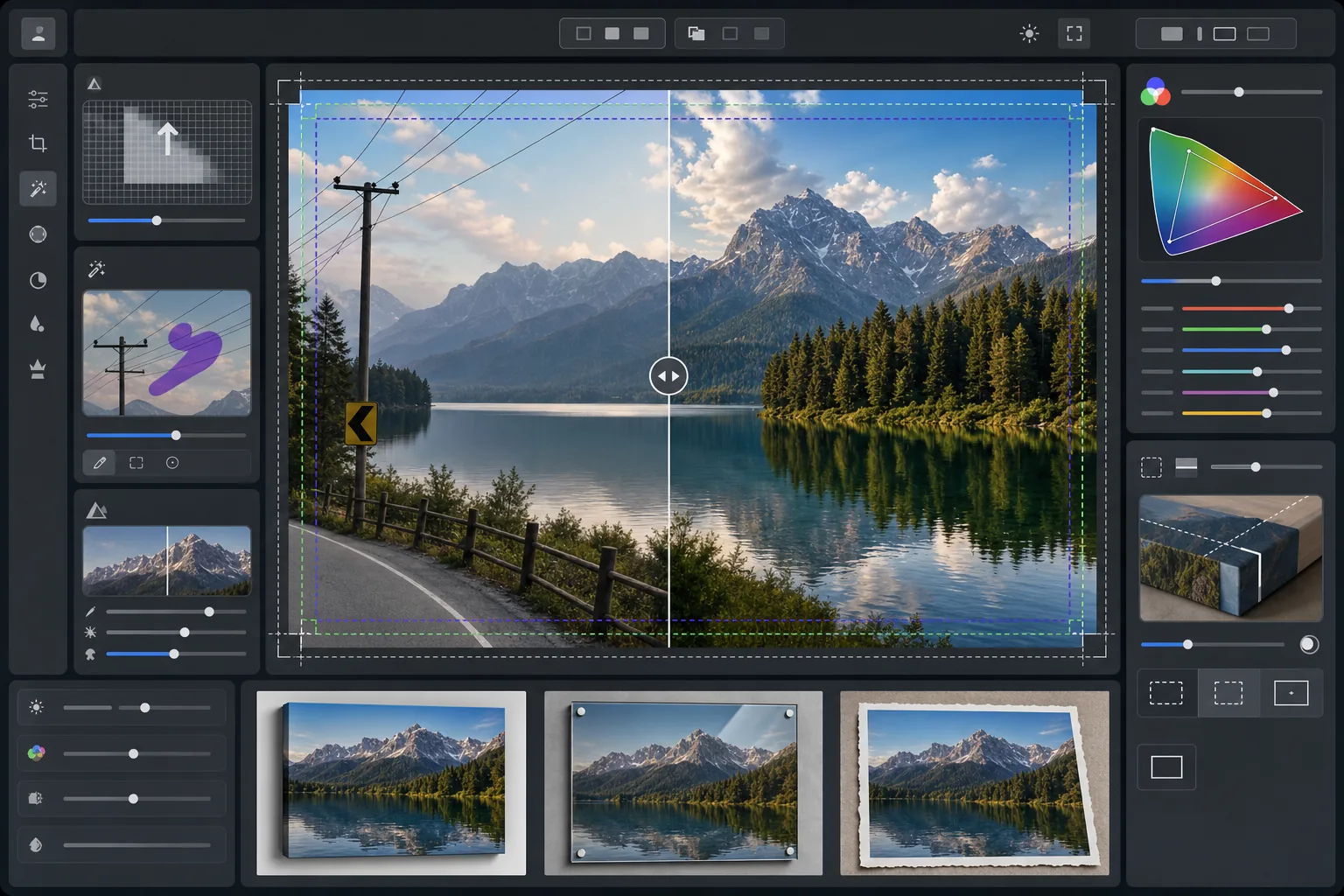
Qué hace esta plantilla
Prepara fotografías de paisajes para la impresión profesional de gran formato ampliando la resolución para cumplir los requisitos de 300 DPI a 16x20 pulgadas y más. AI Enhance aumenta el número de píxeles sin introducir artefactos, conservando el detalle fino del follaje, las texturas del agua y las formaciones de nubes. Magic Eraser elimina líneas eléctricas, postes de servicios, señales de tráfico, vallas y otros elementos artificiales que interrumpen la composición natural. El color se ajusta a la gama más amplia y a las distintas propiedades reflectantes de los lienzos tensados, las impresiones en metal de aluminio y el papel de algodón de bellas artes.
Configuración de la plantilla
| Objetivo de ampliación | 6000×4000px mínimo (300 DPI a 20×13 pulgadas) |
| Enfoque | Máscara de enfoque optimizada para impresión (radio 1,2, cantidad 80%) |
| Perfil de color | ProPhoto RGB (gama máxima para impresión de bellas artes) |
| Rango dinámico | Sombras +0,8 EV, recuperación de altas luces -0,3 EV |
| Reducción de ruido | Sensible a la luminancia (conserva el grano en los cielos, suaviza el follaje) |
| Formato de salida | TIFF de 16 bits con perfil ICC incrustado |
Cómo usar esta plantilla
Sube tu foto de paisaje
Sube una imagen de paisaje desde cualquier cámara o smartphone. La IA analiza la resolución de origen y calcula el factor de ampliación necesario para alcanzar 300 DPI en el tamaño de impresión deseado. Incluso las fotos de smartphone de 12 megapíxeles pueden ampliarse de forma limpia para impresiones de 16x20.
Elimina las distracciones visuales
Magic Eraser identifica y elimina líneas eléctricas, postes de servicios, señales de tráfico, vallas, basura y otros elementos artificiales que desvían la atención de la escena natural. La IA reconstruye los degradados del cielo, los bordes de la línea de árboles y las texturas del terreno detrás de los objetos eliminados.
Mejora para la salida de impresión
AI Enhance amplía la imagen a la resolución deseada mientras la enfoca para la distancia de visualización de impresión. El color se desplaza a la gama ProPhoto RGB para conservar toda la variedad de verdes, azules y tonos de atardecer que el sRGB de consumo recorta.
Exporta para tu sustrato de impresión
Descarga un archivo TIFF de 16 bits con el perfil ICC incrustado correspondiente a tu salida: lienzo tensado, impresión en metal o papel de bellas artes. El archivo incluye el margen de sangrado y las marcas de corte que necesitan la mayoría de los laboratorios de impresión profesionales.
Consejos profesionales para obtener los mejores resultados
- ✓Para los lienzos tensados, añade 1,5 pulgadas de sangrado en cada lado para que la imagen se envuelva alrededor de los bastidores sin recortar la composición principal. La plantilla incluye una guía de zona segura para lienzos de galería en la salida.
- ✓Las impresiones en metal reflejan la luz y amplifican el contraste, así que reduce el control deslizante de contraste un 10-15% respecto a lo que se ve bien en pantalla. Las sombras que parecen detalladas en tu monitor pueden empastarse por completo en sustratos de aluminio.
- ✓Al eliminar líneas eléctricas largas que abarcan todo el encuadre, la IA las procesa por segmentos. Para obtener el resultado más limpio, usa una foto de origen en la que el cielo detrás de las líneas tenga un degradado suave en lugar de patrones de nubes complejos.
- ✓Procesa al tamaño más grande que podrías llegar a imprimir, aunque tu pedido actual sea más pequeño. Reducir un archivo de 24x36 a 16x20 no implica pérdidas, pero no podrás ampliar después un archivo de 16x20 a 24x36 sin pérdida de calidad.
Herramientas
Preguntas frecuentes
¿Qué tamaño puedo imprimir a partir de una foto de smartphone?
+
Una foto de smartphone de 12 megapíxeles (4032x3024) puede ampliarse de forma limpia a 8000x6000 píxeles, lo que permite imprimir a 300 DPI en un tamaño de 26x20 pulgadas. A las distancias de visualización estándar para impresiones grandes (1 a 1,2 metros), incluso las impresiones de 24x36 pulgadas se ven nítidas a partir de originales de smartphone ampliados con IA.
¿La eliminación de líneas eléctricas deja rastros visibles?
+
La IA reconstruye el degradado del cielo, los bordes de las nubes y la línea de árboles detrás de las líneas eléctricas eliminadas usando los datos de los píxeles circundantes. En condiciones de cielo uniforme, la eliminación es prácticamente indetectable. Los cielos complejos con nubes dramáticas pueden mostrar una mezcla sutil al inspeccionarlos muy de cerca, pero a las distancias normales de visualización de impresión el resultado es limpio.
¿Qué formato de archivo debo enviar a un laboratorio de impresión?
+
La mayoría de los laboratorios profesionales aceptan archivos TIFF de 16 bits con perfiles ICC incrustados, que es la salida predeterminada de esta plantilla. Si tu laboratorio solicita JPEG, expórtalo con calidad 100 en el espacio de color Adobe RGB. Evita el sRGB para las impresiones de gran formato, ya que recorta los verdes vivos y los azules profundos habituales en la fotografía de paisajes.
Imprime tus paisajes en cualquier tamaño con total confianza
Sube una foto de paisaje y obtén un archivo listo para imprimir con las líneas eléctricas eliminadas, la resolución ampliada y el color optimizado para lienzo, metal o papel de bellas artes.
Pruébalo gratis