
Foto de lookbook de moda
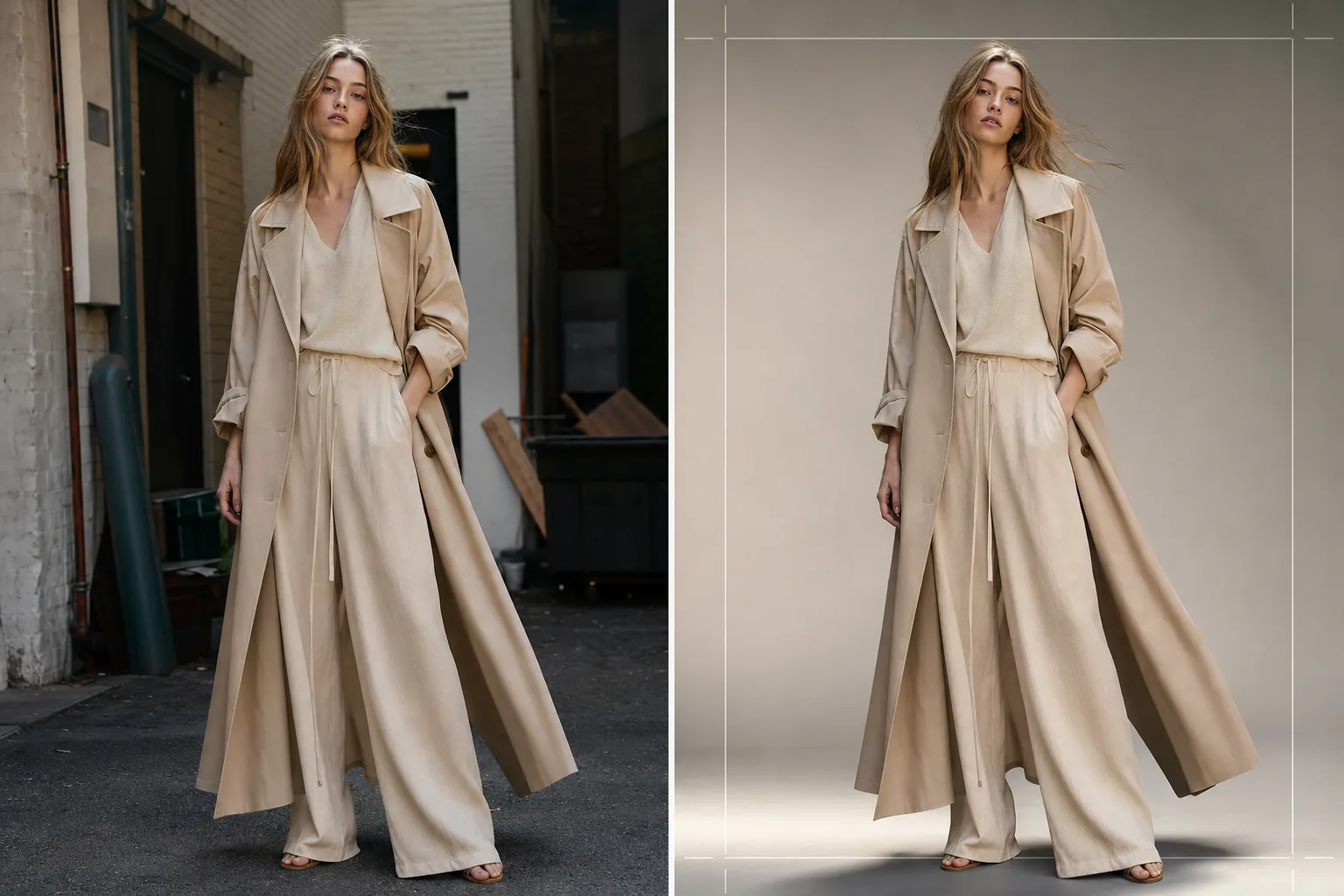
Produzca imágenes de lookbook de calidad editorial para colecciones de temporada, presentaciones mayoristas y campañas de comercio electrónico. Esta plantilla elimina los fondos de ubicación y los reemplaza por telones de fondo de estudio limpios o entornos editoriales curados, aplica una gradación de color de nivel moda que hace resaltar las telas y mejora la piel con un retoque natural que mantiene el foco en la ropa.
Prueba esta plantilla gratisFashion template preview
Qué hace esta plantilla
Agiliza todo el flujo de posproducción del lookbook, desde la toma en bruto en ubicación o estudio hasta imágenes pulidas y coherentes con la marca. Background Eraser aísla a la modelo y la prenda de cualquier entorno y ofrece su reemplazo por colores de estudio sólidos, barridos de degradado o fondos editoriales curados como paredes de hormigón, vegetación natural o escenas de calles urbanas. AI Enhance aplica una gradación de color adaptada a los tipos de tela — tonos cálidos para el lino y la lana de tonos tierra, tonos más fríos para el denim y las telas técnicas — para que la textura y la caída de la prenda sean el protagonista visual. El retoque de piel es ligero y editorial, igualando imperfecciones temporales sin eliminar pecas, lunares o rasgos naturales que hacen que la modelo luzca auténtica.
Configuración de la plantilla
| Estilo de fondo | Blanco de estudio, gris uniforme, barrido de degradado o entorno editorial |
| Gradación de color | Editorial de moda (adaptable a la tela: cálido para naturales, frío para técnicas) |
| Retoque de piel | Editorial ligero (eliminación de imperfecciones, uniformidad del tono, rasgos naturales preservados) |
| Mejora de la tela | Nitidez de textura y énfasis en la caída para la visibilidad del detalle de la prenda |
| Recorte y encuadre | Cuerpo entero, tres cuartos o primer plano con margen de seguridad para superposición de texto |
| Resolución de salida | 4000×6000px (orientación vertical, lista para imprimir a 300 DPI) |
Cómo usar esta plantilla
Sube tu foto de lookbook
Sube una toma de modelo de cuerpo entero o de tres cuartos vistiendo la prenda destacada. Las fotos de sesiones en estudio, ubicaciones exteriores y showrooms funcionan todas. La plantilla maneja conversiones RAW, JPEG y TIFF de alta resolución.
Reemplaza o refina el fondo
Background Eraser aísla a la modelo con una detección de bordes lo suficientemente precisa para preservar los bordes de tela sueltos, el cabello fluido y los materiales translúcidos como la gasa. Reemplaza el fondo con un color de estudio que coincida con las directrices de tu marca o selecciona un entorno editorial que complemente el estado de ánimo de la colección.
Aplica gradación de color y mejora
AI Enhance aplica una gradación de color que enfatiza la textura de la tela y el color real de la prenda. El retoque de piel se aplica con intensidad editorial — igualando rojeces e imperfecciones temporales sin aplanar la piel ni eliminar rasgos naturales. La nitidez de la tela resalta los patrones de tejido, las costuras y las líneas de caída.
Exporta para lookbook y comercio electrónico
Descarga a 4000×6000px para lookbooks impresos y PDF de fichas de productos, o en tamaños optimizados para web para Shopify, portales mayoristas y redes sociales. La plantilla puede generar recortes coherentes en toda una colección para un diseño de lookbook unificado.
Consejos profesionales para mejores resultados
- ✓Fotografía las prendas sobre una modelo en lugar de un maniquí siempre que sea posible. La eliminación de fondo y el retoque de piel de la IA producen los resultados más naturales con formas humanas reales, y los compradores responden de forma más positiva a las imágenes que muestran cómo cae la tela sobre un cuerpo.
- ✓Usa una goma o pinza para mantener el cabello largo alejado del escote de tops y chaquetas durante la sesión. La eliminación de fondo maneja bien el cabello suelto, pero el cabello que cubre los detalles del cuello y la construcción del escote oculta precisamente las características que los compradores están evaluando.
- ✓Mantén una dirección de iluminación coherente en todas las tomas de una colección. Cuando la IA aplica la misma gradación de color y la dirección de la luz es coherente, el lookbook se lee como una historia editorial cohesiva en lugar de un mosaico de sesiones diferentes.
Herramientas
Preguntas frecuentes
¿Puedo usar esto para tomas de prendas en plano cenital?
+
Esta plantilla está optimizada para fotografía sobre modelo. Para tomas de prendas en plano cenital sobre mesas o colgadas, la plantilla Clothing Flat Lay Cleanup maneja esas composiciones de forma más eficaz porque comprende la geometría de la tela extendida en plano en lugar de drapeada sobre un cuerpo.
¿Se preservarán las telas translúcidas como la gasa?
+
Sí. La detección de bordes en Background Eraser preserva los bordes de tela semitransparentes. El fondo de reemplazo es visible a través del material fino, tal como lo sería el entorno original, manteniendo la silueta y el efecto de capas previstos de la prenda.
¿Puedo igualar el fondo al color hexadecimal exacto de mi marca?
+
Sí. Puedes especificar un código hexadecimal exacto para el color de fondo sólido, y la IA genera un telón de fondo uniforme en ese color con una caída de sombra apropiada bajo los pies de la modelo para un aspecto arraigado y realista.
Produce un lookbook pulido desde cualquier ubicación de sesión
Sube tomas de modelo y obtén imágenes de lookbook coherentes con la marca, de calidad editorial, listas para impresión, web y presentaciones mayoristas.
Pruébalo gratis