
Control deslizante de Antes y Después
Muestre el impacto de su trabajo con imágenes comparativas de antes y después perfectamente alineadas. Esta plantilla crea pares listos para demostración que mantienen un encuadre, un equilibrio de iluminación y unas dimensiones coherentes — ideal para portafolios, casos de éxito, prueba social y marketing de producto, donde la transformación visual cuenta la historia.
Prueba esta plantilla gratisMarketing template preview
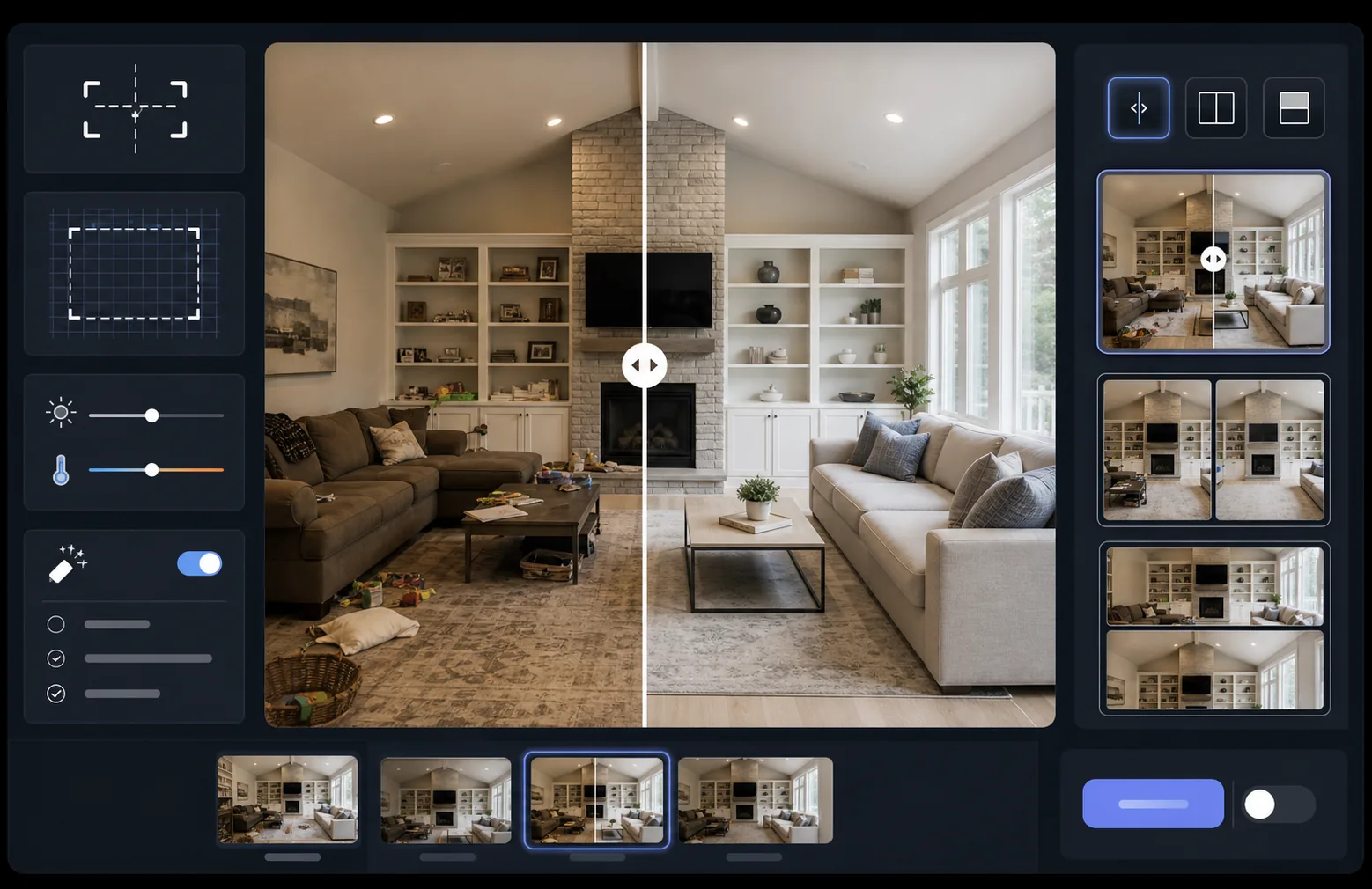
Qué hace esta plantilla
Procesa dos imágenes — un antes y un después — para convertirlas en un par comparativo perfectamente alineado, listo para widgets de control deslizante, diseños en paralelo o revelaciones animadas. AI Enhance normaliza la exposición y el balance de blancos entre los dos fotogramas para que la transformación sea claramente visible sin que las diferencias de iluminación enturbien la comparación. Magic Eraser puede limpiar distracciones incidentales en cualquiera de los fotogramas que no forman parte de la transformación deseada.
Configuración de la plantilla
| Diseño | Par listo para deslizante, en paralelo o apilado en vertical (seleccionable) |
| Tamaño de salida | 1600×1200px por fotograma (dimensiones iguales) |
| Alineación | Registro automático — hace coincidir la perspectiva y el encuadre entre tomas |
| Normalización de la iluminación | Equilibra la exposición y el balance de blancos en todo el par |
| Superposición de etiquetas | Etiquetas 'Before' / 'After' opcionales con posición personalizable |
| Borde | Separador gris neutro de 1px o borde sin costuras (seleccionable) |
Cómo usar esta plantilla
Sube tu imagen de antes
Sube la foto original, sin modificar, que muestra el estado inicial. Puede ser una habitación antes de la renovación, un producto antes de la mejora, una piel antes del tratamiento o cualquier transformación visual que quieras demostrar.
Sube tu imagen de después
Sube la foto del resultado que muestra la transformación completada. Intenta fotografiar desde el mismo ángulo y distancia que la toma de antes. La plantilla alineará automáticamente las pequeñas diferencias de encuadre y perspectiva.
Normaliza y alinea
La plantilla registra automáticamente las dos imágenes para que los elementos correspondientes se alineen píxel a píxel. La exposición y el balance de blancos se normalizan para que las diferencias de iluminación entre las sesiones de fotografía no distraigan de la transformación real.
Exporta la comparación
Elige tu formato de salida — par a juego para un widget deslizante, composición en paralelo para redes sociales o apilado vertical para marketing por correo electrónico. Añade etiquetas Before/After opcionales y exporta en resolución optimizada para web o calidad de impresión.
Consejos de experto para obtener los mejores resultados
- ✓Fotografía el antes y el después desde exactamente la misma posición si es posible — marca la ubicación de tu trípode o colócate en el mismo lugar. Cuanto menos tenga que corregir la alineación la IA, más nítida será la comparación.
- ✓Usa la misma distancia focal para ambas tomas para evitar diferencias de distorsión de perspectiva que hagan que las comparaciones alineadas parezcan sutilmente desajustadas.
- ✓Elimina los cambios no relacionados entre el antes y el después con Magic Eraser — si una planta se movió o apareció un objeto nuevo, bórralo para que los espectadores se centren en la transformación deseada.
- ✓Para incrustaciones de deslizante en la web, exporta ambas imágenes con dimensiones idénticas y usa PNG sin pérdida para evitar artefactos de compresión a lo largo de la línea divisoria del deslizante.
Herramientas
Preguntas frecuentes
¿Qué pasa si las fotos de antes y después se tomaron desde ángulos ligeramente diferentes?
+
El sistema de registro automático gestiona diferencias moderadas en el ángulo de cámara, la distancia y el encuadre. Identifica puntos de referencia correspondientes en ambas imágenes y los transforma para que coincidan. Para obtener los mejores resultados, la diferencia de ángulo debería ser inferior a 15 grados.
¿Puedo usar esto para miniaturas de vídeo que muestren transformaciones?
+
Sí. La salida de composición en paralelo es ideal para miniaturas de vídeo de YouTube y redes sociales. El diseño de pantalla dividida con etiquetas comunica de inmediato una historia de transformación que impulsa los clics.
¿La normalización de la iluminación cambia los resultados reales mostrados?
+
No. La normalización de la iluminación solo ajusta la exposición general y el balance de blancos para que ambos fotogramas parezcan haberse tomado en las mismas condiciones. La transformación real — los cambios en el sujeto — se conserva exactamente tal como se fotografió.
Muestra tus resultados, uno al lado del otro
Sube tus fotos de antes y después y obtén en segundos una imagen comparativa perfectamente alineada y presentada de forma profesional. Deja que la transformación hable por sí sola.
Pruébalo gratis