
Cómo arreglar una foto sobreexpuesta
La sobreexposición ocurre cuando demasiada luz llega al sensor: los rostros se desvanecen, los cielos se vuelven blancos y los detalles desaparecen en brillo. La IA de Magic Eraser recupera detalles perdidos y restaura la exposición natural, guardando fotos que parecen demasiado brillantes.
Last updated
Arreglar la exposición ahora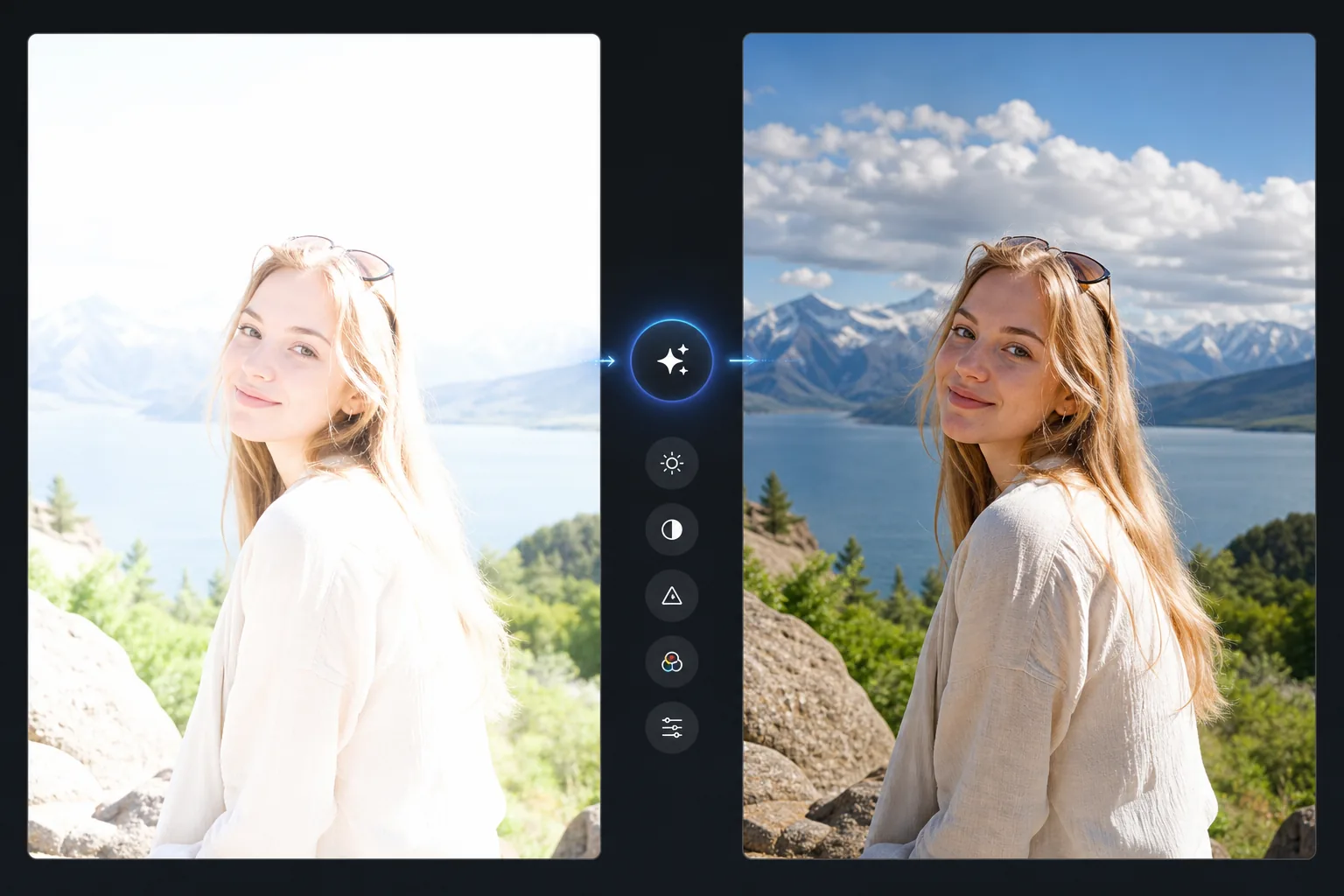
Qué pierde la sobreexposición y qué puede recuperar la IA
Para corregir una foto sobreexpuesta, abre Magic Eraser en la web, iOS o Android, sube la imagen demasiado clara y aplica AI Enhance: reduce la exposición general, recupera las luces altas y devuelve el color y el tono de piel naturales. Es gratis y sin registro. Lo que se recupera depende del original: las zonas brillantes pero que no son blanco puro se recuperan bien, mientras que las áreas totalmente quemadas en blanco ya no conservan detalle, así que la IA las rellena de forma verosímil en lugar de restaurar lo que realmente había. Para obtener el mejor resultado, parte de la copia de la foto con mayor resolución que tengas. La sobreexposición ocurre cuando el sensor de la cámara recibe más luz de la que puede registrar: las áreas brillantes se "recortan" hasta quedar en blanco puro, perdiendo todos los detalles en esas regiones. Una ligera sobreexposición (las luces son muy brillantes pero no de color blanco puro) retiene detalles recuperables que AI Enhancement puede recuperar. La fuerte sobreexposición (grandes áreas de blanco puro, conocidas como luces quemadas) ha perdido detalles permanentemente en esas regiones: la IA puede reducir el brillo y generar detalles plausibles, pero la información original desaparece del archivo. Comprender esta distinción ayuda a establecer expectativas: las fotografías ligeramente sobreexpuestas se pueden restaurar con una calidad excelente; Las fotografías muy descompuestas se pueden mejorar, pero no coincidirán con un original correctamente expuesto. La IA de Magic Eraser analiza la imagen y aplica corrección de exposición, recuperación de luces y restauración de color adaptadas al patrón de sobreexposición específico de cada imagen.
Before you start
Solucione la sobreexposición en tres pasos
Start with sube la foto sobreexpuesta. The result preview above and tips below use this guide's existing content; no separate before-and-after proof is assumed.
- 1
Sube la foto sobreexpuesta
Abra Magic Eraser en la web, iOS o Android. Cargue la imagen sobreexpuesta: un retrato descolorido, un cielo apagado, una toma en interiores con flash o cualquier imagen que sea demasiado brillante. Compatible con JPEG, PNG, HEIC y WebP.
- 2
Aplicar AI Enhancement
Seleccione la herramienta AI Enhance. La IA detecta el patrón de sobreexposición: qué áreas están recortadas, cuáles son recuperables y cuál debería ser la exposición correcta. Retira las luces, restaura la saturación del color perdida debido al brillo y recupera detalles en regiones brillantes.
- 3
Revisar y exportar
La IA produce una versión corregida con reflejos restaurados, color recuperado y equilibrio de exposición natural. Verifique las caras (la piel debe verse natural, no gris), los cielos (deben mostrar detalles de las nubes si no están completamente volados) y las áreas brillantes (deben mostrar textura y detalles). Exportar a máxima resolución.
Lo mejor para
- Fotografía con flash en la que el flash directo borra la cara del sujeto o crea puntos calientes
- Retratos al aire libre donde la luz de fondo brillante o los reflejos hicieron que la cámara sobreexpusiera al sujeto
- Fotografías de paisajes y viajes en las que el cielo se volvió blanco mientras el suelo estaba correctamente expuesto.
- Fotos de teléfono en las que la exposición automática calculó mal la escena y toda la imagen es demasiado brillante
- Fotografía de eventos en la que la iluminación mixta provocó una exposición inconsistente en todas las tomas.
Consejos para obtener mejores resultados
La IA funciona mejor en imágenes ligeramente sobreexpuestas donde los detalles de las luces todavía están técnicamente presentes en el archivo pero no son visibles. Para los archivos JPEG, el rango dinámico limitado significa que las áreas muy dañadas tienen menos detalles recuperables que los archivos RAW, pero la IA aún puede mejorar la imagen retirando las áreas más brillantes y regenerando detalles plausibles. Si el área sobreexpuesta es solo el cielo, también puedes utilizar la herramienta de reemplazo de cielo para lograr una mejora más espectacular. Para la sobreexposición con flash (un sujeto candente contra un fondo normal), la IA equilibra la exposición del sujeto para que coincida con el fondo. Para imágenes uniformemente sobreexpuestas (todo es igualmente demasiado brillante), la IA aplica una corrección de exposición global con recuperación selectiva de luces.
Preguntas frecuentes
- ¿Puede recuperar zonas blancas completamente apagadas?
- Parcialmente. Las áreas que son de blanco puro (RGB 255.255.255) han perdido todos los detalles. La IA puede reducir el brillo y generar texturas plausibles según el contexto circundante, pero no puede recuperar datos que nunca se registraron. Las áreas ligeramente sobreexpuestas (muy brillantes pero no de color blanco puro) se recuperan mucho mejor.
- ¿Es mejor arreglarlo en cámara o con IA?
- En la cámara siempre es mejor: la exposición adecuada captura el máximo detalle. Pero cuando pasa el momento y lo único que tienes es la foto sobreexpuesta, la corrección AI produce resultados significativamente mejores que el ajuste manual de brillo/contraste.
- ¿Repara caras que se borran con el flash?
- Sí. La sobreexposición del flash en los rostros es uno de los mejores casos para la corrección de la IA. La IA restaura el tono de la piel, reduce el punto blanco y recupera los detalles faciales. La piel debe lucir natural y cálida, no gris.
- ¿La corrección de exposición es gratuita?
- Sí. AI Enhancement, incluida la corrección de exposición, está disponible en el nivel gratuito con límites de uso diario. Premium elimina los límites para el procesamiento por lotes.
- ¿Puede recuperar un cielo blanco quemado?
- Depende de cuánto esté quemado. Un cielo muy brillante pero que aún conserva tenues nubes o tonos azules a menudo se puede atenuar para recuperar esos detalles. Un cielo de blanco puro de borde a borde ya no tiene detalle registrado, así que la IA generará nubes verosímiles o un tono degradado en lugar de revelar el cielo real que había. Si necesitas un cielo fiel, una edición aparte de reemplazo de cielo te da más control que la recuperación de luces altas por sí sola.