
Realzar dientes y ojos de forma natural
Ilumina los dientes y realza los ojos en los retratos con ajustes sutiles que se ven naturales y evitan el aspecto sobreblanqueado o sobresaturado.
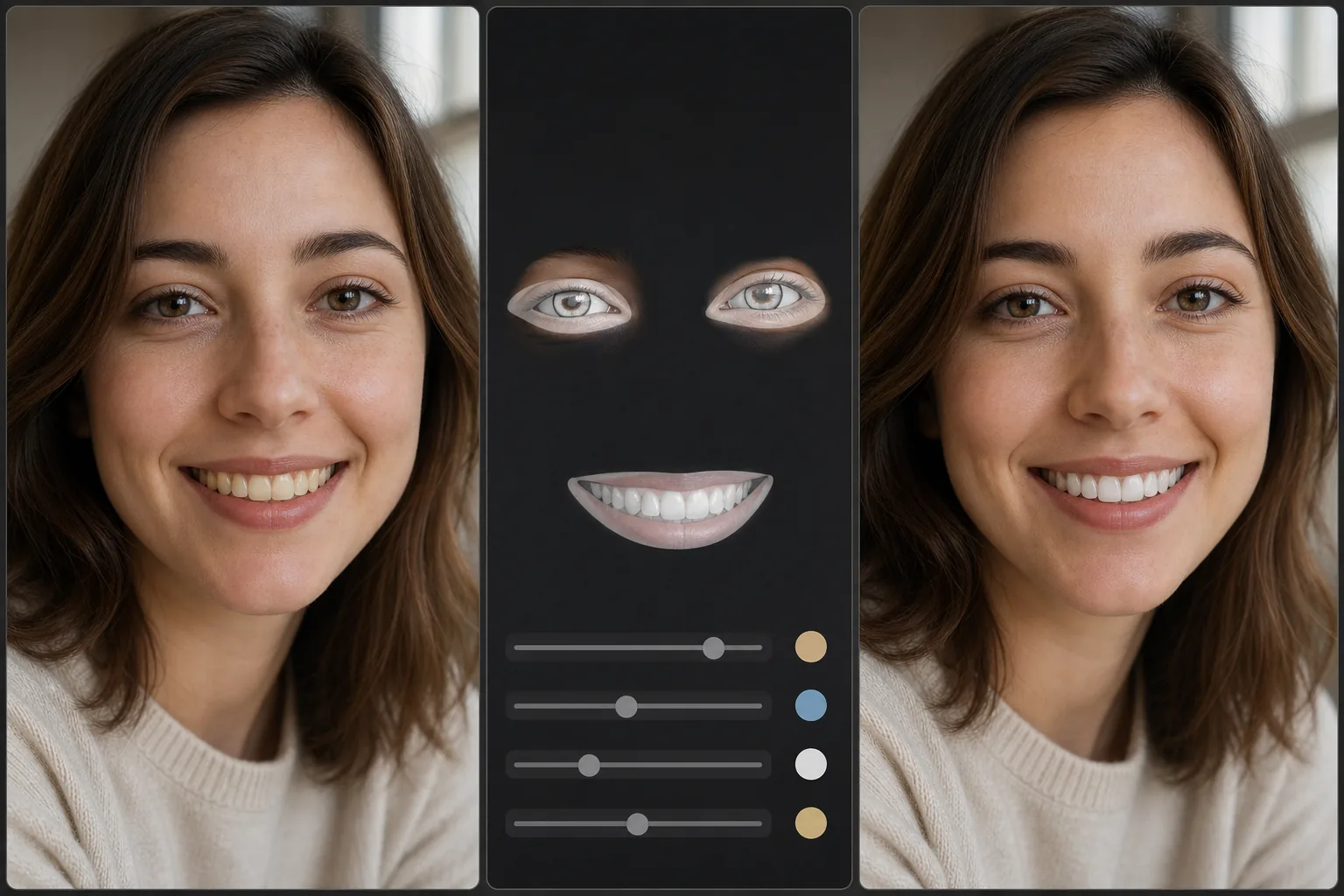
Lesson context before the long read
Review the result preview above, then scan the learning objectives below before reading the full lesson. Updated 2026-05-17.
Example visual uses an existing public asset: /content-images/portrait-teeth-eyes-academy.webp.
Learning Objectives
- 1Aplicar un blanqueamiento de dientes que elimine el tono amarillento sin que los dientes parezcan antinaturalmente brillantes
- 2Realzar el detalle del iris, los brillos de luz y la claridad del blanco para que los ojos sean más cautivadores
- 3Mantener la coherencia entre las ediciones de dientes y ojos y la iluminación general del retrato
Iluminar los ojos de forma natural
Los dientes y los ojos son los puntos focales de cualquier retrato, y las mejoras sutiles en estas áreas pueden mejorar drásticamente una foto sin que el espectador note que se realizó alguna edición. El secreto es la moderación: los dientes sobreblanqueados parecen carillas de un anuncio de pasta de dientes, y los ojos demasiado iluminados pueden hacer que un sujeto parezca sobresaltado o antinatural. Los retocadores profesionales suelen buscar dientes que se vean limpios y sanos, y ojos que parezcan alerta y atentos, ambos coherentes con las condiciones de iluminación existentes en la foto.
Blanqueamiento de dientes sin artefactos
Para el blanqueamiento de dientes, el enfoque más eficaz es desaturar el canal amarillo en lugar de simplemente aumentar el brillo. Esto elimina el tono amarillento o manchado de café mientras preserva la variación natural de luminosidad que hace que los dientes parezcan tridimensionales. Evita que todos los dientes tengan el mismo tono de blanco, ya que los dientes reales tienen degradados sutiles desde la línea de las encías hasta el borde. La herramienta de ajuste selectivo de Magic Eraser te permite enmascarar la zona de los dientes y reducir la saturación del amarillo entre un 30 y un 50%, lo que suele ser suficiente para producir un resultado limpio y creíble.
Mantener expresiones faciales auténticas
El realce de ojos se centra en tres elementos: el detalle del iris, los brillos de luz y la claridad de la esclerótica. Aumentar ligeramente el contraste dentro del iris resalta los patrones de color naturales y hace que los ojos sean más cautivadores. Iluminar los brillos de luz existentes, los pequeños reflejos de las fuentes de luz, añade vida y dimensión. Para el blanco de los ojos, reduce el enrojecimiento e ilumina ligeramente, pero conserva algo de variación natural para que los ojos no parezcan de porcelana. Asegúrate siempre de que tus ediciones de ojos coincidan con la dirección y la calidez de la iluminación de la escena para mantener la coherencia general.
Key Takeaways
- ✓Desatura el canal amarillo de los dientes en lugar de simplemente aumentar el brillo para obtener resultados naturales
- ✓Realza el detalle del iris y los brillos de luz existentes en lugar de pintar reflejos artificiales
- ✓Mantén el brillo de los dientes y los ojos coherente con la iluminación de la escena para evitar un aspecto sobreeditado