
Cómo Ampliar Imágenes sin Pérdida de Calidad
Amplía fotos para impresión o pantallas grandes usando la super-resolución con IA que genera detalle genuino en lugar de una ampliación borrosa.
Lesson context before the long read
Review the result preview above, then scan the learning objectives below before reading the full lesson. Updated 2026-05-17.
Example visual uses an existing public asset: /content-images/ai-upscaling-images-academy.webp.
Learning Objectives
- 1Comprender por qué el escalado tradicional produce resultados borrosos y en qué se diferencia la super-resolución con IA
- 2Elegir el factor de escalado adecuado según la calidad del origen y el uso previsto de salida
- 3Evaluar los resultados ampliados para asegurar que los detalles generados sean precisos y estén libres de artefactos
Cómo la ampliación con IA genera nuevo detalle
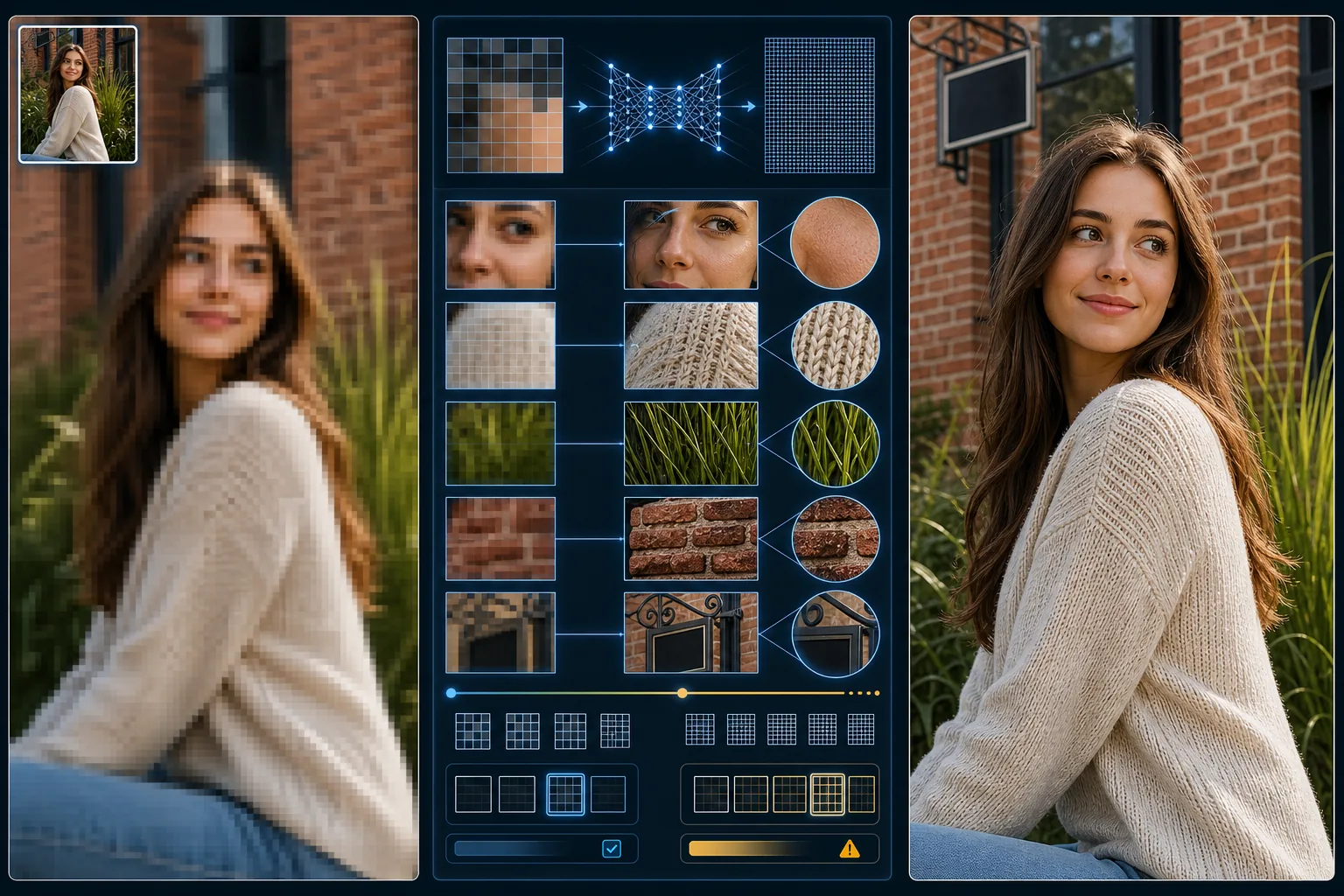
El escalado de imágenes tradicional utiliza la interpolación, un método matemático que calcula nuevos valores de píxel promediando los píxeles vecinos. Esto produce una imagen más grande, pero no más nítida, porque la interpolación no puede crear detalle que nunca se capturó. El resultado es una foto más grande que se ve suave y borrosa, sobre todo a una ampliación de 2x o superior. La super-resolución con IA adopta un enfoque fundamentalmente distinto al usar una red neuronal entrenada para predecir cómo deberían verse los detalles finos a partir de la entrada de menor resolución.
Mejores prácticas para ampliar imágenes pequeñas
Los modelos de super-resolución con IA han aprendido patrones de textura a partir de millones de imágenes de alta resolución. Cuando amplías una foto, el modelo reconoce patrones familiares como los poros de la piel, el tejido de la tela, las briznas de hierba o la textura del ladrillo, y genera detalle plausible de alta frecuencia que es coherente con esos patrones. El resultado con una ampliación de 2x es una imagen que parece haber sido capturada originalmente al doble de la resolución. A 4x, el modelo genera más detalle del que tiene evidencia, por lo que los resultados varían según la complejidad de la escena y lo bien que el contenido coincida con los datos de entrenamiento del modelo.
Expectativas de calidad en distintos factores de escala
Elegir el factor de escalado adecuado depende de tu material de origen y del destino de salida. Una foto de teléfono de 12-megapixel normalmente puede ampliarse 2x para obtener una calidad de impresión excelente de hasta 24x36 inches. A 4x, examina el resultado con cuidado en busca de detalles generados por IA que parezcan plausibles pero que en realidad estén fabricados, como un texto que se ve nítido pero dice algo diferente del original, o rasgos faciales que han sido alterados de forma sutil. Para aplicaciones críticas como la impresión de archivo o el uso forense, quédate con la ampliación de 2x para mantenerte dentro del rango más fiable del modelo.
Key Takeaways
- ✓La super-resolución con IA genera detalle de textura genuino en lugar de solo interpolar entre píxeles
- ✓La ampliación de 2x produce los resultados más fiables; la de 4x requiere una inspección cuidadosa en busca de detalles fabricados
- ✓Evalúa de cerca el texto, los rostros y los patrones finos ampliados para asegurar que los detalles generados por IA sean precisos