
Doğal Cilt Rötuşu
Portreleri plastik görünüm olmadan iyileştirin. Bu şablon geçici lekeleri giderir, cilt tonunu eşitler ve aydınlatma düzensizliklerini yumuşatır; bunu yaparken cildi gerçek gösteren gözenekleri, ince çizgileri ve doğal dokuyu bilinçli olarak korur. Sonuç, kişinin en iyi gününde en iyi haliyle göründüğü bir portredir — yapay zekânın ürettiği bir manken değil.
Bu şablonu ücretsiz deneyinPortrait template preview
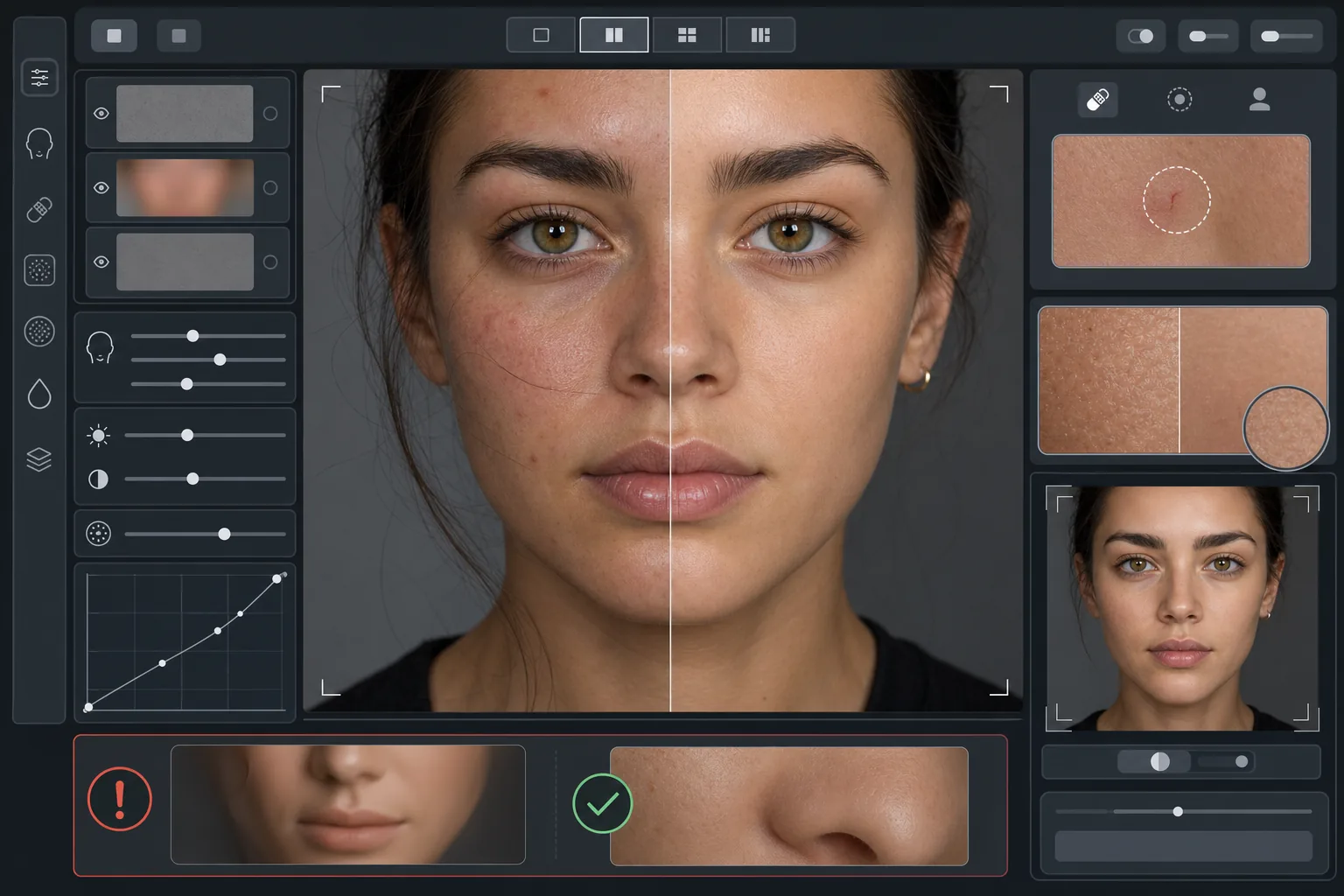
Bu şablon ne yapar
Dokuyu tondan ayıran, frekans duyarlı bir cilt rötuşu uygular. AI Enhance, geçici kusurları (sivilceler, kızarıklık, göz altı morlukları) giderirken gözün gerçek olarak algıladığı ince cilt dokusunu — gözenekleri, ince tüyleri ve doğal değişimi — korur. Magic Eraser, yapay zekâ iyileştirmesinin çok geniş kaldığı durumlarda belirli noktaların kaldırılmasını üstlenir; örneğin çevresindeki cildi etkilemeden tek bir çiziği ya da böcek ısırığını giderir. Genel etki, yakınlaştırma testini geçen, eşit ve sağlıklı görünen bir cilttir.
Şablon ayarları
| Rötuş yoğunluğu | Doğal — lekeleri ve kızarıklığı hedefler, dokuyu korur |
| Gözenek koruması | Tam — tüm doğal cilt dokusunu piksel düzeyinde korur |
| Ton eşitleme | Orta — renk değişimini düzleştirmeden lekelenmeyi ve kızarıklığı azaltır |
| Göz altı düzeltmesi | İnce — doğal gölgeyi yok etmeden koyu halkaları açar |
| Aydınlatma yumuşatma | Sert gölgeleri doldurur ve doğrudan flaştan kaynaklanan parlak noktaları azaltır |
| Çıktı çözünürlüğü | Girişle aynı (kırpma ve yakınlaştırma için tüm ayrıntıyı korur) |
Bu şablon nasıl kullanılır
Bir portre fotoğrafı yükleyin
Yüzün net şekilde odaklandığı, iyi aydınlatılmış bir portre kullanın. Şablon, doğal cilt dokusu orijinalde görünür olduğunda en iyi sonucu verir — yumuşak odaklı veya aşırı sıkıştırılmış görüntüler, yapay zekânın koruyabileceği daha az doku sunar.
Doğal rötuşu uygulayın
AI Enhance geçici lekeleri, düzensiz kızarıklığı ve ton düzensizliklerini belirler ve bunları düzeltirken alttaki cilt dokusunu tamamen olduğu gibi tutar. Gözenekler, ince çizgiler ve doğal renk değişimi görünür kalır — yalnızca kusurlar değişir.
Belirli alanları noktasal düzeltin
Kaldırmak istediğiniz kalan tekil izler için Magic Eraser kullanın — iyileşmekte olan bir çizik, geçici bir kızarıklık veya yüze düşmüş bir saç teli. Her kaldırma, çevresindeki doğal cilt dokusuyla kaynaşır.
Tam yakınlaştırmada inceleyin ve dışa aktarın
Cilt dokusunun bozulmadığını doğrulamak için %100'e yakınlaştırın — gözenekler görünür ve doğal olmalıdır. Herhangi bir alan fazla pürüzsüz görünüyorsa rötuş yoğunluğunu azaltın ve yeniden işleyin. Doğal ayrıntıyı korumak için tam çözünürlükte dışa aktarın.
En iyi sonuçlar için uzman ipuçları
- ✓En düşük rötuş yoğunluğuyla başlayın ve yalnızca gerekiyorsa artırın — yumuşatma eklemek, işlenerek silinmiş bir dokuyu geri kazanmaktan çok daha kolaydır.
- ✓Akne veya rozasesi olan kişilerde şablon, alttaki cilt tonunu değiştirmeden tekil lekeleri giderir — sonuç farklı bir kişi değil, temiz ciltli bir gün gibi görünür.
- ✓Bu şablonu telefon kamerasının güzellik filtreleriyle üst üste kullanmaktan kaçının — birçok telefon kamerasındaki yerleşik yumuşatma zaten dokuyu azaltır ve çift işleme, bu şablonun önlemek için tasarlandığı plastik görünümü yaratır.
- ✓Mümkünse RAW formatında çekin ve yüklemeden önce JPEG'e dönüştürün — RAW, yapay zekânın rötuş sırasında koruyabileceği daha fazla cilt dokusu verisi yakalar.
Araçlar
Sık sorulan sorular
Bunun cildi pürüzsüzleştiren güzellik filtrelerinden farkı nedir?
+
Güzellik filtreleri, gözenekleri, ince çizgileri ve doğal dokuyu silen tek tip bir bulanıklık uygular — ve o belli belirsiz olmayan plastik görünümü yaratır. Bu şablon, dokuyu tondan ayıran frekans duyarlı bir işleme kullanır; lekeleri ton katmanından kaldırırken doku katmanına dokunmadan bırakır. Sonuç, işlenmiş bir yüzey değil, gerçek cilt gibi görünür.
Bu, yüz hatlarının şeklini değiştirir mi?
+
Hayır. Şablon yalnızca cilt yüzeyinin görünümünü etkiler — ton, lekeler ve aydınlatma eşitliği. Burnu, çeneyi, gözleri veya herhangi bir yüz yapısını asla yeniden şekillendirmez. Kişi, yalnızca daha temiz ve daha eşit aydınlatılmış bir ciltle, tam olarak kendisi gibi görünür.
Bunu profesyonel vesikalık ve portfolyo çalışmaları için kullanabilir miyim?
+
Evet. Doğal rötuş standardı; kurumsal vesikalıklar, oyunculuk portfolyoları, tanışma profilleri ve özgünlüğün önemli olduğu sosyal medya için profesyonel beklentileri karşılar. Kişi, yüz yüze de fotoğrafındaki gibi görünür — ki bu, doğal rötuşun bütün amacıdır.
Daha iyi cilt, yine de siz
Bir portre yükleyin ve saniyeler içinde dokuyu koruyan doğal bir cilt rötuşu elde edin. Plastik görünüm yok, tuhaf bir pürüzsüzleştirme yok — yalnızca en iyi gününüzdeki siz.
Ücretsiz deneyinRelated templates
More portrait templates for your workflow.
Yaşa uygun okul portresi rötuş şablonu. Doğal kusur giderme, tutarlı arka planlar ve tüm sınıflar için toplu işleme ile yıllık standart çıktı.
Stüdyo kalitesinde evcil hayvan portresi şablonu. Kürk kenarlarını tutar, tasmaları ve tutacakları çıkarır, arka planları değiştirir ve köpeklerin, kedilerin ve diğer hayvanların gözlerini keskinleştirir.
Yeni doğan ve bebek fotoğraflarını yumuşak, sıcak tonlar, yumuşak cilt yumuşatma, destek ve dikkat dağıtıcı unsurların giderilmesi ve duyurular ve duvar resimleri için baskıya hazır boyutlandırma ile geliştirin.
Zamansız bir hamilelik portresi görünümü için doğum fotoğraflarına nazik cilt yumuşatma, yumuşak parlak aydınlatma, arka plan basitleştirme ve sıcak renk derecelendirme ile rötuş yapın.
Arka plandaki dikkat dağıtıcı unsurları ortadan kaldırarak, düzensiz pozlamayı düzelterek, cildi doğal bir şekilde yumuşatarak ve herkesin aynı karede en iyi şekilde görünmesini sağlayarak aile portrelerini temizleyin.