
Aile Portresi Temizleme
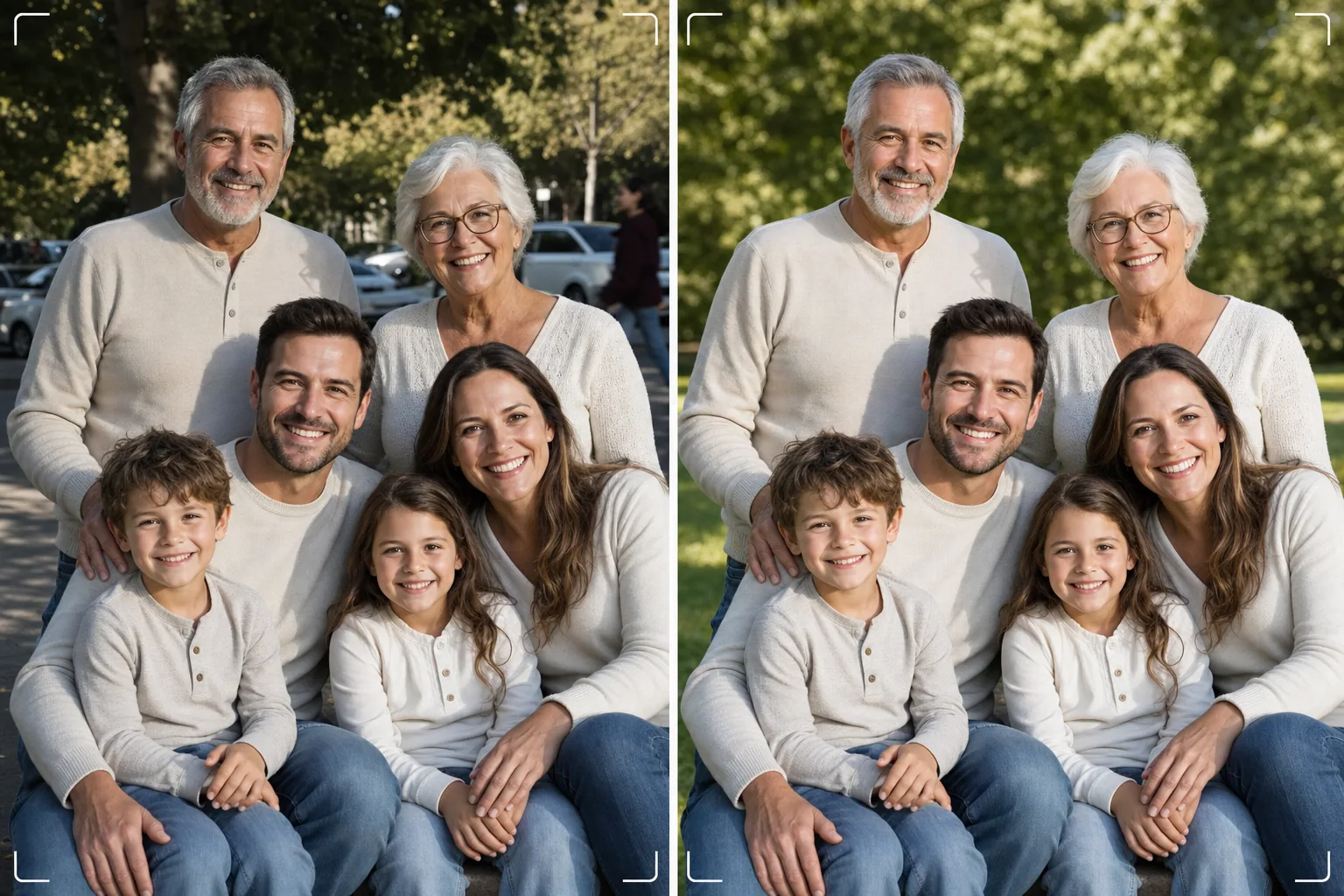
Yüzlerce kez çekim yapmaya gerek kalmadan kusursuz aile fotoğrafını elde edin. Bu şablon arka plandaki dikkat dağıtıcı unsurları kaldırır, grup genelindeki düzensiz aydınlatmayı düzeltir, her yüzdeki kusurları doğal şekilde azaltır ve iyi bir grup fotoğrafının harika olmasını engelleyen küçük kusurları temizler.
Bu şablonu ücretsiz deneyinPortrait template preview
Bu şablonun yaptıkları
Aile fotoğraflarının evrensel sorununu çözer: herkesin tek bir karede harika görünmesini sağlar. Magic Eraser, kareye dalan kişileri, çöp kutularını, çıkış tabelalarını, elektrik hatlarını, park etmiş arabaları ve aksi takdirde iyi olan grup kompozisyonlarını bozan diğer dikkat dağıtıcı unsurları kaldırır. AI Enhance, bazı aile üyeleri gölgedeyken diğerlerinin doğrudan güneş altında olduğunda ortaya çıkan düzensiz aydınlatmayı düzelterek herkesi tutarlı ve yüze yakışan bir pozlamaya getirir. Doğal cilt yumuşatma, kimseyi yapay şekilde rötuşlanmış göstermeden her yüzdeki kusurları, göz altı morluklarını ve kızarıklıkları azaltır. Sonuç, herkesi bir araya getirdiğinizde hayalini kurduğunuz aile portresidir.
Şablon ayarları
| Arka plan temizliği | Dikkat dağıtıcıları otomatik algıla ve kaldır (kişiler, tabelalar, nesneler) |
| Pozlama dengeleme | Tüm öznelerde eşit aydınlatma (gölge doldurma + parlaklık kurtarma) |
| Cilt iyileştirme | Yüz başına doğal kusur azaltma (benzersiz özellikleri korur) |
| Renk düzeltme | Karışık aydınlatmalı grup çekimlerinde birleşik beyaz dengesi |
| Keskinleştirme | Yüz farkındalıklı keskinleştirme (gözlere ve gülümsemelere öncelik verir) |
| Çıktı çözünürlüğü | 6000px uzun kenar (300 DPI'de 20×13 inçe kadar duvar baskısı) |
Bu şablon nasıl kullanılır
Aile fotoğrafını yükleyin
Bir aile toplantısında, tatilde, kavuşmada veya portre çekiminde çekilen grup fotoğrafını yükleyin. Şablon iki ile otuz kişi arasındaki grupları işler. En iyi sonuçlar için, en çok yüzün hoş ifadelerle kameraya baktığı kareyi seçin — şablon arka planı ve aydınlatmayı düzeltir ancak yüz ifadelerini veya kapalı gözleri değiştiremez.
Arka plandaki dikkat dağıtıcıları kaldırın
Magic Eraser, aile grubunun arkasındaki yabancıları, dikkat dağıtan tabelaları, çöpleri, araçları ve diğer istenmeyen unsurları belirler ve kaldırır. Yapay zeka arka planı doğal şekilde yeniden oluşturur ve kaldırılan nesnelerin arkasındaki çimeni, gökyüzünü, duvarları veya zemini doldurur.
Aydınlatmayı dengeleyin ve yüzleri iyileştirin
AI Enhance, aile üyeleri arasındaki pozlama farklarını düzeltir — artık grubun yarısı gölgede, yarısı güneşte gözlerini kısmıyor. Her yüz, her kişinin benzersiz özelliklerini ve doğal görünümünü korurken bireysel kusur azaltma ve hafif göz aydınlatması alır.
Baskı veya paylaşım için dışa aktarın
Büyük duvar baskıları için 6000px uzun kenarda veya sosyal medya ve dijital tatil kartları için 2000px'de indirin. Şablon, ekran görüntüsü için sRGB veya profesyonel baskı için Adobe RGB olarak çıktı verir. Yaygın çerçeve boyutları için birden fazla kırpma oranı (4:5, 5:7, 8:10) mevcuttur.
En iyi sonuçlar için profesyonel ipuçları
- ✓Hızlı ardışık olarak üç ila beş çekim yapın. En çok kişinin gözlerinin açık ve doğal bir ifadeye sahip olduğu kareyi seçin — şablon diğer her şeyi halleder, ancak ifadeler ve gözlerin açık olma durumu sonradan değiştirilemez.
- ✓Aileyi karışık güneş ve gölge yerine açık gölgeye — bir ağacın gölgesi altına veya bir binanın gölgeli tarafına — yerleştirin. Bu, şablona en doğal iyileştirmeyi sağlayan, eşit aydınlatılmış bir başlangıç noktası verir.
- ✓Büyük gruplar (on veya daha fazla kişi) için, daha uzun üyeleri arkada olacak şekilde insanları kademeli sıralar halinde düzenleyin. Bu doğal katmanlama derinlik yaratır ve her yüzün görünür olmasını sağlar. Şablon, ışık kaynağına olan uzaklık nedeniyle biraz daha karanlık olan arka sıralardaki yüzleri aydınlatabilir.
Araçlar
Sık sorulan sorular
Bu, kapalı gözleri veya kötü ifadeleri düzeltebilir mi?
+
Hayır. Şablon aydınlatmayı iyileştirir, dikkat dağıtıcıları kaldırır ve cildi yumuşatır, ancak yüz ifadelerini değiştiremez, kapalı gözleri açamaz veya kişileri yeniden konumlandıramaz. Yüklemeden önce en iyi ifadeye sahip kareyi seçin — şablon o kareyi olabilecek en iyi şekilde gösterir.
Büyük kavuşma grupları ne olacak?
+
Şablon yaklaşık otuz kişiye kadar olan grupları işler. Çok büyük gruplarda, karedeki yüz boyutunun daha küçük olması nedeniyle bireysel yüz iyileştirmesi daha incelikli hale gelir, ancak arka plan temizliği ve aydınlatma düzeltmesi her grup boyutunda tamamen etkilidir.
Aile fotoğrafından bir kişiyi kaldırabilir miyim?
+
Evet, Magic Eraser gruptan belirli kişileri kaldırabilir. Kaldırmak istediğiniz kişiyi seçin, yapay zeka arkasındaki arka planı yeniden oluşturacaktır. Bu, kişi diğerleri arasında ortada olmak yerine grubun kenarında olduğunda en iyi şekilde çalışır.
Kusursuz aile portresi tek bir temizleme uzağınızda
Grup fotoğraflarınızı yükleyin ve duvara asılmaya hazır, temiz, eşit aydınlatılmış, doğal şekilde iyileştirilmiş aile portreleri elde edin.
Ücretsiz deneyinRelated templates
More portrait templates for your workflow.
Yaşa uygun okul portresi rötuş şablonu. Doğal kusur giderme, tutarlı arka planlar ve tüm sınıflar için toplu işleme ile yıllık standart çıktı.
Stüdyo kalitesinde evcil hayvan portresi şablonu. Kürk kenarlarını tutar, tasmaları ve tutacakları çıkarır, arka planları değiştirir ve köpeklerin, kedilerin ve diğer hayvanların gözlerini keskinleştirir.
Gözenekleri ve dokuyu korurken lekeleri gideren doğal cilt rötuş şablonu. Eşit aydınlatma, plastik görünüm yok; sadece kamerada daha iyi bir görünüm.
Yeni doğan ve bebek fotoğraflarını yumuşak, sıcak tonlar, yumuşak cilt yumuşatma, destek ve dikkat dağıtıcı unsurların giderilmesi ve duyurular ve duvar resimleri için baskıya hazır boyutlandırma ile geliştirin.
Zamansız bir hamilelik portresi görünümü için doğum fotoğraflarına nazik cilt yumuşatma, yumuşak parlak aydınlatma, arka plan basitleştirme ve sıcak renk derecelendirme ile rötuş yapın.