
Okul Portresi Rötuşu
Her öğrenciye, görünümü doğal ve yaşına uygun tutarken kendini iyi hissedeceği bir portre sunun. Bu şablon, okul fotoğrafçılığındaki yaygın sorunları — geçici cilt kusurları, bir seans boyunca dengesiz aydınlatma ve tutarsız arka planlar — ele alır ve bir sınıftaki her öğrenci için tek tip, profesyonel kalitede, yıllığa hazır görüntüler üretir.
Bu şablonu ücretsiz deneyinPortrait template preview
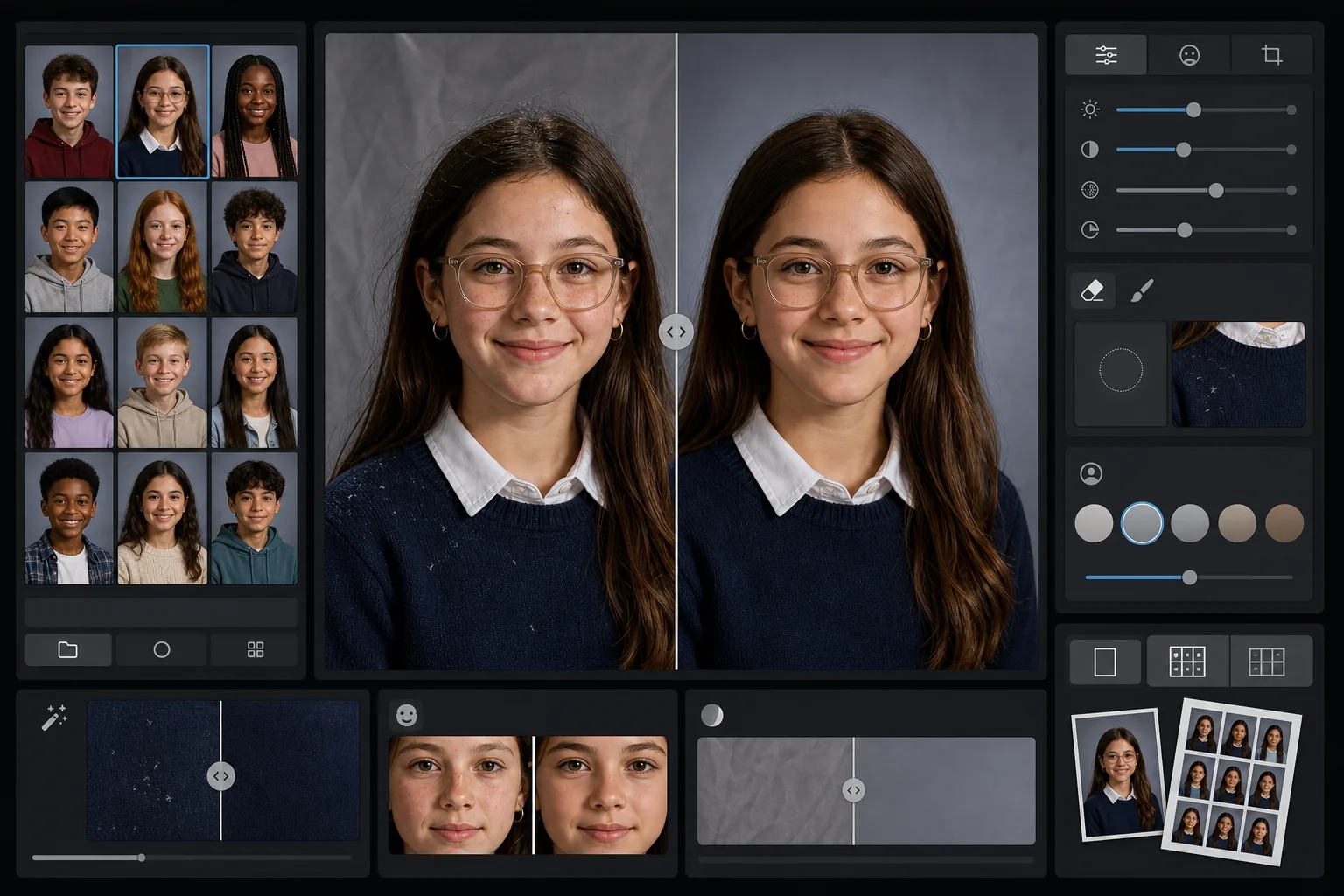
Bu şablon ne yapar
Okul portrelerine, her öğrencinin doğal görünümünü korurken geçici cilt kusurlarını yumuşatan nazik, yaşa uygun bir rötuş uygular. AI Enhance, bir seans boyunca aynı aydınlatma düzeniyle onlarca öğrenci fotoğraflanırken oluşan dengesiz pozlamayı ve renk kaymalarını düzeltir. Magic Eraser, giysideki dağınık saçları, eğri yaka kenarlarını ve taşınabilir fonlardaki arka plan kırışıklıklarını giderir.
Şablon ayarları
| Rötuş düzeyi | Hafif — yalnızca geçici cilt kusurlarını giderir, çilleri ve doğal özellikleri korur |
| Çıktı boyutu | 1200×1500px (4:5 standart portre, cüzdan boyutunda 300 DPI) |
| Arka plan normalleştirme | Bir partideki tüm görüntülerde fon tonunu eşleştirir |
| Pozlama düzeltme | Otomatik — bir çekim seansı boyunca ışık kaymasını telafi eder |
| Renk tutarlılığı | İşlenen tüm portrelerde tek tip beyaz dengesi |
| Dağınık ayrıntı temizliği | Omuzlardaki uçuşan saçları, tüyleri ve fon kırışıklıklarını giderir |
Bu şablon nasıl kullanılır
Sınıf portrelerini yükleyin
Tek bir portre ya da tüm bir sınıf partisi yükleyin. Şablon, bireysel görüntüleri veya grupları işler ve tutarlı bir yıllık bölümü için tüm fotoğraflara aynı rötuş standardını uygular.
Yaşa uygun rötuş uygulayın
AI Enhance, sivilce veya çizik gibi geçici cilt kusurlarını nazikçe yumuşatırken her öğrencinin kendisi gibi görünmesini sağlar. Çiller, doğum lekeleri, diş telleri ve gözlükler her zaman korunur — amaç, gerçek görünümlerinin özenli bir versiyonudur.
Pozlamayı ve arka planı normalleştirin
Bir portre seansı boyunca düzen kaydıkça aydınlatma koşulları değişir. Şablon, her öğrencinin tutarlı biçimde aydınlatılmış görünmesi için pozlamayı ve beyaz dengesini düzeltir ve fon tonu tüm parti boyunca eşleşir.
Temizleyin ve dışa aktarın
Magic Eraser küçük dikkat dağıtıcıları giderir — koyu renk bir kazaktaki tüy, alnın üzerine düşen dağınık bir saç, taşınabilir fondaki bir kırışıklık. Baskı için yıllık standardı çözünürlükte ya da okulun çevrimiçi galerisi için daha düşük çözünürlüklü JPEG olarak dışa aktarın.
En iyi sonuçlar için profesyonel ipuçları
- ✓Tüm sınıf partisini tek tek yerine birlikte işleyin — şablon, tüm portrelerde tutarlı pozlama ve rengi kalibre etmek için grubu kullanır.
- ✓Gözlük takan öğrenciler için orijinal fotoğrafta öğrenci parlamayı en aza indirmek için çenesini hafifçe aşağı eğmelidir — yapay zekâ ile iyileştirme, gözler camların arkasından görünürken en iyi sonucu verir.
- ✓Tüm bir okulu işlemeden önce, rötuş düzeyinin yıllık komitenizin standartlarını karşıladığını doğrulamak için 5-10 portrelik bir test partisi çalıştırın.
- ✓Rötuşlanmamış orijinal dosyaları işlenmiş sürümlerin yanında saklayın — bazı ebeveynler kişisel kullanım için tamamen düzenlenmemiş fotoğrafı tercih eder.
Araçlar
Sık sorulan sorular
Rötuş çocuklar ve gençler için uygun mu?
+
Evet. Şablon özellikle okul çağındaki özneler için tasarlanmıştır. Yalnızca fotoğraf günü çıkan bir sivilce gibi geçici cilt kusurlarını giderir — yüz hatlarını asla yeniden şekillendirmez, cilt tonunu değiştirmez veya yetişkin güzellik rötuşunda kullanılan türden bir pürüzsüzleştirme uygulamaz. Her öğrenci kendisi gibi görünür.
Tüm bir sınıfı veya okulu tek seferde işleyebilir miyim?
+
Evet. Tek bir partide yüzlerce portreye kadar yükleyin. Şablon aynı rötuş standartlarını uygular ve yıllık bölümünün tek tip görünmesi için her görüntüde pozlamayı, rengi ve arka plan tutarlılığını normalleştirir.
Bu, diş tellerini, gözlükleri veya işitme cihazlarını kaldırır mı?
+
Hayır. Şablon, diş telleri, gözlükler, işitme cihazları ve tıbbi cihazlar dâhil tüm kalıcı ve yarı kalıcı özellikleri korumak için tasarlanmıştır. Yalnızca geçici yüzey kusurlarını ve tüy ile fon kırışıklıkları gibi çevresel dikkat dağıtıcıları ele alır.
Yıllığa hazır portreleri dakikalar içinde teslim edin
Okul portrelerini tek tek veya sınıf bazında yükleyin ve baskıya hazır, tutarlı, doğal biçimde rötuşlanmış görüntüler elde edin. Her öğrenci en iyi haliyle görünür.
Ücretsiz deneyinRelated templates
More portrait templates for your workflow.
Stüdyo kalitesinde evcil hayvan portresi şablonu. Kürk kenarlarını tutar, tasmaları ve tutacakları çıkarır, arka planları değiştirir ve köpeklerin, kedilerin ve diğer hayvanların gözlerini keskinleştirir.
Gözenekleri ve dokuyu korurken lekeleri gideren doğal cilt rötuş şablonu. Eşit aydınlatma, plastik görünüm yok; sadece kamerada daha iyi bir görünüm.
Yeni doğan ve bebek fotoğraflarını yumuşak, sıcak tonlar, yumuşak cilt yumuşatma, destek ve dikkat dağıtıcı unsurların giderilmesi ve duyurular ve duvar resimleri için baskıya hazır boyutlandırma ile geliştirin.
Zamansız bir hamilelik portresi görünümü için doğum fotoğraflarına nazik cilt yumuşatma, yumuşak parlak aydınlatma, arka plan basitleştirme ve sıcak renk derecelendirme ile rötuş yapın.
Arka plandaki dikkat dağıtıcı unsurları ortadan kaldırarak, düzensiz pozlamayı düzelterek, cildi doğal bir şekilde yumuşatarak ve herkesin aynı karede en iyi şekilde görünmesini sağlayarak aile portrelerini temizleyin.