
Tıbbi Öncesi ve Sonrası
Dermatoloji, plastik cerrahi, diş hekimliği ve estetik tıp klinikleri için klinik olarak standartlaştırılmış öncesi ve sonrası fotoğraflar üretin. Bu şablon, karşılaştırma çiftleri genelinde aydınlatma ve rengi normalleştirir, tutarsız muayene odası arka planlarını temiz klinik arka planlarla değiştirir ve gizlilik bilincine sahip kırpma ve karartma araçları sunar — klinik pazarlama görsellerinize hasta güveni oluşturan tutarlılığı ve profesyonelliği kazandırır.
Bu şablonu ücretsiz deneyinBusiness template preview
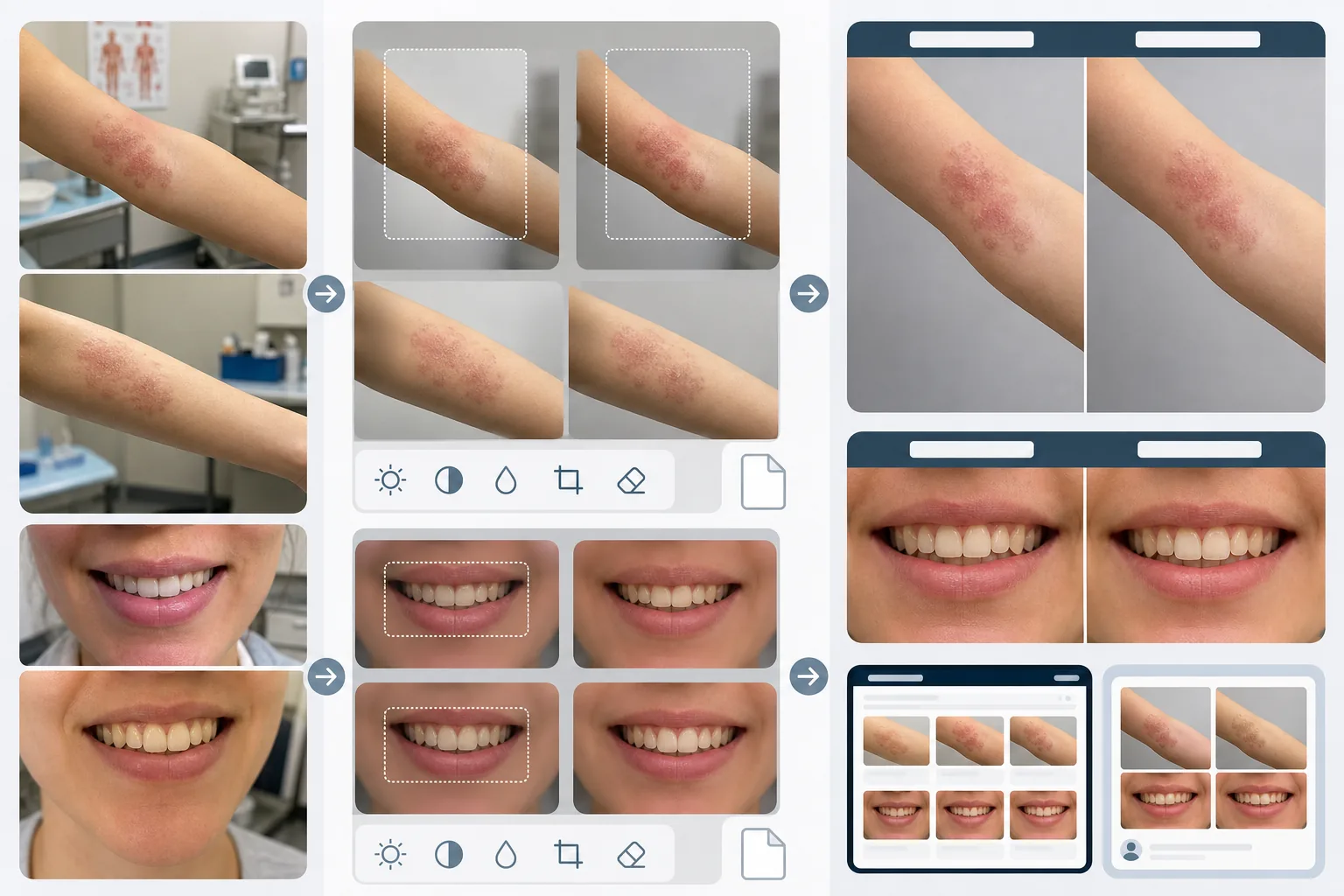
Bu şablon ne yapar
Tıbbi öncesi ve sonrası karşılaştırmaları inandırıcı ve etkileyici kılan görsel tutarlılığı oluşturur. Klinik fotoğrafçılığın en büyük sorunu, öncesi ve sonrası görüntülerin haftalar veya aylar arayla, farklı aydınlatma koşullarında, farklı kameralarla ve bazen farklı odalarda çekilmesidir. AI Enhance, pozlamayı, renk sıcaklığını ve beyaz dengesini her iki görüntüde de normalleştirir; böylece görünür herhangi bir fark, fotoğraftan değil işlemden kaynaklanır. Magic Eraser muayene odası dağınıklığını — tezgahlardaki tıbbi aletleri, duvarlardaki tabloları, arka plandaki ekipman arabalarını — kaldırır ve nötr bir klinik arka planla değiştirir. Gizlilik özellikleri arasında tanımlayıcı işaretlerin otomatik tespiti ve karartılması, belirli vücut bölgelerine kırpma yeteneği ve hasta veri koruması için meta veri temizleme yer alır.
Şablon ayarları
| Aydınlatma normalleştirme | Öncesi/sonrası çifti genelinde pozlamayı, renk sıcaklığını ve beyaz dengesini eşleştirin |
| Arka plan | Klinik nötr gri, temiz beyaz veya mavi cerrahi örtü |
| Gizlilik karartma | Tedavi alanı dışındaki tanımlayıcı özellikleri otomatik bulanıklaştırın |
| Ölçek tutarlılığı | Öncesi ve sonrası görüntüler arasında çerçevelemeyi ve büyütmeyi eşleştirin |
| Meta veri temizleme | HIPAA bilinci için EXIF konum, cihaz ve zaman damgası verilerini kaldırın |
| Çıktı çözünürlüğü | Görüntü başına 2400×1600px (yan yana kompozit 4800×1600px) |
Bu şablon nasıl kullanılır
Öncesi ve sonrası fotoğrafları yükleyin
Öncesi görüntüyü ve karşılık gelen sonrası görüntüyü yükleyin. Şablon, klinik kamera kurulumları, akıllı telefonlar ve kompakt kameralarla çekilen fotoğrafları işler. AI'nın her iki görüntü arasındaki normalleştirme ayarlarını eşleştirebilmesi için bunları çift olarak yükleyin.
Aydınlatmayı ve çerçevelemeyi normalleştirin
AI Enhance, iki görüntü arasındaki pozlamayı, renk sıcaklığını ve beyaz dengesini eşleştirir. Çerçeveleme farklıysa — bir karede daha yakın, diğerinde daha geniş — şablon kırpmayı ayarlar; böylece tedavi alanı her iki görüntüde de aynı ölçek ve konumda olur, adil bir görsel karşılaştırma sağlanır.
Arka planı temizleyin ve gizliliği uygulayın
Magic Eraser muayene odası dağınıklığını kaldırır ve arka planı nötr bir klinik arka planla değiştirir. Gizlilik karartma, tedavi alanı dışındaki tanımlayıcı özellikleri bulanıklaştırır veya kırpar. Konum, cihaz bilgisi ve zaman damgalarını içeren EXIF meta verileri temizlenir.
Klinik pazarlaması için dışa aktarın
Tek tek görüntüleri veya 'Before' ve 'After' etiketli başlıklara sahip yan yana bir kompoziti indirin. Çıktılar web sitesi galerileri, konsültasyon odası ekranları ve sosyal medya için boyutlandırılmıştır. Tutarlı klinik sunum, sonuç galerinizi inceleyen potansiyel hastalar nezdinde güvenilirlik oluşturur.
En iyi sonuçlar için profesyonel ipuçları
- ✓Kliniğinizde sabit aydınlatma ve nötr arka plana sahip tutarlı bir fotoğraf istasyonu kurun. Şablon farklı aydınlatma koşullarını normalleştirebilse de, tutarlı bir kurulumdan başlamak en hassas karşılaştırmayı üretir ve normalleştirme yapaylıkları riskini azaltır.
- ✓Öncesi ve sonrası çekimler için aynı odak uzaklığını ve kamera mesafesini kullanın. Şablon çerçeveleme farklarını ayarlar, ancak farklı lens-özne mesafelerinden kaynaklanan perspektif bozulması, yüz hatlarının veya vücut hatlarının görünüş biçimini ince bir şekilde değiştirebilir; bu da karşılaştırmanın güvenilirliğini zedeleyebilir.
- ✓Görüntüleri işlemeden önce her zaman öncesi ve sonrası fotoğraflama ve amaçlanan kullanımı için hastanın yazılı onayını alın. Şablon gizlilik özellikleri sunar ancak bilgilendirilmiş onam yasal gerekliliğinin yerini almaz.
Araçlar
Sık sorulan sorular
Bu HIPAA uyumlu mu?
+
Şablon, gizlilik bilincine sahip özellikler — meta veri temizleme, tanımlayıcı özellik karartma ve tedavi alanı kırpma — sunar ve bunlar HIPAA uyumluluğunu destekler. Ancak HIPAA uyumluluğu kurumsal bir sorumluluktur. Şablon bir araçtır, bir uyumluluk programı değildir. Kliniğinizin özel gereksinimleri hakkında uyumluluk görevlinize danışın.
Diş hekimliği öncesi ve sonrası fotoğraflarını işleyebilir miyim?
+
Evet. Şablon ağız içi fotoğrafları, gülümseme yakın çekimlerini ve tam yüz diş fotoğrafçılığını işler. Aydınlatma normalleştirme, öncesi görüntünün genellikle muayene odası ışığı altında, sonrası görüntünün ise halka flaşla çekildiği diş fotoğrafları için özellikle değerlidir.
Cilt dokusu farkları doğru bir şekilde korunacak mı?
+
Evet. Normalleştirme, cilt dokusunu pürüzsüzleştirmeden aydınlatmayı ve rengi ayarlar. Bu kritik öneme sahiptir — dermatolojik işlemlerden kaynaklanan cilt dokusu iyileştirmeleri karşılaştırmada görünür olmalıdır. Şablon, tıbbi öncesi ve sonrası görüntülere kasıtlı olarak cilt rötuşu uygulamaz.
Tutarlı klinik fotoğrafçılıkla hasta güveni oluşturun
Öncesi ve sonrası fotoğrafları yükleyin ve klinik pazarlamanız için standartlaştırılmış, gizlilik bilincine sahip karşılaştırma görselleri edinin.
Ücretsiz deneyinRelated templates
More business templates for your workflow.
Tutarlı arka planlara, profesyonel ışık düzeltmesine, markaya uygun renk derecelendirmesine ve ekip genelinde tek tip görüntü kalitesine sahip kurumsal ekip fotoğrafları.
Kas tanımı geliştirme, dinamik aydınlatma düzeltme, arka plan temizleme ve yüksek kontrastlı atletik renk derecelendirme ile spor salonu ve fitness fotoğraflarını geliştirin.
Mürekkep rengi canlılığı, çizgi ayrıntısı keskinleştirme, cilt kızarıklığını azaltma ve sanatçı portföyleri ve Instagram için temiz arka planlar ile dövme portföyü fotoğraflarını geliştirin.
Arka plan değiştirme, cilt yumuşatma ve ışık düzeltme özellikleriyle gösterişli bir özgeçmiş vesikalığı oluşturun. CV'ler, iş portalları ve kurumsal dizinler için idealdir.
Arka plan değiştirme, forma renk geliştirme ve kadrolar ve programlar için stadyum veya stüdyo arka planlarıyla profesyonel takım ve bireysel oyuncu fotoğrafları oluşturun.
Arka plan değiştirme, dramatik aydınlatma geliştirme ve basın kitleri ve mekan gönderimleri için baskıya hazır çıktılar ile profesyonel grup ve müzisyen tanıtım fotoğrafları oluşturun.