
Dövme Portföyü Fotoğrafı
Dövme çalışmanızı, yeni müşteriler çeken ayrıntı ve renk doğruluğuyla sergileyin. Bu şablon mürekkep doygunluğunu ve çizgi netliğini artırır, seans sonrası cilt kızarıklığını ve şişliğini azaltır, gerçek mürekkep renkleri için stüdyo ışığını düzeltir ve eserin kendini anlatmasına izin veren temiz portföy sunumları oluşturur.
Bu şablonu ücretsiz deneyinBusiness template preview
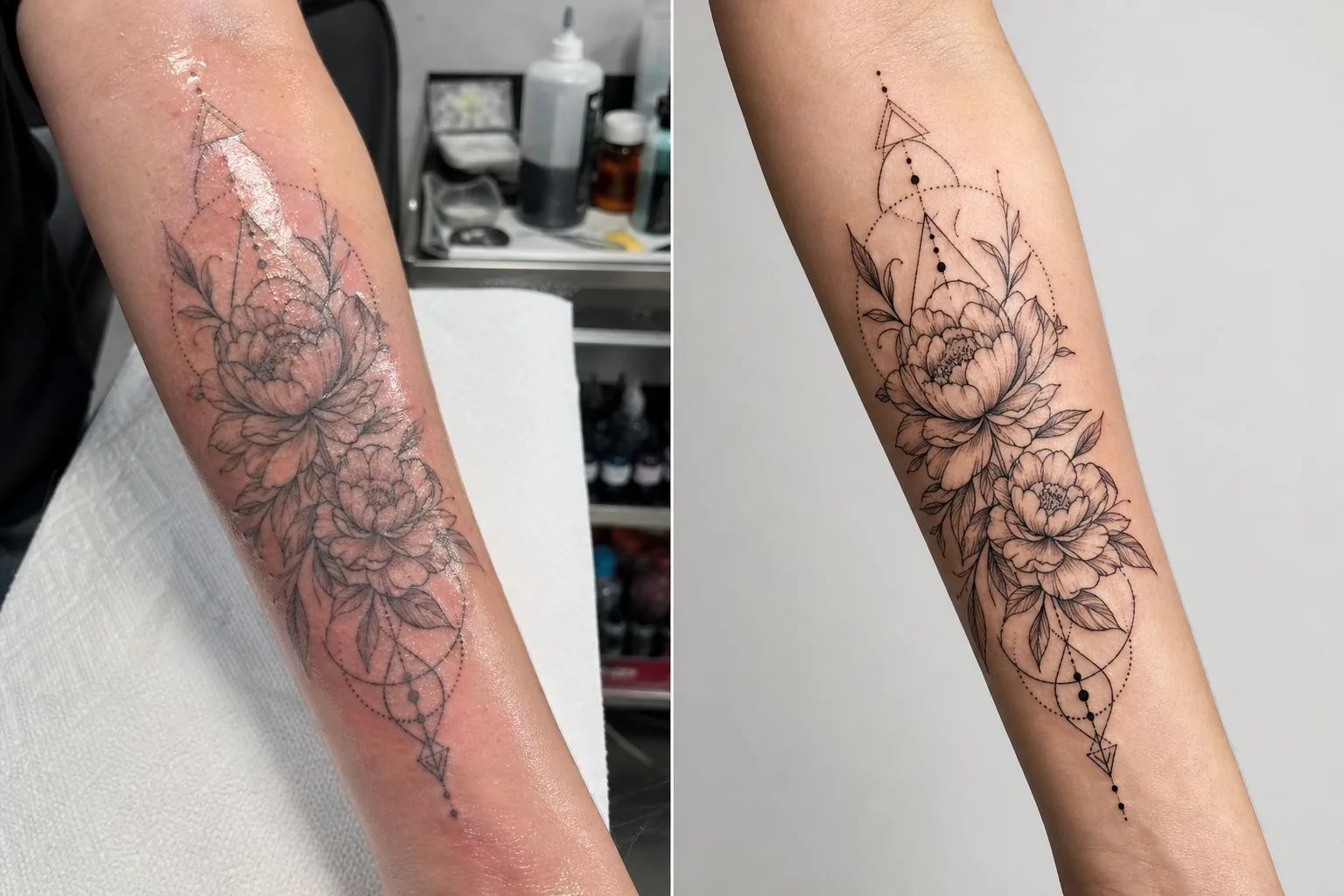
Bu şablon ne yapar
Dövme sanatçılarının çalışmalarını belgelerken karşılaştığı belirli fotoğraf zorluklarını ele alır. Yeni dövmeler, karışık aydınlatmalı stüdyo koşullarında çekilir ve yeni mürekkebin etrafındaki cilt kırmızı, şişmiş ve fazla mürekkep ile merhemle kaplıdır — bunların hiçbiri nihai iyileşmiş sonucu temsil etmez. Bu şablon, mürekkep renklerinin iyileştiğinde görüneceği gibi görünmesi için aydınlatmayı düzeltmek üzere AI Enhance kullanır, ince çizgi işçiliğini ve dotwork ayrıntısını keskinleştirir ve yeni dövmelerin etrafındaki kızarıklığı ve şişliği azaltır. Magic Eraser, dövme istasyonunun arka planındaki dağınıklığı — mürekkep şişeleri, kâğıt havlular, eldivenler ve ekipman dahil — kaldırarak dikkati tamamen esere yönlendiren temiz bir arka plan oluşturur.
Şablon ayarları
| Mürekkep geliştirme | Siyah, renkli ve suluboya dövme stilleri için renk doygunluğu artışı |
| Çizgi keskinleştirme | İnce çizgi ve dotwork mikro-ayrıntı geliştirme |
| Cilt düzeltme | Yeni dövmelerin etrafındaki kızarıklığı, şişliği ve merhem parlaklığını azaltın |
| Aydınlatma düzeltme | Gerçek mürekkep renkleri için karışık stüdyo aydınlatmasını nötr gün ışığına düzeltin |
| Arka plan | Temiz düz veya bulanık arka plan (istasyon dağınıklığını kaldırır) |
| Çıktı boyutları | 2000 × 2000 px (Instagram kare) veya portföy baskısı için 4000px |
Bu şablon nasıl kullanılır
Dövme fotoğrafınızı yükleyin
Tamamlanmış dövmenin bir fotoğrafını — yeni veya iyileşmiş — yükleyin. Perspektif bozulmasını en aza indirmek için dövmeyi tam karşıdan çekin. Şablon, yakın çekim ayrıntı kareleri, tüm eserin genel kareleri ve kollar, bacaklar ve kaburgalar gibi eğri vücut yüzeylerindeki sarmalayan kompozisyonları işler.
Mürekkep ve çizgi geliştirme
AI Enhance, mürekkep doygunluğunu artırır; böylece siyah dövmeler derin ve zengin görünürken renkli dövmeler tüm canlılığını gösterir. İnce çizgiler, dotwork ve geometrik desenler, iğne işçiliğinizin hassasiyetini göstermek için keskinleştirilir. Geliştirme farklı dövme stillerine saygı gösterir — kalın geleneksel, ince çizgi, suluboya ve blackwork her biri uygun işlemi alır.
Cilt ve arka plan düzeltme
Yeni dövmeler için, mürekkebin etrafındaki kızarıklık ve şişlik iyileşmiş görünüme yaklaşmak üzere azaltılır. Merhem parlaklığı ve çevredeki ciltteki fazla mürekkep yumuşatılır. Magic Eraser, dövme istasyonu arka planını — mürekkep kapları, kâğıt havlular, eldivenler ve ekipman — kaldırarak temiz bir arka planla değiştirir.
Portföy ve sosyal medya için dışa aktarın
Instagram portföy gönderileri için 2000 × 2000 px kare olarak veya web sitesi portföyleri ve basılı lookbook'lar için uzun kenarı 4000px olarak indirin. Renk profili, suluboya ve neo-geleneksel stillerdeki ince ton farklılıkları dahil dövme mürekkebi renklerinin tüm yelpazesini korur.
En iyi sonuçlar için profesyonel ipuçları
- ✓Dövmeyi sabit bir açıdan gün ışığı dengeli bir ışık altında (5000–5500K) çekin. Bu, şablona çalışacağı en doğru renk verilerini sağlar. Sıcak tungsten ışıkları mürekkebi daha sarı-turuncu gösterir ve düzeltme, etkili olsa da, nötr aydınlatmadan başlandığında daha iyi sonuçlar verir.
- ✓Çekimden önce cilt yüzeyindeki fazla mürekkebi ve merhemi silin. Şablon merhem parlaklığını azaltır, ancak temiz, tampon ile kurulanmış bir yüzey mürekkep işçiliğini daha net gösterir ve daha iyi bir geliştirilmiş sonuç üretir.
- ✓Mümkün olduğunda aynı dövmenin hem yeni hem de iyileşmiş versiyonlarını çekin. Şablonla işlenen yeni fotoğraf size anında portföy içeriği verir ve iyileşmiş fotoğraf gerçek yerleşmiş sonucu doğrular. Portföyünüzdeki her iki versiyon profesyonelliği gösterir.
- ✓Uzuvları saran büyük eserler için, tüm eserin genel görünümüne ek olarak birden çok örtüşen ayrıntı karesi çekin. Şablon, geniş genel karelerde kaybolan ayrıntıları keskinleştirir ve öne çıkan öğelerin yakın çekimleri etkileyici bireysel portföy gönderileri oluşturur.
Araçlar
Sık sorulan sorular
Bu, yeni bir dövmeyi iyileşmiş gibi gösterebilir mi?
+
Şablon, iyileşmiş görünüme yaklaşmak için kızarıklığı ve şişliği azaltır, ancak sonuç bir geliştirmedir, iyileşmenin kusursuz bir tahmini değildir. Bireysel iyileşme cilt tipine, mürekkep tipine ve vücuttaki konuma göre değişir. Geliştirilmiş yeni fotoğraf iyileşmişe yakın görünecek ancak gerçek iyileşmiş sonuçla aynı olmayabilir.
Bu, tüm dövme stilleri için işe yarar mı?
+
Evet. Şablon kalın geleneksel, Japon, ince çizgi, dotwork, geometrik, suluboya, neo-geleneksel, blackwork ve gerçekçi portre stillerini tanır ve uygun şekilde geliştirir. Her stil, o estetik için en iyi görünene göre ayarlanmış farklı keskinleştirme ve renk işlemi alır.
Kapatma dövmeleri ne olacak?
+
Kapatma dövmeleri diğer dövmeler gibi işlenir. Şablon görünen mürekkebi, yani kapatma tasarımını geliştirir. Öncesini ve sonrasını (orijinal ile kapatma) göstermek istiyorsanız, en tutarlı portföy sunumu için her fotoğrafı ayrı ayrı işleyin.
Koltuğunuzu randevularla dolduran bir portföy
Dövme fotoğraflarını yükleyin ve sanatınızı sergileyen, yeni müşteriler çeken ayrıntı keskinliğinde, renk doğruluğunda portföy görüntüleri elde edin.
Ücretsiz deneyinRelated templates
More business templates for your workflow.
Tutarlı arka planlara, profesyonel ışık düzeltmesine, markaya uygun renk derecelendirmesine ve ekip genelinde tek tip görüntü kalitesine sahip kurumsal ekip fotoğrafları.
Kas tanımı geliştirme, dinamik aydınlatma düzeltme, arka plan temizleme ve yüksek kontrastlı atletik renk derecelendirme ile spor salonu ve fitness fotoğraflarını geliştirin.
Arka plan değiştirme, cilt yumuşatma ve ışık düzeltme özellikleriyle gösterişli bir özgeçmiş vesikalığı oluşturun. CV'ler, iş portalları ve kurumsal dizinler için idealdir.
Arka plan değiştirme, forma renk geliştirme ve kadrolar ve programlar için stadyum veya stüdyo arka planlarıyla profesyonel takım ve bireysel oyuncu fotoğrafları oluşturun.
Arka plan değiştirme, dramatik aydınlatma geliştirme ve basın kitleri ve mekan gönderimleri için baskıya hazır çıktılar ile profesyonel grup ve müzisyen tanıtım fotoğrafları oluşturun.
Instagram portföyleri ve rezervasyon sayfaları için makro düzeyde ayrıntı geliştirme, gerçek jel ve cila renk doğruluğu ve temiz el konumlandırma özellikleriyle tırnak sanatını sergileyin.