
Kurumsal Ekip Fotoğrafı
Pahalı bir fotoğrafçı olmadan ekip sayfanıza profesyonel ve tutarlı bir görünüm kazandırın. Bu şablon, bireysel vesikalık fotoğraflardaki arka planları standartlaştırır, karışık ofis ışığını nötr profesyonel tonlara düzeltir, ince bir cilt pürüzsüzleştirme uygular ve her ekip üyesinin fotoğrafının aynı stile ve kaliteye sahip olmasını sağlar.
Bu şablonu ücretsiz deneyinBusiness template preview
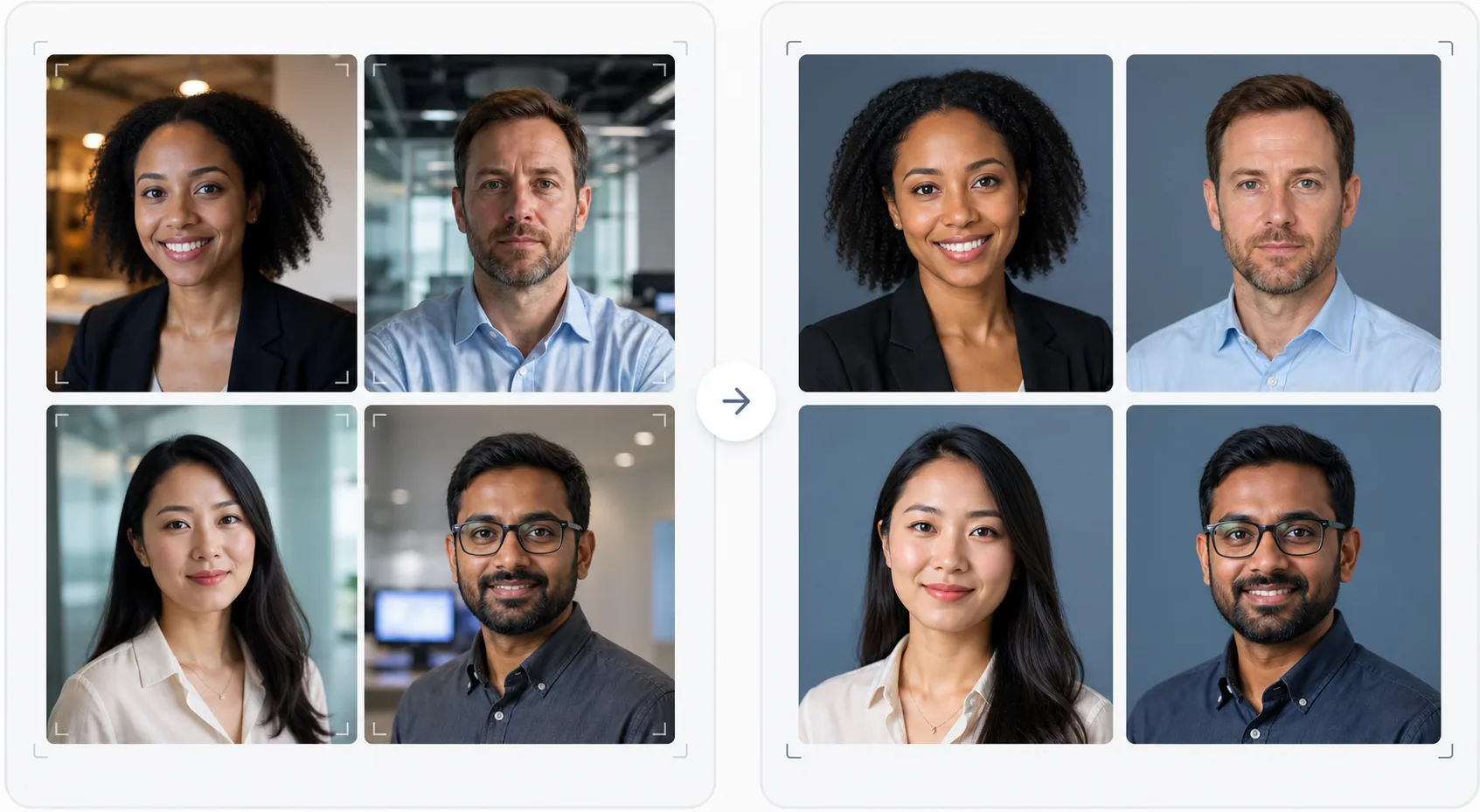
Bu şablon ne yapar
Şirket web siteleri, LinkedIn şirket sayfaları ve pazarlama materyalleri için görsel olarak tutarlı ekip fotoğrafları oluşturur. Ekip vesikalıkları farklı zamanlarda, farklı kişiler tarafından, farklı kameralarla çekildiğinde sonuç, profesyonel görünmeyen uyumsuz bir ekip sayfası olur. Bu şablon, tüm vesikalıklarda arka planları, renk sıcaklığını, ışık stilini ve kırpma çerçevelemesini standartlaştırarak bunu çözer. Background Eraser çeşitli ofis arka planlarını kaldırır ve bunları marka renginizde tutarlı bir düz veya gradyan arka planla değiştirir. AI Enhance pozlamayı normalleştirir, ofis floresan ışıklarından gelen yeşil tonu düzeltir ve her ekip üyesinin özenli ve profesyonel görünmesi için ince bir cilt pürüzsüzleştirme uygular.
Şablon ayarları
| Arka plan | Tutarlı düz renk, gradyan veya ofis bulanıklığı (markaya göre yapılandırılabilir) |
| Kırpma çerçevelemesi | Baş ve omuzlar, ortalanmış, tüm ekip fotoğraflarında tutarlı |
| Işık normalleştirme | Nötr profesyonel (floresan, LED ve pencere ışığı karışımını düzeltir) |
| Cilt iyileştirme | İnce leke azaltma ve göz altı düzeltmesi |
| Çıktı boyutları | 800 × 800 px (web ekip sayfası) ve 400 × 400 px (dizin) |
Bu şablon nasıl kullanılır
Ekip üyesi fotoğraflarını yükleyin
Ekip üyelerinin vesikalık fotoğraflarını yükleyin — bunlar farklı kameralardan, konumlardan ve zaman dilimlerinden olabilir. Şablon, profesyonel portrelerden masada çekilen akıllı telefon selfielerine kadar her şeyi yönetir. Verimli işlem için tüm ekibi toplu olarak yükleyin.
Arka planları standartlaştırın
Background Eraser her fotoğrafın orijinal arka planını kaldırır ve tüm ekip üyelerinde tutarlı bir seçenekle değiştirir. Düz marka renkleri, profesyonel gradyanlar veya standartlaştırılmış bir ofis bulanıklığı efekti arasından seçim yapın. Tüm fotoğraflar görsel tutarlılık için aynı arka plan işlemini alır.
Işığı normalleştirin ve iyileştirin
AI Enhance her fotoğrafın ışığını tutarlı, nötr ve profesyonel bir tona düzeltir. Yeşil floresan tonları, sıcak akkor tonları ve karışık ışık hepsi düzeltilir. İnce cilt pürüzsüzleştirme lekeleri ve göz altı halkalarını azaltır. Gözler, ilgili ve sıcak bir görünüm yaratmak için hafifçe aydınlatılır.
Web ve dizin için dışa aktarın
Web sitesi ekip sayfaları için 800 × 800 px ve dahili dizinler ile e-posta imzaları için 400 × 400 px boyutunda tüm seti indirin. Tüm görüntüler, CMS'nize kolay toplu yükleme için aynı renk profili, sıkıştırma ve dosya adlandırma kuralıyla dışa aktarılır.
En iyi sonuçlar için profesyonel ipuçları
- ✓Ekip üyelerine basit bir fotoğraf brifingi gönderin: doğrudan kameraya bakın, arka planla kontrast oluşturan düz renkli bir üst giyin, yüzde iyi bir aydınlatma sağlayın (mümkünse pencereye dönün) ve hafif bir gülümsemeyle ifadeyi doğal tutun. Daha iyi kaynak fotoğraflar daha az yapay zeka düzeltmesi gerektirir.
- ✓Marka kılavuzlarınızda yer alan bir arka plan rengi seçin — genellikle nötr bir gri, lacivert veya markanızın ikincil rengi. Bu, ekip sayfasını yalnızca bir fotoğraf koleksiyonu yerine bir marka varlığına dönüştürür.
- ✓Yeni ekip üyelerini katıldıkça aynı ayarları kullanarak şablon üzerinden işleyin. Bu, ekip büyüyüp değişse bile zaman içinde görsel tutarlılığı korur.
- ✓Üst düzey yöneticiler ve liderlik için, liderliği daha geniş ekipten görsel olarak ayırt etmek amacıyla aynı arka plan ve stili korurken biraz farklı bir çerçeveleme (daha sıkı kırpma, biraz daha sıcak ton) düşünün.
Araçlar
Sık sorulan sorular
Tüm ekibi bir kerede işleyebilir miyim?
+
Evet. Tüm ekip üyesi fotoğraflarını tek bir toplu işlemde yükleyin. Şablon her görüntüye aynı arka planı, ışık düzeltmesini ve çerçevelemeyi uygulayarak kusursuz tutarlılık sağlar. Fotoğraflar eşleşen boyutlar, sıkıştırma ve renk profilleriyle döndürülür.
Ekip üyelerinin fotoğraf kalitesi çok farklıysa ne olur?
+
Şablon, keskinliği, gürültü azaltmayı ve sıkıştırmayı ayarlayarak akıllı telefon selfieleri ile DSLR portreleri arasındaki kalite farklarını normalleştirir. Bir DSLR kaynağı her zaman biraz daha keskin bir sonuç üretse de, işlenmiş çıktılar görsel olarak yeterince tutarlıdır ve kalite farkları bir web sitesi ızgarasında belirgin olmaz.
Bu, uzaktan çalışan ekipler için işe yarar mı?
+
Bu, yüz yüze fotoğraf çekiminin pratik olmadığı uzaktan çalışan ekipler için ideal kullanım örneğidir. Her ekip üyesi evde bir selfie çeker veya birine fotoğrafını çektirir ve şablon, hepsini aynı stüdyo seansında çekilmiş gibi görünecek şekilde standartlaştırır.
Fotoğraf çekimi olmadan profesyonel bir ekip sayfası
Herhangi bir kaynaktan bireysel vesikalık fotoğraflar yükleyin ve web siteniz için hazır, görsel olarak tutarlı ve markayla uyumlu bir ekip fotoğrafı seti elde edin.
Ücretsiz deneyinRelated templates
More business templates for your workflow.
Kas tanımı geliştirme, dinamik aydınlatma düzeltme, arka plan temizleme ve yüksek kontrastlı atletik renk derecelendirme ile spor salonu ve fitness fotoğraflarını geliştirin.
Mürekkep rengi canlılığı, çizgi ayrıntısı keskinleştirme, cilt kızarıklığını azaltma ve sanatçı portföyleri ve Instagram için temiz arka planlar ile dövme portföyü fotoğraflarını geliştirin.
Arka plan değiştirme, cilt yumuşatma ve ışık düzeltme özellikleriyle gösterişli bir özgeçmiş vesikalığı oluşturun. CV'ler, iş portalları ve kurumsal dizinler için idealdir.
Arka plan değiştirme, forma renk geliştirme ve kadrolar ve programlar için stadyum veya stüdyo arka planlarıyla profesyonel takım ve bireysel oyuncu fotoğrafları oluşturun.
Arka plan değiştirme, dramatik aydınlatma geliştirme ve basın kitleri ve mekan gönderimleri için baskıya hazır çıktılar ile profesyonel grup ve müzisyen tanıtım fotoğrafları oluşturun.
Instagram portföyleri ve rezervasyon sayfaları için makro düzeyde ayrıntı geliştirme, gerçek jel ve cila renk doğruluğu ve temiz el konumlandırma özellikleriyle tırnak sanatını sergileyin.