
Posta kutularını fotoğraflardan kaldırma
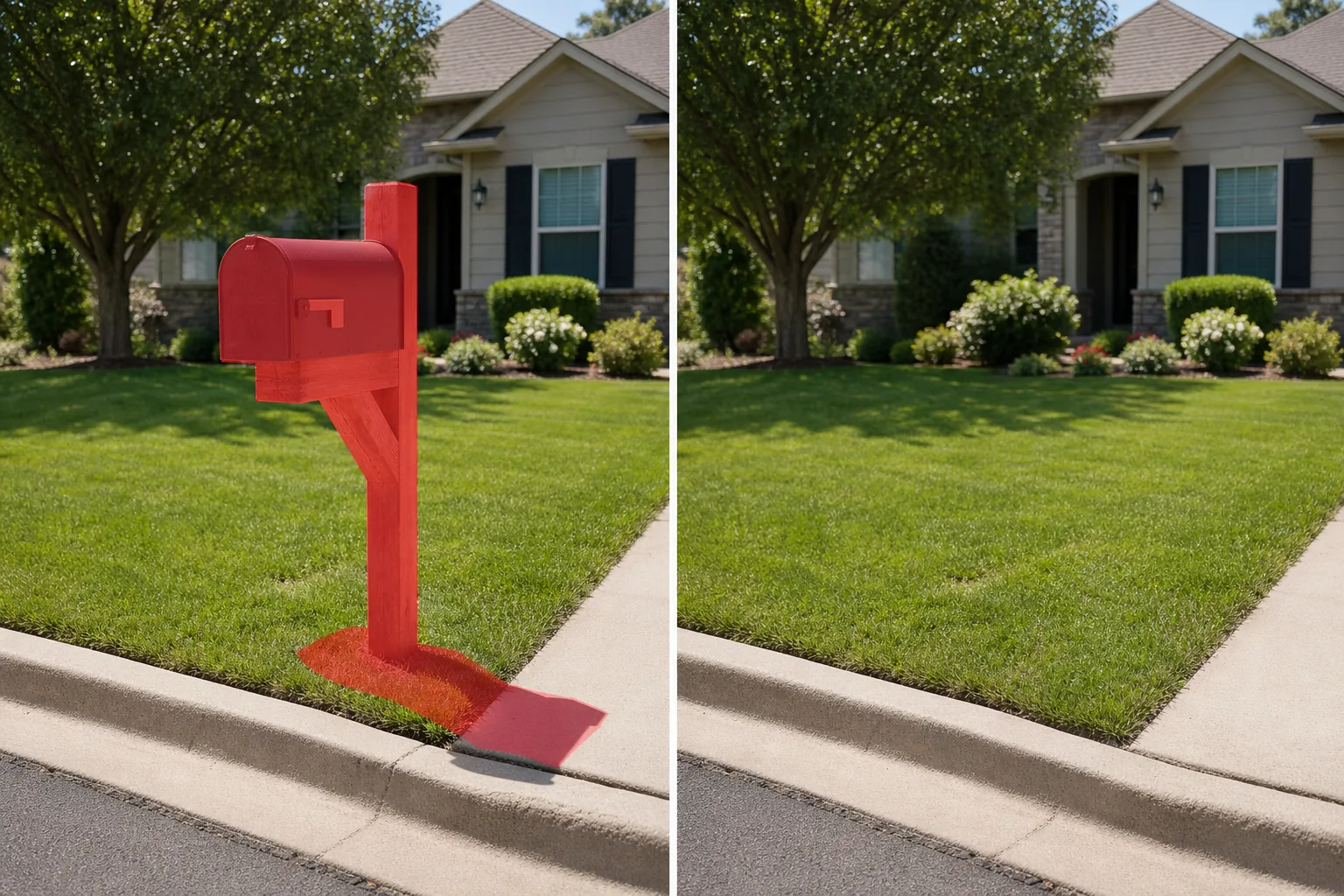
Kaldırım kenarındaki çukurlu bir posta kutusu, emlak listenizin ön bahçe görüntüsünü sabitliyor. Parlak mavi bir USPS toplama kutusu, fotoğrafını çektiğiniz mağazanın önündeki kaldırıma hakimdir. Bir direk üzerindeki bir grup apartman posta kutusu, temiz sokak manzarası kompozisyonunu kesintiye uğratıyor. Magic Eraser posta kutularını, posta kutularını, grup kutusu ünitelerini ve mektup yuvalarını kaldırır ve ardından sahnenin doğal olarak engelsiz görünmesi için arkalarındaki çimleri, kaldırımları, kaldırımları, duvarları veya çitleri yeniden oluşturur.
Son güncelleme
Posta kutuları neden istemediğiniz yerlerde görünmeye devam ediyor?
Posta kutuları, emlak fotoğrafçılarının, mimari fotoğrafçıların ve sokak fotoğrafçılarının en sık çerçevelediği bölge olan mülk ile sokak arasındaki sınırda bulunur. Kaldırım kenarındaki bir konut posta kutusu, garaj yolunun sonunda, USPS yönetmeliklerine göre tipik olarak 42 ila 48 inç yüksekliğinde, ön bahçe kompozisyonunun görsel bağlantı noktasında konumlandırılmış olarak duruyor. Bir ilan fotoğrafını soldan sağa tararken göze çarpan ilk şey budur çünkü mülkün yolla buluştuğu çimenliğin kenarında yer alır. Apartman ve apartman kompleksleri, 3 ila 4 fit genişliğinde olabilen ve binanın önündeki cadde manzarasına hakim olabilen küme kutusu ünitelerini (CBU'lar) (direkler üzerinde büyük metal dolaplar) kullanır. Ticari bölgelerin kaldırımlarında parlak mavi USPS toplama kutuları ve İngiliz sokak sahnelerinde kırmızı Royal Mail sütun kutuları bulunur; her ikisi de oldukça görünür olacak şekilde tasarlanmıştır (işte mesele bu; posta servisi onları bulmanızı istiyor), bu da bunların, yanlarında çekilen her fotoğrafta da oldukça görünür oldukları anlamına geliyor. Emlak ilanı fotoğrafçılığı için posta kutusu karışık bir sinyaldir: teknik olarak mülkün bir parçasıdır, ancak kompozisyona hiçbir estetik değer katmayan faydacı bir nesnedir. Aşınmış, çökmüş veya paslanmış bir posta kutusu, çekiciliği azaltan çekimleri aktif olarak azaltır. Yeni bir dekoratif posta kutusu bile dikkat çekmek için evin kendisiyle yarışıyor. Photoshop'ta manuel kaldırma, posta kutusunun engellediği her şeyin yeniden yapılandırılmasını gerektirir (çoğunlukla çim çimen, araba yolu kenarı, kaldırım betonu ve arka plan düzenlemesi karışımı) ve bu da 10 ila 20 dakikalık dikkatli bir klonlama-damga çalışması gerektirir. Magic Eraser, posta kutusunu ayrı bir nesne olarak tanımlayarak, kaldırarak ve görünür bağlamı referans olarak kullanarak boşluğu çevredeki çim dokusu, kaldırım yüzeyi, kaldırım malzemesi veya duvar kaplamasıyla doldurarak posta kutusunun kaldırılmasını saniyeler içinde gerçekleştirir.
Posta kutularını üç adımda kaldırın
- 1
Fotoğrafınızı yükleyin
Web, iOS veya Android'de Magic Eraser uygulamasını açın ve kaldırmak istediğiniz posta kutusunu içeren emlak ilanı fotoğrafını, sokak manzarasını, mimari çekimi veya seyahat fotoğrafını yükleyin. JPEG, PNG, HEIC ve WebP'nin tümü desteklenir.
- 2
Posta kutusunun üzerini fırçalayın
Direği, montaj braketi, gazete tutucusu (aşağıya takılıysa), bayrak kolu ve yere düşürdüğü gölge dahil olmak üzere posta kutusunun tamamını boyayın. Kaldırım kenarındaki posta kutuları için, direğin tabanından kutunun üstüne kadar fırçalayın. Bina cephelerindeki duvara monte mektup yuvaları ve posta kutuları için, kutuyu ve görünür montaj donanımlarını fırçalayın. Apartman komplekslerindeki küme kutusu üniteleri için, kabinin tamamını ve destek direklerini fırçalayın. Gölgeyi fırça bölgenize dahil etmek, çimlerde veya kaldırımda koyu renkli bir ayak izinin kalmasını önler.
- 3
Sil ve incele
Magic Eraser posta kutusunu kaldırır ve arkasındaki sahneyi yeniden oluşturur: çimenlik alan, araba yolu kenarı, kaldırım, kaldırım, çit veya bina duvarı. %100'e yakınlaştırın ve zemin dokusunun direğin bulunduğu alan boyunca doğal bir şekilde akıp akmadığını kontrol edin. Posta kutusu bir arka plan elemanının (bir çit, bir çit rayı, garaj yolundaki bir araba) kısmen üzerine biniyorsa, bu örtüşme bölgesinde herhangi bir kusur olup olmadığını inceleyin ve gerekirse hızlı bir ikinci geçiş yapın. Listelemeniz, portföyünüz veya sosyal medya yayınınız için tam çözünürlükte dışa aktarın.
Şunun için en iyisi:
- Kaldırım kenarındaki aşınmış veya uyumsuz bir posta kutusunun kaldırım çekiciliğini azalttığı emlak listeleme ön bahçe çekimleri
- Faydacı bir posta kutusunun temiz cephe kompozisyonunu bozduğu mimari fotoğrafçılık
- USPS toplama kutularının veya sütun kutularının kaldırıma hakim olduğu sokak ve şehir fotoğrafçılığı
- Grup kutusu birimlerinin (CBU'lar) sokak manzarasını karmaşıklaştırdığı apartman ve apartman kompleksi dış cepheleri
- Posta kutusunun gizlilik amacıyla mülk adresini gösterdiği fotoğrafların listelendiği kiralık yer (Airbnb/Vrbo)
- Kaldırımdaki bir posta kutusunun iş girişiyle rekabet ettiği mağaza vitrini ve ticari fotoğrafçılık
- Posta kutularının görsel olarak dikkati dağıttığı yerleşim bölgelerinde seyahat fotoğrafçılığı
- Posta kutusunun görünür bir ev numarası veya adresi gösterdiği, gizlilik bilincine sahip sosyal medya gönderileri
Doğal görünümlü posta kutusunun kaldırılmasına yönelik ipuçları
Posta kutusu nispeten sürekli bir arka plana (çimen, kaldırım, kaldırım veya duvar) karşı duran bağımsız bir nesne olduğundan, posta kutusunun kaldırılması kolaydır. Ana husus direk deliğidir. Zemine bir posta kutusu direği yerleştirildiğinde (standart kurulum), AI, direğin ayak izini çevredeki zemin dokusuyla doldurur. Biçilmiş çimlerde bu sorunsuzdur. Posta kutusu tabanının etrafındaki çakıl, malç yatakları veya dekoratif taş bordürlerde, gönderinin ötesine cömert bir kenar boşluğu bırakın, böylece yapay zekanın, uyumsuz dokudan küçük bir parça bırakmak yerine sınır malzemesini yeniden yapılandırmak için yeterli referansı olur. Bina cephelerindeki duvara monte posta kutuları için, montaj vidaları veya braket delikleri çıkarıldıktan sonra görünmez; AI duvar yüzeyini doldurur - ancak posta kutusu girintili bir oyukta veya özel bir rafta duruyorsa girintinin tamamını doldurmak için oyuk sınırını da fırçalayın. Apartman komplekslerindeki küme kutu üniteleri için bunlar büyük nesnelerdir (3-4 feet genişliğinde) ve dolgu alanı da orantılı olarak büyüktür. Yapay zeka arka planı (genellikle bir kaldırım, peyzaj alanı veya park alanı) doldurur ve arka plan çok karmaşık olmadığı sürece sonuçlar temizdir. Bir gizlilik notu: Bir posta kutusunun kaldırılması, üzerinde görüntülenen tüm görünür ev numaralarını veya adreslerini de kaldırır; bu, sahibinin tam konumu gizlemek istediği sosyal medya gönderileri veya kiralık listeler için tercih edilebilir.
Sık sorulan sorular
- Bir fotoğraftan posta kutusunu kaldırmak ücretsiz midir?
- Evet. Magic Eraser'nin ücretsiz katmanı, posta kutusunun kaldırılmasını günlük kullanım limitleriyle gerçekleştirir. Premium (yılda 29,99 ABD doları), sınırları kaldırır ve MLS listeleri, baskı portföyleri ve pazarlama materyalleri için daha yüksek çözünürlüklü dışa aktarmaların kilidini açar.
- Büyük bir grup posta kutusu birimini bir apartman fotoğrafından kaldırabilir miyim?
- Evet. Destek direkleri, üzerine oturduğu beton ped (görünüyorsa) ve gölgesi de dahil olmak üzere tüm küme kutusu ünitesini fırçalayın. Yapay zeka, alanı çevredeki zemin ve arka planla doldurur. CBU'lar büyük nesneler olduğundan, doldurma alanı kaldırım kenarındaki tek bir posta kutusundan daha büyüktür; sonuçlar, CBU'nun arkasındaki arka planın oldukça ayrıntılı olmaktan ziyade nispeten tekdüze olduğu (kaldırım, çim, otopark) olduğunda en iyi sonucu verir.
- Posta kutusu postasının olduğu yerde çim doğal görünecek mi?
- Standart biçilmiş çimlerde evet; yapay zeka, çim dokusunu direk ayak izi boyunca kusursuz bir şekilde genişletiyor. Posta kutusu malç yatağında, çakıl kenarlığında veya dekoratif taşla çevrelenmişse, direk tabanının ötesinde geniş bir alanı fırçalayın, böylece AI eşleşmeyen küçük bir yama oluşturmak yerine zemin kaplamasını yeniden yapılandırmak için yeterli çevre malzemesine sahip olur.
- İlan fotoğrafından posta kutusunun kaldırılması mülkü yanlış tanıtıyor mu?
- Posta kutusu, mülkün yapısal bir özelliği değil, çıkarılabilir, değiştirilebilir bir yardımcı donanımdır. Bunu bir liste fotoğrafından kaldırmak, çekimden önce çöp kutularını çerçevenin dışına çıkarmakla karşılaştırılabilecek standart kaldırım çekici rötuştur. Evin durumunu, metrekaresini veya arsa özelliklerini yanlış yansıtmaz. Posta kutusu özel bir mimari öğeyse (örneğin, evin duvarına uyan taş sütunlu bir posta kutusu), onu kaldırmak yerine bir tasarım özelliği olarak tutmak isteyebilirsiniz.
- Posta kutusunu kaldırabilir miyim ama ev numaralarını görünür tutabilir miyim?
- Ev numaraları yalnızca posta kutusunda görüntüleniyorsa, posta kutusunun kaldırılması numaraları da kaldırır. Numaralar evin kendisinde, ön kapıda veya ayrı bir adres plakasındaysa bunlara dokunulmaz; yalnızca fırçalanmış alan etkilenir. Görünür ev numaralarına ihtiyaç duyan listeler için, adres plakasını (yakına monte edilmiş ayrı bir öğe ise) fırça bölgesinin dışında bırakarak yalnızca posta kutusu gövdesini ve postayı fırçalamayı düşünün.