
Fotoğraflardan dağınıklığı kaldırın
Çekimi yeniden düzenlemeye gerek kalmadan listelenmiş fotoğrafları, emlak odalarını, ürün düz yerleşimlerini ve içerik oluşturucu arka planlarını temizleyin. Magic Eraser'ün yapay zekası kabloları, evrakları, paket paketlerini, örtüleri ve başıboş nesneleri kaldırır ve ardından bunların arkasındaki yüzeyleri yeniden oluşturur; manuel klonlama veya Photoshop gerektirmez.
Son güncelleme
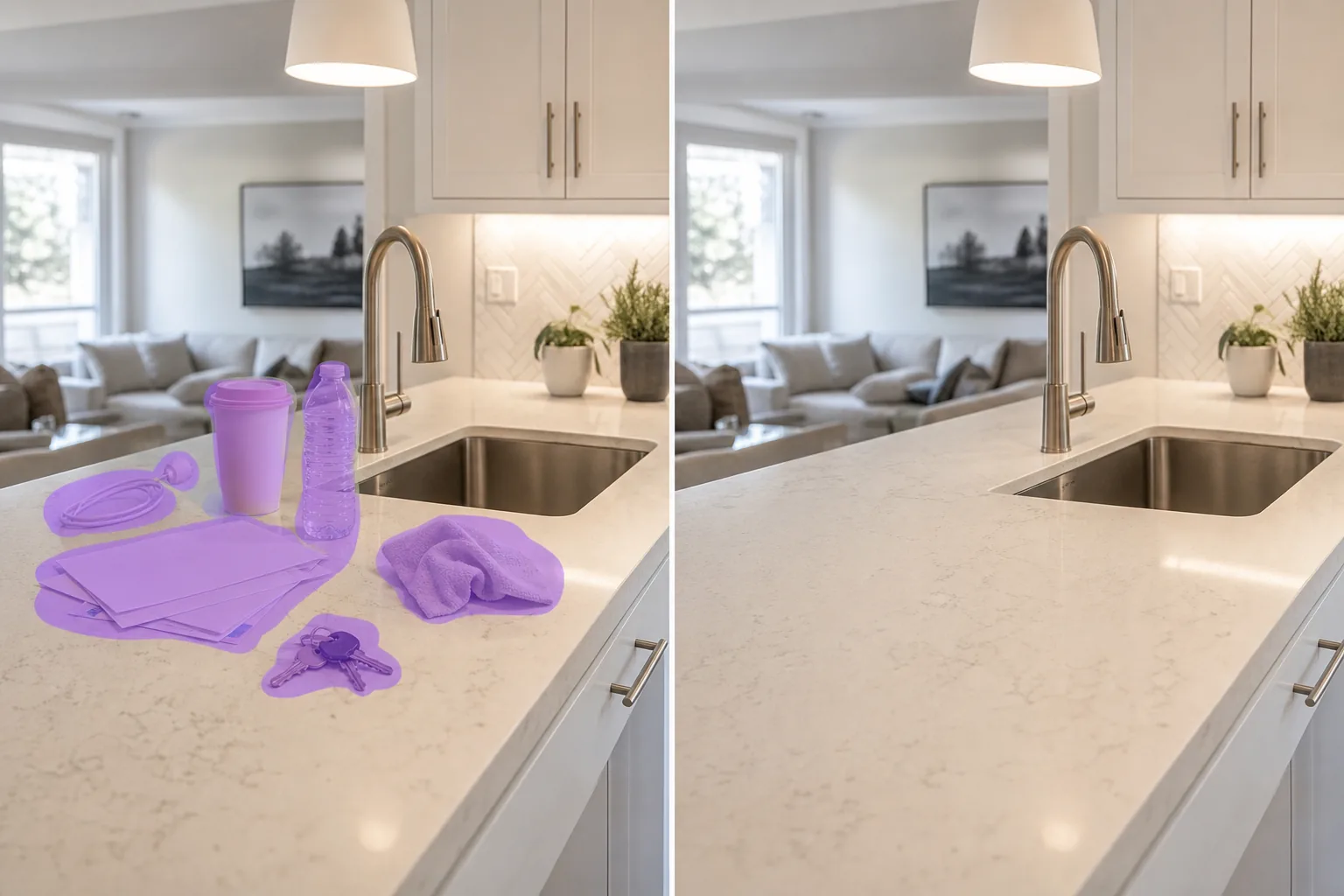
Dağınıklığı gidermek neden yüksek yatırım getirisi sağlayan bir düzenlemedir?
Dağınıklık, bir fotoğrafın amatör olarak okunmasının en yaygın nedenidir. Emlak listeleri, posta ve aletlerle kaplı mutfak tezgahlarını gösteriyor; Etsy, sızıntı kablolarını ve ambalajlarını çerçevenin köşesine düz bir şekilde yerleştirir; restoran menü fotoğraflarında yemekle yarışan tuzluklar ve ketçap şişeleri var; yüklenici portföy çekimleri, normalde bitmiş bir odanın kenarındaki örtüleri ve boyacı bantlarını gösteriyor. Altta yatan sahne genellikle iyidir; dağınıklık, alıcıya veya tarayıcıya geçmişe gitmesini söyleyen şeydir. Yapay zeka ile fotoğrafların dağınıklığının giderilmesi önemli bir noktada: Yapılması kolay, hızlı (çoğu fotoğraf için 90 saniyenin altında) ve Etsy satıcılarından, emlakçılardan ve yemek dağıtım menülerinden alınan önceki/sonraki verilere göre, editör süresi boyunca dakika başına en yüksek yatırım getirisi düzenlemelerinden biri. Orada olmaması gereken şeyleri fırçalayın. Model, arkasındaki yüzeyi yeniden oluşturur.
Fotoğrafları üç adımda düzenleyin
- 1
Fotoğrafınızı yükleyin
Web'de, iOS'ta veya Android'de Magic Eraser'yi açın. Dağınıklığın konuyla rekabet ettiği listeyi, odayı veya ürün fotoğrafını bırakın. JPEG, PNG, HEIC ve WebP'nin tümü desteklenir.
- 2
Dağınıklığın üzerini fırçalayın
Gitmesini istediğiniz nesnelerin üzerini boyayın: kablolar, kağıtlar, paket kutuları, bezler, ambalajlar, çerçevenin kenarındaki çocuk oyuncakları, posta yığınları, şarj blokları, plastik şişeler. Fırça konusunda cömert olun; nesneden biraz daha büyük bir seçim, yapay zekaya dar bir çerçeveden daha temiz kenarlar sağlar.
- 3
Sil ve hassaslaştır'a dokunun
Yapay zeka, tezgahı, zemini, masayı veya altındaki rafı saniyeler içinde yeniden inşa ediyor. Sonucu inceleyin. Rötuş fırçasıyla görünür herhangi bir ek yerinde ikinci bir geçiş yapın, ardından listeleme platformu veya portföy için tam çözünürlükte dışa aktarın.
Şunun için en iyisi:
- Mutfak tezgahı veya sehpa karmaşası içeren emlak listeleme fotoğrafları (posta, kupalar, şarj kabloları, aletler)
- Etsy ve Shopify ürünleri, çerçevenin kenarında ambalaj, şerit artıkları veya başıboş ellerle düz bir şekilde duruyor
- Çeşnilerin, peçetelerin ve tuzlukların tabakları doldurduğu restoran menü fotoğrafları
- Artık bezler, bantlar ve aletlerle müteahhit ve yenileme portföyü çekimleri
- Kişisel eşyalar, şarj blokları veya temizlik malzemeleri içeren Airbnb ve kısa süreli kiralık kahraman fotoğrafları
- YouTube veya TikTok çerçevesine çamaşırların, evrakların veya kabloların sızdığı içerik oluşturucu içeriği arka planları
- LinkedIn veya şirket hakkında sayfalar için ofis ve çalışma alanı fotoğrafları, masa yığını yığını
Edge vakaları ve ipuçları
Dağınıklığı azaltma, dağınıklığın arkasındaki yüzeyin çerçevenin başka bir yerinde görülebildiği fotoğraflarda en iyi sonucu verir - bir tezgah üstü, çıplak zeminin bir bölümü, modelin örnek alabileceği bir temiz duvar parçası. İki sahne türü daha zordur. Birincisi: Dağınıklık, desenli bir halı, süslü pervaz veya kiremitli bir arkalık gibi karmaşık bir yüzeyi tamamen kapladığında, yapay zeka, desene tam olarak uymayan, düzeltilmiş bir yeniden oluşturma üretebilir; Dikişlerdeki rötuş fırçalaması bunların çoğunu çözer. İkincisi: Dağınıklık yansıtıcı bir yüzeyin (paslanmaz çelik buzdolabı, cam sehpa, cilalı tezgah) önünde durduğunda, yapay zekanın bazen gölgelenme gösteren alttaki yansımayı da yeniden oluşturması gerekir; Yansıyan bölgeyi ayrı bir geçişte fırçalamak genellikle sorunu giderir. Kanıt, yasal belge veya haber olarak sunulan fotoğrafların dağınıklığından kaçının; tatil albümleri, listeleri ve portföyleri doğru kapsamdır. Gayrimenkul MLS gönderimleri gibi yüksek riskli ticari işler için, MLS politikası uyarınca yapay zeka ile temizlenmiş fotoğrafları ifşa edin.
Sık sorulan sorular
- Bir fotoğrafı düzenlemek ücretsiz mi?
- Evet. Magic Eraser'nin ücretsiz kullanımı, günlük kullanım limitleriyle dağınıklığın ortadan kaldırılmasını kapsar. Premium'a yükseltme (yılda 29,99 ABD doları) sınırları kaldırır ve daha yüksek çözünürlüklü dışa aktarmaların kilidini açar; MLS gönderimleri, ürün katalogları ve basılı portföyler için kullanışlıdır.
- Çok sayıda küçük nesneyi aynı anda kaldırabilir miyim?
- Evet. Gruplar halinde üzerlerine fırça sürün; AI, büyük çoklu nesne seçimlerini tek geçişte yönetir. Dağınıklık yoğun bir şekilde toplanmışsa ve yüzeyin çoğunu kaplıyorsa, 3-4 geçişte çalışın, böylece modelin yüzeyi doğru şekilde yeniden oluşturması için geçiş başına daha fazla referans pikseli olur.
- Alttaki yüzey açıkça düzenlenmiş görünecek mi?
- Çoğu fotoğrafta hayır; yapay zeka, çevredeki yüzeyin aydınlatmasını, rengini ve dokusunu eşleştirir. Gösterebileceği yerler, kaldırılan bir nesnenin ızgara hizalamasına uymayan bir yama bıraktığı tekrarlanan desenler (fayans harçları, parke zeminler, kumaş dokumalar) ve eksik yansımanın rötuş yapılması gereken yansıtıcı yüzeylerdir. Her ikisinde de, küçük geçişlerle fırçalamak ve rötuş fırçasıyla dikişler giderilir.
- Emlak listelemelerinde yapay zekanın dağınıklığını gidermeye izin veriliyor mu?
- Evet, ancak açıklama kuralları MLS'ye ve yetki alanına göre değişir. Çoğu MLS politikası, dağınıklığın, geçici öğelerin ve küçük dikkat dağıtıcı unsurların yapay zeka tarafından temizlenmesine izin verir, ancak düzenleme mülkün önemli bir özelliğini değiştirdiğinde (bir lekeyi çıkarmak, bir kaplamayı değiştirmek, neredeyse boş bir odayı sahnelemek) açıklama yapılması gerekir. Göndermeden önce yerel MLS el kitabınızı ve NAR Etik Kuralları Madde 12'yi kontrol edin.
- En yüksek yatırım getirisi sağlayan düzenleme nedir?
- Takip edilen vakalarda, en yüksek yatırım getirisi sağlayan tek düzenleme, artık kendinizi göremediğiniz küçük dikkat dağıtıcı unsurların (köşedeki başıboş kablo, tezgahtaki ekmek kırıntısı, kenardaki ressam bandı) kaldırılmasıdır. Bunlar, değişiklik küçük olsa bile dönüşüm metriğini ölçülebilir şekilde hareket ettirir (izlenen bir durumda Amazon TO'su %0,42 ila %0,68). Alıcılar ve tarayıcılar, nedenini belirtmeden, kalitenin belirttiği şekilde bunları kaydeder.