
Bir fotoğraftan teller nasıl kaldırılır
Mükemmel gökyüzü çekiminizde telefon kabloları, güç kabloları ve elektrik hatları kesişiyor mu? Magic Eraser kabloları temiz bir şekilde ortadan kaldırarak gökyüzünü, bulutları ve arkalarındaki bina ayrıntılarını yeniden yapılandırır.
Last updated
Şimdi kabloları çıkarın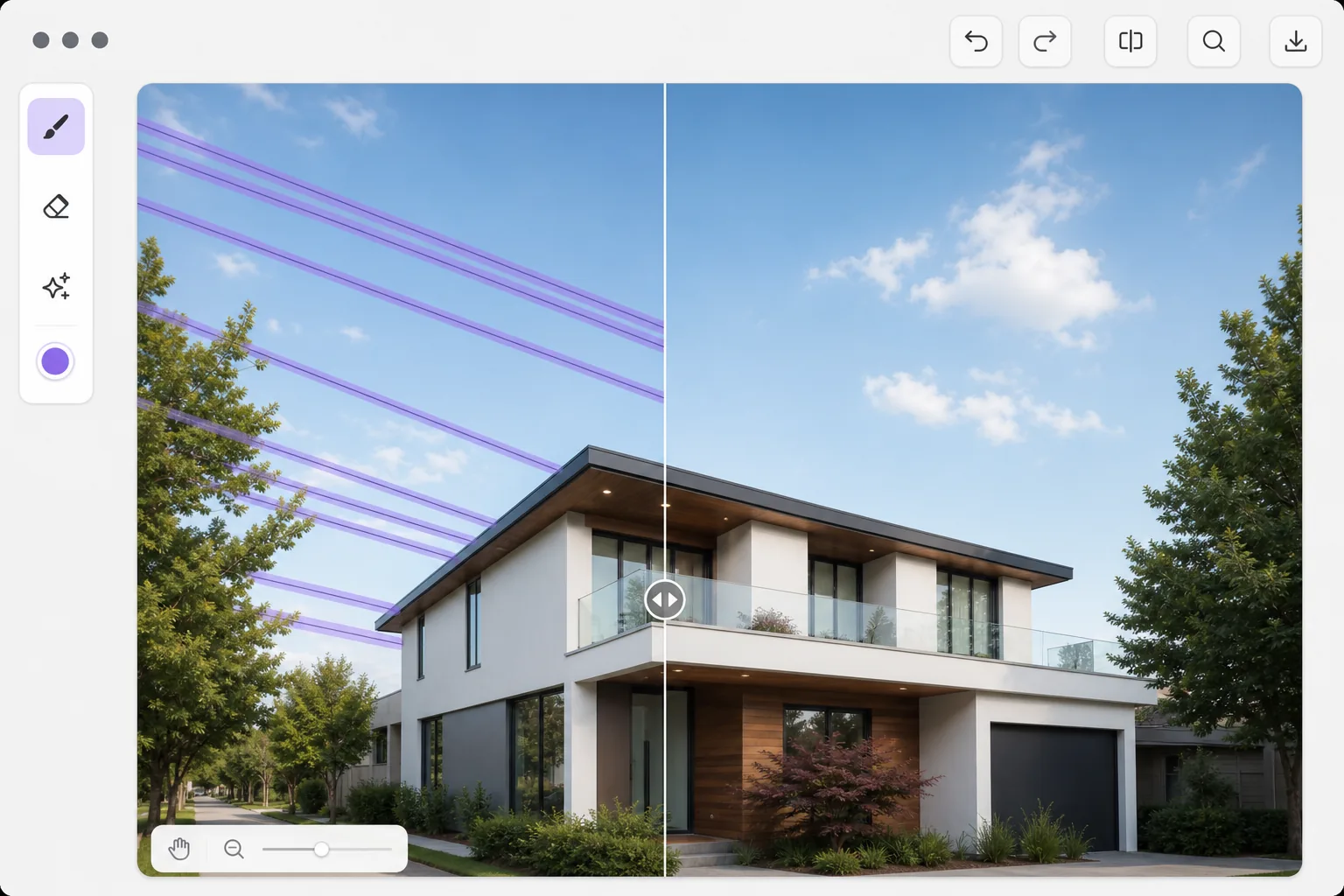
Kablolar her yerde; hem kentsel hem de kırsal fotoğraflarda
Güç hatları, telefon kabloları, ethernet kabloları ve gergi kabloları fotoğrafçılıkta en kalıcı görsel kirleticilerden bazılarıdır. Neredeyse her kentsel manzarada, birçok kırsal sahnede ve hatta dikkatle oluşturulmuş mimari çekimlerde bile karşımıza çıkıyorlar. Kablolar ince olduğundan ve çerçevenin tamamına yayıldığından birden fazla dokuyu (gökyüzü, bulutlar, binalar, ağaçlar) geçerek elle kaldırmayı sıkıcı hale getirir. Bir tel boyunca klon damgalama hassas çalışma gerektirir ve kolayca tekrarlanan desen eserleri oluşturur. Yapay zeka kablo kaldırma, bir telin birden fazla arka planı geçen sürekli bir doğrusal öğe olduğunu anlar ve her bölümü doğru arka plan dokusuyla doldurur: mavi gökyüzü, bulut ayrıntısı, bina cephesi veya ağaç gölgesi.
Before you start
Kabloları üç adımda çıkarın
Start with fotoğrafı yükle. The result preview above and tips below use this guide's existing content; no separate before-and-after proof is assumed.
- 1
Fotoğrafı yükle
Magic Eraser web, iOS veya Android'de açın. Kaldırmak istediğiniz tellerin bulunduğu fotoğrafı yükleyin. Araç, ince telefon hatlarından kalın endüstriyel kablolara kadar kabloların görülebildiği her türlü görüntüyle çalışır.
- 2
Teller boyunca fırçalayın
İnce bir fırça kullanın ve her teli çerçevenin bir kenarından diğerine kadar takip edin. Fırçanın yalnızca telin kendisinden biraz daha geniş olması gerekir. Birden fazla paralel kablo için, hepsini tek geçişte kaplamak üzere daha geniş bir fırça kullanın.
- 3
Gökyüzü ve arka plan rekonstrüksiyonunu inceleyin
Yapay zeka, her kablo yolunu uygun arka planla (degrade gökyüzü, bulut dokusu, bina detayı veya bitki örtüsü) doldurur. Doğruluk açısından kabloların karmaşık arka planlardan geçtiği alanları (bina kenarları veya ağaç dalları gibi) kontrol edin. Temiz fotoğrafı dışa aktarın.
Şunun için en iyisi:
- Manzara fotoğrafçıları, doğal manzaralardan ve ufuk çizgilerinden elektrik hatlarını kaldırıyor
- Emlak fotoğrafçıları dış mekan çekimlerini görünür kablolarla temizliyor
- Kablo karmaşası olmayan, temiz bina profillerine ihtiyaç duyan mimari fotoğrafçılar
- Seyahat fotoğrafçıları, simgesel yapı ve şehir manzarası çekimlerindeki görsel karmaşayı ortadan kaldırıyor
- Drone fotoğrafçıları enerji nakil hatlarının geçtiği havadan görüntüleri temizliyor
En iyi sonuçlar için ipuçları
Kabloyu kaplayan en ince fırçayı kullanın; aşırı kenar boşluğu, yapay zekanın gerekenden daha fazla arka planı yeniden oluşturması anlamına gelir ve görünür yapaylık olasılığını artırır. Degrade gökyüzüne karşı kablolar için yapay zeka, degradeyi sorunsuz bir şekilde sürdürür. Binaların önünden geçen kablolar için yakınlaştırarak mimari çizgilerin (pencereler, kenarlar, pervazlar) doğru şekilde yeniden oluşturulduğunu kontrol edin. Her kabloyu aynı anda seçmeye çalışmak yerine, bir seferde bir dizi paralel kabloyu çıkarın. Kablo kesişimlerindeki direkler ve direkler normal nesneler gibi ayrı ayrı kaldırılabilir.
Sık sorulan sorular
- Karmaşık arka planlardaki çok ince kabloları kaldırabilir mi?
- Evet. Gökyüzüne karşı ince teller en kolay durumdur. Binalardan, ağaçlardan ve ayrıntılı arka planlardan geçen teller de iyi çalışır; yapay zeka, tel yolunun her bölümü için uygun dokuyu yeniden oluşturur.
- Peki ya kabloların uçlarındaki elektrik direkleri?
- Direkler ve direkler ayrı nesnelerdir. Kabloları çıkardıktan sonra isteğe bağlı olarak direklerin üzerini de fırçalayarak çıkartabilirsiniz. Yapay zeka bunları standart nesne kaldırma işlemi olarak ele alır.
- Tel çıkarma ücretsiz mi?
- Evet. Nesne kaldırma özellikleri, günlük kullanım limitleriyle ücretsiz katmanda mevcuttur. Premium, manzara ve emlak fotoğraf setlerinin toplu işlenmesine ilişkin sınırları kaldırır.