
Remove Sun Glare From a Photo
Magic Eraser ile Remove Sun Glare From a Photo yapmayı öğrenin. Ücretsiz AI aracıyla basit adım adım rehber. Web, iOS ve Android'de çalışır.
Last updated
Şimdi dene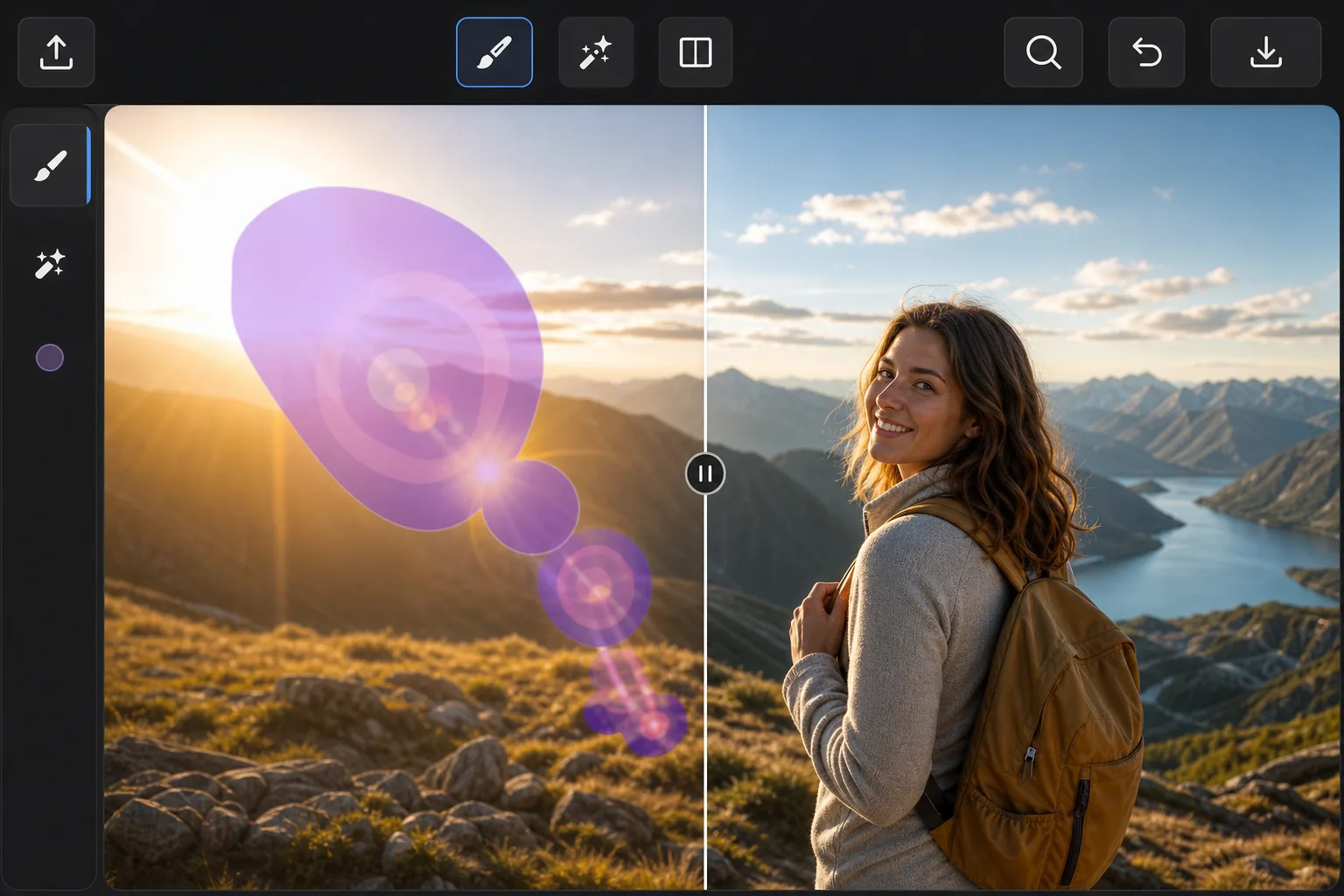
When the sun ruins an outdoor shot — Magic Eraser
Point a lens anywhere near the sun and the light fights back: hazy flare washing over a face, polygon-shaped lens-flare ghosts marching across the frame, and a searing hotspot that drowns out detail. These artifacts are different from a glossy reflection — they're scattered light baked into the exposure, so you can't just dim them down. Magic Eraser handles them by removing the affected pixels and inpainting a believable replacement. Instead of trying to recover blown-out detail that the sensor never captured, the AI studies the surrounding sky, foliage, or skin tones and synthesizes a plausible patch that blends in. It's a reconstruction, not hidden detail brought back — but for sky, gradients, and even backgrounds, the result usually looks like the flare was never there. It runs free in your browser or on the iOS and Android apps, with no watermark on the export.
Before you start
Adım adım talimatlar
Start with fotoğrafı yükleyin. The result preview above and tips below use this guide's existing content; no separate before-and-after proof is assumed.
- 1
Fotoğrafı yükleyin
Web, iOS veya Android'de Magic Eraser'ı açın. JPEG, PNG, HEIC veya WebP fotoğrafınızı sürükleyip bırakın. Hesap gerekmez.
- 2
Aracı ve alanı seçin
Uygun aracı seçin ve işlenecek alanı işaretleyin. AI otomatik olarak analiz eder ve saniyeler içinde değişiklikleri uygular.
- 3
Sonucu indirin
Sonucu önizleyin ve düzenlenmiş fotoğrafı indirin. Yüksek kaliteli PNG veya JPEG olarak dışa aktarın.
En uygun
- Sweeping sun-flare streaks and haze across landscape and beach photos
- Polygon-shaped lens-flare ghosts that march across the frame toward the sun
- Bright hotspots washing out faces in backlit portraits
- Rainbow flare arcs over skies, water, and open horizons
- Golden-hour shots where flare spills over an otherwise perfect scene
En iyi sonuçlar için ipuçları
Tackle each flare element separately — one pass for the ghost rings, another for the haze, another for the hotspot — so the AI can sample the right neighbors for each. Glare sitting over smooth, predictable areas like open sky or water reconstructs almost invisibly; flare crossing detailed edges (tree lines, faces, architecture) is harder, so brush tightly around those and review the seams. If a hotspot has eaten fine detail that was never recorded, accept that the fill is a clean plausible substitute rather than the original texture. For stubborn spots, run a second light pass instead of one heavy brush stroke.
Sıkça sorulan sorular
- Remove Sun Glare From a Photo özelliği ücretsiz mi?
- Evet, Magic Eraser günlük ücretsiz limit dahilinde Remove Sun Glare From a Photo yapmanıza olanak tanır. Sınırsız işleme ve yüksek çözünürlüklü dışa aktarma için Pro'ya yükseltin.
- Remove Sun Glare From a Photo ne kadar sürer?
- Sadece birkaç saniye. Magic Eraser'ın AI'ı fotoğrafları hızla işler — çoğu sonuç yüklemeden hemen sonra hazırdır.
- Telefonda kullanabilir miyim?
- Evet, Magic Eraser iOS, Android ve tüm web tarayıcılarında çalışır. Cihazlar arasında özgürce geçiş yapabilirsiniz.
- Görüntü kalitesi düşer mi?
- Hayır, Magic Eraser orijinal fotoğraf kalitesini korur. AI, ayrıntıları ve netliği koruyarak akıllıca işler.