
Remove an Emoji From an iPhone Photo
Magic Eraser ile iPhone'da emojiyi kaldır yapmayı öğrenin. Ücretsiz AI aracıyla basit adım adım rehber. Web, iOS ve Android'de çalışır.
Last updated
Şimdi dene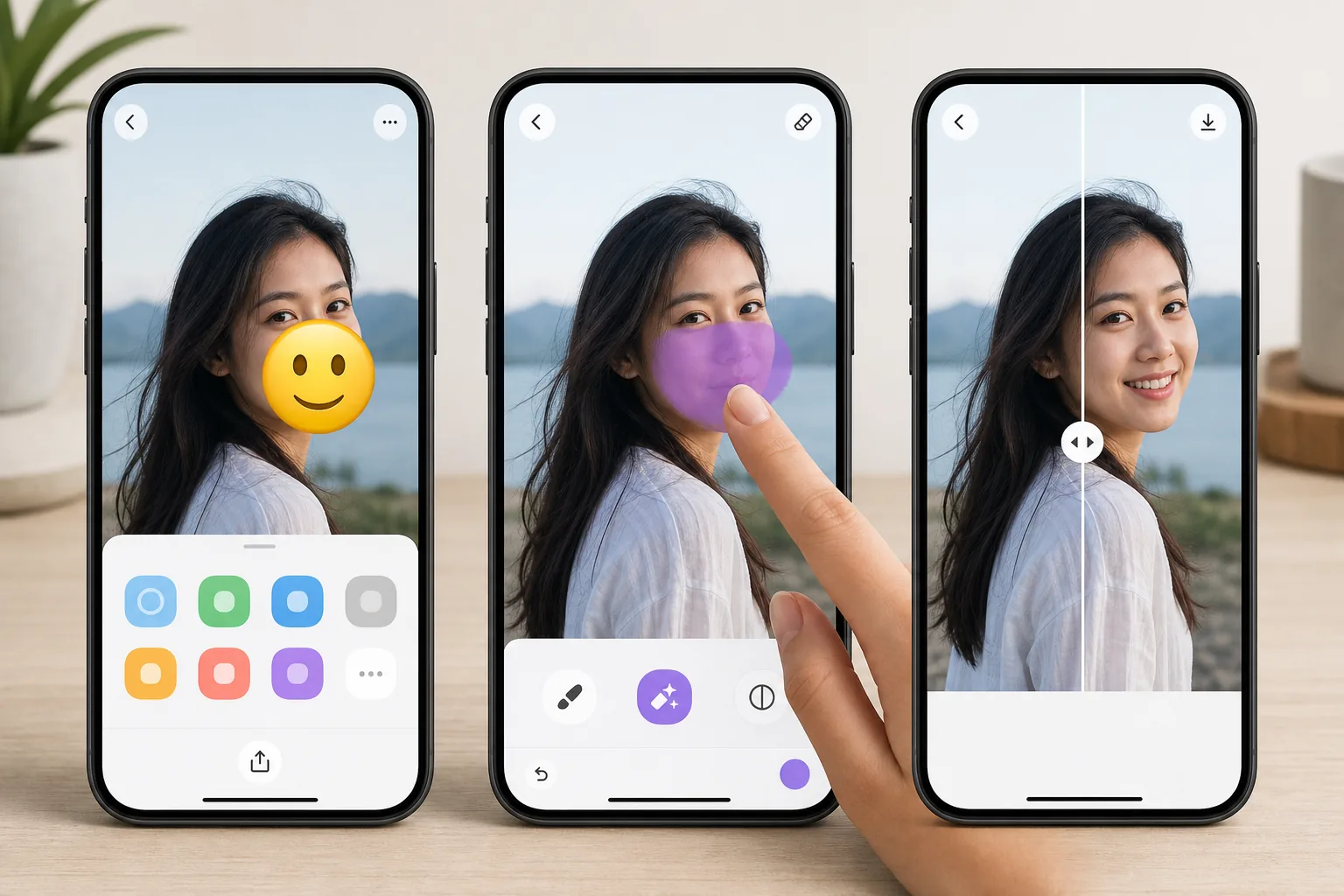
Erase emojis without leaving your iPhone — Magic Eraser
Emojis pile up on iPhone photos fast — a sticker you slapped on in Messages, a 😂 added in Markup, or a face cover someone dropped over a shot before AirDropping it to you. Once it is saved to your camera roll, that emoji is baked into the pixels, and iOS gives you no built-in way to peel it back off. Magic Eraser fixes that on-device. You open the photo in the iOS Photos app, send it to Magic Eraser through the standard share sheet (or the Magic Eraser app), brush over the emoji, and the AI inpainting reconstructs a plausible version of whatever was behind it. To be clear: the AI synthesizes a believable fill based on the surrounding texture — sky, wall, skin, grass — it does not recover the literal original pixels or reveal a hidden face. The result lands back in your Photos library at full resolution, free, and with no watermark on the free tier.
Before you start
Adım adım talimatlar
Start with fotoğrafı yükleyin. The result preview above and tips below use this guide's existing content; no separate before-and-after proof is assumed.
- 1
Fotoğrafı yükleyin
Web, iOS veya Android'de Magic Eraser'ı açın. JPEG, PNG, HEIC veya WebP fotoğrafınızı sürükleyip bırakın. Hesap gerekmez.
- 2
Aracı ve alanı seçin
Uygun aracı seçin ve işlenecek alanı işaretleyin. AI otomatik olarak analiz eder ve saniyeler içinde değişiklikleri uygular.
- 3
Sonucu indirin
Sonucu önizleyin ve düzenlenmiş fotoğrafı indirin. Yüksek kaliteli PNG veya JPEG olarak dışa aktarın.
En uygun
- Wiping a 😂 or 🔥 sticker you added in iMessage or Markup off a saved photo
- Clearing an emoji face-cover someone placed before AirDropping a picture to you
- Cleaning up a screenshot where an emoji landed over the part you actually wanted
- Prepping a camera-roll shot for posting after removing a playful sticker
- Removing an emoji from a downloaded or received iPhone photo without a Mac or laptop
En iyi sonuçlar için ipuçları
Brush slightly past the emoji's edges — sticker outlines and soft shadows extend a few pixels beyond the visible art, and missing them leaves a faint halo. Emojis sitting on flat backgrounds (a clear sky, a solid-color wall, blurred bokeh) reconstruct almost invisibly; ones plastered over a face, fine text, or busy patterns are harder, since the AI is inventing a plausible fill rather than restoring true detail. If the first pass looks slightly soft, zoom in on your iPhone and re-brush just the rough area instead of redoing the whole thing. Always keep the original in Photos until you are happy — iOS makes duplicating a shot easy, so edit the copy.
Sıkça sorulan sorular
- iPhone'da emojiyi kaldır özelliği ücretsiz mi?
- Evet, Magic Eraser günlük ücretsiz limit dahilinde iPhone'da emojiyi kaldır yapmanıza olanak tanır. Sınırsız işleme ve yüksek çözünürlüklü dışa aktarma için Pro'ya yükseltin.
- iPhone'da emojiyi kaldır ne kadar sürer?
- Sadece birkaç saniye. Magic Eraser'ın AI'ı fotoğrafları hızla işler — çoğu sonuç yüklemeden hemen sonra hazırdır.
- Telefonda kullanabilir miyim?
- Evet, Magic Eraser iOS, Android ve tüm web tarayıcılarında çalışır. Cihazlar arasında özgürce geçiş yapabilirsiniz.
- Görüntü kalitesi düşer mi?
- Hayır, Magic Eraser orijinal fotoğraf kalitesini korur. AI, ayrıntıları ve netliği koruyarak akıllıca işler.