
Remove an Emoji Covering a Face
Magic Eraser ile Yüzden emojiyi kaldır yapmayı öğrenin. Ücretsiz AI aracıyla basit adım adım rehber. Web, iOS ve Android'de çalışır.
Last updated
Şimdi dene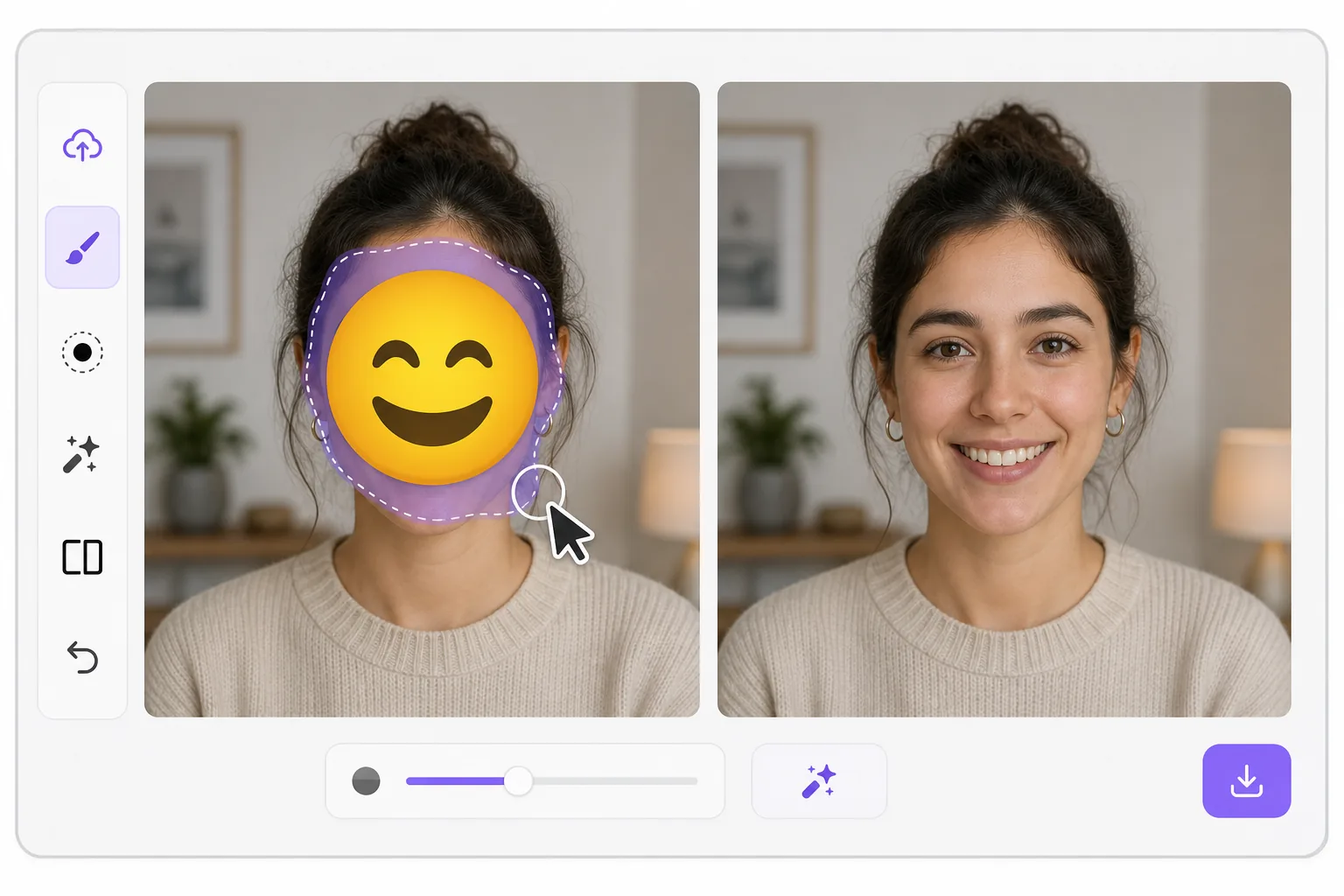
What "uncensoring" an emoji actually does — Magic Eraser
When a smiley, sunglasses, or blur-emoji is slapped over someone's face, those original pixels are gone — the emoji replaced them in the saved image. Magic Eraser's AI inpainting can remove that emoji and fill the gap with a natural-looking face that matches the lighting, skin tone, hairline, and angle around it. Here's the honest part most tools won't tell you: this is a reconstruction, not a recovery. The AI synthesizes a face that fits the scene; it does not and cannot reveal the true identity of whoever was censored. Treat the result as a plausible repair for a photo, not as forensic proof of who someone is. Use it to fix your own images or photos you have permission to edit — never to unmask someone who deliberately hid their face.
Before you start
Adım adım talimatlar
Start with fotoğrafı yükleyin. The result preview above and tips below use this guide's existing content; no separate before-and-after proof is assumed.
- 1
Fotoğrafı yükleyin
Web, iOS veya Android'de Magic Eraser'ı açın. JPEG, PNG, HEIC veya WebP fotoğrafınızı sürükleyip bırakın. Hesap gerekmez.
- 2
Aracı ve alanı seçin
Uygun aracı seçin ve işlenecek alanı işaretleyin. AI otomatik olarak analiz eder ve saniyeler içinde değişiklikleri uygular.
- 3
Sonucu indirin
Sonucu önizleyin ve düzenlenmiş fotoğrafı indirin. Yüksek kaliteli PNG veya JPEG olarak dışa aktarın.
En uygun
- Restoring an old group photo where you yourself added a privacy emoji and lost the original
- Cleaning up a meme or reaction image so the face area reads as a face again instead of a sticker
- Removing a smiley or sunglasses emoji a friend placed on your own picture before resharing
- Designers prototyping how a portrait looks without a placeholder emoji overlay
- Recovering the composition of a photo you edited, where you have the right to undo your own censorship
En iyi sonuçlar için ipuçları
Smaller emojis over a clear, well-lit face reconstruct far better than a big sticker covering eyes, nose, and mouth at once — the more original face the AI can see around the edges, the more convincing its fill. If the emoji sits on a turned or partially shadowed face, expect a softer, more generic result. Run it two or three times and compare; each pass produces a different plausible face. Above all, stay honest with anyone you share it with: say the face was AI-reconstructed. Don't present the output as the real hidden person, and don't use it to identify or expose someone who covered their face on purpose.
Sıkça sorulan sorular
- Yüzden emojiyi kaldır özelliği ücretsiz mi?
- Evet, Magic Eraser günlük ücretsiz limit dahilinde Yüzden emojiyi kaldır yapmanıza olanak tanır. Sınırsız işleme ve yüksek çözünürlüklü dışa aktarma için Pro'ya yükseltin.
- Yüzden emojiyi kaldır ne kadar sürer?
- Sadece birkaç saniye. Magic Eraser'ın AI'ı fotoğrafları hızla işler — çoğu sonuç yüklemeden hemen sonra hazırdır.
- Telefonda kullanabilir miyim?
- Evet, Magic Eraser iOS, Android ve tüm web tarayıcılarında çalışır. Cihazlar arasında özgürce geçiş yapabilirsiniz.
- Görüntü kalitesi düşer mi?
- Hayır, Magic Eraser orijinal fotoğraf kalitesini korur. AI, ayrıntıları ve netliği koruyarak akıllıca işler.