
การแก้ไขภาพศีรษะแบบมืออาชีพทำได้ง่าย
ภาพเฮดช็อตที่สะอาดและเป็นมืออาชีพมีความสำคัญต่อโปรไฟล์ LinkedIn หน้าเพจทีม และไดเร็กทอรีของบริษัท Magic Eraser ช่วยให้บุคคลและบริษัทสร้างภาพบุคคลที่สวยงามโดยไม่ต้องถ่ายทำในสตูดิโอใหม่
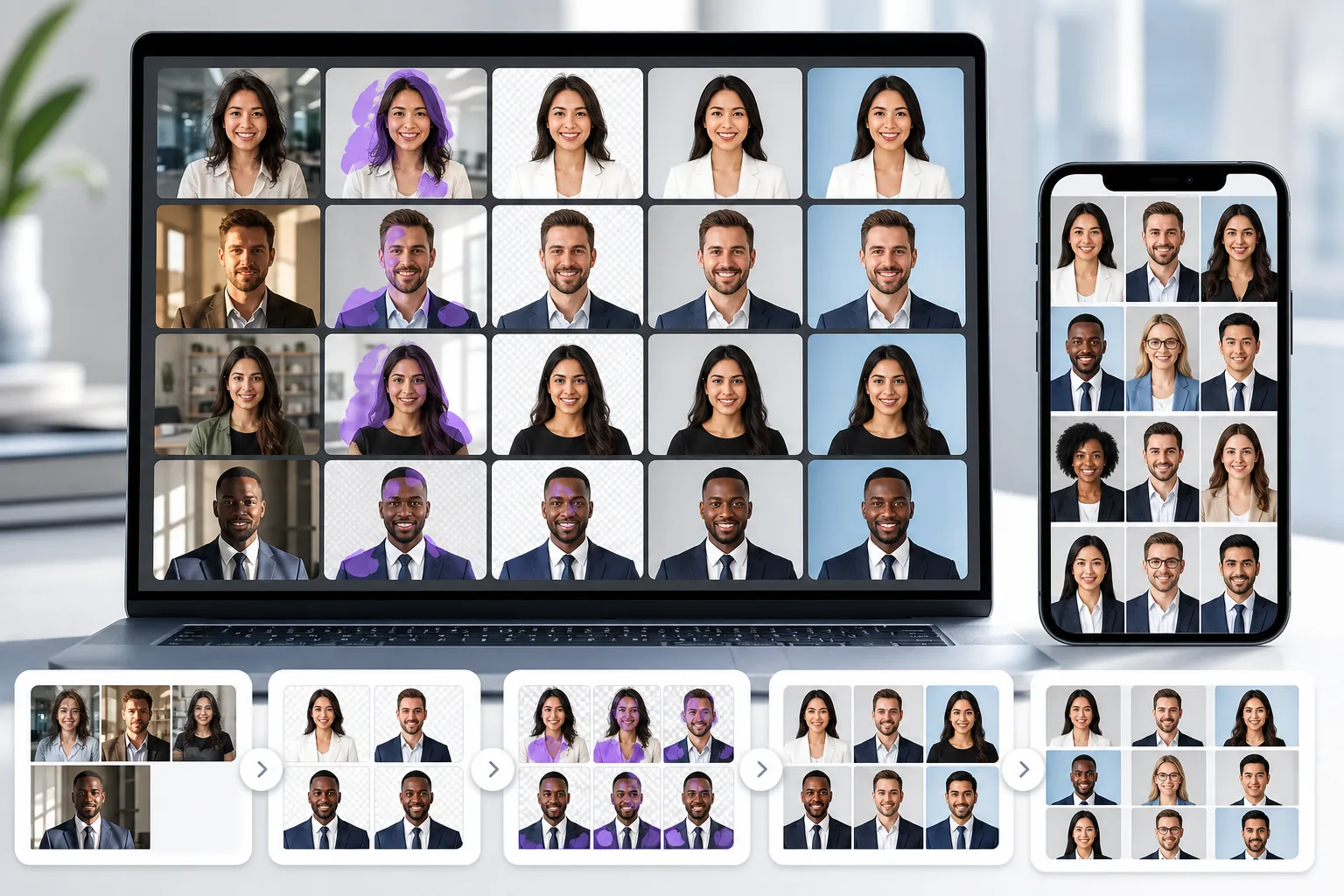
ภูมิหลังที่เสียสมาธิหรือไม่เป็นมืออาชีพ
ภาพเฮดช็อตที่ถ่ายที่โต๊ะทำงาน ในโถงทางเดิน หรือที่บ้าน มักจะมีพื้นหลังที่เกะกะซึ่งบั่นทอนภาพลักษณ์ที่เป็นมืออาชีพ
ปัญหาเรื่องแสงและรายละเอียดผิวหนังที่ไม่สม่ำเสมอ
แสงไฟในสำนักงานจะสร้างเงาที่รุนแรง โทนสีผิวที่ไม่สม่ำเสมอ และรายละเอียดที่นุ่มนวลซึ่งทำให้ภาพเฮดช็อตดูไม่ชำนาญเมื่อเทียบกับภาพพอร์ตเทรตในสตูดิโอ
ภาพถ่ายทีมที่ไม่สอดคล้องกันทั่วทั้งบริษัท
เมื่อสมาชิกในทีมส่งภาพเฮดช็อตที่ถ่ายในเวลาและสถานที่ต่างกัน หน้าเพจของบริษัทจะดูไม่สอดคล้องกันและสวยงามน้อยลง
Magic Eraser ช่วยเรื่องการถ่ายภาพศีรษะแบบมืออาชีพได้อย่างไร
อัปโหลดภาพบุคคล
เปิด Magic Eraser และอัปโหลดภาพเฮดช็อตที่ต้องได้รับการขัดเกลาอย่างมืออาชีพ
ลบหรือเปลี่ยนพื้นหลัง
ใช้การลบพื้นหลังเพื่อวางวัตถุไว้บนพื้นหลังสีขาว สีเทา หรือแบรนด์ที่ดูสะอาดตาและเป็นมืออาชีพ
ทำความสะอาดสิ่งรบกวน
ลบเส้นขนที่หลงเหลือ รอยย่นของเสื้อผ้า หรือรอยตำหนิที่ผิวหนังด้วยเครื่องมือยางลบเพื่อให้ภาพบุคคลสุดท้ายดูสะอาดตายิ่งขึ้น
ปรับปรุงและดาวน์โหลด
ใช้ AI Enhancement เพื่อเพิ่มความคมชัดของรายละเอียดและปรับสมดุลของแสง จากนั้นส่งออกภาพส่วนหัวที่สวยงามตามความละเอียดที่คุณต้องการ
Removal tools for this workflow
เครื่องมือ
คำถามที่พบบ่อย
Magic Eraser สามารถสร้างพื้นหลังภาพเฮดช็อตแบบมืออาชีพได้หรือไม่
+
ใช่. ลบพื้นหลังที่มีอยู่ออกและแทนที่ด้วยสีทึบหรือการไล่ระดับสีที่ตรงกับมาตรฐานภาพเฮดช็อตระดับมืออาชีพสำหรับ LinkedIn หน้าเพจของทีม และการใช้งานในองค์กร
สิ่งนี้มีประโยชน์กับภาพถ่ายเพจ HR และทีมหรือไม่
+
ใช่. บริษัทต่างๆ ใช้ Magic Eraser เพื่อสร้างมาตรฐานให้กับภาพเฮดช็อตของทีมด้วยพื้นหลังและแสงที่สอดคล้องกัน แม้ว่าจะถ่ายภาพในเวลาและสถานที่ต่างกันก็ตาม
ฉันสามารถแก้ไขปัญหาแสงในภาพเฮดช็อตได้หรือไม่
+
AI Enhancement สามารถปรับสมดุลการรับแสง ลดเงาที่รุนแรง และปรับปรุงรายละเอียดของผิวหนังเพื่อให้ภาพเฮดช็อตดูมีแสงอย่างมืออาชีพมากขึ้น
Magic Eraser ใช้ได้กับรูปภาพโปรไฟล์ LinkedIn หรือไม่
+
ใช่. การล้างพื้นหลังและปรับปรุงคุณภาพรายละเอียดเป็นการปรับปรุงที่พบบ่อยที่สุดสองประการสำหรับภาพเฮดช็อตของ LinkedIn และ Magic Eraser จัดการทั้งสองอย่าง
ฉันสามารถแก้ไขภาพเฮดช็อตบนโทรศัพท์ของฉันได้หรือไม่
+
ใช่. Magic Eraser ทำงานได้ทั้งบนเว็บและอุปกรณ์เคลื่อนที่ คุณจึงสามารถล้างและปรับปรุงภาพเฮดช็อตจากอุปกรณ์ใดก็ได้
ถ่ายภาพเฮดช็อตแบบมืออาชีพโดยไม่ต้องรีช็อตในสตูดิโอ
ลองใช้ Magic Eraser ฟรี และสร้างภาพถ่ายบุคคลที่สะอาดตาและสวยงามพร้อมพื้นหลังที่สม่ำเสมอและรายละเอียดที่ได้รับการปรับปรุง
ลองใช้ Magic Eraser ฟรีกรณีการใช้งานที่เกี่ยวข้อง
ดูว่ามืออาชีพใช้เครื่องมือเหล่านี้ในเวิร์กโฟลว์จริงอย่างไร
ภาพประกาศที่เต็มไปด้วยของส่วนตัว รถจอด หรืออุปกรณ์ก่อสร้าง ทำให้ผู้ซื้อไม่สนใจ Magic Eraser ใช้ AI ทำความสะอาดภาพอสังหาริมทรัพย์ของคุณทันที — ไม่ต้องมีทักษะ Photoshop
รูปสินค้าที่พื้นหลังรกรุงรังทำให้ลูกค้าเลื่อนผ่านร้านคุณทุกวัน Magic Eraser ช่วยสร้างรูปสินค้ามืออาชีพได้ในไม่กี่วินาที ไม่ต้องเก่ง Photoshop อัปโหลด ลบสิ่งรบกวน แล้วลงขายได้เลย
สำนักงานพาสปอร์ตและวีซ่าปฏิเสธรูปถ่ายหลายพันใบต่อวันเพราะพื้นหลังไม่ถูกต้อง Magic Eraser ลบพื้นหลังทุกชนิดและแทนที่ด้วยสีที่คุณต้องการ — ขาว เทาอ่อน หรือฟ้า — ในไม่กี่วินาที
การเปรียบเทียบที่เกี่ยวข้อง
ดูว่า Magic Eraser เปรียบเทียบกับเครื่องมือที่คล้ายกันอย่างไร
TouchRetouch เป็นแอปมือถือแบบเสียเงินยอดนิยมสำหรับลบวัตถุและจุดตำหนิ Magic Eraser ให้บริการแก้ไขรูปภาพด้วย AI ฟรีบนทุกอุปกรณ์โดยไม่ต้องติดตั้ง เปรียบเทียบฟีเจอร์ ราคา และความง่ายในการใช้งาน
Cleanup.pictures เป็นเครื่องมือเว็บฟรีสำหรับลบวัตถุอย่างรวดเร็ว Magic Eraser มีเครื่องมือแก้ไข AI 8 ชนิด แอปมือถือ และระบบประมวลผลขั้นสูง มาดูการเปรียบเทียบกัน
remove.bg เป็นผู้นำตลาดด้านการลบพื้นหลังด้วย API ที่ทรงพลังและปลั๊กอินสำหรับ Photoshop และ Figma ส่วน Magic Eraser ให้มากกว่าด้วยเครื่องมือ AI แปดอย่าง ตั้งแต่ลบวัตถุ เติมภาพ AI ไปจนถึงเพิ่มคุณภาพและออกแบบ ทั้งหมดในโปรแกรมเดียว
โปรแกรมแต่งรูป AI ที่ทรงพลังสองตัวที่มีจุดแข็งต่างกัน Magic Eraser มีเครื่องมือ AI สร้างสรรค์ที่หลากหลายกว่า ขณะที่ Photoroom เชี่ยวชาญด้านภาพถ่ายสินค้าอีคอมเมิร์ซและการประมวลผลแบบกลุ่ม ดูว่าตัวไหนเหมาะกับคุณ
คู่มือที่เกี่ยวข้อง
ดูคู่มือและเนื้อหาเชิงบรรณาธิการเพิ่มเติมที่เกี่ยวข้องกับเวิร์กโฟลว์นี้
สำรวจว่า AI กำลังเปลี่ยนการดำเนินงานของธุรกิจอย่างไร ตั้งแต่ระบบอัตโนมัติ การวิเคราะห์ข้อมูล ไปจนถึงประสบการณ์ลูกค้าที่เป็นส่วนตัวมากขึ้น
เรียนรู้วิธีใช้ Magic Eraser เพื่อลบวัตถุ คน ข้อความ และสิ่งรบกวนออกจากรูปภาพ พร้อมผลลัพธ์ AI ที่สะอาดขึ้น
เรียนรู้วิธีลบคนออกจากรูปภาพด้วย AI ภายในไม่กี่วินาที สำหรับรูปท่องเที่ยว อสังหาริมทรัพย์ และรูปสินค้า