
การเตรียมภาพถ่ายสต็อก
ทำให้ภาพถ่ายของคุณได้รับการยอมรับจากเอเจนซี่ภาพสต็อกตั้งแต่การส่งครั้งแรก เทมเพลตนี้ลบเครื่องหมายการค้า โลโก้ และองค์ประกอบที่มีแบรนด์ซึ่งทำให้ถูกปฏิเสธ จัดการกับข้อบกพร่องทางเทคนิคที่ไม่ผ่านการตรวจสอบคุณภาพ และส่งออกไฟล์ตามข้อกำหนดที่แม่นยำซึ่ง Shutterstock, Adobe Stock, Getty และ iStock กำหนด — ขจัดเหตุผลที่พบบ่อยที่สุดที่ภาพถ่ายถูกปฏิเสธจากคลังภาพสต็อก
ทดลองใช้เทมเพลตนี้ฟรีDesign template preview
เทมเพลตนี้ทำอะไรได้บ้าง
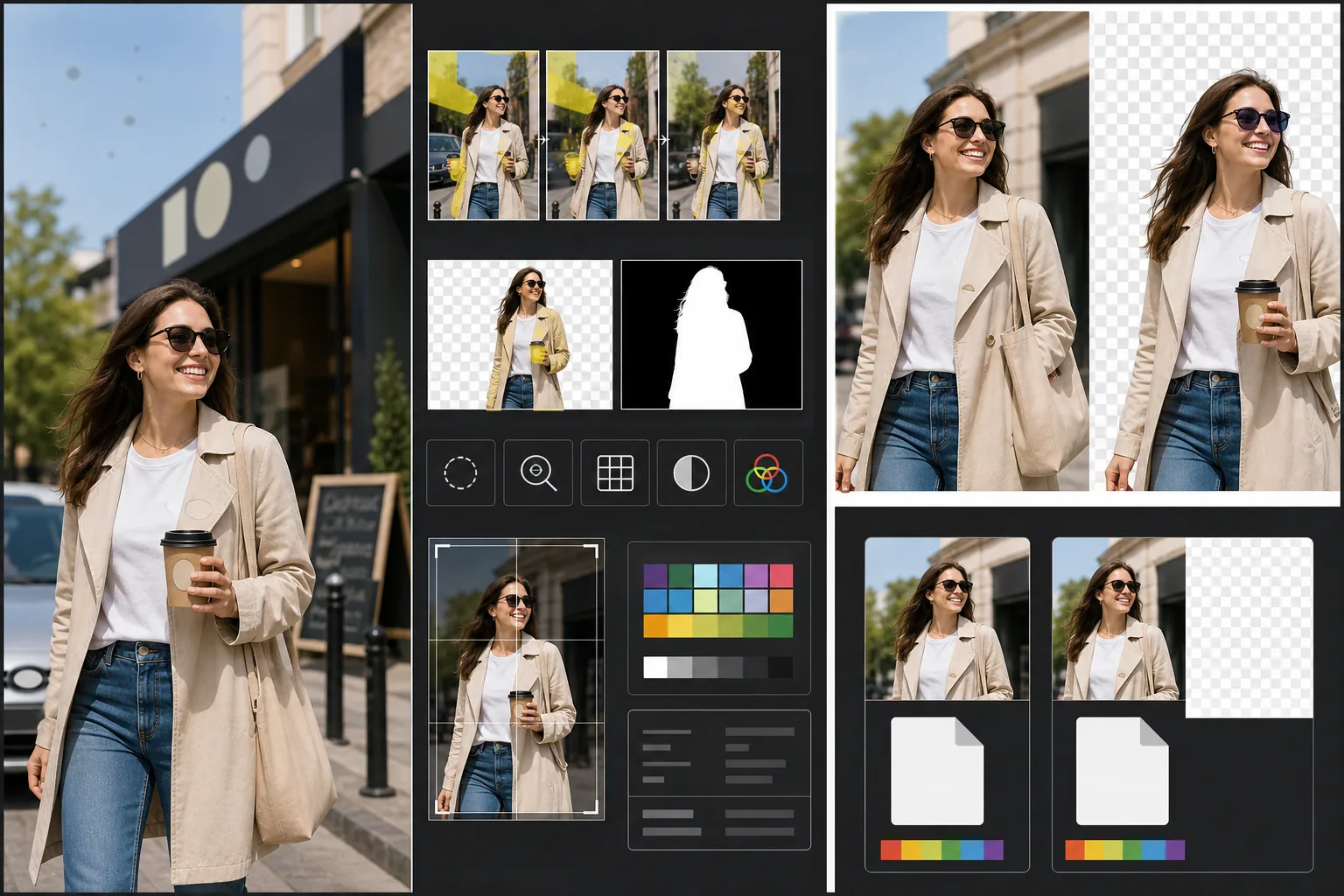
จัดการกับข้อกำหนดทางเทคนิคและทางกฎหมายเฉพาะที่ทำให้ภาพสต็อกถูกปฏิเสธ Magic Eraser ตรวจจับและลบเครื่องหมายการค้า โลโก้แบรนด์ ฉลากผลิตภัณฑ์ และป้ายที่มีแบรนด์ที่มองเห็นได้ ซึ่งจะต้องมีการอนุญาตด้านทรัพย์สินหรือทำให้ถูกปฏิเสธทันที สิ่งเหล่านี้รวมถึงโลโก้บนเสื้อผ้า ตราสัญลักษณ์รถยนต์ ป้ายร้านค้า และชื่อแบรนด์บนบรรจุภัณฑ์ Background Eraser ให้การแยกภาพที่สะอาดสำหรับภาพที่ต้องการนำไปตัดต่อ โดยสร้างทั้งภาพ RGB และอัลฟ่ามาสก์แยกต่างหากที่เอเจนซี่ภาพสต็อกต้องการ การตรวจสอบคุณภาพทางเทคนิคจะตรวจสอบระดับสัญญาณรบกวน ความคมชัด ความคลาดเคลื่อนของสี และจุดฝุ่นบนเซ็นเซอร์ — ล้วนเป็นสาเหตุที่พบบ่อยของการถูกปฏิเสธ — และ AI จะแก้ไขสิ่งที่ทำได้พร้อมทั้งทำเครื่องหมายปัญหาที่ต้องถ่ายใหม่ การส่งออกขั้นสุดท้ายจะตรงตามข้อกำหนดของเอเจนซี่สำหรับรูปแบบไฟล์ โปรไฟล์สี ความละเอียด และการฝังเมตาดาตา
การตั้งค่าเทมเพลต
| การตรวจจับเครื่องหมายการค้า | ตรวจจับและลบโลโก้ ชื่อแบรนด์ และฉลากผลิตภัณฑ์ที่มองเห็นได้โดยอัตโนมัติ |
| การตรวจสอบคุณภาพทางเทคนิค | ตรวจสอบสัญญาณรบกวน ความคมชัด ความคลาดเคลื่อนของสี และฝุ่นบนเซ็นเซอร์ |
| มาสก์แยกภาพ | สร้างช่องอัลฟ่าสำหรับภาพที่ตัดต่อ (PNG ที่มีความโปร่งใส) |
| โปรไฟล์สี | sRGB (เอเจนซี่ภาพสต็อกส่วนใหญ่ต้องการ) |
| เมตาดาตา | ฝังฟิลด์ IPTC สำหรับชื่อ คำอธิบาย และคำสำคัญ |
| รูปแบบเอาต์พุต | JPEG คุณภาพสูงสุด (ระดับ 12) หรือ TIFF (ไม่สูญเสียข้อมูล, Getty แนะนำ) |
วิธีใช้เทมเพลตนี้
อัปโหลดภาพถ่ายของคุณ
อัปโหลดภาพถ่ายที่คุณต้องการส่งให้เอเจนซี่ภาพสต็อก เทมเพลตนี้รองรับไฟล์ RAW, JPEG, TIFF และ PNG อัปโหลดเวอร์ชันคุณภาพสูงสุดที่มี — เอเจนซี่ภาพสต็อกประเมินคุณภาพทางเทคนิคที่ความละเอียดเต็มและปฏิเสธภาพที่แสดงร่องรอยการบีบอัดจากการบันทึกซ้ำๆ
ลบเครื่องหมายการค้าและแบรนด์
Magic Eraser สแกนภาพเพื่อหาเครื่องหมายการค้า โลโก้ ชื่อแบรนด์ และฉลากผลิตภัณฑ์ที่มองเห็นได้ รายการที่ตรวจพบจะถูกไฮไลต์เพื่อตรวจสอบ การลบที่ได้รับอนุมัติจะดำเนินการโดย AI สร้างพื้นผิวด้านหลังเครื่องหมายการค้าแต่ละรายการขึ้นใหม่ — เนื้อผ้าใต้โลโก้บนเสื้อผ้า ตัวถังรถใต้ตราสัญลักษณ์ พื้นผิวผนังใต้ป้ายร้านค้า
รันการตรวจสอบคุณภาพทางเทคนิค
เทมเพลตจะวิเคราะห์ภาพเพื่อหาปัญหาทางเทคนิคที่มักทำให้เอเจนซี่ภาพสต็อกปฏิเสธ ได้แก่ สัญญาณรบกวนในบริเวณเงา ความคมชัดไม่เพียงพอ ความคลาดเคลื่อนของสีตามขอบที่มีคอนทราสต์สูง จุดฝุ่นบนเซ็นเซอร์ และข้อผิดพลาดของไวต์บาลานซ์ ปัญหาที่แก้ไขได้จะถูกแก้ไขโดยอัตโนมัติ ปัญหาที่แก้ไขไม่ได้ (เช่น ภาพเบลอจากการเคลื่อนไหวรุนแรง) จะถูกทำเครื่องหมายเพื่อให้คุณทราบก่อนส่ง
ส่งออกพร้อมเมตาดาตาของเอเจนซี่
เลือกเอเจนซี่เป้าหมายของคุณ แล้วเทมเพลตจะส่งออกในรูปแบบและข้อกำหนดที่เอเจนซี่นั้นต้องการ ฟิลด์เมตาดาตา IPTC สำหรับชื่อ คำอธิบาย และคำสำคัญสามารถฝังได้ก่อนการส่งออก ไฟล์พร้อมที่จะอัปโหลดโดยตรงไปยังพอร์ทัลผู้มีส่วนร่วมของ Shutterstock, Adobe Stock, Getty/iStock หรือ Alamy
เคล็ดลับมืออาชีพเพื่อผลลัพธ์ที่ดีที่สุด
- ✓คำนึงถึงเครื่องหมายการค้าตั้งแต่เริ่มถ่าย แม้ว่า AI จะลบโลโก้ได้อย่างมีประสิทธิภาพ แต่ฉากที่มีองค์ประกอบของแบรนด์น้อยกว่าจะต้องการการเติมภาพน้อยกว่าและดูเป็นธรรมชาติมากกว่า พับฉลากเสื้อผ้าเข้าด้านใน เลือกอุปกรณ์ประกอบฉากที่ไม่มีแบรนด์ และจัดตำแหน่งกล้องเพื่อตัดป้ายร้านค้าออกเมื่อทำได้
- ✓ส่งที่ความละเอียดสูงสุดที่กล้องของคุณผลิตได้ เอเจนซี่ภาพสต็อกจัดอันดับผลการค้นหาบางส่วนตามความละเอียด — ภาพ 50 ล้านพิกเซลจะปรากฏเหนือภาพ 12 ล้านพิกเซลสำหรับการค้นหาเดียวกัน เพราะผู้ซื้อชอบไฟล์ขนาดใหญ่กว่าเพื่อการครอปที่ยืดหยุ่นและการใช้งานในรูปแบบขนาดใหญ่
- ✓ใส่ผู้คนในภาพสต็อกของคุณเมื่อทำได้ ภาพที่มีตัวแบบมนุษย์ที่จดจำได้ (พร้อมการปล่อยตัวแบบ) สร้างรายได้มากกว่าฉากที่คล้ายกันโดยไม่มีผู้คนอย่างสม่ำเสมอ การรีทัชผิวของเทมเพลตถูกปรับให้อยู่ในระดับน้อยที่สุด ซึ่งเอเจนซี่ภาพสต็อกชอบมากกว่าผิวที่ถูกแก้ไขมากเกินไป
เครื่องมือ
คำถามที่พบบ่อย
การลบตราสัญลักษณ์รถยนต์จะดูเป็นธรรมชาติหรือไม่?
+
ใช่ AI จะสร้างตัวถังรถด้านหลังตราสัญลักษณ์ขึ้นใหม่ — โดยจับคู่สีของสี การสะท้อน และความโค้งของพื้นผิว สำหรับตำแหน่งตราสัญลักษณ์ที่พบบ่อย (กระจังหน้า ฝากระโปรงท้าย ดุมล้อ) การสร้างใหม่จะสะอาดมาก ตำแหน่งที่ผิดปกติหรือตราสัญลักษณ์ที่ใหญ่มากอาจต้องมีการรีทัชด้วยมืออย่างรวดเร็วตามขอบ
เทมเพลตนี้สร้างคำสำคัญสำหรับการส่งของฉันได้หรือไม่?
+
เทมเพลตจะฝังฟิลด์เมตาดาตา IPTC ที่คุณสามารถป้อนชื่อ คำอธิบาย และคำสำคัญได้ ไม่ได้สร้างคำสำคัญโดยอัตโนมัติ — การปรับแต่งคำสำคัญสำหรับภาพสต็อกเป็นทักษะเฉพาะทางที่ขึ้นอยู่กับความเข้าใจของคุณว่าผู้ซื้อค้นหาอย่างไร และคำสำคัญที่สร้างโดยอัตโนมัติมักพลาดแนวคิดเชิงพาณิชย์ที่ขับเคลื่อนยอดขาย
เทมเพลตนี้รองรับเอเจนซี่ใดบ้าง?
+
ค่าที่ตั้งไว้ล่วงหน้าสำหรับการส่งออกครอบคลุม Shutterstock, Adobe Stock, Getty Images, iStock, Alamy, Dreamstime และ 500px ค่าที่ตั้งไว้ล่วงหน้าแต่ละค่าจะกำหนดค่ารูปแบบไฟล์ โปรไฟล์สี ขนาดไฟล์สูงสุด และการฝังเมตาดาตาที่ถูกต้องสำหรับข้อกำหนดการส่งของเอเจนซี่นั้นๆ โดยเฉพาะ
ทำให้ภาพถ่ายของคุณได้รับการยอมรับตั้งแต่การส่งครั้งแรก
อัปโหลดภาพถ่ายและรับไฟล์ที่พร้อมสำหรับเอเจนซี่ภาพสต็อก โดยลบเครื่องหมายการค้าแล้ว ตรวจสอบคุณภาพแล้ว และเป็นไปตามข้อกำหนดด้านรูปแบบ
ทดลองใช้ฟรีRelated templates
More design templates for your workflow.
สร้างโลโก้ PNG โปร่งใสพร้อมการปรับแต่งขอบที่สะอาดตาและการส่งออกหลายขนาดสำหรับเว็บ สิ่งพิมพ์ โซเชียลมีเดีย และไอคอนแอป ใช้งานได้กับภาพถ่ายโลโก้ที่พิมพ์และไฟล์ดิจิทัล
สร้างการจำลองปกหนังสือที่สมจริงด้วยมุมมอง 3 มิติ การแสดงเงา และพื้นหลังไลฟ์สไตล์สำหรับการตลาดของผู้เขียนและการส่งเสริมการขายของผู้จัดพิมพ์
ออกแบบหน้าปกพอดแคสต์ที่ตรงตามข้อกำหนดของ Apple Podcasts และ Spotify พร้อมการเปลี่ยนพื้นหลัง การแยกแนวตั้งของโฮสต์ และเค้าโครงที่พร้อมสำหรับการพิมพ์
เตรียมงานศิลปะดิจิทัลและภาพถ่ายสำหรับการพิมพ์ขนาดใหญ่ด้วยการเพิ่มขนาด AI การขยายแคนวาส การพิสูจน์สีที่แม่นยำ และการส่งออกไฟล์พร้อมพิมพ์