
แบบจำลองปกหนังสือ
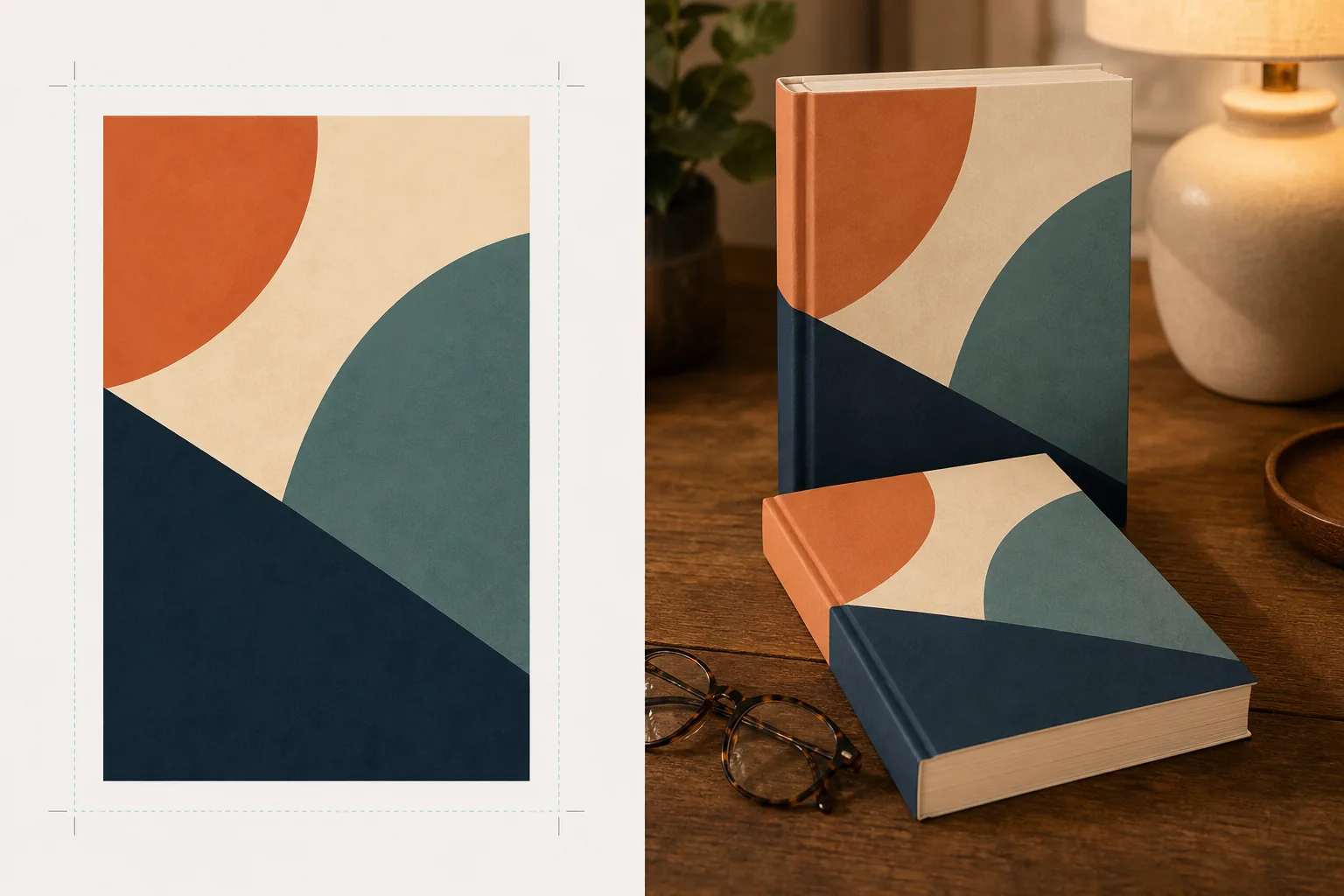
สร้างแบบจำลองปกหนังสือของคุณที่สมจริงราวภาพถ่าย วางในฉากไลฟ์สไตล์ บนชั้นวาง หรือแสดงเป็นภาพเรนเดอร์ 3 มิติแบบเดี่ยวพร้อมเงาตามธรรมชาติ เทมเพลตนี้นำงานออกแบบปกแบบแบนของคุณมาเปลี่ยนเป็นภาพโปรโมตสำหรับการประกาศบนโซเชียลมีเดีย เว็บไซต์ผู้เขียน เนื้อหา Amazon A+ และชุดข่าวประชาสัมพันธ์ — โดยไม่ต้องใช้ซอฟต์แวร์ 3 มิติใด ๆ
ลองใช้เทมเพลตนี้ฟรีDesign template preview
เทมเพลตนี้ทำอะไรได้บ้าง
แปลงงานออกแบบปกหนังสือแบบแบนให้เป็นภาพแบบจำลองสำหรับโปรโมตที่ดูเหมือนภาพถ่ายผลิตภัณฑ์ระดับมืออาชีพ อัปโหลดงานออกแบบปกของคุณเป็น JPEG หรือ PNG แบบแบน แล้วเทมเพลตจะแมปลงบนรูปทรงหนังสือที่สมจริงพร้อมมุมมองที่ถูกต้อง ความหนาของหน้า และความโค้งของสันปก จากนั้นแบบจำลองจะถูกวางลงในฉากไลฟ์สไตล์ — โต๊ะกาแฟพร้อมแว่นอ่านหนังสือ ชั้นวางในร้านหนังสือ โต๊ะข้างเตียงพร้อมแสงโคมไฟอุ่น ๆ — หรือเรนเดอร์เป็นผลิตภัณฑ์แบบเดี่ยวบนพื้นหลังสะอาดตาพร้อมเงาตามธรรมชาติ สำหรับชุดหนังสือหรือการโปรโมตหลายเล่ม สามารถจัดวางปกหลายปกเป็นแถวหรือซ้อนกันด้วยมุมมองที่สอดคล้องกัน ทิศทางของแสงและเงาจะตรงกับสภาพแวดล้อมของฉาก ทำให้หนังสือดูปรากฏอยู่จริงทางกายภาพแทนที่จะดูเหมือนการตัดต่อ
การตั้งค่าเทมเพลต
| รูปแบบหนังสือ | ปกอ่อน ปกแข็ง หรือปกแข็งพร้อมใบหุ้มปก |
| ลักษณะตามจำนวนหน้า | บาง (100 หน้า) ปานกลาง (250 หน้า) หนา (400+ หน้า) — มีผลต่อความกว้างของสันปกและขอบหน้า |
| ประเภทฉาก | แบบเดี่ยวพร้อมเงา โต๊ะกาแฟ ชั้นวางหนังสือ โต๊ะข้างเตียง หรือถือในมือ |
| มุมมองเปอร์สเปคทีฟ | ด้านหน้าตรง สามส่วนสี่ หรือเอียงมองจากด้านบนเล็กน้อย |
| ความละเอียดของผลลัพธ์ | 3000×3000px (1:1 โซเชียล) หรือ 2400×1600px (แบนเนอร์ 16:10) |
วิธีใช้เทมเพลตนี้
อัปโหลดงานออกแบบปกของคุณ
อัปโหลดปกหนังสือของคุณเป็นภาพแบบแบน — อย่างน้อยต้องมีปกหน้า สำหรับแบบจำลองปกแข็งพร้อมใบหุ้มปก คุณยังสามารถอัปโหลดสันปกและปกหลังได้ด้วย เทมเพลตรองรับไฟล์ JPEG, PNG และ PDF ขนาดของปกจะถูกตรวจจับโดยอัตโนมัติและสัดส่วนของหนังสือจะถูกปรับตามนั้น
เลือกรูปแบบหนังสือและฉาก
เลือกระหว่างรูปแบบปกอ่อน ปกแข็ง หรือใบหุ้มปก เลือกช่วงจำนวนหน้าเพื่อให้ความกว้างของสันปกและขอบหน้าตรงกับหนังสือจริงของคุณ จากนั้นเลือกฉาก: แบบเดี่ยวพร้อมเงา ฉากไลฟ์สไตล์ หรือสีพื้นหลังที่กำหนดเอง
ปรับมุมมองและเรนเดอร์
เลือกมุมมอง — ด้านหน้าตรงเพื่อความคมชัดของภาพย่อ สามส่วนสี่เพื่อความลึกเชิงภาพ หรือเอียงจากด้านบนสำหรับโพสต์โซเชียลแบบวางราบ เทมเพลตจะเรนเดอร์แบบจำลองด้วยแสงที่เหมาะสม พื้นผิวขอบหน้า และทิศทางเงาที่ตรงกับฉากที่เลือก
ดาวน์โหลดภาพโปรโมต
ส่งออกในอัตราส่วน 1:1 สำหรับ Instagram, 16:9 สำหรับส่วนหัวของ Twitter/Facebook หรือขนาดที่กำหนดเองสำหรับส่วนฮีโร่ของเว็บไซต์ของคุณ การส่งออกแต่ละครั้งจะมีแบบจำลองหนังสือพร้อมตัวเลือกพื้นหลังโปร่งใส เพื่อให้คุณสามารถวางลงในเลย์เอาต์ที่กำหนดเองของคุณได้
เคล็ดลับจากมืออาชีพเพื่อผลลัพธ์ที่ดีที่สุด
- ✓อัปโหลดปกของคุณที่ความละเอียดสูงสุดเท่าที่มี การแปลงมุมมอง 3 มิติจะลดความละเอียดที่ปรากฏบนด้านที่ถอยห่างของหนังสือ ดังนั้นการเริ่มต้นด้วยแหล่งที่มาความละเอียดสูงจึงช่วยให้ข้อความบนสันปกและปกยังคงอ่านได้ชัดเจน
- ✓สำหรับเนื้อหา Amazon A+ ให้ใช้แบบจำลองแบบเดี่ยวบนพื้นหลังสีขาว สิ่งนี้ทำให้หนังสือมีความรู้สึกแบบภาพถ่ายผลิตภัณฑ์ระดับพรีเมียมที่แตกต่างจากภาพปกแบบแบนที่แสดงอยู่แล้วบนหน้ารายการสินค้า
- ✓สร้างการจัดวางชุดหนังสือโดยการอัปโหลดปกทั้งหมดในชุด เทมเพลตจะจัดเรียงปกเหล่านั้นเป็นแถวด้วยมุมมองและระยะห่างที่สอดคล้องกัน ซึ่งสร้างผลกระทบเชิงภาพได้มากกว่าการแสดงปกทีละปกในการโปรโมตชุดหนังสืออย่างมาก
เครื่องมือ
คำถามที่พบบ่อย
ฉันสามารถจำลองเครื่องอ่านอีบุ๊กหรือแท็บเล็ตที่แสดงปกของฉันได้หรือไม่
+
เทมเพลตนี้เน้นที่แบบจำลองหนังสือทางกายภาพ — รูปแบบปกอ่อนและปกแข็ง สำหรับแบบจำลองที่แสดงบนเครื่องอ่านอีบุ๊กหรือแท็บเล็ต คุณจะต้องนำปกแบบแบนไปวางซ้อนบนภาพถ่ายอุปกรณ์แยกต่างหาก
ข้อความบนสันปกจะอ่านได้หรือไม่
+
ได้ ตราบใดที่ไฟล์ปกต้นฉบับมีงานออกแบบสันปก เทมเพลตจะห่องานออกแบบสันปกรอบขอบหนังสือด้วยมุมมองที่ตรงกับมุมของปกหน้า สำหรับหนังสือบาง (น้อยกว่า 150 หน้า) สันปกจะแคบและข้อความขนาดเล็กอาจอ่านได้ยากที่ขนาดการแสดงผลเล็ก
ฉันสามารถใช้สิ่งนี้เพื่อโปรโมตหนังสือเสียงหรือพอดแคสต์ได้หรือไม่
+
ได้ รูปแบบปกสี่เหลี่ยมจัตุรัสที่ใช้สำหรับหนังสือเสียงและพอดแคสต์สามารถเรนเดอร์เป็นแบบจำลองสไตล์กล่องซีดี หรือเป็นรูปสี่เหลี่ยมจัตุรัสแบบเดี่ยวพร้อมเงาที่มีมิติ ทำให้มีความรู้สึกปรากฏอยู่จริงทางกายภาพที่งานปกแบบแบนไม่มี
เปลี่ยนงานศิลป์ปกของคุณให้เป็นภาพโปรโมตที่น่าทึ่ง
อัปโหลดงานออกแบบปกแบบแบนแล้วรับแบบจำลองหนังสือที่สมจริงราวภาพถ่ายสำหรับโซเชียลมีเดีย เว็บไซต์ผู้เขียน และแคมเปญการตลาด
ลองใช้ฟรีRelated templates
More design templates for your workflow.
สร้างโลโก้ PNG โปร่งใสพร้อมการปรับแต่งขอบที่สะอาดตาและการส่งออกหลายขนาดสำหรับเว็บ สิ่งพิมพ์ โซเชียลมีเดีย และไอคอนแอป ใช้งานได้กับภาพถ่ายโลโก้ที่พิมพ์และไฟล์ดิจิทัล
ออกแบบหน้าปกพอดแคสต์ที่ตรงตามข้อกำหนดของ Apple Podcasts และ Spotify พร้อมการเปลี่ยนพื้นหลัง การแยกแนวตั้งของโฮสต์ และเค้าโครงที่พร้อมสำหรับการพิมพ์
เตรียมงานศิลปะดิจิทัลและภาพถ่ายสำหรับการพิมพ์ขนาดใหญ่ด้วยการเพิ่มขนาด AI การขยายแคนวาส การพิสูจน์สีที่แม่นยำ และการส่งออกไฟล์พร้อมพิมพ์
เตรียมภาพถ่ายสำหรับการส่งตัวแทนสต็อกพร้อมการลบเครื่องหมายการค้า การแก้ไขการปฏิบัติตามข้อกำหนดการปล่อยตัวแบบ การตรวจสอบคุณภาพทางเทคนิค และข้อกำหนดด้านรูปแบบเฉพาะของเอเจนซี่