
เทมเพลตภาพถ่ายหนังสือเดินทาง
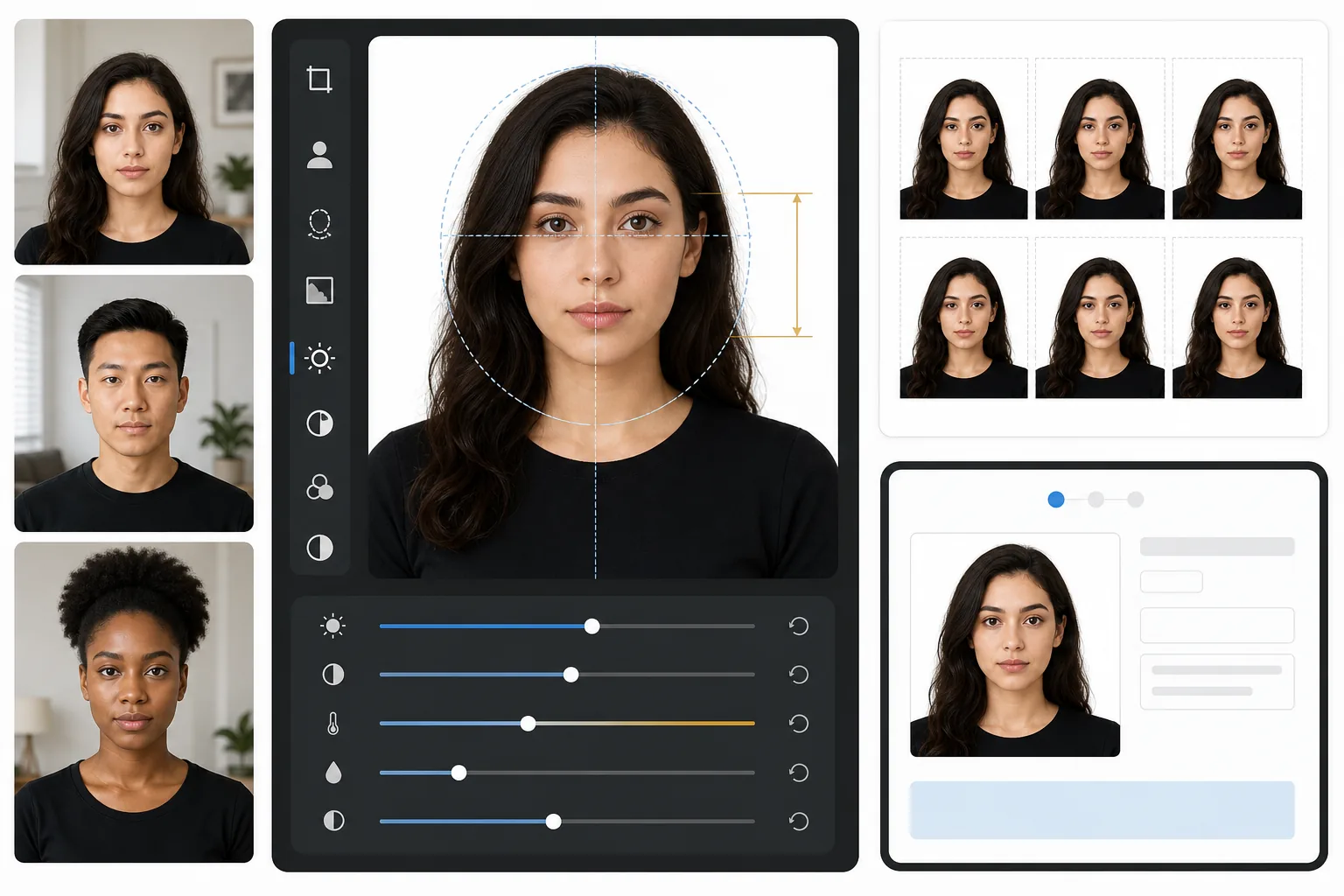
ข้ามตู้ถ่ายรูปในร้านขายยาไปได้เลย เทมเพลตนี้สร้างภาพถ่ายหนังสือเดินทางที่สอดคล้องกับข้อกำหนดของรัฐบาลจากภาพเซลฟี่ที่มีแสงสว่างเพียงพอ — พื้นหลังสีขาว อัตราส่วนศีรษะต่อเฟรมที่ถูกต้อง (1 ถึง 1-3/8 นิ้วจากคางถึงกระหม่อม) และเอาต์พุต 2×2 นิ้วที่ 600 DPI ซึ่งตรงตามข้อกำหนดของกระทรวงการต่างประเทศสหรัฐฯ, HMPO ของสหราชอาณาจักร, สหภาพยุโรป และวีซ่าเชงเก้น
ลองใช้เทมเพลตนี้ฟรีProfessional template preview
เทมเพลตนี้ทำอะไร
แปลงภาพถ่ายบุคคลมาตรฐานให้เป็นภาพถ่ายหนังสือเดินทางหรือวีซ่าที่สอดคล้องกับข้อกำหนดของรัฐบาล เทมเพลตจะลบพื้นหลังใดๆ และแทนที่ด้วยสีขาวล้วน ครอบตัดให้ได้ขนาด 2×2 นิ้ว (51×51 มม.) ที่กระทรวงการต่างประเทศสหรัฐฯ กำหนดอย่างแม่นยำ จัดตำแหน่งศีรษะให้อยู่ในช่วงขนาดที่กำหนด และให้แสงสว่างสม่ำเสมอโดยไม่มีเงาที่รุนแรง เอาต์พุตพร้อมพิมพ์ที่ 600 DPI สำหรับการพิมพ์ลงกระดาษภาพถ่ายหรือการส่งแบบดิจิทัลโดยตรง
การตั้งค่าเทมเพลต
| ขนาดเอาต์พุต | 2×2 นิ้ว (51×51 มม.) ที่ 600 DPI (1200×1200px) |
| พื้นหลัง | สีขาวล้วน (#FFFFFF) ไม่มีการไล่สีหรือพื้นผิว |
| ขนาดศีรษะ | 1 นิ้วถึง 1-3/8 นิ้ว (25–35 มม.) จากคางถึงกระหม่อม |
| ตำแหน่งดวงตา | ดวงตาอยู่กึ่งกลางระหว่าง 1-1/8 ถึง 1-3/8 นิ้วจากด้านล่าง |
| โปรไฟล์สี | sRGB (เข้ากันได้กับแล็บภาพถ่าย) |
| รูปแบบไฟล์ | JPEG คุณภาพ 100% หรือ PNG (สำหรับพอร์ทัลส่งแบบดิจิทัล) |
วิธีใช้เทมเพลตนี้
ถ่ายภาพบุคคลแบบหันหน้าตรง
ยืนหน้ากำแพงเรียบโดยให้แสงสว่างสม่ำเสมอบนใบหน้า ใช้แสงธรรมชาติตอนกลางวันหรือโคมไฟสองดวงวางห่างเท่ากันแต่ละด้าน มองตรงไปที่กล้องด้วยสีหน้าที่เป็นกลางและเห็นหูทั้งสองข้าง
ลบและแทนที่พื้นหลัง
Background Eraser จะขจัดพื้นหลังใดๆ — ลวดลายวอลล์เปเปอร์ เงา ขอบเฟอร์นิเจอร์ — และแทนที่ด้วยสีขาวล้วนที่กำหนด เครื่องมือนี้จะรักษาขอบเส้นผมตามธรรมชาติและกรอบแว่นตาไว้โดยไม่สร้างรอยขอบแสง
ครอบตัดอัตโนมัติให้เป็นไปตามข้อกำหนด
เทมเพลตจะตรวจจับใบหน้าของคุณและจัดตำแหน่งให้อยู่ในช่วงขนาดศีรษะที่รัฐบาลกำหนด ดวงตาจะถูกวางในระดับความสูงที่ถูกต้อง และการวัดจากคางถึงกระหม่อมจะอยู่ในข้อกำหนด 1 ถึง 1-3/8 นิ้ว
พิมพ์หรือส่งแบบดิจิทัล
ดาวน์โหลดไฟล์ 600 DPI เพื่อพิมพ์ลงกระดาษภาพถ่ายแบบมัน 4×6 (ใส่ภาพ 2×2 ได้สี่รูปต่อแผ่น) หรือส่งไฟล์ดิจิทัลโดยตรงไปยังพอร์ทัลออนไลน์สำหรับต่ออายุหนังสือเดินทางและสมัครวีซ่า
เคล็ดลับมืออาชีพเพื่อผลลัพธ์ที่ดีที่สุด
- ✓ใช้แสงธรรมชาติตอนกลางวันที่ส่องตรงมาจากหน้าต่าง — ช่วยสร้างแสงสว่างที่นุ่มนวลและสม่ำเสมอที่สำนักงานหนังสือเดินทางชื่นชอบ และขจัดเงาที่รุนแรงจากการถ่ายภาพด้วยแฟลช
- ✓ถอดแว่นตาออกก่อนถ่ายภาพหากเป็นไปได้ หลายประเทศตอนนี้กำหนดให้ใช้ภาพที่ไม่สวมแว่น และแม้ในที่ที่อนุญาต แสงสะท้อนและเงาของกรอบแว่นก็เป็นสาเหตุที่พบบ่อยที่สุดของการปฏิเสธภาพถ่าย
- ✓สวมเสื้อสีพื้นที่ตัดกับสีขาว — สีน้ำเงินเข้ม สีดำ หรือสีเขียวเข้มได้ผลดีที่สุด เสื้อผ้าสีขาวจะกลมกลืนกับพื้นหลังและอาจทำให้ถูกปฏิเสธได้
- ✓ให้คนอื่นถ่ายภาพให้ในระยะแขนเอื้อมแทนการเซลฟี่ การเซลฟี่ด้วยกล้องหน้าทำให้เกิดการบิดเบือนแบบมุมกว้างเล็กน้อยซึ่งอาจทำให้สัดส่วนใบหน้าดูไม่เป็นธรรมชาติและกระตุ้นการตรวจสอบด้วยมือ
เครื่องมือ
คำถามที่พบบ่อย
ภาพถ่ายนี้จะได้รับการยอมรับจากกระทรวงการต่างประเทศสหรัฐฯ หรือไม่
+
เทมเพลตปฏิบัติตามข้อกำหนดที่แม่นยำซึ่งเผยแพร่ในข้อกำหนดภาพถ่ายหนังสือเดินทางของกระทรวงการต่างประเทศสหรัฐฯ: 2×2 นิ้ว พื้นหลังสีขาว ขนาดศีรษะระหว่าง 1 ถึง 1-3/8 นิ้ว และตำแหน่งดวงตาที่ถูกต้อง อย่างไรก็ตาม การยอมรับยังขึ้นอยู่กับสีหน้า มุมศีรษะ และแสงด้วย — เทมเพลตจัดการพื้นหลัง การปรับขนาด และการครอบตัด แต่ไม่สามารถแก้ไขดวงตาที่หลับหรือศีรษะที่หันเอียงได้
ใช้ได้กับภาพถ่ายหนังสือเดินทางที่ไม่ใช่ของสหรัฐฯ หรือไม่
+
ค่าเริ่มต้นตั้งไว้สำหรับหนังสือเดินทางสหรัฐฯ (2×2 นิ้ว) แต่ขนาดภาพถ่ายหนังสือเดินทางแตกต่างกันไปตามประเทศ — ตัวอย่างเช่น สหราชอาณาจักรกำหนด 35×45 มม. และอินเดียกำหนด 2×2 นิ้วด้วยอัตราส่วนขนาดศีรษะที่ต่างกัน การลบพื้นหลังและการจัดตำแหน่งใบหน้าหลักใช้ได้กับทุกประเทศ ปรับขนาดการครอบตัดให้ตรงกับข้อกำหนดเฉพาะของคุณ
ฉันพิมพ์ที่บ้านได้ไหม
+
ได้ เอาต์พุต 600 DPI พิมพ์ที่ขนาด 2×2 นิ้วได้อย่างแม่นยำบนเครื่องพิมพ์ภาพถ่ายใดๆ เพื่อผลลัพธ์ที่ดีที่สุด ให้ใช้กระดาษภาพถ่ายแบบมันหรือแบบด้านและพิมพ์สี่ชุดบนกระดาษ 4×6 แผ่นเดียว ตู้พิมพ์ภาพถ่ายในร้านขายยาส่วนใหญ่ก็รับไฟล์ดิจิทัลสำหรับการพิมพ์คุณภาพสูงเช่นกัน
รับภาพถ่ายหนังสือเดินทางที่ตรงตามข้อกำหนดโดยไม่ต้องออกจากบ้าน
อัปโหลดภาพบุคคลแบบหันหน้าตรงแล้วรับภาพถ่ายหนังสือเดินทางตามข้อกำหนดของรัฐบาลภายในไม่กี่วินาที พิมพ์ที่บ้านหรือส่งแบบดิจิทัล
ลองใช้ฟรีRelated templates
More professional templates for your workflow.
เทมเพลตภาพศีรษะ LinkedIn ระดับมืออาชีพ พื้นหลังที่สะอาดตา การปรับปรุงผิวให้เป็นธรรมชาติ และรูปลักษณ์ที่สวยงามที่ได้รับการดูโปรไฟล์เพิ่มขึ้น 14 เท่า
เทมเพลตภาพศีรษะแบบมืออาชีพสำหรับนักแสดงและนางแบบ เป็นไปตามมาตรฐานผู้กำกับการคัดเลือกนักแสดงด้วยผลงานพร้อมพิมพ์ขนาด 8×10 การรีทัชอย่างเป็นธรรมชาติ และพื้นหลังที่สะอาดตาสำหรับการส่งเอเจนซี่
ปรับปรุงภาพถ่ายการตลาดทางทันตกรรมด้วยการฟอกสีฟันตามธรรมชาติ พื้นหลังแนวตั้งที่สอดคล้องกัน และภาพเปรียบเทียบก่อน-หลังสำหรับเว็บไซต์สถานประกอบการและโซเชียลมีเดีย