
การปรับปรุงรอยยิ้มทางทันตกรรม
สร้างภาพการตลาดทางทันตกรรมก่อน-หลังระดับมืออาชีพที่นำเสนอผลงานของคลินิกคุณ เทมเพลตนี้ใช้การฟอกสีฟันที่ดูเป็นธรรมชาติ ขจัดความรกของพื้นหลังทางคลินิก ปรับพื้นหลังภาพถ่ายผู้ป่วยให้เป็นมาตรฐาน และปรับสมดุลแสงด้านบนที่จัดจ้านซึ่งพบได้ทั่วไปในภาพถ่ายในห้องทำฟัน
ลองใช้เทมเพลตนี้ฟรีProfessional template preview
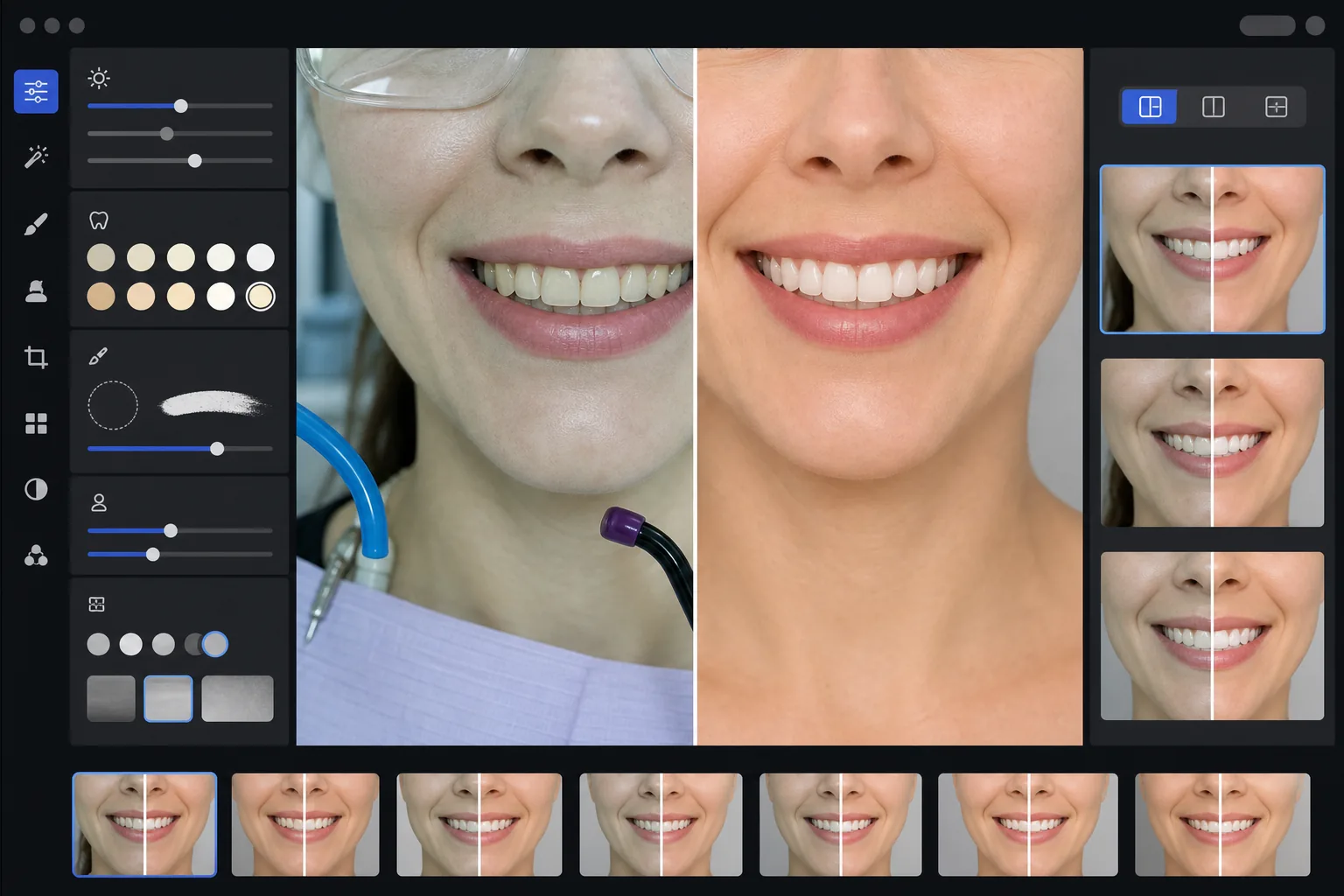
เทมเพลตนี้ทำอะไรได้บ้าง
แปลงภาพถ่ายทางทันตกรรมทางคลินิกให้เป็นภาพการตลาดที่ขัดเกลาแล้วสำหรับเว็บไซต์คลินิก โซเชียลมีเดีย และสื่อให้ความรู้แก่ผู้ป่วย AI Enhance แก้ไขโทนสีเขียว-ขาวที่ไม่น่ามองของแสงในห้องทำฟัน และใช้การฟอกสีฟันที่ละเอียดอ่อนซึ่งดูเป็นธรรมชาติ — ทำให้ฟันสว่างขึ้น 2-3 เฉดสีโดยไม่ทำให้ดูปลอม Magic Eraser ขจัดองค์ประกอบพื้นหลังทางคลินิก เช่น ท่อดูด ไฟฉายเร่งแข็งตัว รอยกระดาษกัดสบบนริมฝีปาก และแว่นตาป้องกัน พื้นหลังภาพถ่ายผู้ป่วยจะถูกปรับให้เป็นพื้นหลังที่สะอาดและสอดคล้องกันตลอดทั้งแกลเลอรีเคสของคุณ
การตั้งค่าเทมเพลต
| การฟอกสีฟัน | เพิ่มความสว่างตามธรรมชาติ +2 ถึง +3 เฉดสี (รักษาความโปร่งแสงและพื้นผิวเคลือบฟัน) |
| การแก้ไขแสง | สมดุลแสงกลางวันของห้องทำฟัน (ขจัดโทนสีเขียว-ขาวทางคลินิก) |
| พื้นหลัง | พื้นหลังสีเทาหรือสีขาวที่เป็นกลางและสอดคล้องกันพร้อมขอบมืดนุ่มนวล |
| โทนสีผิว | การแก้ไขความอบอุ่นรอบปาก (ลดความซีดจากแสงทางทันตกรรม) |
| สีริมฝีปาก | การฟื้นคืนความอิ่มตัวตามธรรมชาติ (ต้านแสงทางคลินิกที่ทำให้สีจาง) |
วิธีใช้เทมเพลตนี้
อัปโหลดภาพถ่ายทางคลินิก
อัปโหลดภาพระยะใกล้ของรอยยิ้ม ภาพก่อน-หลังสไตล์ภาพบุคคล หรือภาพในช่องปากที่ถ่ายในห้องทำฟันของคุณ เทมเพลตนี้ใช้งานได้กับภาพจากกล้องเฉพาะทางทันตกรรม กล้อง DSLR พร้อมแฟลชวงแหวน และภาพจากสมาร์ทโฟนที่ถ่ายภายใต้แสงในห้องทำฟัน
แก้ไขแสงทางคลินิก
AI Enhance ปรับให้โทนสีเขียว-ขาวจากไฟยูนิตทำฟันด้านบนเป็นกลาง เพิ่มความอบอุ่นให้โทนสีผิวรอบปาก และฟื้นคืนสีริมฝีปากตามธรรมชาติ สีฟันจะถูกทำให้สว่างขึ้นอย่างละเอียดอ่อนเพื่อแสดงผลลัพธ์ในแบบที่ดีที่สุดในขณะที่ยังคงสมจริงและซื่อตรง
ทำความสะอาดพื้นหลังและสิ่งรบกวน
Magic Eraser ขจัดท่อที่มองเห็นได้ ปลายไฟเร่งแข็งตัว คลิปผ้ากันเปื้อน คราบกระดาษกัดสบบนริมฝีปาก และอุปกรณ์ทางคลินิกในพื้นหลัง พื้นหลังจะถูกแทนที่ด้วยพื้นหลังที่เป็นกลางและสอดคล้องกันซึ่งตรงกันในทุกคู่ภาพก่อน-หลังของคุณ
ส่งออกเพื่อใช้ในการตลาด
ดาวน์โหลดภาพที่ปรับปรุงแล้วแยกแต่ละภาพ หรือภาพประกอบก่อน-หลังแบบเคียงข้างกัน ผลลัพธ์มีขนาดที่เหมาะสำหรับแกลเลอรีเว็บไซต์ โพสต์ Instagram, Google Business Profile และโบรชัวร์สำหรับผู้ป่วยแบบพิมพ์ ด้วยความละเอียดที่เหมาะสำหรับการพิมพ์ขนาด 8x10 นิ้ว
เคล็ดลับมืออาชีพเพื่อผลลัพธ์ที่ดีที่สุด
- ✓สำหรับคู่ภาพก่อน-หลัง ให้ถ่ายทั้งภาพก่อนการรักษาและหลังการรักษาจากมุม ระยะห่าง และตำแหน่งแสงเดียวกัน เทมเพลตสามารถแก้ไขความแตกต่างของการเปิดรับแสงระหว่างทั้งสองได้ แต่การจับคู่มุมกล้องดั้งเดิมจะให้การเปรียบเทียบที่น่าเชื่อถือที่สุด
- ✓การฟอกสีฟันตั้งใจให้อยู่ในระดับพอประมาณ — มันเพิ่มความสว่าง 2-3 เฉดสี vita แทนที่จะทำให้ฟันขาวเหมือนกระดาษ สิ่งนี้ดูเป็นธรรมชาติและน่าเชื่อถือมากกว่าสำหรับผู้ป่วยที่มีแนวโน้ม หากผลลัพธ์ทางคลินิกจริงของคุณน่าทึ่ง ภาพถ่ายที่ซื่อตรงพร้อมการปรับปรุงเล็กน้อยจะโน้มน้าวได้มากกว่าภาพที่ประมวลผลมากเกินไป
- ✓ใช้เครื่องถ่างแก้มสำหรับภาพรอยยิ้มในช่องปากเพื่อให้เห็นงานทันตกรรมได้ครบถ้วนที่สุด เทมเพลตจัดการกับลักษณะที่ดูทางคลินิกเล็กน้อยของภาพที่ใช้เครื่องถ่างช่วยโดยเพิ่มความอบอุ่นให้โทนสีผิวและครอบตัดเพื่อโฟกัสที่บริเวณรอยยิ้ม
- ✓ประมวลผลแกลเลอรีเคสทั้งหมดของคุณในชุดเดียวเพื่อให้แน่ใจว่าสีพื้นหลัง ความสว่าง และความอบอุ่นสอดคล้องกันในทุกคู่ภาพก่อน-หลัง แสงที่ไม่ตรงกันระหว่างเคสต่างๆ บนเว็บไซต์ของคุณบั่นทอนความรู้สึกแบบมืออาชีพ
เครื่องมือ
คำถามที่พบบ่อย
สิ่งนี้ถือเป็นการโฆษณาทางทันตกรรมที่ทำให้เข้าใจผิดหรือไม่?
+
การปรับปรุงการฟอกสีจำกัดอยู่ที่ 2-3 เฉดสี vita และรักษาความโปร่งแสงตามธรรมชาติและพื้นผิวของเคลือบฟัน สิ่งนี้อยู่ในขอบเขตที่แสงถ่ายภาพระดับมืออาชีพและสมดุลแสงขาวส่งผลตามธรรมชาติอย่างมาก เทมเพลตไม่เปลี่ยนรูปร่างฟัน การจัดเรียง หรือเส้นขอบเหงือก — มันแก้ไขเพียงผลกระทบของสีที่ไม่น่ามองจากแสงทางคลินิกที่ทำให้ผลลัพธ์ดูแย่ในภาพถ่ายมากกว่าตอนเห็นจริง
สิ่งนี้สามารถสร้างภาพประกอบก่อน-หลังแบบเคียงข้างกันได้หรือไม่?
+
ได้ เทมเพลตสามารถส่งออกภาพที่ปรับปรุงแล้วแยกแต่ละภาพ หรือสร้างภาพประกอบแบบเคียงข้างกันพร้อมเส้นแบ่งตรงกลาง พื้นหลังที่สอดคล้องกัน และป้ายกำกับก่อน/หลัง ภาพทั้งสองในคู่ได้รับการปรับแต่งพื้นหลังแบบเดียวกัน ดังนั้นการเปรียบเทียบจึงดูสะอาดและเป็นมืออาชีพ
สิ่งนี้ใช้งานได้กับภาพถ่ายจากกล้องในช่องปากหรือไม่?
+
ได้ ภาพจากกล้องในช่องปากมักมีแสงที่จัดจ้านและตรงมากซึ่งทำให้พื้นผิวซีดขาว เทมเพลตฟื้นคืนรายละเอียดของเคลือบฟัน แก้ไขโทนสีขาวที่สุดขั้ว และปรับคอนทราสต์เพื่อแสดงกายวิภาคของฟันอย่างเป็นธรรมชาติ ผลลัพธ์มีรายละเอียดมากขึ้นและดูเป็นธรรมชาติมากกว่าภาพในช่องปากแบบดิบ
นำเสนอผลงานทันตกรรมของคุณด้วยภาพถ่ายการตลาดระดับมืออาชีพ
อัปโหลดภาพถ่ายทางคลินิกและรับภาพก่อน-หลังที่ปรับปรุงอย่างเป็นธรรมชาติและมีสไตล์ที่สอดคล้องกัน พร้อมสำหรับเว็บไซต์ โซเชียลมีเดีย และโบรชัวร์สำหรับผู้ป่วยของคุณ
ลองใช้ฟรีRelated templates
More professional templates for your workflow.
เทมเพลตภาพศีรษะ LinkedIn ระดับมืออาชีพ พื้นหลังที่สะอาดตา การปรับปรุงผิวให้เป็นธรรมชาติ และรูปลักษณ์ที่สวยงามที่ได้รับการดูโปรไฟล์เพิ่มขึ้น 14 เท่า
สร้างรูปถ่ายหนังสือเดินทางและวีซ่าที่ตรงตามมาตรฐานที่บ้าน พื้นหลังสีขาว อัตราส่วนขนาดศีรษะที่ถูกต้อง มาตรฐานสหรัฐอเมริกา 2×2 นิ้ว และเอาต์พุต 600 DPI ที่ตรงตามข้อกำหนดของกระทรวงการต่างประเทศ
เทมเพลตภาพศีรษะแบบมืออาชีพสำหรับนักแสดงและนางแบบ เป็นไปตามมาตรฐานผู้กำกับการคัดเลือกนักแสดงด้วยผลงานพร้อมพิมพ์ขนาด 8×10 การรีทัชอย่างเป็นธรรมชาติ และพื้นหลังที่สะอาดตาสำหรับการส่งเอเจนซี่