
ภาพถ่ายโปรไฟล์มืออาชีพสำหรับ LinkedIn
เปลี่ยนภาพถ่ายที่มีแสงดีให้กลายเป็นภาพถ่ายศีรษะมืออาชีพที่พร้อมใช้บน LinkedIn พื้นหลังสะอาดตา การปรับแต่งที่เป็นธรรมชาติ และการนำเสนอที่สวยงามซึ่งเพิ่มยอดดูโปรไฟล์ขึ้น 14 เท่า
ลองใช้เทมเพลตนี้ฟรีProfessional template preview
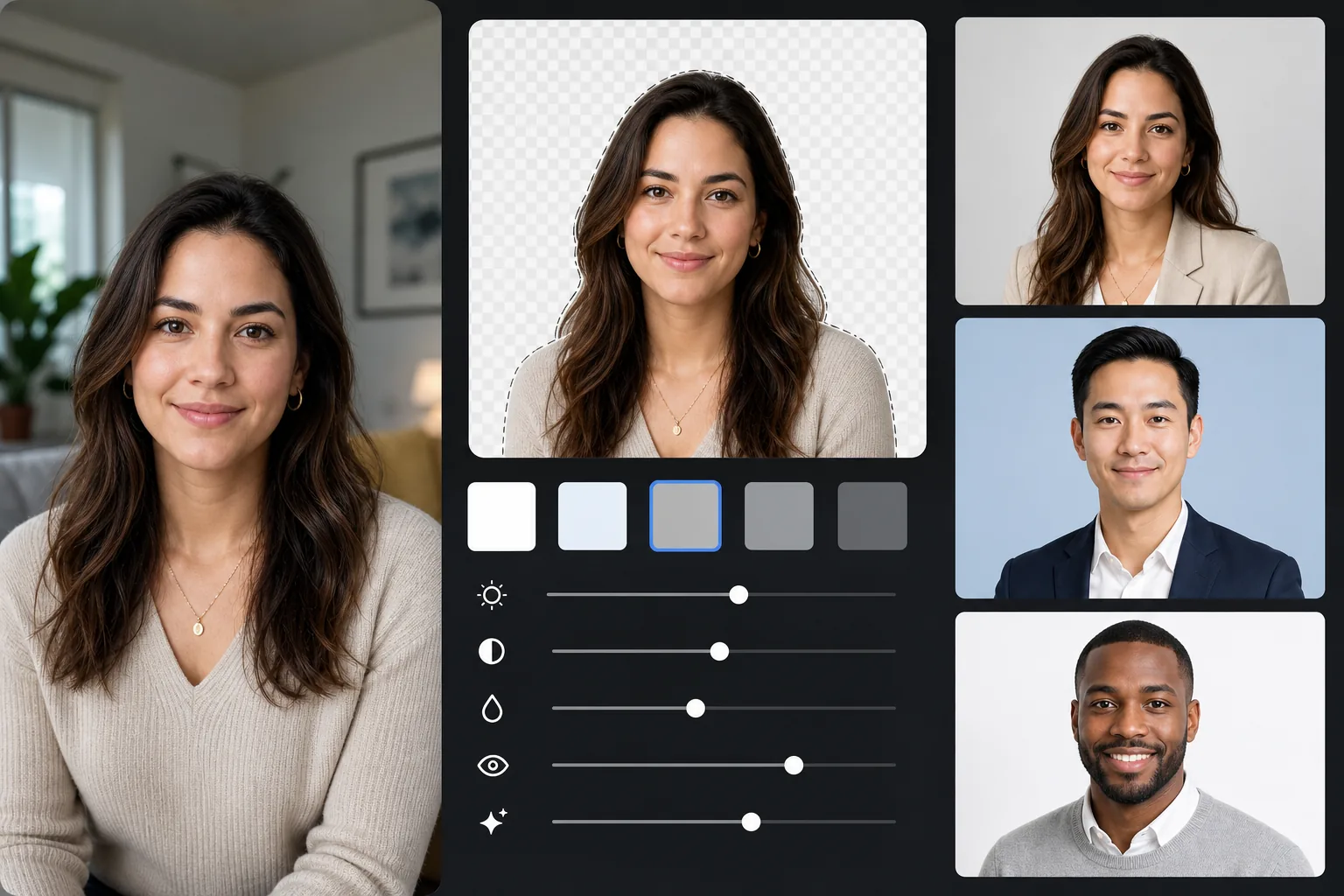
เทมเพลตนี้ทำอะไรได้บ้าง
แทนที่พื้นหลังใด ๆ ด้วยสีพื้นระดับมืออาชีพ (เทาอ่อน ฟ้านวล หรือขาว) ปรับแต่งผิวและแสงให้เป็นธรรมชาติ และส่งออกตามขนาดที่ LinkedIn แนะนำ ผลลัพธ์ดูเหมือนการถ่ายภาพศีรษะในสตูดิโอ
การตั้งค่าเทมเพลต
| พื้นหลัง | เทาอ่อน (#E8E8E8) — มาตรฐานมืออาชีพ |
| ขนาดผลลัพธ์ | 800×800px (แนะนำโดย LinkedIn) |
| การปรับแต่ง | ผิวธรรมชาติ แสงสม่ำเสมอ ดวงตาคมชัด |
| การครอบตัด | ศีรษะและไหล่ ใบหน้าอยู่ในช่วงหนึ่งในสามด้านบน |
| รูปแบบไฟล์ | JPEG (คุณภาพ 95%) |
วิธีใช้เทมเพลตนี้
ถ่ายภาพของคุณ
ยืนใกล้หน้าต่างเพื่อให้ได้แสงธรรมชาติ สวมเสื้อผ้าที่เหมาะกับการสัมภาษณ์ ให้ใครสักคนถ่ายภาพในระดับสายตาจากระยะห่างประมาณ 4 ฟุต โดยจัดเฟรมจากช่วงไหล่ขึ้นไป
ลบพื้นหลัง
Background Eraser แทนที่สภาพแวดล้อมใด ๆ ด้วยสีเทาระดับมืออาชีพที่สะอาดตา AI จะรักษาเส้นขอบเส้นผม ขอบเสื้อผ้า และรูปร่างร่างกายตามธรรมชาติของคุณอย่างแม่นยำ
ปรับแต่งให้เป็นธรรมชาติ
AI Enhance ปรับแสงให้สม่ำเสมอทั่วใบหน้า แก้ไขสีที่เพี้ยนในที่ร่มเพื่อให้ได้โทนผิวที่เป็นธรรมชาติ และทำให้ดวงตาคมชัด — จุดโฟกัสของภาพถ่ายศีรษะทุกภาพ
ส่งออกสำหรับ LinkedIn
ดาวน์โหลดที่ขนาด 800×800px สำหรับโปรไฟล์ LinkedIn ไฟล์ต้นฉบับเดียวกันส่งออกเป็นขนาดอื่นได้: 400×400 สำหรับภาพย่อ LinkedIn และความละเอียดเต็มสำหรับเรซูเม่หรือการพิมพ์
เคล็ดลับมืออาชีพเพื่อผลลัพธ์ที่ดีที่สุด
- ✓รอยยิ้มบาง ๆ ที่จริงใจพร้อมดวงตาที่ผ่อนคลายทำให้ดูเข้าถึงง่ายและมั่นใจ — สีหน้าที่เหมาะที่สุดสำหรับ LinkedIn
- ✓สวมสีที่ตัดกับพื้นหลังสีเทา: น้ำเงินกรมท่า เขียวเข้ม เลือดหมู หรือดำ ล้วนเข้ากันได้ดี
- ✓ถ่ายอย่างน้อย 20 รูป — คุณต้องการรูปที่สีหน้าเป็นธรรมชาติและดวงตาคมชัดเต็มที่
- ✓ควรใช้ภาพถ่ายศีรษะเดียวกันบน LinkedIn เรซูเม่ และโปรไฟล์มืออาชีพทั้งหมดเพื่อความสม่ำเสมอของแบรนด์
เครื่องมือ
คำถามที่พบบ่อย
สีพื้นหลังใดเหมาะที่สุดสำหรับ LinkedIn?
+
เทาอ่อน (#E8E8E8) เป็นตัวเลือกที่ดูเป็นมืออาชีพที่สุดในทุกกรณี ฟ้านวลสื่อถึงความน่าเชื่อถือสำหรับตำแหน่งในองค์กร สีขาวสะอาดตาแต่อาจทำให้โทนผิวที่อ่อนกว่าดูซีดได้ ทั้งสามสีมีให้ใช้ในเทมเพลตนี้
มันจะดูเหมือนภาพถ่ายมืออาชีพจากสตูดิโอไหม?
+
ด้วยแสงธรรมชาติที่ดีและสีหน้าที่จริงใจ ผลลัพธ์ที่ปรับแต่งด้วย AI แทบแยกไม่ออกจากภาพถ่ายศีรษะในสตูดิโอ การแทนที่พื้นหลัง การแก้ไขแสง และการปรับแต่งผิวอย่างละเอียดอ่อนจำลองสิ่งที่ช่างภาพมืออาชีพมอบให้
ฉันใช้สิ่งนี้กับโปรไฟล์มืออาชีพอื่น ๆ ได้ไหม?
+
ได้ เทมเพลตเดียวกันใช้ได้กับประวัติบริษัท หน้าวิทยากรในงานประชุม ภาพผู้เขียน และทุกแพลตฟอร์มที่ต้องการภาพถ่ายศีรษะมืออาชีพ ส่งออกในขนาดต่าง ๆ สำหรับแต่ละแพลตฟอร์ม
รับภาพถ่ายมืออาชีพของคุณวันนี้
ไม่ต้องนัดสตูดิโอ อัปโหลดภาพของคุณแล้วรับภาพถ่ายศีรษะที่พร้อมใช้บน LinkedIn ในเวลาไม่ถึงหนึ่งนาที
ลองใช้ฟรีRelated templates
More professional templates for your workflow.
สร้างรูปถ่ายหนังสือเดินทางและวีซ่าที่ตรงตามมาตรฐานที่บ้าน พื้นหลังสีขาว อัตราส่วนขนาดศีรษะที่ถูกต้อง มาตรฐานสหรัฐอเมริกา 2×2 นิ้ว และเอาต์พุต 600 DPI ที่ตรงตามข้อกำหนดของกระทรวงการต่างประเทศ
เทมเพลตภาพศีรษะแบบมืออาชีพสำหรับนักแสดงและนางแบบ เป็นไปตามมาตรฐานผู้กำกับการคัดเลือกนักแสดงด้วยผลงานพร้อมพิมพ์ขนาด 8×10 การรีทัชอย่างเป็นธรรมชาติ และพื้นหลังที่สะอาดตาสำหรับการส่งเอเจนซี่
ปรับปรุงภาพถ่ายการตลาดทางทันตกรรมด้วยการฟอกสีฟันตามธรรมชาติ พื้นหลังแนวตั้งที่สอดคล้องกัน และภาพเปรียบเทียบก่อน-หลังสำหรับเว็บไซต์สถานประกอบการและโซเชียลมีเดีย