
ลบแสงจ้าออกจากภาพถ่าย
ทำความสะอาดแสงสะท้อนจากแว่นตาในการถ่ายภาพบุคคล กำจัดแสงสะท้อนบนงานศิลปะที่กรอบกระจก และทำให้จุดสว่างบนผลิตภัณฑ์ที่มันเงาดูเรียบขึ้น แปรงแสงสะท้อนและ Magic Eraser AI Fill สร้างรายละเอียดที่อยู่ด้านล่างขึ้นมาใหม่ Review edges and preserve realistic lighting because results vary by image.
อัปเดตล่าสุด
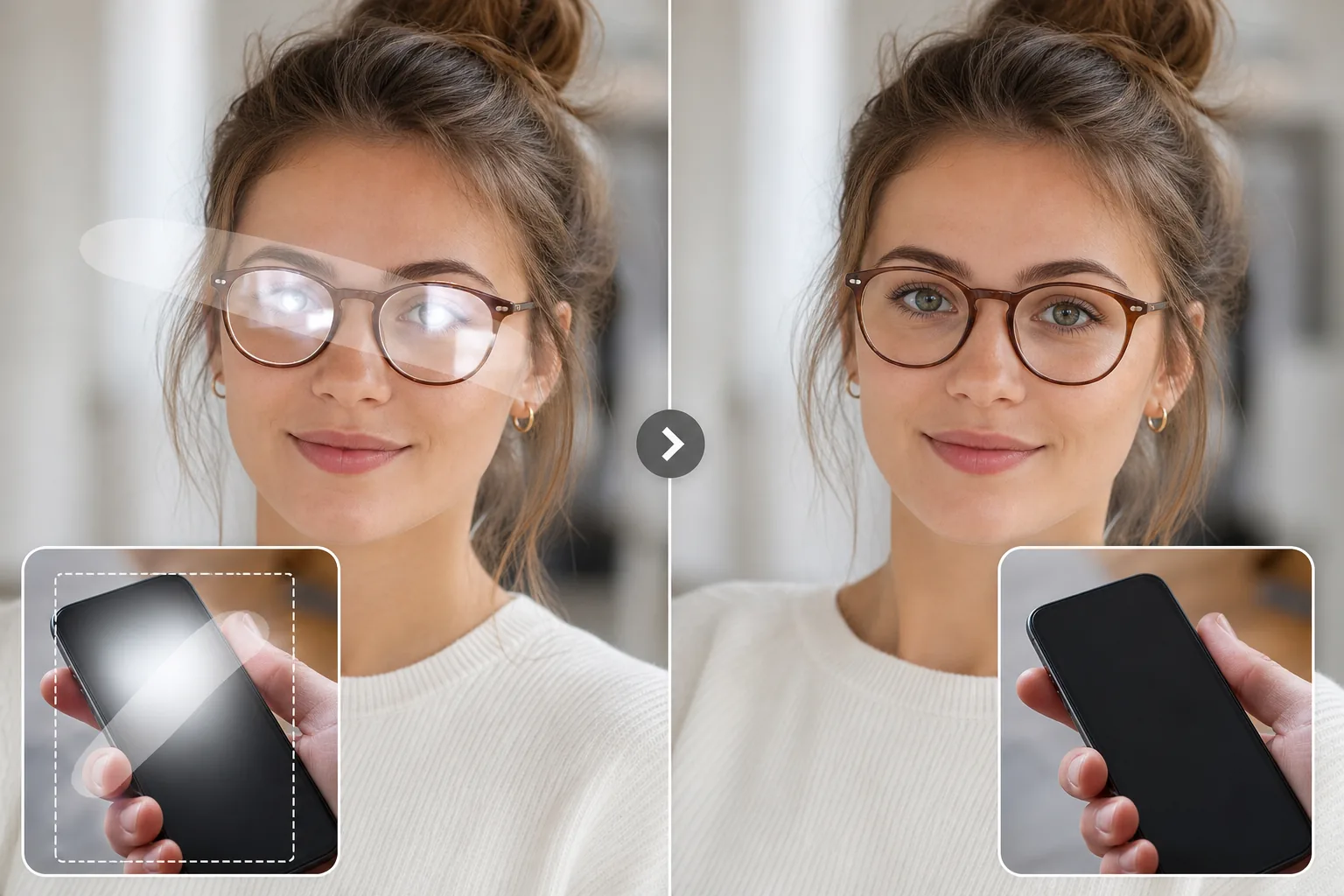
วิธีลบแสงสะท้อนและเงาสะท้อนจากกระจกหน้าต่างออกจากรูปภาพ
Reduce glare by masking the bright patch, including the soft halo, then review the filled area at full size. Results vary when glare has clipped eyes, text, labels, or other fine detail, so preserve realism and use a reshoot for identity-critical or catalog-accuracy work. หากต้องการลบแสงสะท้อนจากกระจกหน้าต่างในภาพ ให้เปิด Magic Eraser AI Fill แล้วใช้ brush ระบายทับบริเวณที่สว่างจ้าจนรายละเอียดหายไปบนกระจก รวมถึงรัศมีนุ่ม ๆ ที่ลามออกมารอบ ๆ ด้วย จากนั้นแตะ Fill ระบบ AI จะสร้างสิ่งที่อยู่หลังแสงสะท้อนขึ้นมาใหม่ ไม่ว่าจะเป็นวิวที่มองผ่านหน้าต่าง ภาพในกรอบ หรือดวงตาของคนที่อยู่หลังแว่นตา โดยอ้างอิงจากพิกเซลโดยรอบเป็นบริบท ใช้งานฟรี ไม่ต้องสมัครสมาชิก ทำงานได้ทั้งบนเว็บ iOS และ Android ขั้นตอน brush แล้ว fill แบบเดียวกันนี้ยังลบแสงแดดสะท้อนบนรถยนต์และผิวน้ำ แสงสะท้อนบนหน้าจออุปกรณ์ รวมถึงจุดแสงจ้าบนสินค้าผิวมันและฉลากเคลือบมันได้อีกด้วย แสงจ้าคือการเปิดรับแสงมากเกินไปในท้องถิ่น แสงที่สะท้อนจากพื้นผิวจะสว่างมากเมื่อเทียบกับส่วนอื่นๆ ของฉากจนเซ็นเซอร์กล้องบันทึกเป็นสีขาวบริสุทธิ์ รายละเอียดที่อยู่ตรงหน้าภาพถ่าย (ดวงตาหลังแว่น งานศิลปะหลังกรอบ ฉลากผลิตภัณฑ์ใต้เส้นโค้งมัน) หายไปจากไฟล์ เครื่องมือแก้ไขด้วยตนเอง เช่น แสตมป์โคลน จำเป็นต้องมีพื้นที่ที่ไม่มีแสงสะท้อนที่คล้ายกันในการคัดลอก ซึ่งมักไม่มีสำหรับวัตถุเฉพาะ AI Fill คาดการณ์รายละเอียดที่ขาดหายไปจากบริบท เช่น ความสมมาตรของใบหน้า ส่วนโดยรอบของงานศิลปะชิ้นเดียวกัน พื้นผิวผลิตภัณฑ์ที่อยู่ใกล้เคียง และสร้างพื้นที่ใหม่ภายในไม่กี่วินาที
ลบแสงจ้าในสามขั้นตอน
- 1
อัพโหลดรูปภาพของคุณ
เปิด Magic Eraser AI Fill วางรูปภาพ ใช้งานได้กับภาพบุคคล ภาพผลิตภัณฑ์ และฉากใดๆ ที่มีพื้นผิวสะท้อนแสง
- 2
แปรงเหนือแสงจ้า
ทาสีทับบริเวณที่สว่าง ครอบคลุมแสงจ้าทั้งหมด รวมถึงรัศมีหรือบานรอบๆ ส่วนที่สว่างที่สุด สำหรับแสงสะท้อนของเลนส์แว่นตา ให้ปัดให้ทั่วทั้งแผ่นสะท้อนแสง แม้ว่าจะมองเห็นรายละเอียดบางอย่างได้ก็ตาม
- 3
เรียกใช้ AI Fill และตรวจสอบ
แตะเติม AI จะสร้างรายละเอียดที่ซ่อนอยู่ขึ้นมาใหม่ภายในไม่กี่วินาที สำหรับดวงตาหลังแว่นตา ให้ตรวจสอบผลลัพธ์อย่างระมัดระวัง การสร้างใหม่เป็นการคาดเดาที่ดีที่สุดโดยพิจารณาจากโครงสร้างใบหน้าและดวงตาอีกข้าง Review edges, surface texture, and lighting before export.
ดีที่สุดสำหรับ
- แสงสะท้อนจากแว่นตาในการถ่ายภาพบุคคลและภาพศีรษะ
- ภาพสะท้อนบนภาพถ่าย งานศิลปะ หรือใบรับรองที่กรอบกระจก
- จุดที่สว่างสดใสบนพื้นผิวผลิตภัณฑ์มันวาว (โทรศัพท์ เครื่องประดับ เครื่องแก้ว)
- การสะท้อนบนหน้าจอและจอภาพในการถ่ายภาพผลิตภัณฑ์
- แสงสะท้อนจากดวงอาทิตย์บนตัวรถ แว่นกันแดด และป้ายสะท้อนแสง
บันทึกความซื่อสัตย์สำหรับภาพถ่ายประจำตัวและเอกสาร
Glare cleanup is a reconstruction, not a guaranteed recovery of hidden pixels. Use smaller passes, check eyes and text carefully, and leave natural highlights when they explain the surface shape. สำหรับเอกสารระบุตัวตน (หนังสือเดินทาง ใบขับขี่ บัตรประจำตัว) และบันทึกทางการแพทย์หรือทางกฎหมายที่มีแสงจ้าซ่อนข้อมูลที่จำเป็น การสร้าง AI ใหม่ถือเป็นเครื่องมือที่ไม่ถูกต้อง AI กำลังคาดเดาสิ่งที่อยู่ข้างใต้ และผู้ออกคาดว่าจะเห็นเอกสารต้นฉบับ ถ่ายภาพใหม่โดยใช้แสงแบบกระจายหรือในมุมที่หลีกเลี่ยงแสงสะท้อน สำหรับการถ่ายภาพบุคคลในชีวิตประจำวัน การถ่ายภาพผลิตภัณฑ์ และงานสร้างสรรค์ การลบแสงจ้าของ AI ทำได้รวดเร็วและน่าเชื่อถือ
คำถามที่พบบ่อย
- มันใช้ได้กับแสงสะท้อนของแว่นตาหรือเปล่า?
- ใช่. ลากไปทั่วทั้งแผ่นสะท้อนแสง จากนั้น AI จะสร้างบริเวณรอบดวงตาขึ้นมาใหม่โดยใช้ความสมมาตรของใบหน้าและบริบทโดยรอบ
- สามารถลบแสงสะท้อนออกจากกรอบรูปได้หรือไม่?
- ใช่. สำหรับงานศิลปะหรือภาพถ่ายที่มีกรอบกระจก ให้ปัดเหนือแสงสะท้อน จากนั้น AI จะสร้างงานศิลปะด้านล่างขึ้นใหม่โดยใช้ส่วนที่มองเห็นได้ของงานศิลปะเดียวกันเป็นบริบท
- แล้วแสงจ้าของหน้าจอในรูปถ่ายสินค้าล่ะ?
- แสงสะท้อนหน้าจอบนโทรศัพท์ จอภาพ และทีวีในช็อตผลิตภัณฑ์เป็นเรื่องปกติ AI จะสร้างเนื้อหาบนหน้าจอขึ้นมาใหม่หากคุณมีบริบทที่มองเห็นได้เพียงพอ หรือคุณสามารถสลับเป็นภาพหน้าจอที่สะอาดตาเป็นคอมโพสิตได้
- พื้นที่ที่สร้างใหม่จะตรงกับส่วนที่เหลือของรูปภาพหรือไม่
- สี ความสว่าง และพื้นผิวจะถูกจับคู่กับพิกเซลโดยรอบโดยอัตโนมัติ รายละเอียดคอนทราสต์ที่สูงมากในพื้นที่เล็กๆ (ข้อความใต้แสงสะท้อน รูปแบบที่ละเอียด) เป็นกรณีที่ยากที่สุดและอาจต้องมีการปรับแต่ง
- AI Fill กู้คืนดวงตาที่ถูกแสงสะท้อนจากแว่นบังจนหนักได้ไหม?
- มันสร้างบริเวณดวงตาขึ้นใหม่จากความสมมาตรของใบหน้าและดวงตาส่วนที่มองเห็นได้ ผลลัพธ์จึงมักดูสมจริงสำหรับภาพพอร์ตเทรตทั่วไปและภาพลงโซเชียล แต่นี่เป็นการสร้างขึ้นใหม่แบบคาดเดาให้ใกล้เคียงที่สุด ไม่ใช่สีตาจริงหรือทิศทางการมองที่กู้คืนมาจากไฟล์ ดังนั้นสำหรับงานที่เกี่ยวกับการระบุตัวตน ควรตรวจดูอย่างละเอียดหรือถ่ายใหม่โดยขยับแหล่งแสงให้พ้นแนวตรง
- จะลดแสงสะท้อนตั้งแต่ตอนถ่ายเพื่อให้แก้น้อยลงได้อย่างไร?
- ขยับแหล่งแสงไม่ให้สะท้อนตรงเข้าเลนส์ คือถ่ายเฉียงเล็กน้อยกับกระจกและหน้าจอ เอียงแว่นตาลงสองสามองศา และใช้แสงนวลหรือแสงจากหน้าต่างแทนแฟลชตรง ๆ ฟิลเตอร์โพลาไรซ์แบบหมุน (CPL) ช่วยตัดแสงสะท้อนบนน้ำ กระจก และใบไม้ได้อย่างมาก แสงสะท้อนที่น้อยในภาพต้นฉบับย่อมดีกว่าการมาสร้างขึ้นใหม่ทีหลังเสมอ
- การลบแสงสะท้อนจะเปลี่ยนค่าแสงหรือสีโดยรวมของภาพไหม?
- ไม่ AI Fill จะสร้างใหม่เฉพาะบริเวณที่คุณป้ายด้วยแปรงเท่านั้น และจับคู่ความสว่าง สี และพื้นผิวให้เข้ากับพิกเซลรอบ ๆ ส่วนที่เหลือของภาพจึงไม่ถูกแตะต้อง หากทั้งภาพสว่างเกินไป (overexposed) ไม่ใช่แค่จุดที่มีแสงสะท้อน นั่นเป็นการแก้ค่าแสงทั้งภาพ ควรใช้แถบปรับค่าแสงและไฮไลต์ในโปรแกรมแก้ภาพของคุณ ไม่ใช่การป้ายแปรง
- ลบแสงสะท้อนจากหน้าต่างในภาพได้อย่างไร?
- ใช้ brush ระบายทับส่วนของกระจกหน้าต่างที่สว่างจ้าจนรายละเอียดหายไป รวมถึงแสงฟุ้งนุ่ม ๆ ที่ค่อย ๆ จางลงจากจุดที่สว่างที่สุด แล้วแตะ Fill ถ้าแสงสะท้อนบังวิวที่มองผ่านหน้าต่างหรือภาพในกรอบที่อยู่ด้านหลัง ระบบ AI จะสร้างส่วนนั้นขึ้นใหม่จากบริเวณที่ยังมองเห็นได้ในฉากเดียวกัน แสงสะท้อนจากหน้าต่างมักเป็นบริเวณกว้างและคอนทราสต์สูง จึงควรทำเป็นช่วง ๆ คือเก็บจุดที่แย่ที่สุดก่อน ตรวจดูผล แล้วค่อยแต่งจุดแสงจ้าที่เหลือ แทนที่จะระบายปิดกระจกทั้งบานในครั้งเดียว
- ลบแสงแดดสะท้อนจากภาพกลางแจ้งและผิวน้ำได้ไหม?
- ได้ แสงแดดสะท้อนบนตัวถังรถ แว่นกันแดด ป้ายสะท้อนแสง และจุดแสงจ้าบนผิวน้ำ สระว่ายน้ำ หรือพื้นเปียก ล้วนสร้างขึ้นใหม่ได้ดี เพราะพื้นผิวโดยรอบให้รูปแบบที่ชัดเจนแก่ AI ในการต่อรายละเอียด ทั้งสีรถ ท้องฟ้า และผิวน้ำที่เป็นริ้วคลื่นล้วนคาดเดาเพื่อสร้างใหม่ได้ กรณีที่ยากคือแสงแดดสะท้อนที่ขาวจ้าจนรายละเอียดหายไปหมด เพราะไม่มีข้อมูลใดถูกบันทึกไว้ตรงนั้น AI จะเติมส่วนต่อเนื่องของพื้นผิวที่ดูสมจริงแทน มากกว่าจะกู้พื้นผิวเฉพาะจุดที่หายไปกลับมาได้
- ใช้กับแสงสะท้อนบนสินค้าผิวมันหรือฉลากเคลือบมันได้ไหม?
- ได้ แต่มีข้อควรระวัง จุดแสงจ้าบนโทรศัพท์ เครื่องประดับ เครื่องแก้ว และบรรจุภัณฑ์ผิวมัน จะถูกเก็บได้อย่างน่าเชื่อ เพราะส่วนโค้งของพื้นผิวเรียบและคาดเดาได้ กรณีที่ยากกว่าคือรายละเอียดเล็ก ๆ ที่อยู่ใต้แสงสะท้อน เช่น ตัวหนังสือเล็ก ๆ บนเมนูเคลือบมัน โลโก้ที่สลักไว้ หรือเส้นบาร์โค้ด ซึ่ง AI เดาขึ้นมาจริง ๆ และอาจลบเรียบหายไป สำหรับภาพแคตตาล็อกหรือภาพลงขายที่ตัวหนังสือต้องถูกต้อง ควรวางแผนแต่งภาพเพิ่มหรือถ่ายใหม่โดยเอียงมุมและใช้แสงนุ่มกระจาย
- เครื่องมือลบแสงสะท้อนใช้ฟรีไหม และใช้บนมือถือได้หรือเปล่า?
- ฟรีทั้งคู่ การลบแสงสะท้อนทำงานบนแพ็กเกจฟรีของ Magic Eraser โดยไม่ต้องสมัครสมาชิกและไม่มีลายน้ำ เพียงอัปโหลด ใช้ brush ระบายบนแสงสะท้อน แล้วส่งออกภาพที่เก็บงานเรียบร้อยได้โดยไม่มีค่าใช้จ่าย ใช้งานได้บนเบราว์เซอร์มือถือทุกตัว และมีแอปเฉพาะทั้ง iOS และ Android คุณจึงแก้แสงสะท้อนจากภาพในคลังกล้องได้โดยตรง ด้วย AI และผลลัพธ์แบบเดียวกับเวอร์ชันเว็บบนเดสก์ท็อป