
ยกระดับภาพการเล่นเกมของคุณ
สตรีมเมอร์ ทีม eSports และผู้สร้างเนื้อหาเกมจำเป็นต้องมีภาพขนาดย่อ ภาพซ้อนทับ และกราฟิกส่งเสริมการขายที่สะดุดตา Magic Eraser ลบพื้นหลัง ทำความสะอาดภาพหน้าจอ และแยกอักขระเพื่อให้เนื้อหาของคุณโดดเด่นในฟีดที่มีผู้คนหนาแน่น
Last updated
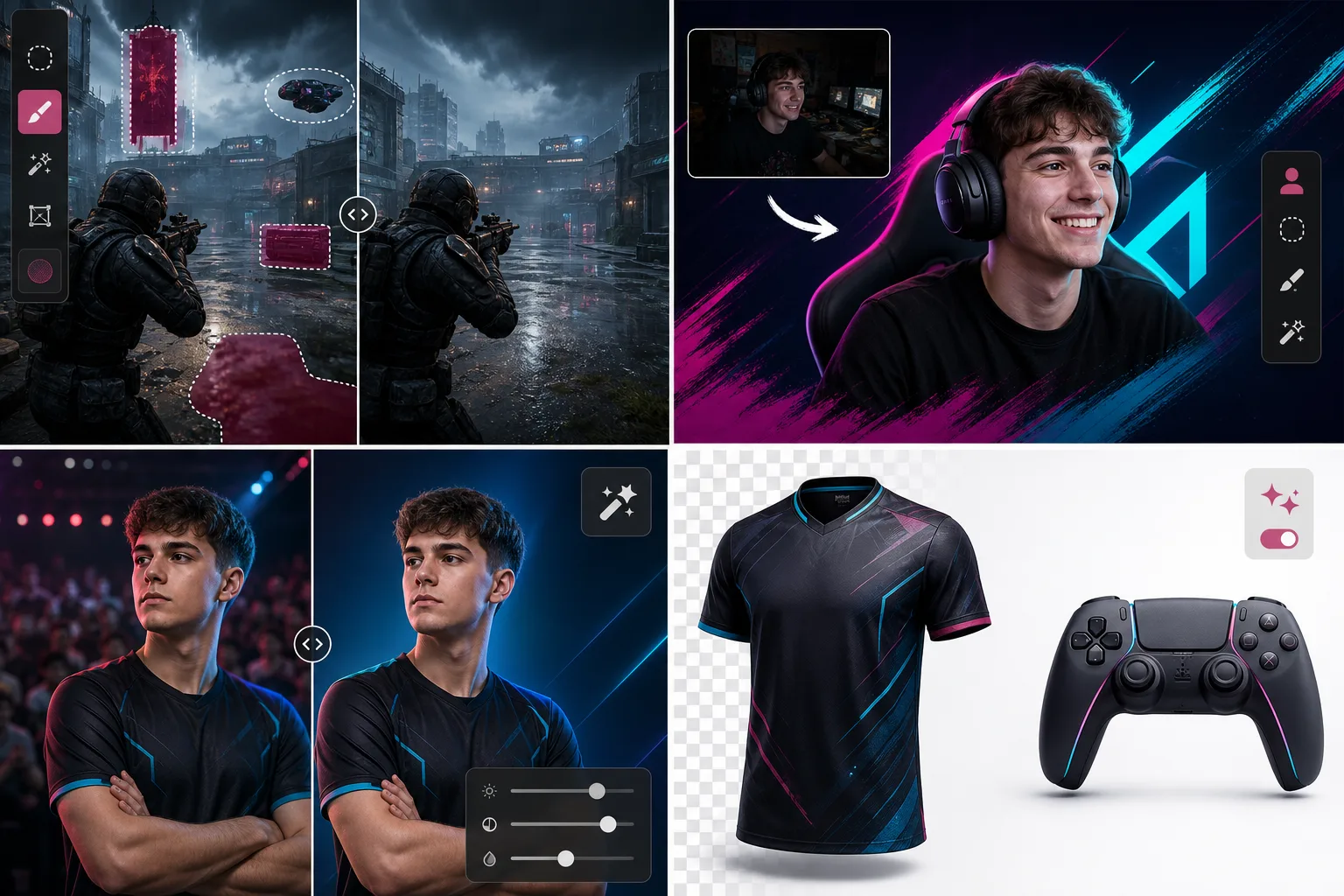
เหตุใดผู้สร้างเกมจึงเลือก Magic Eraser
ในเกม ภาพกระตุ้นการคลิก ภาพขนาดย่อที่น่าดึงดูดสามารถเพิ่มจำนวนการดูของคุณเป็นสองเท่า และการสร้างแบรนด์ทีมงานมืออาชีพก็ดึงดูดผู้สนับสนุนได้ Magic Eraser ช่วยให้ผู้สร้างและองค์กร eSports มีพลังในการแก้ไขเพื่อสร้างกราฟิกที่สวยงามโดยไม่ต้องเรียนรู้ Photoshop ผู้ชมเกมและกีฬาคาดหวังคุณภาพการผลิตระดับมืออาชีพในทุกจุดสัมผัส ตั้งแต่การซ้อนทับแบบสตรีมไปจนถึงการรายงานข่าวทัวร์นาเมนต์ไปจนถึงร้านค้าสินค้า ความสอดคล้องของภาพจะส่งสัญญาณถึงการดำเนินการที่ถูกต้องตามกฎหมายและมีการจัดการที่ดี ภาพที่สะอาดตาสร้างความไว้วางใจให้กับผู้ชมและดึงดูดผู้สนับสนุนที่กำลังมองหาพันธมิตรแบรนด์ที่สวยงาม
ประโยชน์หลักสำหรับการเล่นเกมและ Esports
สร้างเนื้อหาภาพระดับมืออาชีพสำหรับการสตรีม การแข่งขัน และการมีส่วนร่วมของชุมชน
สตรีมภาพซ้อนทับและการสร้างภาพขนาดย่อ
สร้างภาพพื้นฐานที่ชัดเจนสำหรับภาพขนาดย่อของสตรีม หน้าปก YouTube และโพสต์โซเชียลโดยการลบพื้นหลังและแยกหัวเรื่อง
ถ่ายภาพการแข่งขันและงานกิจกรรม
ทำความสะอาดรูปภาพจากกิจกรรม LAN การแข่งขัน และการพบปะโดยลบความยุ่งเหยิงของสถานที่ ความขัดแย้งของผู้สนับสนุน และสิ่งรบกวนเบื้องหลัง
ภาพทีมและผู้เล่น
สร้างภาพเฮดช็อตและรูปถ่ายทีมที่สวยงามพร้อมพื้นหลังที่สะอาดตาสำหรับหน้าบัญชีรายชื่อ เอกสารข่าว และโปรไฟล์ทัวร์นาเมนต์
ภาพสินค้าสินค้า
ถ่ายภาพเสื้อแข่ง อุปกรณ์ต่อพ่วง และสินค้าที่มีแบรนด์ จากนั้นลบพื้นหลังสำหรับรายการอีคอมเมิร์ซและสื่อส่งเสริมการขายที่ดูสะอาดตา
การขัดเกลาเนื้อหาชุมชน
อัปเกรดเนื้อหาที่แฟนๆ ส่งเข้ามาและชุมชนด้วยการล้างพื้นหลังและการปรับปรุงสำหรับการโพสต์ซ้ำในช่องอย่างเป็นทางการ
การนำเสนอแบรนด์ที่สอดคล้องกัน
รักษาคุณภาพของภาพที่สม่ำเสมอบน Twitch, YouTube, Discord และแพลตฟอร์มโซเชียลที่ผู้ชมของคุณคาดหวังเนื้อหาระดับมืออาชีพ
กรณีการใช้งานทั่วไป
สตรีมโอเวอร์เลย์และพาเนล
แยกรูปภาพ facecam หรือโลโก้ทีมของคุณบนพื้นหลังโปร่งใสเพื่อสร้างโอเวอร์เลย์ แผง และการแจ้งเตือนแบบกำหนดเองสำหรับ Twitch, YouTube และ Kick
YouTube และภาพขนาดย่อทางสังคม
ลบพื้นหลังที่รกออกจากภาพหน้าจอและภาพจากกล้องหน้าเพื่อสร้างภาพขนาดย่อที่มีคอนทราสต์สูงและสามารถคลิกได้ซึ่งมี Boost CTR
การสร้างแบรนด์ทีม Esports
สร้างภาพผู้เล่นที่ดูสะอาดตาสำหรับหน้ารายชื่อ กราฟิกการแข่งขัน และการจำลองเสื้อแข่งโดยลบพื้นหลังสตูดิโอหรือกิจกรรมออก
เนื้อหาเกมและมีม
แยกตัวละคร ไอเท็ม หรือช่วงเวลาต่างๆ จากภาพหน้าจอการเล่นเกมเพื่อดูภาพปฏิกิริยา โพสต์ชุมชน และวงล้อไฮไลท์
การทำงานร่วมกันของผู้สร้างเนื้อหา
สร้างภาพถ่ายระดับมืออาชีพของกิจกรรมการทำงานร่วมกัน มีตติ้ง และเนื้อหาส่งเสริมการขายร่วมกับผู้สร้างคนอื่นๆ โดยใช้พื้นหลังและมาตรฐานแสงที่สอดคล้องกัน
Magic Eraser เครื่องมือสำหรับการเล่นเกม
| Tool | How It Helps |
|---|---|
| การกำจัดวัตถุ | ลบลายน้ำ องค์ประกอบ HUD และภาพซ้อนทับ UI ที่ไม่ต้องการออกจากภาพหน้าจอการเล่นเกมเพื่อให้ภาพโปรโมตดูสะอาดตา |
| Background Eraser | แยกกล้องหน้าผู้เล่น โลโก้ทีม และตัวละครในเกมบนพื้นหลังโปร่งใสเพื่อใช้เป็นภาพซ้อนทับและภาพขนาดย่อ |
| เอไอ ฟิล | แทนที่องค์ประกอบที่ถูกลบออกด้วยสภาพแวดล้อมของเกมที่ตรงกันหรือการเติมสีทึบเพื่อกราฟิกคอมโพสิตที่ไร้รอยต่อ |
| โปรแกรมปรับปรุงภาพ | ภาพหน้าจอที่มีความละเอียดต่ำที่ยกระดับและคมชัด รวมถึงการบันทึกสตรีมแบบบีบอัดสำหรับโพสต์บนโซเชียลมีเดียที่คมชัด |
มันทำงานอย่างไร
อัปโหลด
อัปโหลดภาพหน้าจอ รูปภาพ Facecam หรือภาพทีมจากอุปกรณ์หรือคลิปบอร์ดของคุณ
แก้ไข
ปัดทับพื้นหลัง ลายน้ำ หรือความยุ่งเหยิงของ UI AI จะลบพวกมันออกอย่างหมดจดภายในไม่กี่วินาที
ส่งออก
ดาวน์โหลด PNG แบบโปร่งใสสำหรับภาพซ้อนทับ หรือ JPG ความละเอียดสูงสำหรับภาพขนาดย่อและโพสต์โซเชียล
คำถามที่พบบ่อย
ฉันสามารถสร้างโอเวอร์เลย์แบบโปร่งใสสำหรับ OBS ได้หรือไม่
+
ใช่. ส่งออกเป็น PNG ด้วยความโปร่งใส และวางโดยตรงลงใน OBS, Streamlabs หรือซอฟต์แวร์กระจายเสียงใดๆ เป็นแหล่งรูปภาพ
มันใช้งานได้กับภาพหน้าจอการเล่นเกมหรือไม่?
+
อย่างแน่นอน. Magic Eraser จัดการภาพหน้าจอในเกมจากทุกแพลตฟอร์ม — พีซี, การจับภาพคอนโซล หรือมือถือ — โดยไม่คำนึงถึงสไตล์ศิลปะหรือความละเอียด
เร็วพอสำหรับขั้นตอนการสร้างเนื้อหาหรือไม่?
+
การแก้ไขส่วนใหญ่จะเสร็จสิ้นภายใน 10 วินาที ผู้สร้างจำนวนมากใช้สิ่งนี้เพื่อเตรียมกลางสตรีมหรือระหว่างเซสชันการบันทึกเพื่อสร้างภาพขนาดย่อและกราฟิกอย่างรวดเร็ว
Magic Eraser สามารถทำงานร่วมกับภาพหน้าจอในเกมได้หรือไม่?
+
ใช่. ทำความสะอาดภาพหน้าจอโดยการลบการซ้อนทับ UI ลายน้ำ และองค์ประกอบอื่นๆ เพื่อใช้ในสื่อส่งเสริมการขาย โพสต์โซเชียล และเนื้อหาชุมชน
รองรับการถ่ายภาพคอสเพลย์และงานประชุมหรือไม่?
+
อย่างแน่นอน. ลบสิ่งที่รบกวนสมาธิในการประชุม ผู้ถือป้าย และพื้นหลังของฝูงชนออกจากภาพถ่ายคอสเพลย์เพื่อสร้างภาพตัวละครที่ดูสะอาดตา
ฉันสามารถสร้างสื่อการตลาดของทีม Esports ได้หรือไม่
+
ใช่. สร้างภาพถ่ายบัญชีรายชื่อมืออาชีพ สรุปกิจกรรม และภาพส่งเสริมการขายที่พร้อมสำหรับผู้สนับสนุน โดยการล้างภาพถ่ายเหตุการณ์ดิบด้วยการลบและเพิ่มประสิทธิภาพพื้นหลัง
สร้างกราฟิกเกมอย่างมืออาชีพ
สร้างภาพปก โอเวอร์เลย์ และกราฟิกทีมที่ดูเรียบร้อยด้วยเครื่องมือแก้ไข AI โดยไม่ต้องมีขั้นตอนออกแบบที่ซับซ้อน
ลองใช้ Magic Eraser ฟรีMore Industries
See how Magic Eraser helps professionals in other industries.
ช่างภาพใช้เวลาหลายชั่วโมงในขั้นตอนหลังการถ่ายทำเพื่อขจัดสิ่งที่รบกวนสมาธิ รีทัชภาพบุคคล และตกแต่งพื้นหลังให้สมบูรณ์แบบ Magic Eraser เร่งขั้นตอนการแก้ไขของคุณ เพื่อให้คุณสามารถส่งภาพที่ประณีตให้กับลูกค้าได้รวดเร็วขึ้นโดยไม่ลดคุณภาพลง
Magic Eraser ช่วยตัวแทนและช่างภาพอสังหาริมทรัพย์ลบวัตถุรบกวน ลดความรกของภาพ และปรับแต่งภาพถ่าย โปรดตรวจสอบทุกการแก้ไขและปฏิบัติตามกฎการเปิดเผยข้อมูลของแพลตฟอร์มในพื้นที่ เพื่อให้ภาพแสดงอสังหาริมทรัพย์อย่างถูกต้อง
นักช้อปออนไลน์ตัดสินสินค้าจากรูปภาพของพวกเขา Magic Eraser ลบพื้นหลังที่ยุ่งเหยิง ลบองค์ประกอบที่ทำให้เสียสมาธิ และสร้างภาพถ่ายผลิตภัณฑ์ที่พร้อมสำหรับตลาดซื้อขายที่สร้างความไว้วางใจของผู้ซื้อและเพิ่มอัตราการแปลง
โซเชียลมีเดียดำเนินไปอย่างรวดเร็วและภาพลักษณ์ของคุณจำเป็นต้องตามให้ทัน Magic Eraser ช่วยให้ผู้สร้าง นักการตลาด และแบรนด์ลบสิ่งรบกวน สลับพื้นหลัง และขัดเกลารูปภาพ เพื่อให้ทุกโพสต์โดดเด่นในฟีดที่มีผู้คนหนาแน่นบน Instagram, TikTok และ Twitter
รูปภาพที่น่ารับประทานช่วยขับเคลื่อนคำสั่งซื้อและการสัญจรไปมา Magic Eraser ช่วยให้ร้านอาหาร ร้านกาแฟ และแบรนด์อาหารทำความสะอาดภาพถ่ายอาหาร ขจัดความยุ่งเหยิงบนโต๊ะอาหาร และปรับปรุงการนำเสนออาหารจานสำหรับเมนู แอปจัดส่ง และการตลาดผ่านโซเชียลมีเดีย
ตั้งแต่สมุดจดไปจนถึงหน้าผลิตภัณฑ์ แบรนด์แฟชั่นต้องการภาพที่ไร้ที่ติในวงกว้าง Magic Eraser ช่วยให้นักออกแบบ สไตลิสต์ และนักการตลาดด้านแฟชั่นลบพื้นหลัง รีทัชช็อตโมเดล และสร้างแฟลตเลย์ที่สวยงามซึ่งจะแสดงเสื้อผ้าทุกชิ้นได้อย่างดีที่สุด
การตลาดการท่องเที่ยวเป็นและตายด้วยจินตภาพ Magic Eraser ช่วยให้โรงแรม บริษัททัวร์ และนักการตลาดปลายทางกำจัดฝูงชนออกจากสถานที่สำคัญ ทำความสะอาดภาพถ่ายที่พัก และปรับปรุงภาพทิวทัศน์ที่เปลี่ยนผู้เยี่ยมชมให้กลายเป็นผู้จอง
ตั้งแต่ภาพบุคคลในหนังสือรุ่นไปจนถึงการตลาดในมหาวิทยาลัย สถาบันการศึกษาต้องการภาพที่สะอาดตาและเป็นมืออาชีพ Magic Eraser ช่วยให้โรงเรียน วิทยาลัย และแพลตฟอร์มอีเลิร์นนิงขจัดสิ่งรบกวนสมาธิจากรูปภาพ ปรับปรุงภาพของมหาวิทยาลัย และสร้างภาพที่สวยงามสำหรับผู้ชมทุกคน