
รูปถ่ายสินค้าที่กระตุ้นยอดขาย
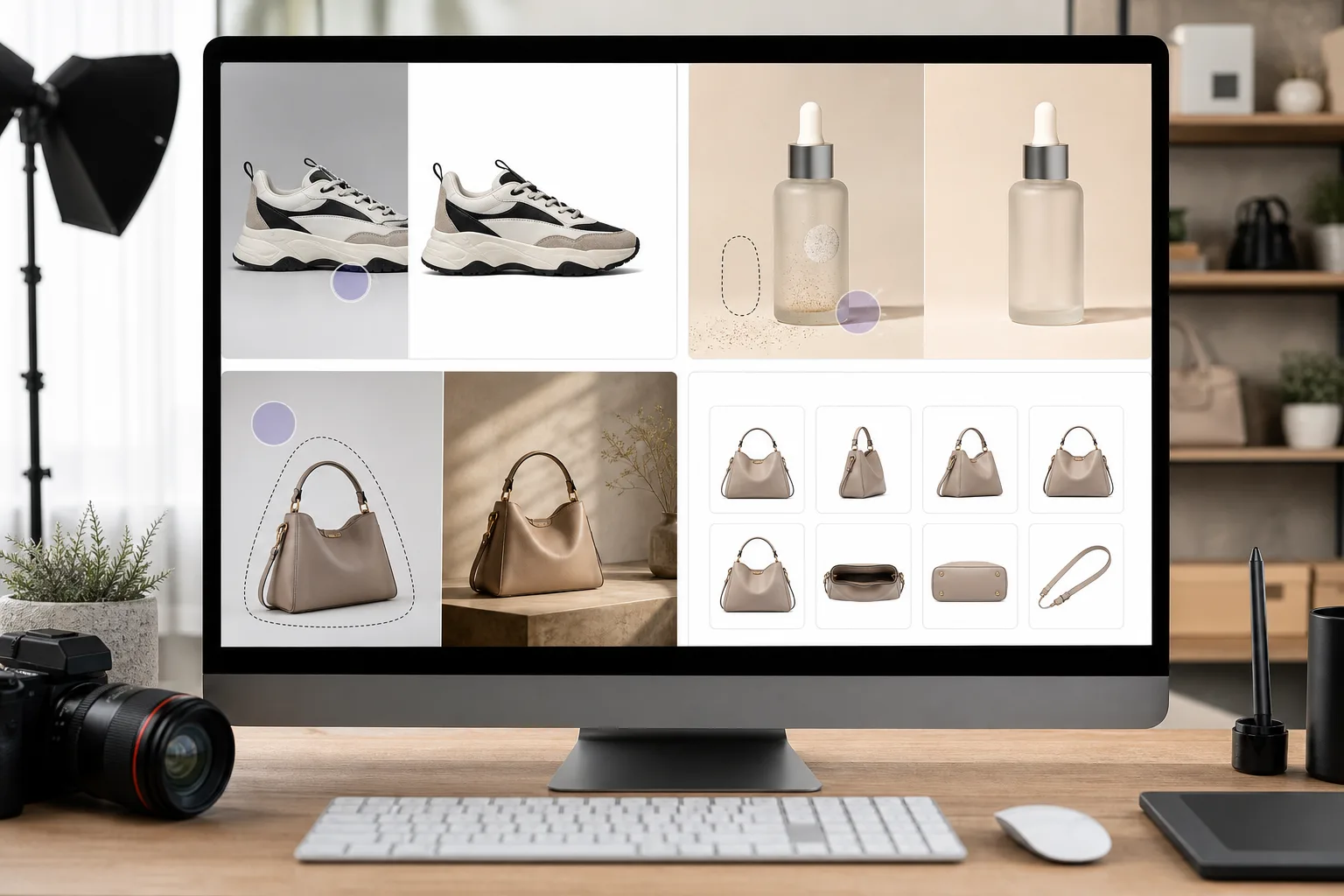
นักช้อปออนไลน์ตัดสินสินค้าจากรูปภาพของพวกเขา Magic Eraser ลบพื้นหลังที่ยุ่งเหยิง ลบองค์ประกอบที่ทำให้เสียสมาธิ และสร้างภาพถ่ายผลิตภัณฑ์ที่พร้อมสำหรับตลาดซื้อขายที่สร้างความไว้วางใจของผู้ซื้อและเพิ่มอัตราการแปลง
Last updated
เหตุใดผู้เชี่ยวชาญด้านอีคอมเมิร์ซจึงเลือก Magic Eraser
การถ่ายภาพสินค้าคุณภาพสูงคือความแตกต่างระหว่างการขายและการตีกลับ Magic Eraser ช่วยให้ผู้ขายสามารถสร้างภาพระดับสตูดิโอจากภาพถ่ายสมาร์ทโฟนโดยการลบพื้นหลัง ทำความสะอาดจุดบกพร่อง และรับประกันว่า SKU ทุกรายการจะดูสอดคล้องกันทั่วทั้งร้านค้าของคุณ สำหรับผู้ขายที่จัดการ SKU หลายร้อยหรือหลายพันรายการ การแก้ไขคอขวดจะส่งผลโดยตรงต่อรายได้ ในแต่ละวันที่สินค้าไม่มีรูปถ่ายแบบมืออาชีพถือเป็นวันที่สูญเสียคอนเวอร์ชั่นไป Magic Eraser ขจัดปัญหาคอขวดนั้นโดยการนำการแก้ไขภาพระดับสตูดิโอมาสู่มือของทุกคนที่มีเบราว์เซอร์และสมาร์ทโฟน
ประโยชน์หลักสำหรับผู้ขายอีคอมเมิร์ซ
สร้างรูปภาพสินค้าพร้อมใช้บนมาร์เก็ตเพลสที่ช่วยสร้างความเชื่อมั่นของผู้ซื้อและเสริมหน้าสินค้าให้แข็งแรงขึ้น
การปฏิบัติตามข้อกำหนดของตลาดในคลิกเดียว
สร้างพื้นหลังสีขาวบริสุทธิ์ที่ตรงตามข้อกำหนดรูปภาพของ Amazon, eBay, Walmart และ Etsy ทันที ไม่จำเป็นต้องใช้สตูดิโอถ่ายภาพ ไลท์บ็อกซ์ หรือการมาสก์ด้วยตนเอง เพียงแค่อัปโหลดและส่งออก
อัตราการแปลงที่สูงขึ้น
รูปภาพผลิตภัณฑ์ที่สะอาดตาและเป็นมืออาชีพสร้างความไว้วางใจให้กับผู้ซื้อและลดความลังเลในการซื้อ ผู้ขายที่อัปเกรดจากภาพถ่ายมือสมัครเล่นเป็นภาพที่ขัดเกลาอย่างสม่ำเสมอจะเห็นการเพิ่มขึ้นที่วัดได้ในอัตราการเพิ่มลงในรถเข็นและอัตราการชำระเงิน
การเริ่มต้นใช้งาน SKU ที่เร็วขึ้น
ลงรายการผลิตภัณฑ์ใหม่ภายในไม่กี่ชั่วโมง แทนที่จะรอเซสชั่นการถ่ายภาพในสตูดิโอ ภาพถ่ายจากสมาร์ทโฟนสามารถเปลี่ยนเป็นภาพคุณภาพระดับมืออาชีพได้ทันที ช่วยให้แคตตาล็อกของคุณสดใหม่อยู่เสมอ
ความสอดคล้องทั้งแคตตาล็อก
ตรวจสอบให้แน่ใจว่าผลิตภัณฑ์ทุกชิ้นในร้านของคุณมีพื้นหลัง ความสมดุลของแสง และคุณภาพการนำเสนอที่เหมือนกัน ความสอดคล้องของภาพใน SKU หลายร้อยรายการช่วยเพิ่มการรับรู้ถึงแบรนด์และส่งเสริมการเรียกดู
ต้นทุนการถ่ายภาพที่ต่ำกว่า
แทนที่ค่าเช่าสตูดิโอที่เกิดขึ้นประจำและเซสชันช่างภาพมืออาชีพด้วยการแก้ไขที่ขับเคลื่อนโดย AI ซึ่งเปลี่ยนภาพถ่ายใดๆ ให้เป็นทรัพย์สินที่สามารถขายได้ มีคุณค่าอย่างยิ่งสำหรับผู้ขายที่มีสินค้าคงคลังจำนวนมากหรือหมุนเวียนบ่อยครั้ง
ไลฟ์สไตล์และภูมิหลังตามบริบท
ก้าวไปไกลกว่าพื้นหลังสีขาวด้วยการวางผลิตภัณฑ์ลงในฉากไลฟ์สไตล์ที่สร้างแรงบันดาลใจ การตั้งค่าตามบริบทที่สร้างโดย AI ช่วยให้ผู้ซื้อจินตนาการถึงผลิตภัณฑ์ในชีวิตของตนเอง และเพิ่มการเชื่อมโยงทางอารมณ์
กรณีการใช้งานทั่วไป
ภาพผลิตภัณฑ์พื้นหลังสีขาว
ลบพื้นหลังใดๆ ทันทีและแทนที่ด้วยสีขาวบริสุทธิ์เพื่อให้เป็นไปตามข้อกำหนดของตลาดในร้านค้า Amazon, eBay, Walmart และ Shopify
การเพิ่มประสิทธิภาพรายการตลาดกลาง
ทำความสะอาดรูปภาพผลิตภัณฑ์เพื่อให้เป็นไปตามหลักเกณฑ์ของตลาดเฉพาะ เช่น ขนาดที่ถูกต้อง ลบลายน้ำ และตรวจสอบให้แน่ใจว่ารูปภาพดูคมชัดที่ขนาดภาพขนาดย่อ
การสร้างภาพไลฟ์สไตล์
ลบพื้นหลังเดิมออกและวางผลิตภัณฑ์ในการตั้งค่าไลฟ์สไตล์ที่สร้างแรงบันดาลใจโดยใช้ AI Fill เพื่อเพิ่มเสน่ห์ทางอารมณ์
ความสอดคล้องของแคตตาล็อก
ประมวลผลแคตตาล็อกผลิตภัณฑ์ทั้งหมด เพื่อให้ทุกภาพใช้พื้นหลัง ความสมดุลของแสง และมาตรฐานคุณภาพเดียวกันสำหรับการนำเสนอแบรนด์ที่สอดคล้องกัน
ช็อตที่มีรายละเอียดลดลง
ปรับปรุงรูปภาพรายละเอียดผลิตภัณฑ์ เช่น การเย็บ ฉลาก พื้นผิวของวัสดุ เพื่อให้ลูกค้าทราบได้อย่างแน่ชัดว่าพวกเขากำลังซื้ออะไร ภาพที่มีรายละเอียดที่ชัดเจนจะช่วยลดอัตราการคืนสินค้าโดยการกำหนดความคาดหวังที่แม่นยำก่อนซื้อ
Magic Eraser เครื่องมือสำหรับอีคอมเมิร์ซ
| Tool | How It Helps |
|---|---|
| การกำจัดวัตถุ | ลบแท็ก สติ๊กเกอร์ราคา ฝุ่น และอุปกรณ์ประกอบฉากที่เบี่ยงเบนความสนใจจากตัวผลิตภัณฑ์ |
| Background Eraser | สร้างพื้นหลังสีขาวบริสุทธิ์หรือโปร่งใสได้ในคลิกเดียว ไม่จำเป็นต้องใช้สตูดิโอถ่ายภาพหรือไลท์บ็อกซ์ |
| เอไอ ฟิล | สลับพื้นหลังที่ถูกลบออกด้วยฉากตามบริบท — วางเทียนบนพื้นผิวหินอ่อนหรือรองเท้าบนทางเท้าในเมือง |
| โปรแกรมปรับปรุงภาพ | ปรับรายละเอียดผลิตภัณฑ์ให้คมชัด ความถูกต้องของสีที่ถูกต้อง และยกระดับรูปภาพซัพพลายเออร์ที่มีความละเอียดต่ำเพื่อลงรายการสินค้าคุณภาพสูง |
มันทำงานอย่างไร
อัปโหลด
อัปโหลดรูปภาพผลิตภัณฑ์ของคุณจากอุปกรณ์ใดก็ได้ ไม่ว่าจะเป็นภาพถ่ายจากสมาร์ทโฟน รูปภาพของซัพพลายเออร์ หรือสตูดิโอส่งออก ทั้งหมดนี้ทำได้
แก้ไข
ลบพื้นหลังด้วยการคลิกเพียงครั้งเดียว ลบจุดบกพร่อง และปรับปรุงสีและความคมชัดเพื่อทำให้ผลิตภัณฑ์ดูโดดเด่น
ส่งออก
ดาวน์โหลดภาพที่พร้อมสำหรับตลาดในรูปแบบ JPEG หรือ PNG และอัปโหลดโดยตรงไปยังร้านค้าออนไลน์หรือผู้จัดการรายการของคุณ
คำถามที่พบบ่อย
Magic Eraser สร้างพื้นหลังสีขาวที่เป็นไปตามข้อกำหนดสำหรับ Amazon หรือไม่
+
ใช่. Background Eraser สร้างพื้นหลังสีขาวล้วน (RGB 255,255,255) ที่ตรงตามข้อกำหนดของ Amazon, eBay และรูปภาพของตลาดกลางที่สำคัญที่สุด
ฉันสามารถประมวลผลแค็ตตาล็อกผลิตภัณฑ์ทั้งหมดพร้อมกันได้หรือไม่
+
ใช่. การประมวลผลเป็นชุดช่วยให้คุณสามารถลบพื้นหลัง ปรับปรุงคุณภาพ และส่งออกรูปภาพผลิตภัณฑ์หลายร้อยภาพในเซสชันเดียว
การแก้ไขจะส่งผลต่อคุณภาพของภาพหรือไม่?
+
ไม่ Magic Eraser คงความละเอียดและรายละเอียดดั้งเดิมไว้ AI Enhancer สามารถปรับปรุงคุณภาพการรับรู้ได้จริงโดยการเพิ่มความคมชัดของรายละเอียดและแก้ไขความสมดุลของสี
ฉันสามารถสร้างพื้นหลัง PNG โปร่งใสสำหรับร้านค้าของฉันได้หรือไม่
+
ใช่. Background Eraser รองรับการส่งออก PNG แบบโปร่งใส ซึ่งเหมาะอย่างยิ่งสำหรับธีม Shopify การออกแบบร้านค้าแบบกำหนดเอง และการวางซ้อนผลิตภัณฑ์ที่ต้องวางบนสีพื้นหลังอย่างเรียบร้อย
การประมวลผลเป็นชุดทำงานอย่างไรสำหรับแค็ตตาล็อกขนาดใหญ่
+
อัปโหลดภาพผลิตภัณฑ์หลายภาพพร้อมกัน ใช้การตั้งค่าการลบพื้นหลังหรือการปรับปรุงประสิทธิภาพแบบเดียวกัน และส่งออกภาพทั้งหมดในการดาวน์โหลดครั้งเดียว เหมาะอย่างยิ่งสำหรับการรีเฟรชแคตตาล็อกตามฤดูกาล
Magic Eraser ใช้งานได้กับรูปภาพที่ซัพพลายเออร์จัดหาให้หรือไม่
+
ใช่. ผู้ขายหลายรายได้รับรูปภาพที่มีความละเอียดต่ำหรือมีแสงน้อยจากซัพพลายเออร์ Magic Eraser สามารถเพิ่มความคมชัด ปรับสมดุลสี และลบพื้นหลังเพื่อให้ภาพเหล่านั้นเป็นไปตามมาตรฐานรายการ
อัพเกรดการถ่ายภาพสินค้าของคุณ
ลองใช้ Magic Eraser ฟรีเพื่อสร้างภาพถ่ายผลิตภัณฑ์ระดับมืออาชีพพร้อมพื้นหลังที่ดูสะอาดตาซึ่งแปลงเบราว์เซอร์ให้เป็นผู้ซื้อ
ลองใช้ Magic Eraser ฟรีMore Industries
See how Magic Eraser helps professionals in other industries.
ช่างภาพใช้เวลาหลายชั่วโมงในขั้นตอนหลังการถ่ายทำเพื่อขจัดสิ่งที่รบกวนสมาธิ รีทัชภาพบุคคล และตกแต่งพื้นหลังให้สมบูรณ์แบบ Magic Eraser เร่งขั้นตอนการแก้ไขของคุณ เพื่อให้คุณสามารถส่งภาพที่ประณีตให้กับลูกค้าได้รวดเร็วขึ้นโดยไม่ลดคุณภาพลง
Magic Eraser ช่วยตัวแทนและช่างภาพอสังหาริมทรัพย์ลบวัตถุรบกวน ลดความรกของภาพ และปรับแต่งภาพถ่าย โปรดตรวจสอบทุกการแก้ไขและปฏิบัติตามกฎการเปิดเผยข้อมูลของแพลตฟอร์มในพื้นที่ เพื่อให้ภาพแสดงอสังหาริมทรัพย์อย่างถูกต้อง
โซเชียลมีเดียดำเนินไปอย่างรวดเร็วและภาพลักษณ์ของคุณจำเป็นต้องตามให้ทัน Magic Eraser ช่วยให้ผู้สร้าง นักการตลาด และแบรนด์ลบสิ่งรบกวน สลับพื้นหลัง และขัดเกลารูปภาพ เพื่อให้ทุกโพสต์โดดเด่นในฟีดที่มีผู้คนหนาแน่นบน Instagram, TikTok และ Twitter
รูปภาพที่น่ารับประทานช่วยขับเคลื่อนคำสั่งซื้อและการสัญจรไปมา Magic Eraser ช่วยให้ร้านอาหาร ร้านกาแฟ และแบรนด์อาหารทำความสะอาดภาพถ่ายอาหาร ขจัดความยุ่งเหยิงบนโต๊ะอาหาร และปรับปรุงการนำเสนออาหารจานสำหรับเมนู แอปจัดส่ง และการตลาดผ่านโซเชียลมีเดีย
ตั้งแต่สมุดจดไปจนถึงหน้าผลิตภัณฑ์ แบรนด์แฟชั่นต้องการภาพที่ไร้ที่ติในวงกว้าง Magic Eraser ช่วยให้นักออกแบบ สไตลิสต์ และนักการตลาดด้านแฟชั่นลบพื้นหลัง รีทัชช็อตโมเดล และสร้างแฟลตเลย์ที่สวยงามซึ่งจะแสดงเสื้อผ้าทุกชิ้นได้อย่างดีที่สุด
การตลาดการท่องเที่ยวเป็นและตายด้วยจินตภาพ Magic Eraser ช่วยให้โรงแรม บริษัททัวร์ และนักการตลาดปลายทางกำจัดฝูงชนออกจากสถานที่สำคัญ ทำความสะอาดภาพถ่ายที่พัก และปรับปรุงภาพทิวทัศน์ที่เปลี่ยนผู้เยี่ยมชมให้กลายเป็นผู้จอง
ตั้งแต่ภาพบุคคลในหนังสือรุ่นไปจนถึงการตลาดในมหาวิทยาลัย สถาบันการศึกษาต้องการภาพที่สะอาดตาและเป็นมืออาชีพ Magic Eraser ช่วยให้โรงเรียน วิทยาลัย และแพลตฟอร์มอีเลิร์นนิงขจัดสิ่งรบกวนสมาธิจากรูปภาพ ปรับปรุงภาพของมหาวิทยาลัย และสร้างภาพที่สวยงามสำหรับผู้ชมทุกคน
ผู้ซื้อรถยนต์เริ่มต้นทางออนไลน์ และรูปถ่ายประกาศคือโชว์รูมของคุณ Magic Eraser ช่วยให้ตัวแทนจำหน่ายและผู้ขายส่วนตัวลบเงาสะท้อน ทำความสะอาดพื้นหลังล็อต และปรับปรุงรูปภาพยานพาหนะ เพื่อให้ทุกรายการดูพร้อมโชว์รูมและทดลองขับได้