
การแก้ไขภาพระดับมืออาชีพทำได้อย่างง่ายดาย
ช่างภาพใช้เวลาหลายชั่วโมงในขั้นตอนหลังการถ่ายทำเพื่อขจัดสิ่งที่รบกวนสมาธิ รีทัชภาพบุคคล และตกแต่งพื้นหลังให้สมบูรณ์แบบ Magic Eraser เร่งขั้นตอนการแก้ไขของคุณ เพื่อให้คุณสามารถส่งภาพที่ประณีตให้กับลูกค้าได้รวดเร็วขึ้นโดยไม่ลดคุณภาพลง
Last updated
เหตุใดผู้เชี่ยวชาญด้านการถ่ายภาพจึงเลือก Magic Eraser
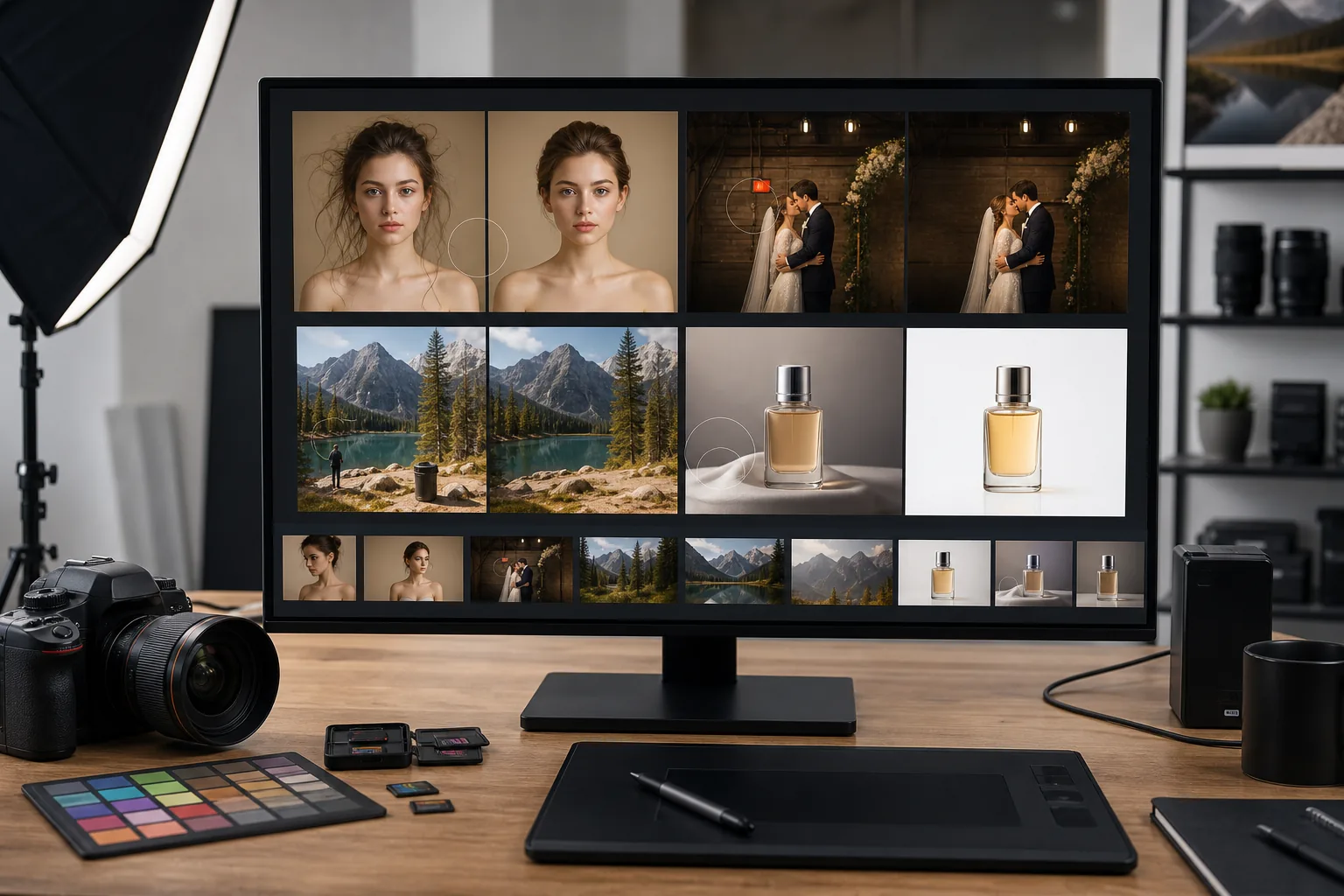
Magic Eraser ช่วยให้ช่างภาพมีวิธีที่รวดเร็วและแม่นยำในการลบองค์ประกอบที่ไม่ต้องการออกจากช็อตใดๆ ไม่ว่าคุณจะทำความสะอาดฉากหลังแนวตั้ง ลบโฟโต้บอมเบอร์ออกจากทิวทัศน์ หรือประมวลผลแกลเลอรีงานแต่งงานเป็นชุด เครื่องมือที่ขับเคลื่อนด้วย AI จัดการการแก้ไขที่น่าเบื่อได้ภายในไม่กี่วินาที คุณจึงสามารถมุ่งความสนใจไปที่วิสัยทัศน์ที่สร้างสรรค์ของคุณได้ ตั้งแต่สตูดิโอถ่ายภาพบุคคลไปจนถึงการถ่ายภาพผจญภัยกลางแจ้ง Magic Eraser เติมเต็มช่องว่างระหว่างแอปพลิเคชันเดสก์ท็อปที่มีคุณสมบัติครบถ้วนและการแก้ไขด่วนที่ตรงเป้าหมายซึ่งครอบงำปริมาณงานหลังการผลิตรายวัน ผลลัพธ์ที่ได้คือไปป์ไลน์ที่สะอาดขึ้นและเร็วขึ้น ทำให้คุณมีเวลาตัดสินใจอย่างสร้างสรรค์ แทนที่จะล้างข้อมูลซ้ำๆ
ประโยชน์หลักสำหรับช่างภาพ
เร่งกระบวนการทำงานหลังการผลิตของคุณโดยไม่กระทบต่อคุณภาพการสร้างสรรค์
รีทัชได้เร็วขึ้นอย่างมาก
ลดเวลาหลังการผลิตโดยขจัดสิ่งรบกวนสมาธิในไม่กี่วินาที แทนที่จะเป็นนาทีต่อภาพ สำหรับการถ่ายภาพที่มีปริมาณมาก เช่น งานแต่งงานหรืองานอีเว้นท์ จะช่วยประหยัดเวลาในการจัดส่งแกลเลอรีเดียวได้
ความแม่นยำแบบไม่ทำลาย
การลบที่ขับเคลื่อนด้วย AI จะสร้างพื้นหลังขึ้นมาใหม่อย่างเป็นธรรมชาติโดยไม่ทิ้งสิ่งแปลกปลอมที่มองเห็นได้ ผลลัพธ์จะดูผ่านการตัดต่อด้วยมือโดยผู้เชี่ยวชาญด้านการรีทัช โดยคงความสมบูรณ์ขององค์ประกอบต้นฉบับของคุณ
การประมวลผลเป็นชุดตามขนาด
ประมวลผลภาพหลายร้อยภาพจากเหตุการณ์หรือเซสชันเดียวในเวิร์กโฟลว์เดียว ใช้การแก้ไขที่สอดคล้องกันทั่วทั้งแกลเลอรี เพื่อให้ทุกภาพที่ส่งมามีคุณภาพตรงตามมาตรฐานคุณภาพเดียวกัน
ตัวเลือกการสร้างสรรค์ที่ขยายเพิ่มเติม
ทดลองจัดองค์ประกอบภาพที่คุณไม่สามารถทำได้ในฉาก ลบองค์ประกอบที่กวนใจที่คุณสังเกตเห็นหลังจากถ่ายภาพเท่านั้น ขยายพื้นหลัง หรือแยกวัตถุสำหรับงานคอมโพสิต
การตอบสนองที่พร้อมของลูกค้า
ส่งมอบแกลเลอรีที่สวยงามให้กับลูกค้าหลายวันเร็วขึ้น โดยขจัดงานรีทัชที่ใช้เวลานานที่สุด การจัดส่งที่รวดเร็วยิ่งขึ้นหมายถึงลูกค้ามีความสุขมากขึ้นและได้รับการอ้างอิงมากขึ้น
ไม่จำเป็นต้องใช้ซอฟต์แวร์เพิ่มเติม
ข้ามการสมัครรีทัชเดสก์ท็อปราคาแพงเพื่องานล้างข้อมูลที่รวดเร็ว Magic Eraser จัดการงานการลบและการปรับปรุงทั่วไปส่วนใหญ่โดยตรงในเบราว์เซอร์
กรณีการใช้งานทั่วไป
การรีทัชภาพบุคคล
ลบรอยตำหนิ ผมร่วง และความยุ่งเหยิงของพื้นหลังออกจากการถ่ายภาพเฮดช็อตและการถ่ายภาพบุคคลโดยไม่ต้องปิดบังทุกรายละเอียดด้วยตนเอง
การล้างข้อมูลพื้นหลัง
ลบสายไฟ ถังขยะ รถที่จอดอยู่ และองค์ประกอบอื่นๆ ที่รบกวนสมาธิ ซึ่งดึงความสนใจออกไปจากวัตถุของคุณ
การแก้ไขงานแต่งงานและงานอีเวนต์เป็นกลุ่ม
ประมวลผลภาพถ่ายเหตุการณ์หลายร้อยภาพอย่างรวดเร็วโดยลบป้ายทางออก เคเบิล และแขกที่ไม่ต้องการออกจากภาพพิธีและการต้อนรับ
สินค้าและการถ่ายภาพหุ่นนิ่ง
แยกผลิตภัณฑ์บนพื้นหลังที่สะอาด ลบแสงสะท้อนจากพื้นผิวกระจก และกำจัดจุดฝุ่นจากการถ่ายภาพในสตูดิโอ
ภาพศีรษะและการถ่ายภาพองค์กร
ทำความสะอาดพื้นหลังสำนักงานและห้องประชุมสำหรับภาพหน้าบริษัท โปรไฟล์ LinkedIn และไดเรกทอรีของบริษัท โดยไม่ต้องมีการตั้งค่าสตูดิโอแบบพกพาในทุกสถานที่
Magic Eraser เครื่องมือสำหรับการถ่ายภาพ
| Tool | How It Helps |
|---|---|
| การกำจัดวัตถุ | ลบโฟโต้บอมเบอร์ แสงแฟลร์ และวัตถุที่หลงทางออกจากฉากใดๆ ในขณะที่ AI จะสร้างพื้นหลังที่ดูเป็นธรรมชาติขึ้นมาใหม่ |
| Background Eraser | แยกวัตถุออกจากพื้นหลังที่ยุ่งวุ่นวายทันทีเพื่อนำไปประกอบ ภาพพิสูจน์ลูกค้า หรือภาพพอร์ตโฟลิโอที่มีพื้นหลังสีขาว |
| เอไอ ฟิล | แทนที่องค์ประกอบที่ถูกลบออกด้วยการเติมที่แม่นยำตามบริบท เหมาะอย่างยิ่งสำหรับการขยายท้องฟ้า การสร้างขอบใหม่ หรือการเติมช่องว่างหลังจากการลบวัตถุ |
| โปรแกรมปรับปรุงภาพ | ปรับรายละเอียดให้คมชัด ช่องรับแสงที่ถูกต้อง และยกระดับภาพ เพื่อให้งานพิมพ์และการจัดส่งดิจิทัลทุกชิ้นตรงตามมาตรฐานระดับมืออาชีพ |
มันทำงานอย่างไร
อัปโหลด
ลากและวางการส่งออก RAW, JPEG หรือ PNG ลงใน Magic Eraser — ไม่ต้องใช้บัญชีในการเริ่มต้น
แก้ไข
ปัดทับวัตถุที่ไม่ต้องการ ลบพื้นหลัง หรือปรับปรุงคุณภาพของภาพด้วยเครื่องมือ AI เพียงคลิกเดียว
ส่งออก
ดาวน์โหลดรูปภาพที่คุณแก้ไขด้วยความละเอียดสูง พร้อมส่งให้กับลูกค้าหรือเผยแพร่ไปยังพอร์ตโฟลิโอของคุณ
คำถามที่พบบ่อย
Magic Eraser รักษาความละเอียดของภาพต้นฉบับไว้หรือไม่
+
ใช่. Magic Eraser ประมวลผลภาพถ่ายของคุณที่ความละเอียดเต็ม ดังนั้นภาพที่ส่งออกจะมีขนาดพิกเซลและคุณภาพเท่าเดิมกับต้นฉบับของคุณ
ฉันสามารถใช้ Magic Eraser กับไฟล์ RAW ได้หรือไม่
+
Magic Eraser ใช้งานได้กับไฟล์ JPEG, PNG และ WebP ส่งออกไฟล์ RAW ของคุณจาก Lightroom หรือ Capture One ก่อน จากนั้นอัปโหลด JPEG หรือ PNG ที่ได้เพื่อแก้ไข
Magic Eraser เหมาะสำหรับการถ่ายภาพเหตุการณ์ที่มีปริมาณมากหรือไม่
+
อย่างแน่นอน. ความสามารถในการประมวลผลเป็นชุดช่วยให้คุณสามารถแก้ไขภาพได้หลายร้อยภาพ ซึ่งเหมาะสำหรับงานแต่งงาน การประชุม และการแข่งขันกีฬา
Magic Eraser ทำงานกับการส่งออกเป็นชุดจาก Lightroom หรือไม่
+
ใช่. ส่งออกภาพที่แก้ไขของคุณจาก Lightroom เป็น JPEG หรือ PNG จากนั้นอัปโหลดชุดไปที่ Magic Eraser สำหรับการลบวัตถุและการล้างพื้นหลัง เวิร์กโฟลว์จะรวมเข้ากับไปป์ไลน์ที่มีอยู่ของคุณ
ฉันสามารถลบวัตถุที่ซับซ้อน เช่น รั้วหรือกิ่งไม้ ได้หรือไม่
+
ใช่. AI จัดการการลบทั้งแบบง่ายและซับซ้อน องค์ประกอบที่ทับซ้อนกัน รูปแบบที่ซ้ำกัน และวัตถุที่ข้ามพื้นผิวหลายแบบล้วนได้รับการสร้างขึ้นใหม่อย่างเป็นธรรมชาติ
มีการจำกัดขนาดไฟล์สำหรับการอัพโหลดหรือไม่?
+
Magic Eraser จัดการรูปภาพได้สูงสุด 25 MB สำหรับไฟล์สตูดิโอที่มีความละเอียดสูงมาก ให้ส่งออกที่ความละเอียดเว็บมาตรฐานก่อน หรือใช้การบีบอัดในตัวในการส่งออก
ส่งภาพถ่ายไร้ที่ติได้รวดเร็วยิ่งขึ้น
ลองใช้ Magic Eraser ฟรีเพื่อลบสิ่งรบกวน ทำความสะอาดพื้นหลัง และปรับปรุงทุกช็อตในขั้นตอนการถ่ายภาพของคุณ
ลองใช้ Magic Eraser ฟรีMore Industries
See how Magic Eraser helps professionals in other industries.
Magic Eraser ช่วยตัวแทนและช่างภาพอสังหาริมทรัพย์ลบวัตถุรบกวน ลดความรกของภาพ และปรับแต่งภาพถ่าย โปรดตรวจสอบทุกการแก้ไขและปฏิบัติตามกฎการเปิดเผยข้อมูลของแพลตฟอร์มในพื้นที่ เพื่อให้ภาพแสดงอสังหาริมทรัพย์อย่างถูกต้อง
นักช้อปออนไลน์ตัดสินสินค้าจากรูปภาพของพวกเขา Magic Eraser ลบพื้นหลังที่ยุ่งเหยิง ลบองค์ประกอบที่ทำให้เสียสมาธิ และสร้างภาพถ่ายผลิตภัณฑ์ที่พร้อมสำหรับตลาดซื้อขายที่สร้างความไว้วางใจของผู้ซื้อและเพิ่มอัตราการแปลง
โซเชียลมีเดียดำเนินไปอย่างรวดเร็วและภาพลักษณ์ของคุณจำเป็นต้องตามให้ทัน Magic Eraser ช่วยให้ผู้สร้าง นักการตลาด และแบรนด์ลบสิ่งรบกวน สลับพื้นหลัง และขัดเกลารูปภาพ เพื่อให้ทุกโพสต์โดดเด่นในฟีดที่มีผู้คนหนาแน่นบน Instagram, TikTok และ Twitter
รูปภาพที่น่ารับประทานช่วยขับเคลื่อนคำสั่งซื้อและการสัญจรไปมา Magic Eraser ช่วยให้ร้านอาหาร ร้านกาแฟ และแบรนด์อาหารทำความสะอาดภาพถ่ายอาหาร ขจัดความยุ่งเหยิงบนโต๊ะอาหาร และปรับปรุงการนำเสนออาหารจานสำหรับเมนู แอปจัดส่ง และการตลาดผ่านโซเชียลมีเดีย
ตั้งแต่สมุดจดไปจนถึงหน้าผลิตภัณฑ์ แบรนด์แฟชั่นต้องการภาพที่ไร้ที่ติในวงกว้าง Magic Eraser ช่วยให้นักออกแบบ สไตลิสต์ และนักการตลาดด้านแฟชั่นลบพื้นหลัง รีทัชช็อตโมเดล และสร้างแฟลตเลย์ที่สวยงามซึ่งจะแสดงเสื้อผ้าทุกชิ้นได้อย่างดีที่สุด
การตลาดการท่องเที่ยวเป็นและตายด้วยจินตภาพ Magic Eraser ช่วยให้โรงแรม บริษัททัวร์ และนักการตลาดปลายทางกำจัดฝูงชนออกจากสถานที่สำคัญ ทำความสะอาดภาพถ่ายที่พัก และปรับปรุงภาพทิวทัศน์ที่เปลี่ยนผู้เยี่ยมชมให้กลายเป็นผู้จอง
ตั้งแต่ภาพบุคคลในหนังสือรุ่นไปจนถึงการตลาดในมหาวิทยาลัย สถาบันการศึกษาต้องการภาพที่สะอาดตาและเป็นมืออาชีพ Magic Eraser ช่วยให้โรงเรียน วิทยาลัย และแพลตฟอร์มอีเลิร์นนิงขจัดสิ่งรบกวนสมาธิจากรูปภาพ ปรับปรุงภาพของมหาวิทยาลัย และสร้างภาพที่สวยงามสำหรับผู้ชมทุกคน
ผู้ซื้อรถยนต์เริ่มต้นทางออนไลน์ และรูปถ่ายประกาศคือโชว์รูมของคุณ Magic Eraser ช่วยให้ตัวแทนจำหน่ายและผู้ขายส่วนตัวลบเงาสะท้อน ทำความสะอาดพื้นหลังล็อต และปรับปรุงรูปภาพยานพาหนะ เพื่อให้ทุกรายการดูพร้อมโชว์รูมและทดลองขับได้