
Médico antes e depois
Produza fotografias de antes e depois padronizadas clinicamente para consultórios de dermatologia, cirurgia plástica, odontologia e medicina estética. Este modelo padroniza a iluminação e a cor nos pares de comparação, substitui fundos inconsistentes de salas de exame por fundos clínicos limpos e oferece ferramentas de recorte e ocultação conscientes da privacidade — conferindo às imagens de marketing do seu consultório a consistência e o profissionalismo que constroem a confiança do paciente.
Experimente este modelo gratuitamenteBusiness template preview
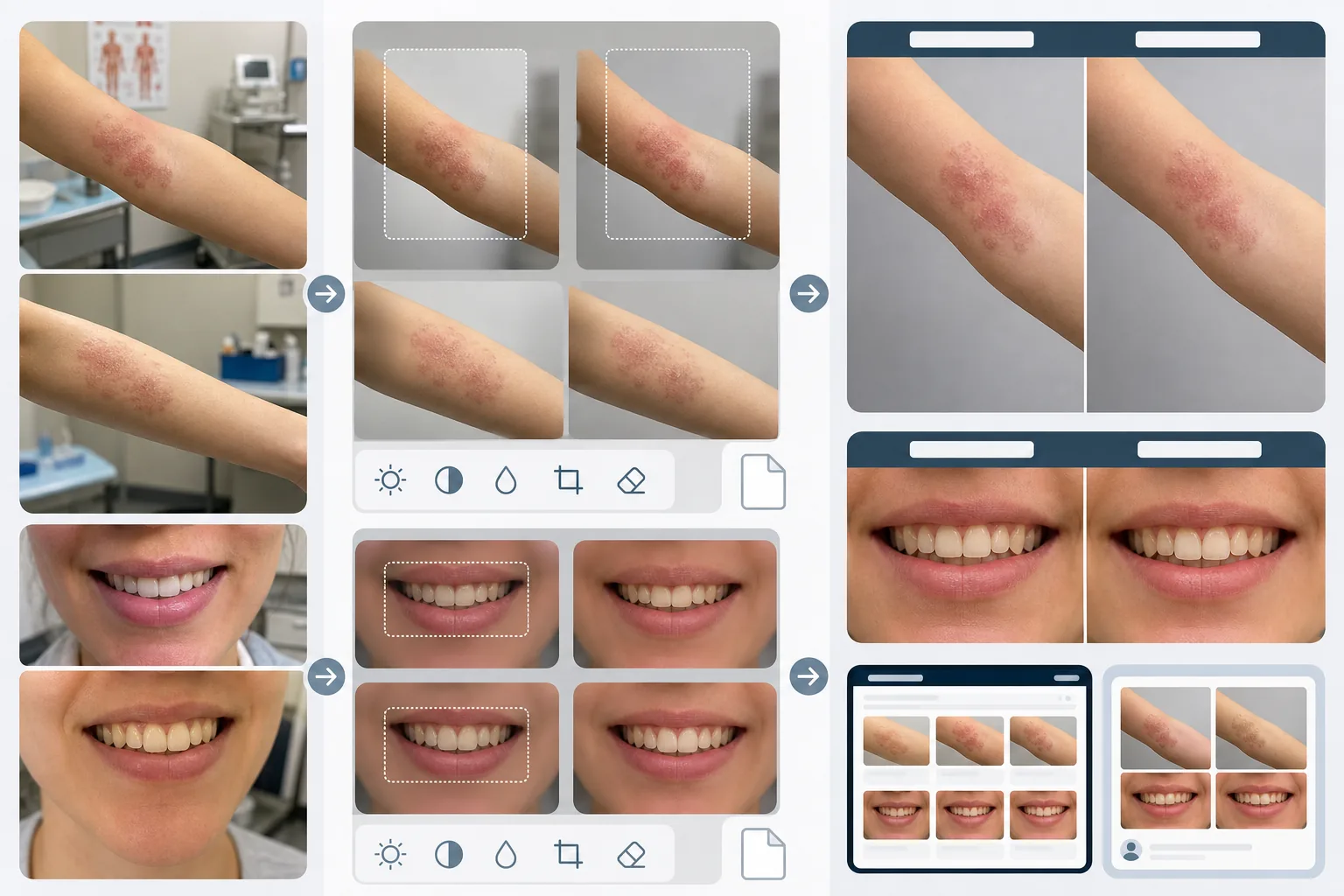
O que este modelo faz
Cria a consistência visual que torna as comparações médicas de antes e depois confiáveis e convincentes. O maior problema da fotografia clínica é que as imagens de antes e depois são feitas com semanas ou meses de diferença, em condições de iluminação distintas, com câmeras diferentes e, às vezes, em salas diferentes. O AI Enhance padroniza a exposição, a temperatura de cor e o balanço de branco em ambas as imagens, de modo que qualquer diferença visível seja decorrente do procedimento, e não da fotografia. O Magic Eraser remove a bagunça da sala de exame — instrumentos médicos sobre bancadas, fichas nas paredes, carrinhos de equipamentos ao fundo — e a substitui por um fundo clínico neutro. Os recursos de privacidade incluem detecção e ocultação automáticas de marcas identificadoras, a capacidade de recortar regiões corporais específicas e a remoção de metadados para proteção dos dados do paciente.
Configurações do modelo
| Padronização da iluminação | Igualar exposição, temperatura de cor e balanço de branco entre o par de antes/depois |
| Fundo | Cinza neutro clínico, branco limpo ou campo cirúrgico azul |
| Ocultação de privacidade | Desfocar automaticamente os traços identificadores fora da área de tratamento |
| Consistência de escala | Igualar enquadramento e ampliação entre as imagens de antes e depois |
| Remoção de metadados | Remover os dados EXIF de localização, dispositivo e carimbo de data/hora por consciência da HIPAA |
| Resolução de saída | 2400×1600px por imagem (composição lado a lado a 4800×1600px) |
Como usar este modelo
Envie as fotos de antes e depois
Envie a imagem de antes e a imagem de depois correspondente. O modelo lida com fotos feitas com configurações de câmeras clínicas, smartphones e câmeras compactas. Envie-as em par para que a IA possa igualar as configurações de padronização entre ambas as imagens.
Padronize a iluminação e o enquadramento
O AI Enhance iguala a exposição, a temperatura de cor e o balanço de branco entre as duas imagens. Se o enquadramento diferir — mais próximo em uma foto, mais amplo na outra — o modelo ajusta o recorte para que a área de tratamento fique na mesma escala e posição em ambas as imagens, para uma comparação visual justa.
Limpe o fundo e aplique a privacidade
O Magic Eraser remove a bagunça da sala de exame e substitui o fundo por um fundo clínico neutro. A ocultação de privacidade desfoca ou recorta os traços identificadores fora da área de tratamento. Os metadados EXIF contendo localização, informações do dispositivo e carimbos de data/hora são removidos.
Exporte para o marketing do consultório
Baixe imagens individuais ou uma composição lado a lado com cabeçalhos rotulados 'Before' e 'After'. As saídas são dimensionadas para galerias de sites, telas de salas de consulta e redes sociais. A apresentação clínica consistente constrói credibilidade junto a pacientes em potencial que navegam pela sua galeria de resultados.
Dicas profissionais para os melhores resultados
- ✓Estabeleça uma estação de fotos consistente em seu consultório, com iluminação fixa e fundo neutro. Embora o modelo possa padronizar diferentes condições de iluminação, partir de uma configuração consistente produz a comparação mais precisa e reduz o risco de artefatos de padronização.
- ✓Use a mesma distância focal e a mesma distância de câmera para as fotos de antes e depois. O modelo ajusta as diferenças de enquadramento, mas a distorção de perspectiva causada por distâncias diferentes entre a lente e o sujeito pode alterar sutilmente a aparência dos traços faciais ou dos contornos corporais, o que pode comprometer a credibilidade da comparação.
- ✓Sempre obtenha o consentimento por escrito do paciente para a fotografia de antes e depois e seu uso pretendido antes de processar as imagens. O modelo oferece recursos de privacidade, mas não substitui a exigência legal de consentimento informado.
Ferramentas
Perguntas comuns
Isso está em conformidade com a HIPAA?
+
O modelo oferece recursos conscientes da privacidade — remoção de metadados, ocultação de traços identificadores e recorte da área de tratamento — que apoiam a conformidade com a HIPAA. No entanto, a conformidade com a HIPAA é uma responsabilidade organizacional. O modelo é uma ferramenta, não um programa de conformidade. Consulte seu responsável pela conformidade sobre os requisitos específicos do seu consultório.
Posso processar fotos odontológicas de antes e depois?
+
Sim. O modelo lida com fotos intraorais, close-ups do sorriso e fotografia odontológica de rosto inteiro. A padronização da iluminação é especialmente valiosa para fotos odontológicas, em que a imagem de antes costuma ser feita sob a luz da sala de exame, enquanto a de depois é feita com um flash circular.
As diferenças de textura da pele serão preservadas com precisão?
+
Sim. A padronização ajusta a iluminação e a cor sem suavizar a textura da pele. Isso é fundamental — as melhorias na textura da pele decorrentes de procedimentos dermatológicos precisam estar visíveis na comparação. O modelo, intencionalmente, não aplica retoque de pele às imagens médicas de antes e depois.
Construa a confiança do paciente com uma fotografia clínica consistente
Envie fotos de antes e depois e obtenha imagens de comparação padronizadas e conscientes da privacidade para o marketing do seu consultório.
Experimente gratuitamenteRelated templates
More business templates for your workflow.
Fotos da equipe corporativa aprimoradas com planos de fundo consistentes, correção de iluminação profissional, gradação de cores apropriada à marca e qualidade de imagem uniforme em toda a equipe.
Aprimore fotos de academia e condicionamento físico com aprimoramento de definição muscular, correção dinâmica de iluminação, limpeza de fundo e gradação de cores atléticas de alto contraste.
Aprimore fotos de portfólio de tatuagens com cores vibrantes de tinta, nitidez de detalhes de linhas, redução de vermelhidão da pele e fundos limpos para portfólios de artistas e Instagram.
Crie uma foto de currículo sofisticada com substituição de fundo, suavização de pele e correção de iluminação. Ideal para currículos, portais de empregos e diretórios corporativos.
Crie fotos de equipes profissionais e de jogadores individuais com substituição de fundo, aprimoramento de cores de camisas e cenários de estádio ou estúdio para escalações e programas.
Crie fotos promocionais profissionais de bandas e músicos com substituição de fundo, aprimoramento de iluminação dramático e resultados prontos para impressão para kits de imprensa e envios para locais.