
Foto de equipe corporativa
Dê à página da sua equipe um visual profissional e consistente sem um fotógrafo caro. Este modelo padroniza os planos de fundo dos retratos individuais, corrige a iluminação mista do escritório para tons profissionais neutros, aplica um suavizamento sutil da pele e garante que a foto de cada membro da equipe tenha o mesmo estilo e qualidade.
Experimente este modelo gratuitamenteBusiness template preview
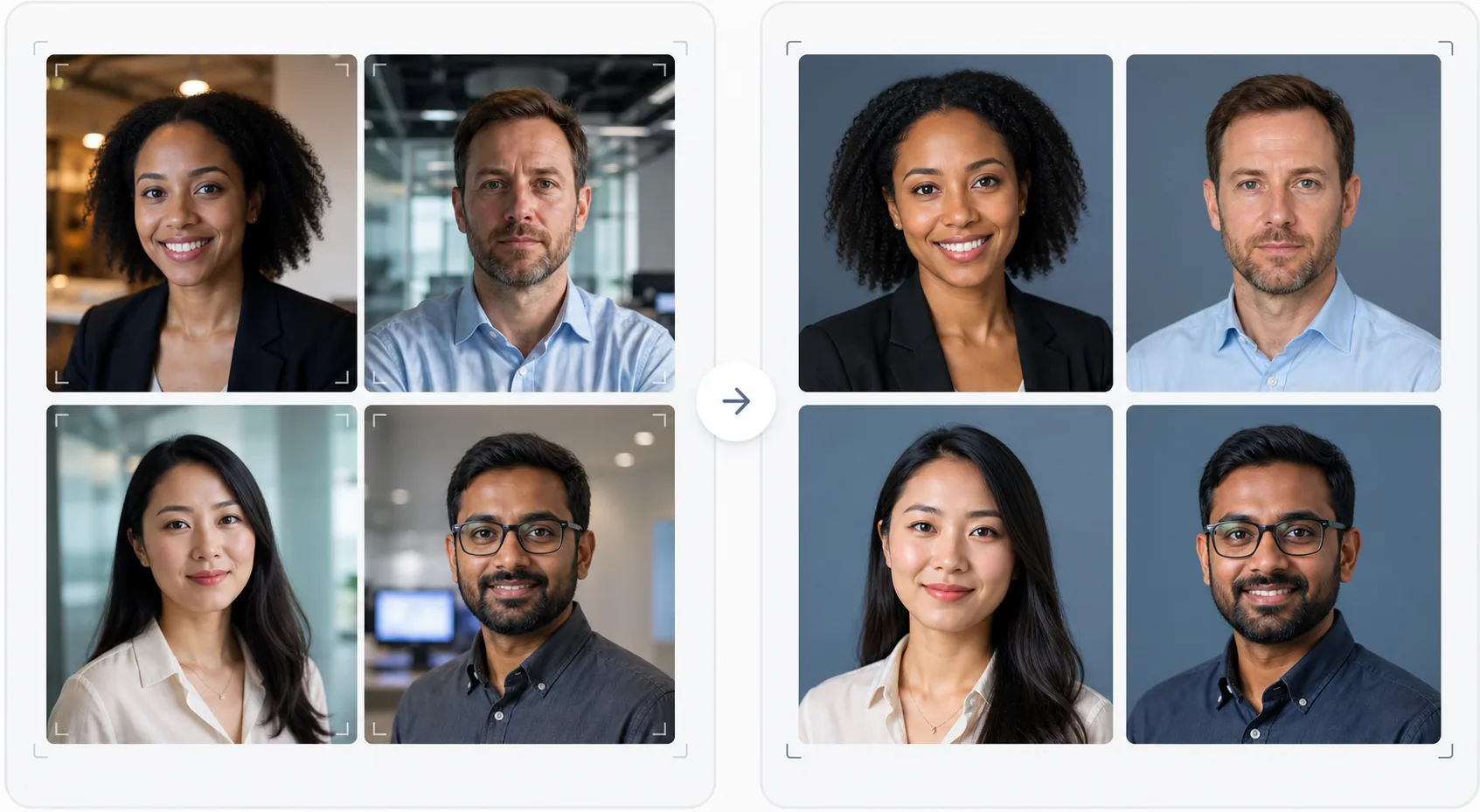
O que este modelo faz
Cria fotos de equipe visualmente consistentes para sites de empresas, páginas de empresa no LinkedIn e materiais de marketing. Quando os retratos da equipe são tirados em momentos diferentes, por pessoas diferentes e com câmeras diferentes, o resultado é uma página de equipe desigual que parece pouco profissional. Este modelo resolve isso padronizando planos de fundo, temperatura de cor, estilo de iluminação e enquadramento em todos os retratos. O Background Eraser remove os variados planos de fundo de escritório e os substitui por um plano de fundo sólido ou gradiente consistente na cor da sua marca. O AI Enhance normaliza a exposição, corrige o tom esverdeado das luzes fluorescentes do escritório e aplica um suavizamento sutil da pele para que cada membro da equipe pareça refinado e profissional.
Configurações do modelo
| Plano de fundo | Cor sólida, gradiente ou desfoque de escritório consistente (configurável conforme a marca) |
| Enquadramento | Cabeça e ombros, centralizado, consistente em todas as fotos da equipe |
| Normalização da iluminação | Profissional neutra (corrige a mistura de fluorescente, LED e luz de janela) |
| Aprimoramento da pele | Redução sutil de imperfeições e correção de olheiras |
| Dimensões de saída | 800 × 800 px (página de equipe na web) e 400 × 400 px (diretório) |
Como usar este modelo
Envie as fotos dos membros da equipe
Envie os retratos dos membros da equipe — eles podem ser de câmeras, locais e períodos diferentes. O modelo lida com tudo, de retratos profissionais a selfies tiradas com o smartphone em uma mesa. Envie a equipe inteira em lote para um processamento eficiente.
Padronize os planos de fundo
O Background Eraser remove o plano de fundo original de cada foto e o substitui por uma opção consistente para todos os membros da equipe. Escolha entre cores sólidas da marca, gradientes profissionais ou um efeito de desfoque de escritório padronizado. Todas as fotos recebem o mesmo tratamento de plano de fundo para uniformidade visual.
Normalize a iluminação e aprimore
O AI Enhance corrige a iluminação de cada foto para um tom profissional neutro e consistente. Tons esverdeados fluorescentes, tons quentes incandescentes e iluminação mista são todos corrigidos. O suavizamento sutil da pele reduz imperfeições e olheiras. Os olhos são suavemente iluminados para criar uma aparência envolvente e acessível.
Exporte para web e diretório
Baixe o conjunto completo em 800 × 800 px para páginas de equipe de sites e em 400 × 400 px para diretórios internos e assinaturas de e-mail. Todas as imagens são exportadas com o mesmo perfil de cor, compressão e convenção de nomenclatura de arquivos para facilitar o upload em lote no seu CMS.
Dicas profissionais para melhores resultados
- ✓Envie aos membros da equipe um briefing fotográfico simples: olhar diretamente para a câmera, vestir uma blusa de cor sólida que contraste com o plano de fundo, garantir boa iluminação no rosto (virar-se para uma janela, se possível) e manter a expressão natural com um leve sorriso. Fotos de origem melhores exigem menos correção por IA.
- ✓Escolha uma cor de plano de fundo que apareça nas diretrizes da sua marca — normalmente um cinza neutro, azul-marinho ou a cor secundária da sua marca. Isso transforma a página da equipe em um ativo de marca, em vez de apenas uma coleção de fotos.
- ✓Processe os novos membros da equipe pelo modelo conforme eles entram, usando as mesmas configurações. Isso mantém a consistência visual ao longo do tempo, mesmo à medida que a equipe cresce e muda.
- ✓Para a alta liderança e diretoria, considere um enquadramento ligeiramente diferente (recorte mais fechado, tom um pouco mais quente) para diferenciar visualmente a liderança do restante da equipe, mantendo o mesmo plano de fundo e estilo.
Ferramentas
Perguntas frequentes
Posso processar a equipe inteira de uma vez?
+
Sim. Envie todas as fotos dos membros da equipe em um único lote. O modelo aplica o mesmo plano de fundo, correção de iluminação e enquadramento a cada imagem, garantindo consistência perfeita. As fotos são retornadas com dimensões, compressão e perfis de cor correspondentes.
E se os membros da equipe tiverem qualidade de foto muito diferente?
+
O modelo normaliza as diferenças de qualidade entre selfies de smartphone e retratos de câmeras DSLR ajustando nitidez, redução de ruído e compressão. Embora uma fonte DSLR sempre produza um resultado ligeiramente mais nítido, as saídas processadas são visualmente consistentes o suficiente para que as diferenças de qualidade não sejam evidentes em uma grade de site.
Isso funciona para equipes remotas?
+
Este é o caso de uso ideal para equipes remotas em que uma sessão de fotos presencial é impraticável. Cada membro da equipe tira uma selfie ou pede para alguém tirar sua foto em casa, e o modelo padroniza todas elas para que pareçam ter sido tiradas na mesma sessão de estúdio.
Uma página de equipe profissional sem a sessão de fotos
Envie retratos individuais de qualquer fonte e obtenha um conjunto de fotos de equipe visualmente consistente e alinhado à marca, pronto para o seu site.
Experimente gratuitamenteRelated templates
More business templates for your workflow.
Aprimore fotos de academia e condicionamento físico com aprimoramento de definição muscular, correção dinâmica de iluminação, limpeza de fundo e gradação de cores atléticas de alto contraste.
Aprimore fotos de portfólio de tatuagens com cores vibrantes de tinta, nitidez de detalhes de linhas, redução de vermelhidão da pele e fundos limpos para portfólios de artistas e Instagram.
Crie uma foto de currículo sofisticada com substituição de fundo, suavização de pele e correção de iluminação. Ideal para currículos, portais de empregos e diretórios corporativos.
Crie fotos de equipes profissionais e de jogadores individuais com substituição de fundo, aprimoramento de cores de camisas e cenários de estádio ou estúdio para escalações e programas.
Crie fotos promocionais profissionais de bandas e músicos com substituição de fundo, aprimoramento de iluminação dramático e resultados prontos para impressão para kits de imprensa e envios para locais.
Mostre nail art com aprimoramento de detalhes em nível macro, precisão real de cores de gel e esmalte e posicionamento limpo das mãos para portfólios do Instagram e páginas de reserva.