
Foto de portfólio de tatuagem
Apresente seu trabalho de tatuagem com o detalhe e a precisão de cor que atraem novos clientes. Este modelo realça a saturação da tinta e a nitidez das linhas, reduz a vermelhidão e o inchaço da pele após a sessão, corrige a iluminação do estúdio para cores de tinta fiéis e cria apresentações de portfólio limpas que deixam a obra falar por si.
Experimente este modelo gratuitamenteBusiness template preview
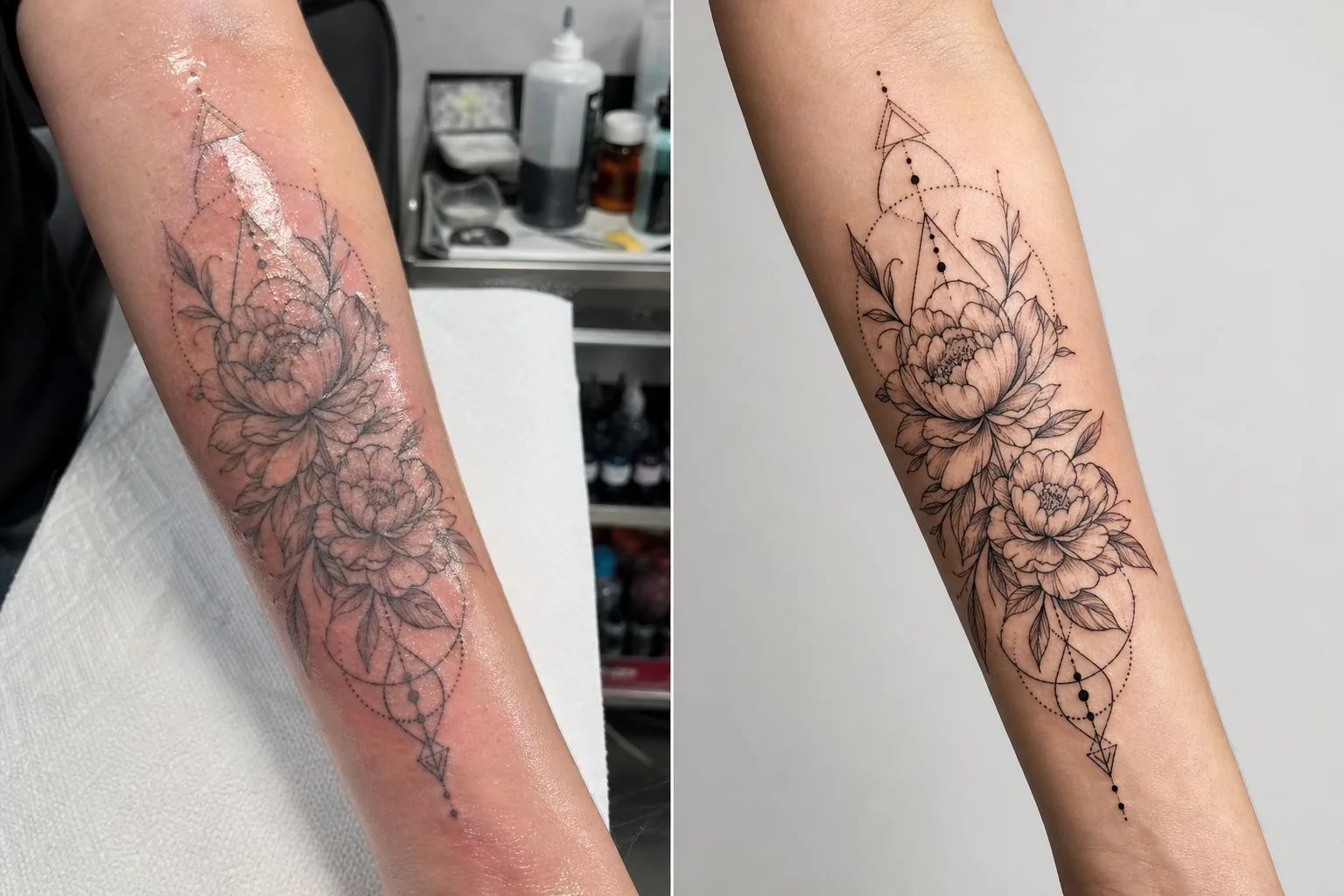
O que este modelo faz
Aborda os desafios fotográficos específicos que os tatuadores enfrentam ao documentar seu trabalho. Tatuagens recém-feitas são fotografadas em condições de estúdio com iluminação mista, e a pele ao redor da tinta nova está vermelha, inchada e coberta por excesso de tinta e pomada — nada disso representa o resultado final cicatrizado. Este modelo usa o AI Enhance para corrigir a iluminação de modo que as cores da tinta apareçam como ficarão depois de cicatrizadas, aguça o trabalho de linhas finas e o detalhe do dotwork, e reduz a vermelhidão e o inchaço ao redor de tatuagens recentes. O Magic Eraser remove a bagunça do fundo da estação de tatuagem, incluindo frascos de tinta, toalhas de papel, luvas e equipamentos, criando um fundo limpo que concentra toda a atenção na obra.
Configurações do modelo
| Realce da tinta | Aumento de saturação de cor para estilos de tatuagem em preto, colorida e aquarela |
| Nitidez das linhas | Realce de microdetalhes de linhas finas e dotwork |
| Correção da pele | Reduz vermelhidão, inchaço e brilho da pomada ao redor de tatuagens recentes |
| Correção de iluminação | Corrige a iluminação mista de estúdio para luz do dia neutra, garantindo cores de tinta fiéis |
| Fundo | Fundo sólido ou desfocado limpo (remove a bagunça da estação) |
| Dimensões de saída | 2000 × 2000 px (quadrado do Instagram) ou 4000px para impressão de portfólio |
Como usar este modelo
Envie sua foto de tatuagem
Envie uma foto da tatuagem concluída — recém-feita ou cicatrizada. Fotografe a tatuagem de frente para minimizar a distorção de perspectiva. O modelo lida com close-ups de detalhe, fotos de visão geral da peça inteira e composições envolventes em superfícies corporais curvas como braços, pernas e costelas.
Realce de tinta e linhas
O AI Enhance aumenta a saturação da tinta para que as tatuagens em preto pareçam profundas e intensas, enquanto as coloridas mostram toda a sua vivacidade. Linhas finas, dotwork e padrões geométricos são aguçados para mostrar a precisão do seu trabalho com a agulha. O realce respeita os diferentes estilos de tatuagem — tradicional marcante, linha fina, aquarela e blackwork recebem cada um o tratamento apropriado.
Correção de pele e fundo
Em tatuagens recentes, a vermelhidão e o inchaço ao redor da tinta são reduzidos para se aproximar da aparência cicatrizada. O brilho da pomada e o excesso de tinta na pele ao redor são atenuados. O Magic Eraser remove o fundo da estação de tatuagem — potinhos de tinta, toalhas de papel, luvas e equipamentos — substituindo-o por um fundo limpo.
Exporte para portfólio e redes sociais
Baixe no quadrado de 2000 × 2000 px para posts de portfólio no Instagram, ou a 4000px no lado maior para portfólios de site e lookbooks impressos. O perfil de cor preserva toda a gama de cores de tinta de tatuagem, incluindo as sutis variações de tonalidade dos estilos aquarela e neo-tradicional.
Dicas profissionais para os melhores resultados
- ✓Fotografe a tatuagem sob uma luz equilibrada para luz do dia (5000–5500K) a partir de um ângulo constante. Isso fornece ao modelo os dados de cor mais precisos para trabalhar. Luzes de tungstênio quentes fazem a tinta parecer mais amarelo-alaranjada, e a correção, embora eficaz, produz melhores resultados a partir de uma iluminação neutra.
- ✓Limpe o excesso de tinta e pomada da superfície da pele antes de fotografar. O modelo reduz o brilho da pomada, mas uma superfície limpa e enxugada mostra o trabalho de tinta com mais clareza e produz um resultado realçado melhor.
- ✓Fotografe as versões recém-feita e cicatrizada da mesma tatuagem sempre que possível. A foto recente processada pelo modelo lhe dá conteúdo de portfólio imediato, e a foto cicatrizada confirma o resultado real estabilizado. Ambas as versões no seu portfólio demonstram profissionalismo.
- ✓Para peças grandes que envolvem os membros, faça vários close-ups de detalhe sobrepostos além da visão geral da peça inteira. O modelo aguça os detalhes que se perdem em fotos de visão geral amplas, e os close-ups de elementos de destaque rendem posts individuais de portfólio marcantes.
Ferramentas
Perguntas frequentes
Isso pode fazer uma tatuagem recente parecer cicatrizada?
+
O modelo reduz a vermelhidão e o inchaço para se aproximar da aparência cicatrizada, mas o resultado é um aprimoramento, não uma previsão perfeita da cicatrização. A cicatrização individual varia conforme o tipo de pele, o tipo de tinta e a localização no corpo. A foto recente aprimorada parecerá próxima da cicatrizada, mas pode não ser idêntica ao resultado cicatrizado real.
Isso funciona para todos os estilos de tatuagem?
+
Sim. O modelo reconhece e aprimora adequadamente os estilos tradicional marcante, japonês, linha fina, dotwork, geométrico, aquarela, neo-tradicional, blackwork e retrato realista. Cada estilo recebe nitidez e tratamento de cor diferentes, calibrados para o que melhor valoriza aquela estética.
E quanto às tatuagens de cobertura?
+
Tatuagens de cobertura são processadas como qualquer outra tatuagem. O modelo aprimora a tinta visível, que é o desenho de cobertura. Se você quiser mostrar o antes e depois (original versus cobertura), processe cada foto separadamente para a apresentação de portfólio mais consistente.
Um portfólio que lota sua agenda
Envie fotos de tatuagens e obtenha imagens de portfólio nítidas nos detalhes e fiéis nas cores que destacam sua arte e atraem novos clientes.
Experimente grátisRelated templates
More business templates for your workflow.
Fotos da equipe corporativa aprimoradas com planos de fundo consistentes, correção de iluminação profissional, gradação de cores apropriada à marca e qualidade de imagem uniforme em toda a equipe.
Aprimore fotos de academia e condicionamento físico com aprimoramento de definição muscular, correção dinâmica de iluminação, limpeza de fundo e gradação de cores atléticas de alto contraste.
Crie uma foto de currículo sofisticada com substituição de fundo, suavização de pele e correção de iluminação. Ideal para currículos, portais de empregos e diretórios corporativos.
Crie fotos de equipes profissionais e de jogadores individuais com substituição de fundo, aprimoramento de cores de camisas e cenários de estádio ou estúdio para escalações e programas.
Crie fotos promocionais profissionais de bandas e músicos com substituição de fundo, aprimoramento de iluminação dramático e resultados prontos para impressão para kits de imprensa e envios para locais.
Mostre nail art com aprimoramento de detalhes em nível macro, precisão real de cores de gel e esmalte e posicionamento limpo das mãos para portfólios do Instagram e páginas de reserva.