
Remova antenas de satélite das fotos
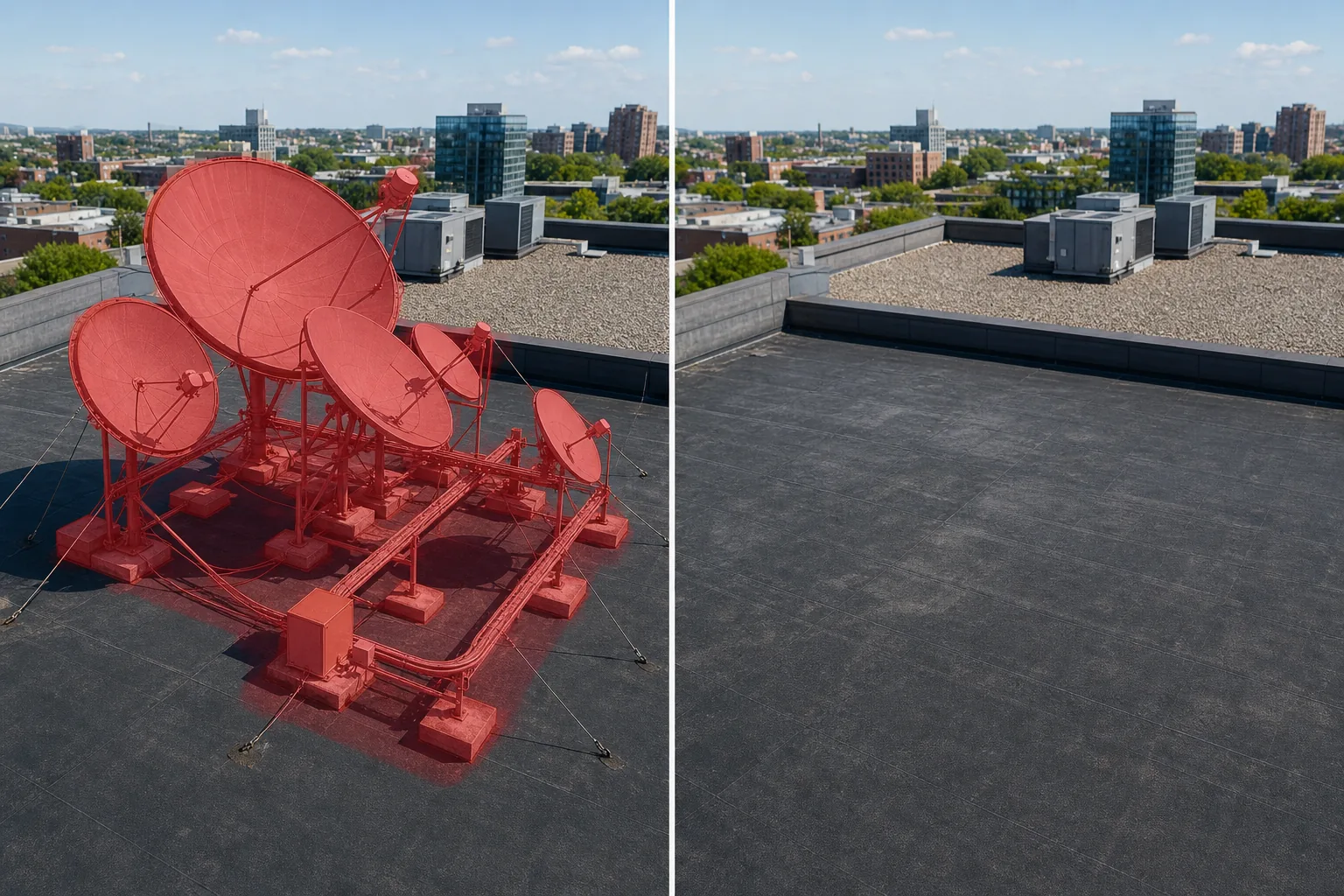
Apague grandes conjuntos de antenas de satélite, instalações comerciais VSAT, conjuntos de antenas de alimentação múltipla e equipamentos de transmissão em telhados de fotografias aéreas e externas de edifícios. Magic Eraser remove todo o conjunto de hardware – pratos, buzinas de alimentação, guias de ondas e estruturas de montagem – e reconstrói o telhado, o parapeito ou a plataforma do equipamento atrás dele.
Última atualização
Por que grandes conjuntos de antenas de satélite superam a fotografia de edifícios
Uma antena parabólica residencial é um pequeno defeito na linha do telhado, mas uma instalação de antena parabólica comercial é uma escala totalmente diferente de perturbação visual. Prédios de telecomunicações, instalações de transmissão, hotéis, hospitais e campi corporativos geralmente carregam conjuntos de antenas parabólicas de grande diâmetro – 1,2 a 3,8 metros cada – montadas em pesadas estruturas de aço que dominam o perfil do telhado. Essas instalações podem incluir múltiplas antenas destinadas a diferentes slots orbitais, bandejas de cabos de guia de ondas que atravessam o telhado, abrigos de equipamentos e plataformas geradoras de backup. Ao fotografar tais edifícios para marketing, venda ou uso editorial, o conjunto de antenas compete visualmente com a própria arquitetura. Os espectadores veem uma instalação de telecomunicações em vez de uma elegante sede corporativa ou um hotel acolhedor. O retoque manual dessas matrizes é um projeto de várias horas porque cada antena é um refletor parabólico com geometria complexa - superfícies curvas, sombras de chifre de alimentação, malha ou painéis sólidos e montagens de treliça de aço - tudo contra uma paisagem variada de equipamentos HVAC, parapeitos e céu. Magic Eraser simplifica isso para um fluxo de trabalho de pincelar e apagar. A IA reconhece os limites da antena, remove todo o conjunto de hardware e reconstrói a superfície do telhado – membrana, lastro de cascalho, deck de metal ou concreto – junto com as bordas do parapeito e o céu, produzindo um telhado que parece limpo e arquitetonicamente coerente.
Remova antenas de satélite em três etapas
- 1
Envie sua foto
Abra Magic Eraser na web, iOS ou Android e carregue o exterior do edifício, a foto aérea do drone ou a foto do telhado contendo a instalação da antena de satélite. Os formatos JPEG, PNG, HEIC e WebP são suportados. Para grandes matrizes comerciais, use a resolução mais alta disponível para que a IA possa reconstruir com precisão os detalhes da superfície do telhado.
- 2
Pincele sobre o conjunto de antenas
Pinte toda a instalação da antena parabólica - cada antena parabólica, o pedestal ou estrutura de montagem, buzinas de alimentação, guias de onda, bandejas de cabos e qualquer abrigo de equipamento ou almofada de concreto na base. Para matrizes de vários pratos, você pode mascarar todo o grupo em uma seleção ou trabalhar em pratos individuais sequencialmente. Inclua sombras projetadas na superfície do telhado e quaisquer cabos de sustentação ou pára-raios visíveis associados à instalação.
- 3
Apagar e revisar
Toque em Apagar e Magic Eraser remove o hardware da antena de satélite enquanto reconstrói a membrana do telhado, as paredes do parapeito e o céu atrás da instalação. Verifique se a borda do telhado e o parapeito parecem contínuos. Para matrizes muito grandes, uma segunda passagem pode ajudar a refinar áreas onde convergem múltiplas texturas de fundo. Exporte em resolução máxima para uso em marketing, editorial ou portfólio.
Melhor para
- Marketing imobiliário comercial, onde conjuntos de antenas em telhados fazem os edifícios parecerem instalações de telecomunicações
- Fotografia de hotéis e hospitalidade onde uma linha de telhado limpa transmite elegância em vez de utilidade
- Fotografia do campus corporativo e da sede para relatórios anuais e apresentações para investidores
- Fotos do portfólio arquitetônico onde o projeto do edifício deveria falar sem equipamentos de retrofit
- Fotografia aérea e de drones de horizontes urbanos onde a desordem nos telhados prejudica a paisagem urbana
Dicas para remover grandes conjuntos de antenas parabólicas
As instalações comerciais de satélite são os objetos de telhado mais complexos de serem removidos devido à sua escala e à quantidade de superfície do telhado que obscurecem. Para obter os melhores resultados, trabalhe por etapas: comece pela antena maior e sua estrutura de montagem imediata, depois passe para as antenas secundárias e conectando as eletrocalhas. Isso permite que a IA revele e reconstrua progressivamente o telhado em seções gerenciáveis. Preste atenção especial ao pedestal de montagem - normalmente são vigas I de aço pesadas ou pilares de concreto aparafusados à estrutura do telhado e deixam uma pegada distinta que inclui parafusos de ancoragem, colares de impermeabilização e rufos. Inclua tudo isso em sua seleção. Para fotos de drones olhando para o telhado, os interiores da antena são visíveis como superfícies reflexivas côncavas; a IA lida bem com essa geometria, mas pode precisar de uma segunda passagem onde a borda do prato cruza a borda do parapeito. Se o edifício tiver múltiplas plataformas de antenas em alturas diferentes, trabalhe primeiro na mais alta – isso dá à IA um céu limpo e uma paisagem urbana distante como referência ao preencher atrás de instalações mais baixas.
Perguntas frequentes
- Qual a diferença entre isso e a remoção de uma antena parabólica normal?
- A ferramenta padrão de remoção de antena parabólica é otimizada para pequenas antenas residenciais (45-90 cm). Esta ferramenta tem como alvo grandes instalações comerciais – antenas parabólicas de vários metros, matrizes VSAT, clusters de antenas de alimentação múltipla e antenas parabólicas de uplink de transmissão. Estes requerem mais reconstrução de fundo devido ao seu tamanho e à complexidade da sua infra-estrutura de montagem.
- Ele pode lidar com uma variedade de vários pratos em um telhado?
- Sim. Para rooftops com três, cinco ou até uma dúzia de pratos, você pode mascarar toda a variedade em uma ampla seleção ou trabalhar prato por prato. Para conjuntos onde os pratos se sobrepõem visualmente a partir do ângulo da câmera, uma seleção grande geralmente produz resultados mais limpos do que tentar separar os pratos individuais.
- E quanto às bandejas de cabos de guias de onda e abrigos de equipamentos?
- Inclua-os na área do pincel. A IA lida com bandejas de cabos metálicas, gabinetes de equipamentos de fibra de vidro, caixas de junção à prova de intempéries e o conduíte que conecta as antenas à sala de equipamentos. A membrana do telhado e qualquer lastro de cascalho serão reconstruídos no local onde as ferragens foram montadas.
- É grátis?
- Sim. O nível gratuito do Magic Eraser lida com a remoção de antenas de satélite com limites de uso diários. Premium (US$ 29,99/ano) elimina limites e desbloqueia exportações de alta resolução para fotografia arquitetônica profissional e materiais de marketing.