
Remover carros das fotos
Livre-se do caminhão do vizinho estacionado em frente ao seu anúncio imobiliário, do carro alugado na entrada da casa dos seus sonhos, da van de entrega bloqueando a fachada do edifício histórico, do trânsito aleatório arruinando a composição da sua paisagem. Magic Eraser pinta carros e reconstrói estradas, calçadas, calçadas ou prédios em segundos.
Última atualização
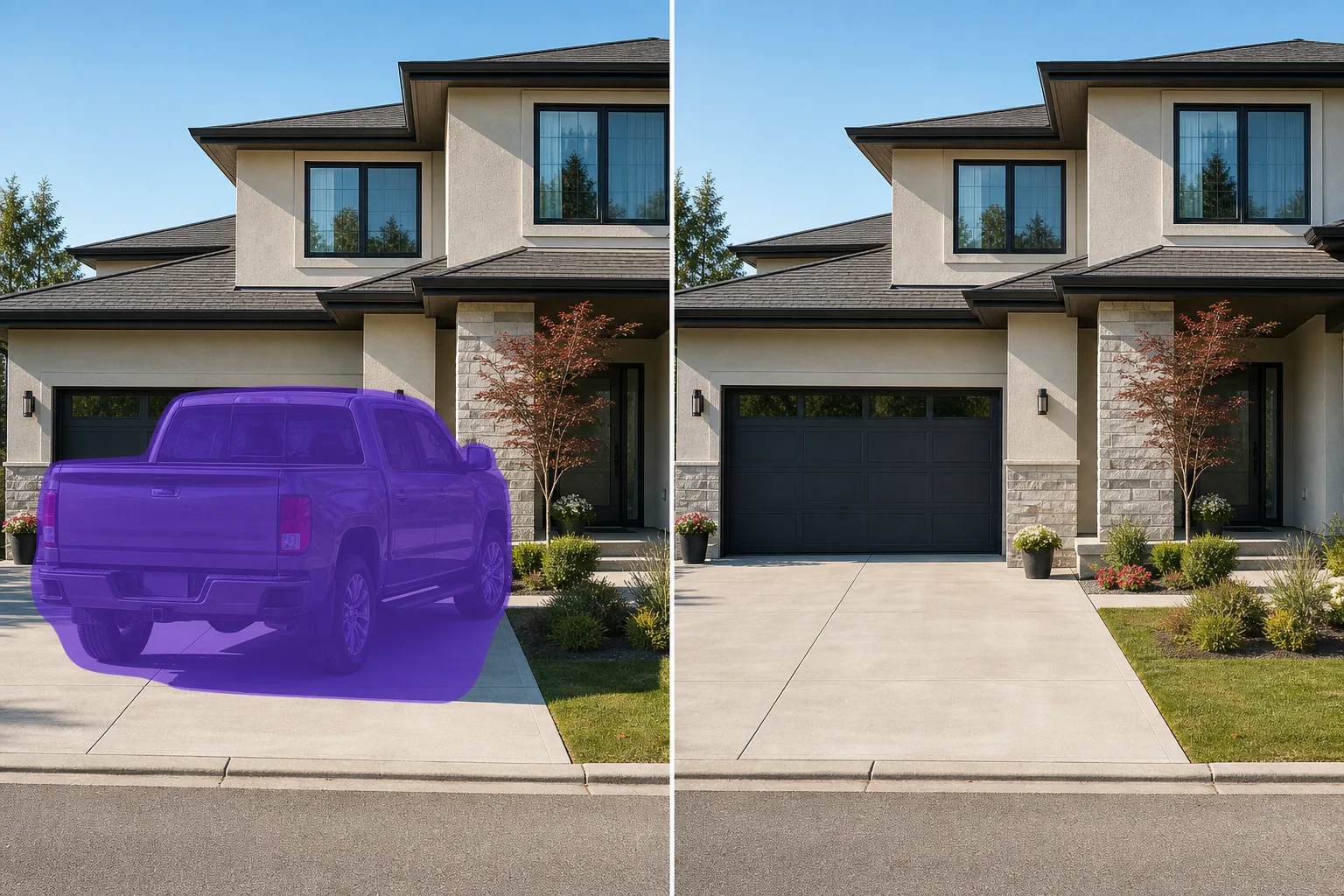
Por que os carros são o elemento mais editado dos fotógrafos imobiliários
Os carros ficam nas calçadas, nas ruas e em frente aos prédios em quase todas as fotos tiradas em uma área desenvolvida - e raramente são seus, raramente estilizados para combinar com a listagem e raramente posicionados onde a composição os deseja. A remoção manual é lenta porque o carro cobre várias texturas ao mesmo tempo: concreto da entrada de automóveis, bordas do gramado, sombras de cercas, o prédio atrás dele. Magic Eraser lida com o veículo inteiro como uma região – escove todo o carro, incluindo qualquer sombra no chão, e a IA reconstrói a entrada de automóveis, estrada, grama, calçada ou fachada abaixo usando as margens visíveis como referência. Funciona para um único sedã estacionado, uma fileira de carros na calçada em um quarteirão e o caminhão de entrega no meio de uma foto de paisagem.
Remova um carro em três etapas
- 1
Envie sua foto
Abra Magic Eraser na web, iOS ou Android e insira a foto imobiliária, paisagística, arquitetônica ou de viagem. JPEG, PNG, HEIC e WebP são todos suportados.
- 2
Pincele cada carro, incluindo sua sombra
Pinte todo o veículo – carroceria, rodas, espelhos laterais, antenas – e inclua a sombra que ele projeta no chão na região do pincel. Os carros lançam sombras duras que podem ser lidas como “carro aqui”, mesmo depois de o corpo ser removido; escovar a sombra ao mesmo tempo é a maior atualização do fluxo de trabalho em relação à remoção apenas do veículo visível.
- 3
Toque em Apagar e inspecionar
Magic Eraser reconstrói a entrada de automóveis, estrada, grama, calçada ou fachada de edifício em segundos. Digitalize com zoom de 100% em busca de silhuetas residuais ou sombras, execute uma segunda passagem em qualquer artefato restante e, em seguida, exporte em resolução total para a listagem, portfólio ou postagem social da MLS.
Melhor para
- Listagens de imóveis onde o carro do vizinho, o carro do vendedor ou o carro do corretor estão parados na garagem
- Fotografia arquitetônica onde veículos estacionados ou que passam bloqueiam a fachada do edifício ou a vista da rua
- Fotos de paisagens e viagens onde carros na beira da estrada interrompem a composição
- Fotos de bairros históricos e cidades antigas onde os carros modernos quebram a estética da época
- Fotos externas de vitrines e pequenas empresas onde o estacionamento na calçada domina o quadro
- Exteriores do local do casamento, onde os veículos dos convidados ocupam a entrada ou a área de estacionamento
- Anúncios de aluguel por temporada (Airbnb / Vrbo) onde o carro ou carros alugados do anfitrião são visíveis
- Exteriores de escolas, igrejas e edifícios cívicos onde o lote é o pano de fundo do contexto errado
Casos extremos e dicas
A remoção do carro funciona melhor quando o veículo fica contra um fundo relativamente contínuo – entrada de automóveis aberta, estrada pavimentada, gramado, fachada de edifício. Dois casos extremos se beneficiam de cuidado extra. Primeiro: quando um carro obscurece parcialmente outro (uma fileira de veículos na calçada), escove o carro obscurecido por último para que a IA tenha a estrada reconstruída ou a borda do meio-fio como referência ao preencher a lacuna. Segundo: quando um carro está estacionado em uma superfície com muitos detalhes (calçada de tijolos, cascalho decorativo, linhas de estacionamento pintadas), pinte uma margem generosa e inspecione em 100% – a IA pode suavizar levemente os padrões detalhados onde o carro estava, e uma passagem de retoque com um pincel menor restaura a textura. Para listagens MLS de alto risco, portfólios arquitetônicos e marketing imobiliário, siga o padrão de divulgação do seu setor para imagens limpas por IA: O Artigo 12 do Código de Ética da NAR exige que qualquer alteração material não deturpe a condição real, o ambiente ou as características reais da propriedade - a remoção de carros para limpar a listagem é amplamente aceita, mas divulgue a edição se solicitado.
Perguntas frequentes
- É grátis remover carros de uma foto?
- Sim. O nível gratuito de Magic Eraser cobre a remoção do carro com limites de uso diário. Atualizar para Premium (US$ 29,99/ano) elimina os limites e desbloqueia exportações de alta resolução – útil para marketing imobiliário impresso, envios MLS, portfólios arquitetônicos e impressões de galerias.
- Posso remover todos os carros de uma cena de rua da cidade?
- Sim. Pincele cada veículo estacionado ou em movimento no quadro e apague. A IA reconstrói a estrada, o meio-fio e a calçada abaixo. Para ruas urbanas densas com uma dúzia de carros visíveis, execute duas ou três passagens cobrindo diferentes planos de profundidade (primeiro carros próximos, depois carros intermediários e depois carros distantes) para obter dicas espaciais mais limpas - correr em uma área mascarada gigante às vezes nivela a perspectiva.
- E quanto aos carros que se obscurecem parcialmente em uma fila na calçada?
- Remova-os em ordem – primeiro os visíveis, depois os parcialmente obscurecidos. Após a primeira passagem, a IA reconstruiu a estrada e as bordas do meio-fio para referência; a segunda passagem usa essa referência para preencher de forma limpa a lacuna deixada pelo carro obscurecido. Ir de uma só vez funciona para linhas curtas, mas produz resultados mais suaves em linhas longas.
- A entrada, estrada ou fachada limpa parecerá obviamente editada?
- Na maioria das fotos, não – a IA corresponde à textura da superfície, direção da iluminação e caráter da sombra dos pixels circundantes. Os locais que ele pode mostrar são superfícies com padrões de alto detalhe (pavimentos de tijolos, linhas de estacionamento pintadas, cascalho decorativo onde o carro estava), onde a área reconstruída pode suavizar ligeiramente o padrão; uma passagem de retoque com um pincel menor geralmente resolve isso. Para uso imobiliário, fotografar sem carro quando possível (ou pedir ao proprietário que o mova para a filmagem) ainda é o caminho mais limpo; A remoção da IA é a opção de recuperação quando a refilmagem não é viável.
- Devo divulgar a edição dos anúncios imobiliários?
- O Artigo 12 do Código de Ética da NAR exige que as imagens de listagem limpas por IA não representem erroneamente a condição real ou os arredores da propriedade. Remover um carro estacionado temporariamente (do vendedor, do agente, do vizinho) de uma foto na entrada de automóveis é amplamente aceito porque o carro não é uma propriedade. A remoção de estruturas permanentes (galpões, cercas, garagem própria do imóvel) não é — alteram a representação do imóvel e exigem divulgação. Na dúvida, divulgue a edição nas notas do anúncio; a transparência representa uma pequena sobrecarga operacional e protege o agente nas raras ocasiões em que um comprador levanta a questão.