
Como Criar Fotos de Dupla Exposição com AI: Mistura, Camadas e Efeitos Artísticos
Aprenda a criar fotos impressionantes de dupla exposição usando ferramentas de mistura e sobreposição com AI. Combine retratos com paisagens, texturas e padrões para fotografias compostas artísticas sem a necessidade de conhecimento em Photoshop.
SEO & Growth
Revisado por Magic Eraser Editorial ·
Índice
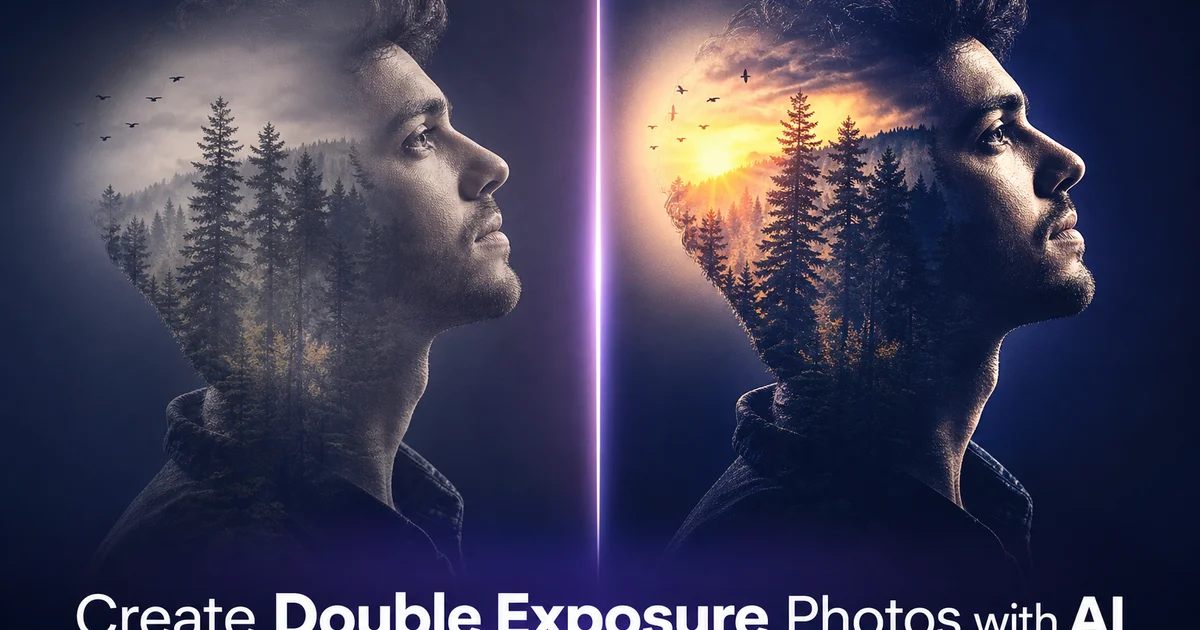
A fotografia de dupla exposição mescla duas imagens em um único quadro, criando uma composição onde uma paisagem vive dentro de um retrato ou as luzes da cidade traçam o contorno de uma silhueta. A técnica teve origem na fotografia analógica, onde os fotógrafos expunham o mesmo filme duas vezes. Ela continua sendo um dos efeitos visualmente mais marcantes na fotografia criativa. Os resultados podem ser etéreos, dramáticos ou surreais. Uma floresta crescendo a partir do perfil de uma pessoa, ondas do oceano preenchendo a silhueta de uma dançarina ou um horizonte urbano mapeado em um rosto.
No passado, criar uma dupla exposição convincente na fotografia digital exigia habilidades avançadas em Photoshop. Máscaras de camada, modos de mesclagem, ajustes de opacidade e refinamento cuidadoso de bordas. O processo era acessível para editores experientes, mas intimidante para fotógrafos e artistas que queriam o efeito visual sem mergulhar tecnicamente em software de composição.
Ferramentas com AI tornaram a criação de dupla exposição muito mais acessível. Com AI Fill, AI Filter e AI Create, você pode mesclar duas imagens em uma composição coesa com detecção inteligente de bordas, seleção automática de modo de mesclagem e harmonização de cores. Produzindo resultados que parecem intencionais e artísticos, em vez de uma sobreposição transparente acidental.
- AI Fill mescla inteligentemente uma textura ou paisagem em uma silhueta de retrato, preservando as características faciais e o contorno.
- AI Filter unifica a paleta de cores de ambas as imagens de origem para um resultado artístico coeso.
- AI Create gera variações e refina as zonas de transição entre o sujeito e a textura.
- Nenhum conhecimento em Photoshop, máscaras de camada ou modos de mesclagem é necessário.
- A técnica funciona com retratos, silhuetas, vida selvagem, arquitetura e sujeitos abstratos.
O que torna uma dupla exposição excelente
As duplas exposições mais poderosas compartilham algumas características. Primeiro, a imagem base tem uma forma forte e distinta. Geralmente um perfil humano, silhueta ou figura com um contorno limpo. A forma atua como moldura ou recipiente para a segunda imagem. Quando os espectadores veem uma floresta dentro de uma cabeça ou ondas dentro de um corpo, eles instantaneamente entendem a intenção artística porque a forma humana é universalmente reconhecida. Segundo, a imagem de preenchimento tem textura rica e variação tonal. Imagens planas e uniformemente iluminadas não produzem duplas exposições interessantes porque não há variação para criar profundidade dentro da composição.
Terceiro, as melhores duplas exposições têm uma conexão conceitual entre as duas imagens. A silhueta de um montanhista preenchida com picos de montanhas conta uma história. O perfil de um músico preenchido com ondas sonoras ou luzes de show evoca emoção. Um surfista preenchido com imagens oceânicas cria uma metáfora visual. Quando a combinação parece intencional em vez de aleatória, a dupla exposição transcende um truque visual e se torna uma obra de arte significativa.
Entender esses princípios ajuda você a selecionar suas imagens de origem. Antes de abrir qualquer ferramenta de edição, pense na forma que deseja usar como recipiente e na textura ou cena que a preencherá. Quanto mais forte a forma e mais significativa a combinação, mais impactante será o resultado final.
- Contornos fortes e limpos na imagem base criam uma moldura clara para o preenchimento de textura.
- Variação tonal rica e texturas variadas na imagem de preenchimento produzem profundidade e interesse visual.
- Uma conexão conceitual entre as duas imagens transforma o efeito de truque em arte.
Usando AI Fill para composição inteligente
AI Fill é a ferramenta principal para criar duplas exposições porque lida com a parte tecnicamente mais exigente do processo: mesclar duas imagens de forma a preservar as características importantes de ambas. Quando você seleciona a área do seu sujeito e aplica o preenchimento de textura, a AI não simplesmente sobrepõe a segunda imagem com opacidade reduzida, como uma abordagem básica no Photoshop faria. Em vez disso, ela analisa a estrutura tonal de ambas as imagens e as compõe usando mesclagem adaptativa que preserva as características faciais, o contorno e os detalhes-chave do sujeito, enquanto integra a imagem de textura organicamente.
O efeito prático é que olhos, lábios e a linha do maxilar de um retrato permanecem visíveis e distintos dentro da composição mesclada, enquanto a paisagem ou textura preenche as áreas mais amplas: testa, bochechas, cabelo e ombros. Isso cria o visual característico da dupla exposição onde o sujeito é tanto distinto quanto transformado. A AI gerencia automaticamente as transições de borda, suavizando a mesclagem onde o sujeito encontra o fundo, sem linhas de corte rígidas ou artefatos de mascaramento evidentes.
Você pode controlar a intensidade da mesclagem ajustando o quanto a imagem de preenchimento influencia a composição. Uma mesclagem mais suave mantém mais do retrato original visível, produzindo um efeito sutil. Uma mesclagem mais intensa empurra a textura para o primeiro plano, criando um resultado mais dramático e surreal. Experimentar diferentes intensidades de mesclagem usando as mesmas duas imagens de origem pode produzir resultados notavelmente diferentes.
- AI Fill usa mesclagem adaptativa que preserva as características faciais enquanto integra a textura organicamente.
- As transições de borda são suavizadas automaticamente — sem necessidade de mascaramento manual ou refinamento de bordas.
- A intensidade da mesclagem pode ser ajustada de uma sutil sobreposição de retrato a uma dominância dramática da textura.
Unificando cor e atmosfera com filtros de AI
Um dos problemas mais comuns com duplas exposições, seja feitas no Photoshop ou com ferramentas mais simples, é que as duas imagens de origem têm temperaturas de cor, níveis de contraste e perfis tonais diferentes. Um retrato quente da hora dourada mesclado com uma cena oceânica fria e azul produz uma composição que parece desconexa porque os dois mundos de cor colidem em vez de harmonizar. AI Filter resolve isso aplicando uma gradação de cor coesa em toda a composição.
Para duplas exposições com temática natural — florestas, flores, montanhas, oceanos — tons vintage quentes ou paletas de cores terrosas tendem a funcionar bem, criando uma sensação nostálgica e orgânica. Para preenchimentos urbanos e arquitetônicos — horizontes de cidades, luzes de néon, texturas industriais — paletas dessaturadas mais frias ou tratamentos em preto e branco de alto contraste produzem um resultado mais moderno e gráfico. Para composições abstratas e surreais, gradações de cor altamente saturadas ou split-tone podem levar a imagem ainda mais para o reino artístico.
A etapa de gradação de cor é o que separa uma dupla exposição que parece duas imagens sobrepostas acidentalmente daquela que parece uma obra de arte finalizada. Quando ambas as imagens de origem compartilham uma paleta de cores unificada, o olho do espectador lê a composição como uma única imagem intencional, em vez de duas fotografias separadas lutando para coexistir.
- AI Filter aplica uma gradação de cor coesa que harmoniza diferentes temperaturas de cor das imagens de origem.
- Tons vintage quentes são ideais para preenchimentos naturais, enquanto paletas dessaturadas frias funcionam para texturas urbanas.
- A gradação de cor unificada transforma a composição de um acidente visual em uma obra de arte intencional.
How to do it
- 1
Select a portrait or silhouette as your base image
Choose a portrait with a clean outline against a simple background. Ideally, use a side profile or a strong silhouette shape. The clearer the subject's outline, the more defined the double exposure effect will be. Headshots, profile views, and full-body silhouettes work best because their distinct human shape creates an immediate visual anchor that the texture fill will complement rather than compete with.
- 2
Choose your texture or landscape image for the overlay
Select a second image with strong texture, pattern, or scenery. A forest canopy, ocean waves, a city skyline at night, flower fields, star trails, or abstract patterns. This image will fill the silhouette of your base subject. High-contrast textures with a mix of light and dark areas produce the most dramatic results because the tonal variation creates depth within the blended composite.
- 3
Use AI Fill to blend the texture into the subject
Select the area of your base subject and apply AI Fill with your texture image as the source. The AI blends the two images using intelligent compositing that preserves the outline and key features of the portrait. Eyes, lips, and jawline remain visible while filling the interior with the landscape or texture. This produces the signature double exposure look where a forest grows inside a profile or city lights map across a face.
- 4
Apply AI filters to unify the color palette and mood
Use AI Filter to apply a cohesive color grade across the composite. A warm vintage tone suits nature-filled double exposures, while a cool desaturated palette works for urban and architectural overlays. The filter ensures that the two source images, which may have completely different white balance and color profiles, feel like a unified artwork rather than two photos awkwardly stacked together.
- 5
Refine edges and generate variations with AI Create
Use AI Create to refine the transition zones where the subject outline meets the background. You can also generate fully new variations by describing the effect you want in text. For example, ask the AI to fill a silhouette with a galaxy scene or an autumn forest. Export the finished piece at high resolution for prints, social media, or portfolio display.
Fontes
- The History and Art of Double Exposure Photography — PhotographyTalk
- Blending Modes and Layer Compositing in Digital Photography — Adobe Creative Cloud