
시계 제품 사진
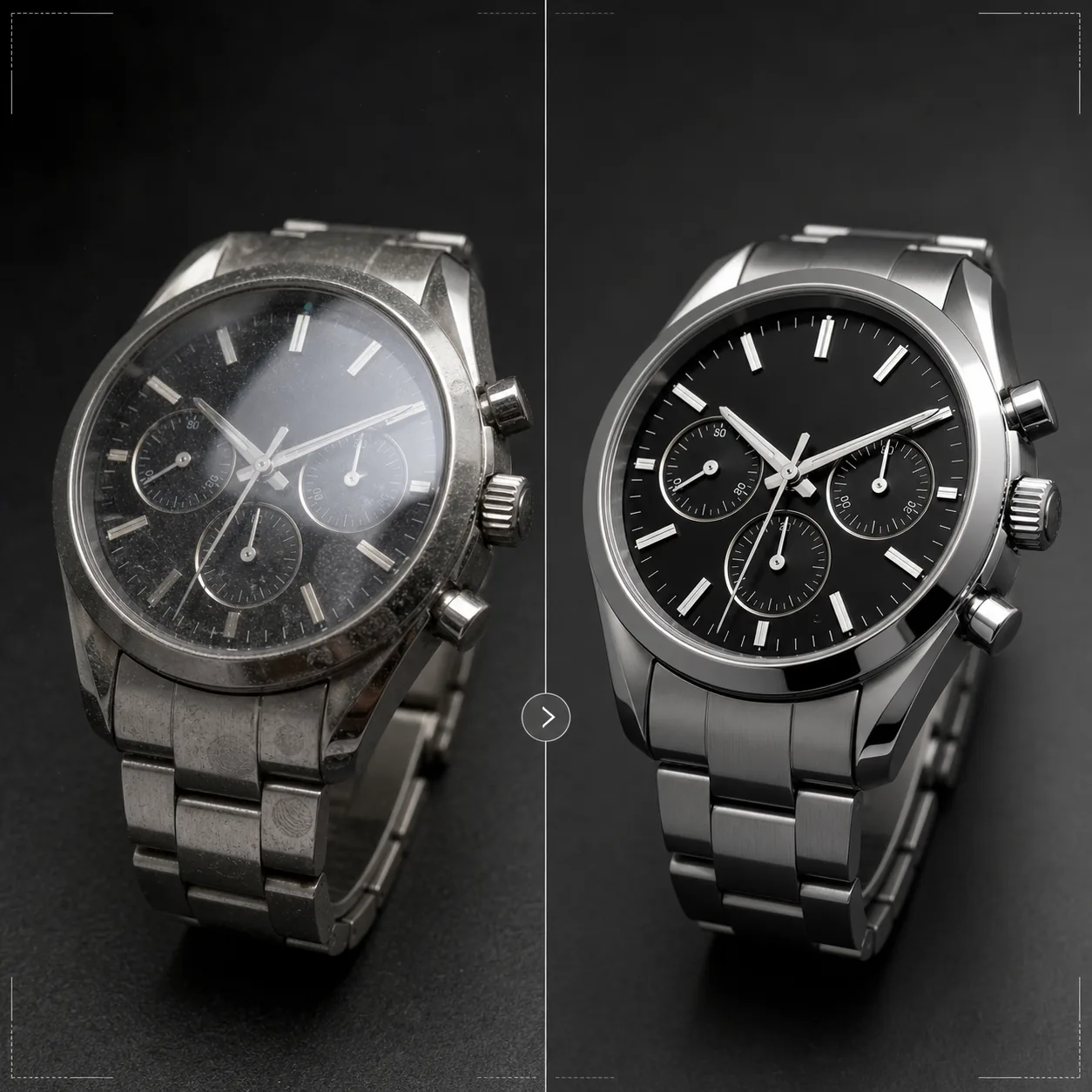
시계에 어울리는 정밀함으로 타임피스를 선보이세요. 이 템플릿은 다이얼 디테일과 인덱스를 선명하게 하고, 크리스털 반사를 제어하며, 브레이슬릿과 케이스의 메탈 질감을 살리고, 광택 표면의 먼지와 지문을 제거하며, 럭셔리 이커머스 리스팅과 카탈로그용으로 이미지를 마무리합니다.
이 템플릿 무료로 사용해 보기E-commerce template preview
이 템플릿이 하는 일
아주 작은 디테일이 구매자에게 매우 중요한 시계 촬영 특유의 과제를 해결합니다. 시계 다이얼에는 인덱스, 서브다이얼, 날짜 창, 인쇄된 텍스트 등 정교한 디테일이 담겨 있으며, 이미지가 품질을 전달하려면 이러한 요소가 면도날처럼 선명해야 합니다. 이 템플릿은 AI Enhance를 사용해 전체 이미지를 자연스럽게 유지하면서 다이얼 요소를 선택적으로 선명하게 합니다. Magic Eraser는 다이얼의 먼지 입자, 광택 케이스의 지문, 고배율에서 드러나는 크리스털의 미세한 흠집을 제거합니다. 크리스털 반사를 줄여 아래의 다이얼이 또렷하게 보이도록 하고, 케이스와 브레이슬릿의 메탈 질감을 살려 시계 구매자가 꼼꼼히 살피는 브러시드와 폴리시드 마감의 차이를 보여줍니다.
템플릿 설정
| 다이얼 선명화 | 선택적 마이크로 디테일 향상(인덱스, 핸즈, 텍스트) |
| 크리스털 반사 | 사파이어/미네랄 크리스털의 눈부심과 반사 감소 |
| 메탈 질감 | 브러시드와 폴리시드 표면 구분 강화 |
| 표면 정리 | 먼지, 지문, 미세한 흠집 제거 |
| 출력 해상도 | 4000 × 4000 px (확대 보기를 위한 매크로 디테일) |
| 배경 | 순백색, 단색 다크 또는 그라데이션(럭셔리 제품 표준) |
이 템플릿 사용 방법
시계 사진 업로드
시계의 제품 사진을 업로드하세요 — 손목 착용 샷, 플랫 레이, 쿠션이나 스탠드를 활용한 스튜디오 세팅 모두 가능합니다. 다이얼 면의 매크로 클로즈업과 케이스 측면 뷰도 지원됩니다. 최상의 결과를 얻으려면 로고를 균형 있게 담고 대칭적인 구도를 만드는 업계 표준 위치인 10시 10분 핸즈 위치로 시계를 촬영하세요.
다이얼 및 디테일 향상
AI Enhance가 다이얼을 선택적으로 선명하게 합니다 — 시각 마커, 핸즈, 서브다이얼, 날짜 창, 인쇄된 텍스트가 또렷하고 읽기 쉬워집니다. 인덱스의 야광 도트는 그 존재가 드러나도록 살짝 밝아집니다. 이 향상 처리는 원본 촬영의 피사계 심도를 존중하여 의도적으로 흐리게 한 영역은 부드럽게 유지합니다.
표면 정리 및 반사 제어
Magic Eraser가 다이얼의 먼지 입자, 케이스와 브레이슬릿의 지문, 크리스털 표면의 미세한 흠집을 제거합니다. 크리스털 반사를 줄여 아래의 다이얼 전체를 드러내면서도 유리의 존재감을 전달할 만큼의 반사는 유지합니다 — 반사를 완전히 없애면 시계가 비현실적으로 평평해 보입니다.
리스팅 또는 카탈로그용 내보내기
확대가 가능한 이커머스 리스팅용으로는 4000 × 4000 px로, 카탈로그와 광고용으로는 인쇄 해상도로 다운로드하세요. 배경 옵션에는 마켓플레이스 리스팅용 순백색, 럭셔리 브랜드 감성을 위한 단색 다크, 에디토리얼 용도의 그라데이션이 있습니다.
최상의 결과를 위한 전문가 팁
- ✓핸즈를 10시 10분 또는 10시 08분에 맞춰 시계를 촬영하세요 — 이 위치는 브랜드 로고를 양 핸즈 사이에 담고, 날짜 창과 서브다이얼을 모두 또렷하게 보여주며, 시계 업계 전반에서 사용되는 시각적으로 균형 잡힌 구도를 만듭니다.
- ✓매크로 렌즈나 클로즈업 모드를 사용해 다이얼 디테일을 최대한 담아내세요. 템플릿은 기존 디테일을 선명하게 할 수 있지만 촬영되지 않은 디테일을 만들어낼 수는 없습니다 — 다이얼 디테일이 더 많은 고해상도 원본 이미지가 훨씬 더 나은 결과를 제공합니다.
- ✓메탈 브레이슬릿 시계의 경우, 브러시드와 폴리시드 표면의 차이가 드러나도록 빛의 각도를 조절하세요. 템플릿이 이 대비를 강화하지만, 표면 구분이 보이는 상태에서 시작할 때 가장 인상적인 결과가 나옵니다.
- ✓촬영 직전 마이크로파이버 천으로 시계를 닦으세요. Magic Eraser가 먼지와 지문을 제거하긴 하지만, 깨끗한 상태에서 시작하면 AI 재구성이 줄어들고 정리된 영역의 메탈 질감이 더 정확하게 보존됩니다.
E-commerce workflow
Product photo hub
Use this template with the full ecommerce product photo workflow for marketplace backgrounds, cleanup, compression, resizing, and listing-ready exports.
View ecommerce product photo workflow자주 묻는 질문
다이얼이 반사에 가려진 사진도 수정할 수 있나요?
+
적당한 반사는 줄여서 아래의 다이얼 디테일을 드러낼 수 있습니다. 다만 반사가 너무 강해 원본 사진에서 다이얼 디테일이 전혀 보이지 않는 경우, AI는 애초에 촬영되지 않은 디테일을 만들어낼 수 없습니다. 최상의 결과를 얻으려면 크리스털에 직접 반사가 최소화되도록 광원을 배치해 촬영하세요.
스마트워치에도 적용되나요?
+
네. 스마트워치 화면은 인터페이스 요소를 선명하게 하고 유리의 지문을 줄여 향상됩니다. 템플릿은 전통적인 아날로그 다이얼과 디지털 디스플레이를 모두 인식하고 그에 맞게 선명화 방식을 조정합니다.
시계 밴드와 스트랩은 어떤가요?
+
가죽 스트랩은 결과 스티칭 디테일을 보여주는 질감 향상을 받습니다. NATO와 패브릭 스트랩은 은은한 질감 선명화가 적용됩니다. 메탈 브레이슬릿은 브러시드/폴리시드 표면 향상을 받습니다. 케이스, 크리스털, 다이얼, 스트랩 등 시계 전체가 하나의 완성된 제품으로 처리됩니다.
타임피스를 판매할 때는 모든 디테일이 중요합니다
시계 사진을 업로드하면 수정처럼 선명한 다이얼 디테일, 제어된 반사, 그리고 리스팅을 위한 보석급 이미지 품질을 얻으실 수 있습니다.
무료로 사용해 보기Related templates
More e-commerce templates for your workflow.
제품 사진을 위한 순수한 흰색 배경 템플릿입니다. 변환 가능한 깔끔하고 전문적인 제품 이미지를 위한 Amazon, Shopify 및 마켓플레이스 지원 설정입니다.
Etsy에 최적화된 목록 사진 템플릿입니다. 라이프스타일 사진을 2000px의 깔끔한 흰색 배경으로 변환하고 핸드메이드 제품 디테일을 향상시키며 Etsy의 이미지 가이드라인을 충족합니다.
eBay에 최적화된 목록 사진 템플릿입니다. eBay의 이미지 표준을 충족하는 갤러리 이미지, 상태 문서 개선 및 다중 각도 레이아웃을 위한 흰색 배경입니다.
반지, 목걸이, 시계를 위한 전문 보석 사진 템플릿입니다. 반사를 제어하고 보석의 광채를 강화하며 깨끗한 배경에 시장에 바로 사용할 수 있는 이미지를 제공합니다.
마켓플레이스 목록을 위한 전문 가구 사진 템플릿입니다. 방의 어수선한 부분을 제거하고, 실제 크기를 보여주고, 깔끔한 배경이나 스타일이 지정된 방 상황에 맞춰 작품을 제시하세요.
주름 제거, 보푸라기 청소, 순백색 배경 및 정확한 직물 색상을 사용하여 의류 플랫 레이 사진을 정리합니다. Shopify, Amazon 및 부티크 매장에 적합합니다.